

Pooled Placement#
ArenaEnvBuilder maintains one logical pool of solved layouts, partitioned
by environment. Users describe the intended arrangement, and the builder
generates, stores, and applies the layouts.
How the Pool Is Built#
PooledObjectPlacer builds the pool in four stages:
Generation: the placement solver produces candidate layouts.
Build-time filtering: inexpensive validators check every candidate; those that pass all required inexpensive checks then undergo expensive candidate validation.
Ranking: candidates are ordered by required-check failures, optional-check failures, and then solver loss.
Storage: each selected layout enters the pool partition for its environment.
Arena processes candidates for multiple environments together. Users do not need to place each environment separately.
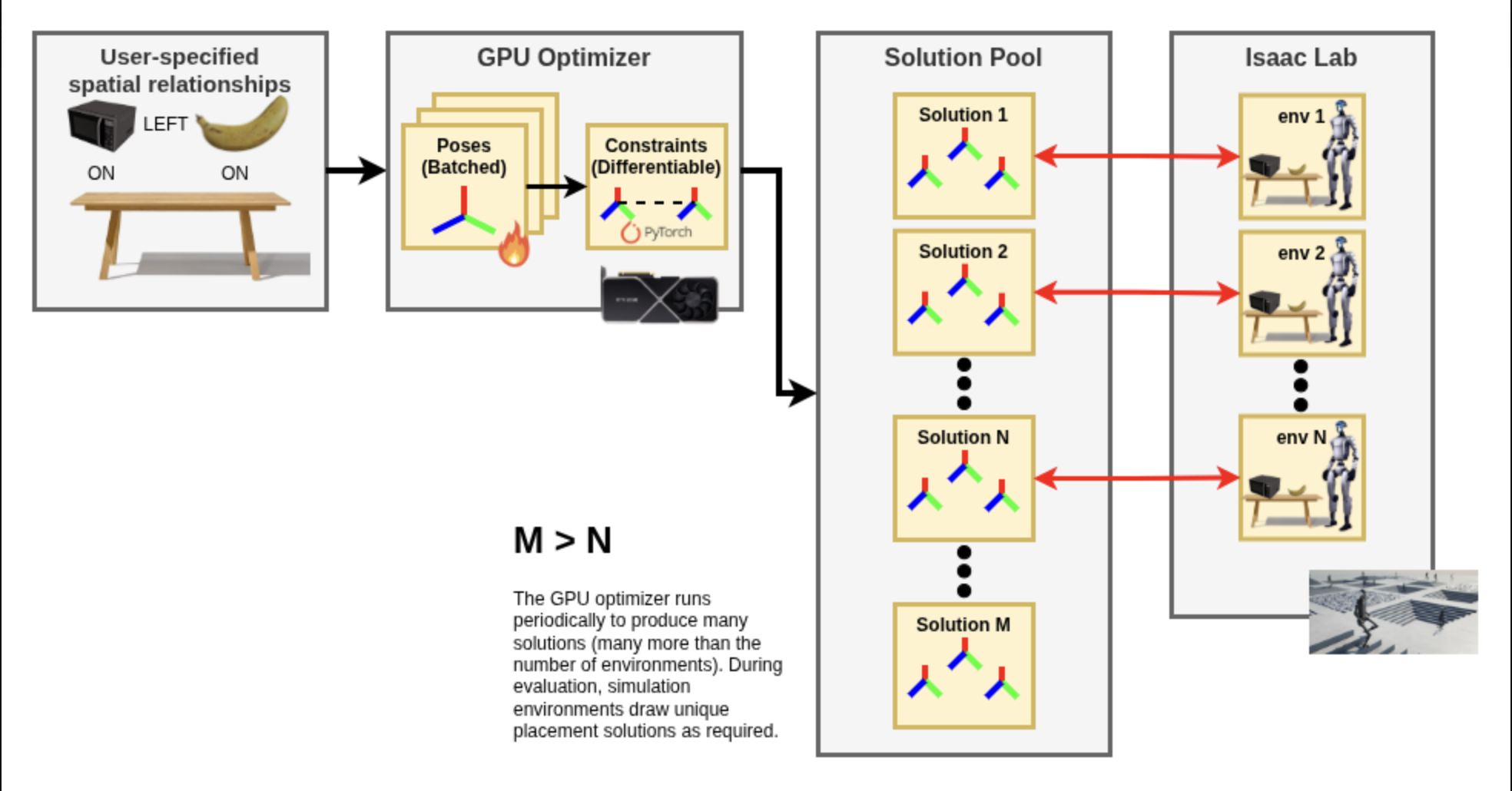
The diagram shows the logical solution pool. Arena keeps its layouts partitioned by environment, and each reset draws from the corresponding partition.#
Note
Arena prefers layouts that pass every required check. If an environment
still has unfilled pool slots and its final refill batch produces no valid
layout, the default allow_best_loss_fallbacks=True allows Arena to store
the batch’s highest-ranked candidates for those slots. Arena reports when it
uses this fallback. Set the option to False to fail placement instead.
Layouts and Object Identity#
A layout specifies the positions and orientations of placed entities. Layouts can differ across environments and resets.
Object identity is the registered object selected for a placeable asset. A
RigidObjectSetallows this selection to differ between environments.
Persistence and Geometry-Aware Solving#
Arena selects object identities once for each environment. It solves and checks every candidate layout using the selected objects’ dimensions and configured collision representation.
Examples#
When every environment contains the same objects, their identities stay fixed while their positions and orientations can differ.
When a
RigidObjectSetis used, each environment can receive a different registered object. Arena solves and checks its layouts using the geometry of that selected object.
Layout Behavior Across Resets#
The builder prepares ranked layouts for each environment. By default, each reset uses the next queued layout from that environment’s pool. This allows layouts to change without solving on every reset, although uniqueness is not guaranteed. If the pool is empty, Arena generates more layouts during the reset.
Set ObjectPlacerParams.resolve_on_reset=False to reuse the layout assigned
during environment creation. The equivalent command-line option is
--no-resolve_on_reset. Keep the default to change layouts across episodes.
Reproducibility#
Set placement_seed when placement must be reproducible. Given the same
Arena environment definition, placement seed, and environment count, Arena
reproduces layout generation and random object-set assignment.
For example:
python isaaclab_arena/evaluation/policy_runner.py \
  --policy_type zero_action \
  --seed 42 \
  --placement_seed 42 \
  --num_steps 100 \
  pick_and_place_maple_table
--seed controls general simulation randomness, while --placement_seed
controls placement-specific randomness.
Recommended Workflow and Configuration#
Standard Configuration#
Start with the defaults. Most users only need to:
Use
RigidObjectSetwhen a role should contain different objects across environments.Set
placement_seedif results must be reproducible.Decide whether to reuse or change layouts on reset.
Choose a collision representation only when bounding boxes are too conservative. See Collision Handling.
Advanced Tuning#
Solver iteration counts, optimizer settings, pool sizes, and debugging options are advanced tuning controls. Change them only after identifying a specific placement failure or performance problem.
See ObjectPlacerParams and RelationSolverParams for placer and solver configuration fields. Relation-specific parameters are defined in relations.py.
Next Steps#
Continue to Homogeneous and Heterogeneous Object Placement for implementation details, visual examples, and runnable commands showing the same or different objects across parallel environments.