

Agentic Environment Generation#
Motivation#
Scalability of Environment Generation#
Building evaluation environments manually does not scale. Traditionally, creating an Arena evaluation environment meant writing Python to pick assets, place objects and the robot (by explicit poses or user-specified relations), configure the task and variations, and then run simulation to check that the setup was stable and reachable.
Agentic environment generation turns a natural-language task into an editable Env Spec that Arena can build, validate, and evaluate. The agent automatically selects assets, configures the task, and describes object placement from the user’s prompt. The relation solver then computes and validates robot and object placement against the spatial and task constraints. Optional manual review and revision are limited to the validated Env Spec, reducing the risk of semantic errors and allowing users to focus on the core task-evaluation logic.
Manual environment authoring workflow
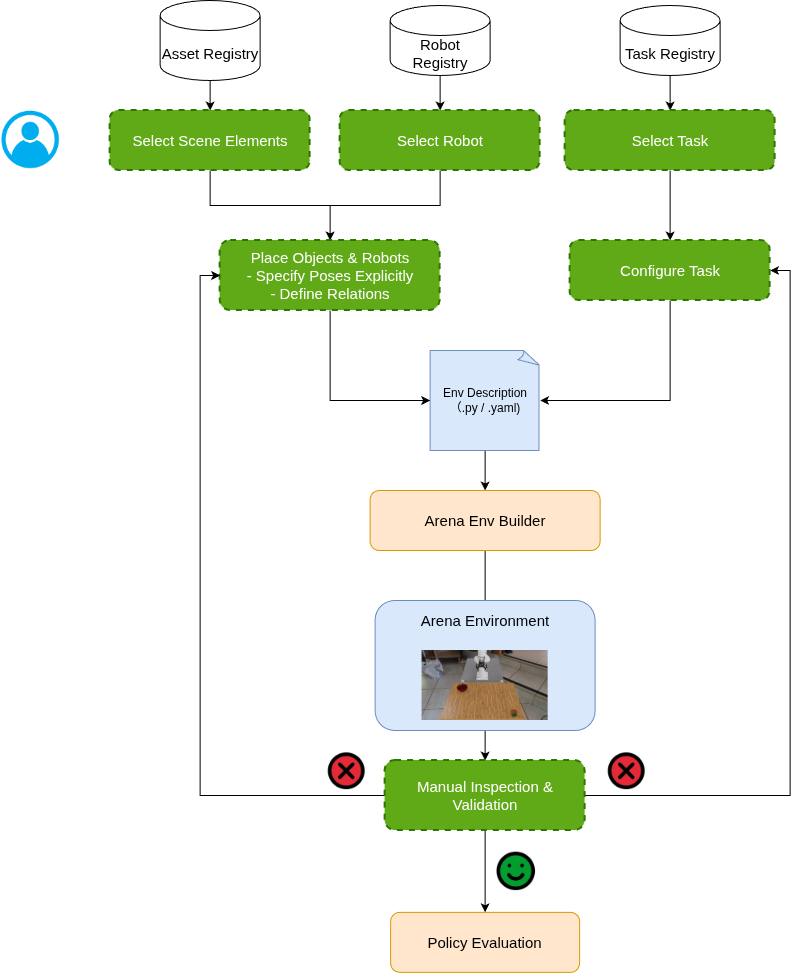
Diagram key: Green boxes indicate manual authoring or editing; blue shapes indicate environment descriptions, either on disk or as online environment representations; orange boxes indicate Arena core library components.
Manual authoring selects the robot and objects, composes the scene, configures the task, then runs simulation and revises the environment until it can complete the task.
Agentic environment generation pipeline
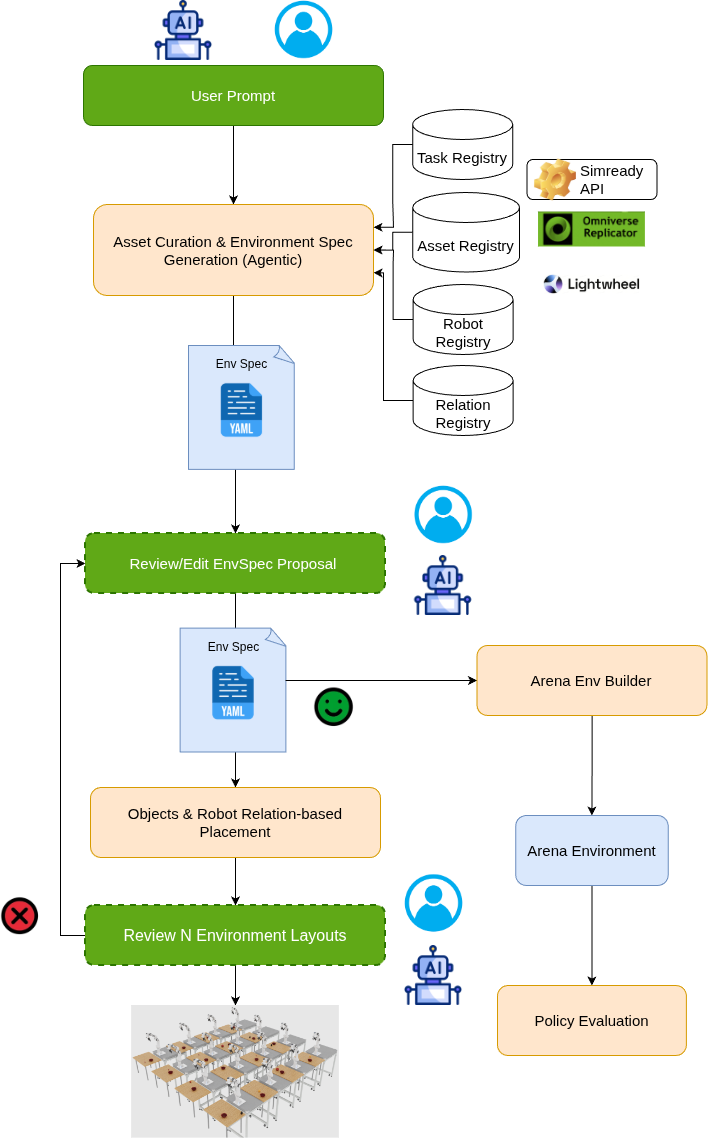
Agentic pipeline generates an editable Env Spec describing the scene, robot, and task. Arena solves robot and object placement during the environment build and produces multiple initial layouts for runtime evaluation.
Task-Ready Diversification#
A typical one-off agentic scene-generation workflow takes a natural-language prompt, curates assets, and has the agent infer relative object poses from geometric understanding, writing each scene layout into a single USD. At runtime that USD is loaded as the scene, while the task must still be wired separately. Placing the robot is an extra manual step—not done by the agent—by identifying feasible locations given the layout and task. Arena differs along four axes:
Typical agentic scene gen |
Arena |
|
|---|---|---|
Environment Description |
One USD layout; task and robot left for later wiring. |
Editable Env Spec describing scene, robot, and task. |
Objects & Robot Placement |
Agent infers scene-object poses; robot placement is a separate manual step. |
Relation solver places objects and robot from spatial and task constraints; placement validator checks robot reachability. |
Initial Scene Layouts |
One layout per generated USD. |
Relation solver produces multiple layouts for objects and the robot; evaluation samples those layouts across rollouts. |
Variations |
None, or hand-edit the USD for each experimental condition. |
Variations can be applied so evaluation experiments run under controlled conditions. |
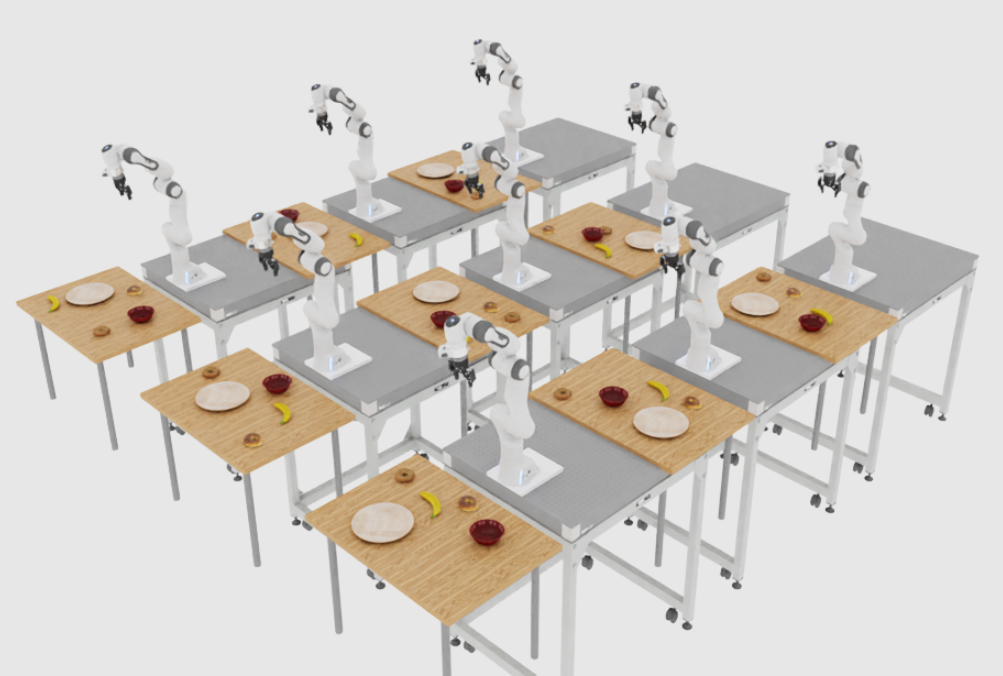
One agent-generated YAML specification resolves into the many initial scene layouts shown here for the prompt: “Droid picks up the banana from the maple table and places it on the plate. There are two bagels and one bowl on the table.”#
Supported Tasks#
Currently, agentic environment generation supports only tasks marked @agent_ready in implementation:
Pick and place — atomic and composite variants
Open / close door — articulated door tasks
Other registered tasks are not yet marked @agent_ready and are not exposed to the agent.
Non-goals#
Arena’s environment generation agent explicitly does not provide the following:
Asset generation. The agent does not create assets. It selects from assets already produced upstream—for example Lightwheel libraries or NVIDIA’s SimReady database— and places those into an Env Spec. Assets include:
Objects — small-scale props and interactables
Backgrounds — large-scale scenes and rooms
Motion generation. The agent does not generate motion trajectories. Those trajectories could be achieved by a separate motion control policy.
Warning
Agentic environment generation is experimental and changing quickly. Generated specs should be reviewed and validated before they are used for policy evaluation. Prompt formats, generated spec structure, GUI behavior, and policy evaluation integrations may change across releases.
We are actively working on:
Support for more complex scene layouts and object placements.
Support for more diverse task specifications.