

Defining Environments in Your Repository#
This section describes how to write a new environment, within your own repository (i.e. not in the Isaac Lab - Arena source tree).
To write your own environment, subclass ExampleEnvironmentBase, set a unique name,
and implement get_env() and add_cli_args().
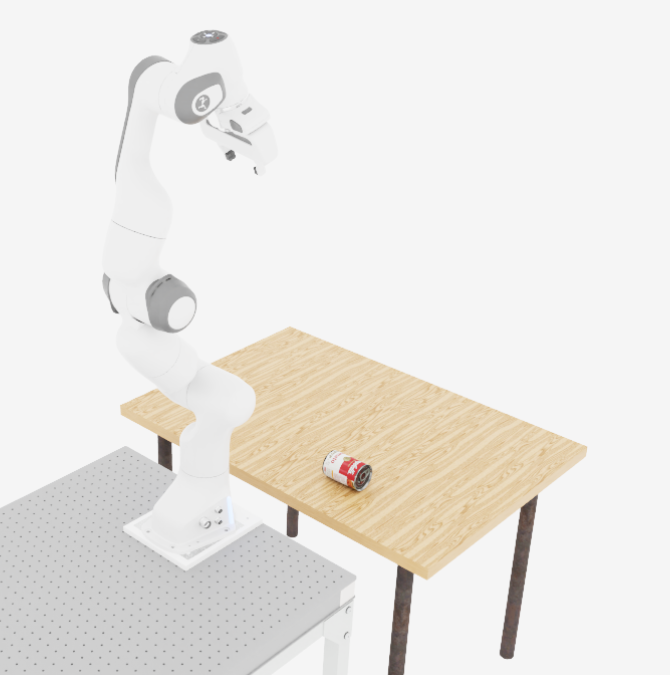
Below is an example of a custom environment that places a single object on a table.
# my_package/isaaclab_arena_environments/my_environment.py

import argparse

from isaaclab_arena_environments.example_environment_base import ExampleEnvironmentBase


class ExternalFrankaTableEnvironment(ExampleEnvironmentBase):

    name: str = "franka_table"

    def get_env(self, args_cli: argparse.Namespace):
        from isaaclab_arena.assets.object_reference import ObjectReference
        from isaaclab_arena.environments.isaaclab_arena_environment import IsaacLabArenaEnvironment
        from isaaclab_arena.relations.relations import IsAnchor, On
        from isaaclab_arena.scene.scene import Scene
        from isaaclab_arena.tasks.no_task import NoTask

        # Grab some assets from the registry.
        background = self.asset_registry.get_asset_by_name("maple_table_robolab")()
        light = self.asset_registry.get_asset_by_name("light")()
        pick_up_object = self.asset_registry.get_asset_by_name(args_cli.object)()
        embodiment = self.asset_registry.get_asset_by_name("franka_ik")()

        # Position the assets
        table_reference = ObjectReference(
            name="table",
            prim_path="{ENV_REGEX_NS}/maple_table_robolab/table",
            parent_asset=background,
        )
        table_reference.add_relation(IsAnchor())
        pick_up_object.add_relation(On(table_reference))

        # Compose the scene
        scene = Scene(assets=[background, table_reference, pick_up_object, light])

        # Create the environment
        isaaclab_arena_environment = IsaacLabArenaEnvironment(
            name=self.name,
            embodiment=embodiment,
            scene=scene,
            task=NoTask(),
        )
        return isaaclab_arena_environment

    @staticmethod
    def add_cli_args(parser: argparse.ArgumentParser) -> None:
        parser.add_argument("--object", type=str, default="cracker_box")
External environments can be used in Isaac Lab - Arena workflows by using a particular CLI syntax. For example, a zero-action policy can be run with an externally-defined environment like this:
python isaaclab_arena/evaluation/policy_runner.py \
  --policy_type zero_action \
  --num_steps 50 \
  --external_environment_class_path my_package.isaaclab_arena_environments.my_environment:ExternalFrankaTableEnvironment \
  franka_table \
  --object tomato_soup_can
So the flag external_environment_class_path is used to specify the (fully qualified) path to the
external environment module and class. The environment name is then specified as the
first non flag argument to the policy runner, and any additional arguments are passed to the
environment’s add_cli_args() method.
Note
The environment above is actually located in isaaclab_arena_examples/external_environments/basic.py.
So this environment is located in the Isaac Lab - Arena source-tree, but isn’t included
in the built in environments, so must be called through the external environment syntax.
This is done to demonstrate how this would be done in an external codebase.
The environment can be run with:
python isaaclab_arena/evaluation/policy_runner.py \
  --viz kit \
  --policy_type zero_action \
  --num_steps 50 \
  --external_environment_class_path isaaclab_arena_examples.external_environments.basic:ExternalFrankaTableEnvironment \
  franka_table \
  --object tomato_soup_can
which results in an environment like the one below:
Next Steps#
The example above uses a built-in task (NoTask) and a built-in embodiment
(franka_ik). To learn how to define your own custom tasks and embodiment
variants, see Your Own Tasks and Embodiments.