

Environment Setup and Validation#
Docker Container: Base (see Installation for more details)
On this page we briefly describe the environment used in this example workflow and validate that we can load it in Isaac Lab.
Docker Container: Base (see Installation for more details)
./docker/run_docker.sh
Environment Description#
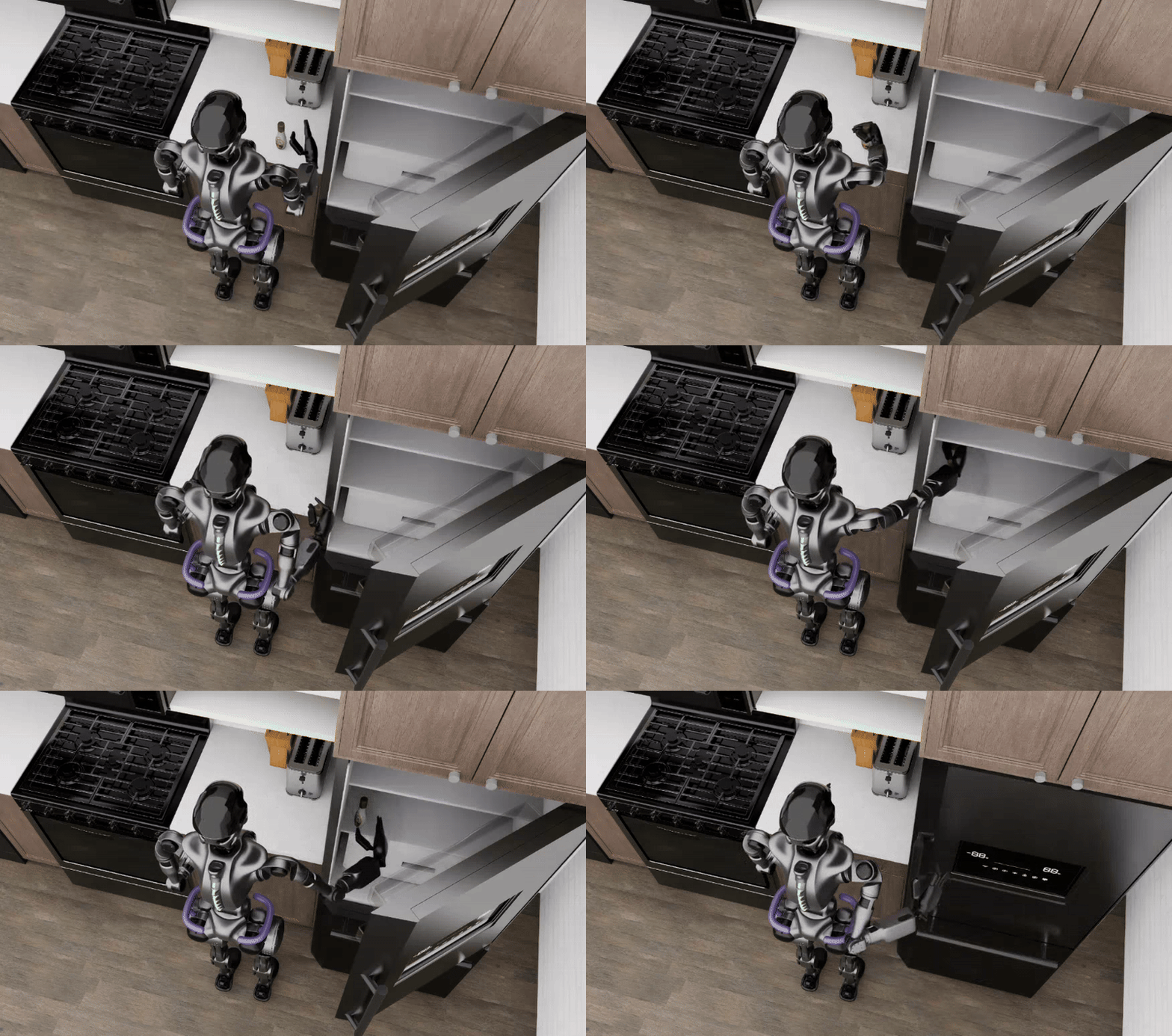
The GR1 Sequential Pick & Place and Close Door Environment
# Pickup-object position on the counter, and the half-extents of the box it is placed within.
PICKUP_OBJECT_X_M = 4.05
PICKUP_OBJECT_Y_M = -0.574
RANDOMIZATION_HALF_RANGE_X_M = 0.0025
RANDOMIZATION_HALF_RANGE_Y_M = 0.001

# The GR1 embodiments that are compatible with this environment.
GR1_EMBODIMENTS = ("gr1_joint", "gr1_pink")


@dataclass
class GR1PutAndCloseDoorEnvironmentCfg(ArenaEnvironmentCfg):
    """Configure the GR1 put-and-close-door environment."""

    object: str = "ranch_dressing_hope_robolab"
    object_set: list[str] | None = None
    kitchen_background: str = "lightwheel_kitchen_one_wall_farmhouse1"
    teleop_device: str | None = None
    embodiment: str = "gr1_pink"


@register_environment
class GR1PutAndCloseDoorEnvironment(ArenaEnvironmentFactory[GR1PutAndCloseDoorEnvironmentCfg]):
    """
    A sequential task environment with two subtasks for GR1 humanoid robot:
    1. Pick and place object into the refrigerator shelf
    2. Close the refrigerator door
    The refrigerator starts open, the robot places the object inside, then closes it.
    Uses the lightwheel robocasa kitchen background.
    """

    name = "put_item_in_fridge_and_close_door"
    _legacy_argparse_cfg_type = GR1PutAndCloseDoorEnvironmentCfg

    def build(self, cfg: GR1PutAndCloseDoorEnvironmentCfg) -> IsaacLabArenaEnvironment:
        """Build the environment from its typed configuration."""
        from isaaclab.envs.mimic_env_cfg import MimicEnvCfg
        from isaaclab.sensors import CameraCfg
        from isaaclab.utils.configclass import configclass

        from isaaclab_arena.assets.object_reference import ObjectReference, OpenableObjectReference
        from isaaclab_arena.assets.object_set import RigidObjectSet
        from isaaclab_arena.embodiments.common.arm_mode import ArmMode
        from isaaclab_arena.environments.isaaclab_arena_environment import IsaacLabArenaEnvironment
        from isaaclab_arena.environments.isaaclab_arena_manager_based_env_cfg import set_control_rate_50hz
        from isaaclab_arena.relations.relations import IsAnchor, On, PositionLimitsBox, RotateAroundSolution
        from isaaclab_arena.scene.scene import Scene
        from isaaclab_arena.tasks.close_door_task import CloseDoorTask
        from isaaclab_arena.tasks.composite_task_base import CompositeTaskBase
        from isaaclab_arena.tasks.pick_and_place_task import PickAndPlaceTask
        from isaaclab_arena.tasks.task_base import TaskBase
        from isaaclab_arena.utils.pose import Pose

        # Custom task class for this environment
        class PutAndCloseDoorTask(CompositeTaskBase):
            def __init__(
                self,
                subtasks: list[TaskBase],
                episode_length_s: float | None = None,
            ):
                super().__init__(
                    subtasks=subtasks,
                    episode_length_s=episode_length_s,
                    desired_subtask_success_state=[True, True],
                    subtasks_are_sequential=True,
                )

            def get_viewer_cfg(self):
                return self.subtasks[0].get_viewer_cfg()

            def get_prompt(self):
                return None

            def get_mimic_env_cfg(self, arm_mode: ArmMode):
                mimic_env_cfg = PutAndCloseDoorTaskMimicEnvCfg()
                mimic_env_cfg.subtask_configs = self.combine_mimic_subtask_configs(ArmMode.RIGHT)

                # Override default subtask term offset range and action noise
                for eef_name, subtask_list in mimic_env_cfg.subtask_configs.items():
                    for subtask_config in subtask_list:
                        subtask_config.subtask_term_offset_range = (0, 0)
                        subtask_config.action_noise = 0.003

                return mimic_env_cfg

        @configclass
        class PutAndCloseDoorTaskMimicEnvCfg(MimicEnvCfg):
            """
            Isaac Lab Mimic environment config class for GR1 put and close door task.
            """

            def __post_init__(self):
                # post init of parents
                super().__post_init__()

                # Override the existing values
                self.datagen_config.name = "put_and_close_door_task_D0"
                # Use default mimic datagen config parameters
                for key, value in MIMIC_DATAGEN_CONFIG_DEFAULTS.items():
                    setattr(self.datagen_config, key, value)

        camera_offset = Pose(position_xyz=(0.12515, 0.0, 0.06776), rotation_xyzw=(0.11204, -0.17712, -0.79108, 0.57469))
        assert (
            cfg.embodiment in GR1_EMBODIMENTS
        ), f"{self.name} only supports GR1 embodiments {GR1_EMBODIMENTS}, got '{cfg.embodiment}'."
        embodiment = self.asset_registry.get_asset_by_name(cfg.embodiment)(enable_cameras=cfg.enable_cameras)
        embodiment.camera_config.robot_pov_cam.offset = CameraCfg.OffsetCfg(
            pos=camera_offset.position_xyz,
            rot=camera_offset.rotation_xyzw,
            convention="opengl",
        )
        kitchen_background = self.asset_registry.get_asset_by_name(cfg.kitchen_background)()
        kitchen_prim_path = f"{{ENV_REGEX_NS}}/{kitchen_background.name}"

        kitchen_counter_top = ObjectReference(
            name="kitchen_counter_top",
            prim_path=f"{kitchen_prim_path}/counter_right_main_group/top_geometry",
            parent_asset=kitchen_background,
        )
        kitchen_counter_top.add_relation(IsAnchor())

        light = self.asset_registry.get_asset_by_name("light")()

        if cfg.teleop_device is not None:
            teleop_device = self.device_registry.get_device_by_name(cfg.teleop_device)()
        else:
            teleop_device = None

        # Set initial poses
        embodiment.set_initial_pose(
            Pose(
                position_xyz=(3.943, -1.0, 0.995),
                rotation_xyzw=(0.0, 0.0, 0.7071068, 0.7071068),
            )
        )

        # Create refrigerator reference (OpenableObjectReference)
        refrigerator = OpenableObjectReference(
            name="refrigerator",
            prim_path=f"{kitchen_prim_path}/fridge_main_group",
            parent_asset=kitchen_background,
            openable_joint_name="fridge_door_joint",
            openable_threshold=0.5,
        )

        # Create refrigerator shelf reference (destination for pick and place)
        refrigerator_shelf = ObjectReference(
            name="refrigerator_shelf",
            prim_path=f"{kitchen_prim_path}/fridge_main_group/Refrigerator034",
            parent_asset=kitchen_background,
        )

        if cfg.object_set is not None and len(cfg.object_set) > 0:
            objects = [self.asset_registry.get_asset_by_name(obj)() for obj in cfg.object_set]
            pickup_object = RigidObjectSet(name="object_set", objects=objects)
        else:
            pickup_object = self.asset_registry.get_asset_by_name(cfg.object)()

        pickup_object.add_relation(On(kitchen_counter_top))
        pickup_object.add_relation(
            PositionLimitsBox(
                x_min=PICKUP_OBJECT_X_M - RANDOMIZATION_HALF_RANGE_X_M,
                x_max=PICKUP_OBJECT_X_M + RANDOMIZATION_HALF_RANGE_X_M,
                y_min=PICKUP_OBJECT_Y_M - RANDOMIZATION_HALF_RANGE_Y_M,
                y_max=PICKUP_OBJECT_Y_M + RANDOMIZATION_HALF_RANGE_Y_M,
            )
        )
        # Consider changing to other values for different objects, below is for ranch dressing bottle.
        yaw_rad = math.radians(-111.55)
        pickup_object.add_relation(RotateAroundSolution(yaw_rad=yaw_rad))
        scene = Scene(
            assets=[kitchen_background, kitchen_counter_top, pickup_object, light, refrigerator, refrigerator_shelf]
        )

        # Create pick and place task
        pick_and_place_task = PickAndPlaceTask(
            pick_up_object=pickup_object,
            destination_object=refrigerator,
            destination_location=refrigerator_shelf,
            background_scene=kitchen_background,
        )

        # Create close door task
        close_door_task = CloseDoorTask(
            openable_object=refrigerator,
            closedness_threshold=0.10,
            reset_openness=0.5,
        )

        # Create sequential task
        sequential_task = PutAndCloseDoorTask(subtasks=[pick_and_place_task, close_door_task], episode_length_s=10.0)

        # Create and return environment
        isaaclab_arena_environment = IsaacLabArenaEnvironment(
            name=self.name,
            embodiment=embodiment,
            scene=scene,
            task=sequential_task,
            teleop_device=teleop_device,
            # 50 Hz control for backwards compatibility with the recorded tutorial data.
            env_cfg_callback=set_control_rate_50hz,
        )
        return isaaclab_arena_environment
See the complete source.
Step-by-Step Breakdown#
1. Interact with the Asset and Device Registry
camera_offset = Pose(position_xyz=(0.12515, 0.0, 0.06776), rotation_xyzw=(0.11204, -0.17712, -0.79108, 0.57469))
assert (
    cfg.embodiment in GR1_EMBODIMENTS
), f"{self.name} only supports GR1 embodiments {GR1_EMBODIMENTS}, got '{cfg.embodiment}'."
embodiment = self.asset_registry.get_asset_by_name(cfg.embodiment)(enable_cameras=cfg.enable_cameras)
embodiment.camera_config.robot_pov_cam.offset = CameraCfg.OffsetCfg(
    pos=camera_offset.position_xyz,
    rot=camera_offset.rotation_xyzw,
    convention="opengl",
)
kitchen_background = self.asset_registry.get_asset_by_name(cfg.kitchen_background)()
kitchen_prim_path = f"{{ENV_REGEX_NS}}/{kitchen_background.name}"

kitchen_counter_top = ObjectReference(
    name="kitchen_counter_top",
    prim_path=f"{kitchen_prim_path}/counter_right_main_group/top_geometry",
    parent_asset=kitchen_background,
)
kitchen_counter_top.add_relation(IsAnchor())

light = self.asset_registry.get_asset_by_name("light")()

if cfg.teleop_device is not None:
    teleop_device = self.device_registry.get_device_by_name(cfg.teleop_device)()
else:
    teleop_device = None
Here, we’re selecting the components needed for our sequential static manipulation task:
The GR1 embodiment, the kitchen environment as our background, the object to pick and place,
and a light to illuminate the scene.
The AssetRegistry and DeviceRegistry have been initialized in the ArenaEnvironmentFactory class.
See Assets for details on asset architecture.
2. Position the Embodiment and Objects
# Set initial poses
embodiment.set_initial_pose(
    Pose(
        position_xyz=(3.943, -1.0, 0.995),
        rotation_xyzw=(0.0, 0.0, 0.7071068, 0.7071068),
    )
)

# Create refrigerator reference (OpenableObjectReference)
refrigerator = OpenableObjectReference(
    name="refrigerator",
    prim_path=f"{kitchen_prim_path}/fridge_main_group",
    parent_asset=kitchen_background,
    openable_joint_name="fridge_door_joint",
    openable_threshold=0.5,
)

# Create refrigerator shelf reference (destination for pick and place)
refrigerator_shelf = ObjectReference(
    name="refrigerator_shelf",
    prim_path=f"{kitchen_prim_path}/fridge_main_group/Refrigerator034",
    parent_asset=kitchen_background,
)

if cfg.object_set is not None and len(cfg.object_set) > 0:
    objects = [self.asset_registry.get_asset_by_name(obj)() for obj in cfg.object_set]
    pickup_object = RigidObjectSet(name="object_set", objects=objects)
else:
    pickup_object = self.asset_registry.get_asset_by_name(cfg.object)()

pickup_object.add_relation(On(kitchen_counter_top))
pickup_object.add_relation(
    PositionLimitsBox(
        x_min=PICKUP_OBJECT_X_M - RANDOMIZATION_HALF_RANGE_X_M,
        x_max=PICKUP_OBJECT_X_M + RANDOMIZATION_HALF_RANGE_X_M,
        y_min=PICKUP_OBJECT_Y_M - RANDOMIZATION_HALF_RANGE_Y_M,
        y_max=PICKUP_OBJECT_Y_M + RANDOMIZATION_HALF_RANGE_Y_M,
    )
)
# Consider changing to other values for different objects, below is for ranch dressing bottle.
yaw_rad = math.radians(-111.55)
pickup_object.add_relation(RotateAroundSolution(yaw_rad=yaw_rad))
Before we create the scene, we need to place our embodiment and objects in the right locations.
The embodiment is placed in a fixed spot while the object is placed on top of the kitchen counter using
the relational object placement APIs. PositionLimitsBox keeps the object within a small region of the
counter that the GR1 can reach, and RotateAroundSolution sets its yaw.
See Relations and Strategies for the available relations.
3. Compose the Scene
scene = Scene(
    assets=[kitchen_background, kitchen_counter_top, pickup_object, light, refrigerator, refrigerator_shelf]
)
Now we bring everything together into an IsaacLab-Arena scene. See Scene for scene composition details.
4. Create the Sequential Pick & Place and Close Door Task
# Create pick and place task
pick_and_place_task = PickAndPlaceTask(
    pick_up_object=pickup_object,
    destination_object=refrigerator,
    destination_location=refrigerator_shelf,
    background_scene=kitchen_background,
)

# Create close door task
close_door_task = CloseDoorTask(
    openable_object=refrigerator,
    closedness_threshold=0.10,
    reset_openness=0.5,
)

# Create sequential task
sequential_task = PutAndCloseDoorTask(subtasks=[pick_and_place_task, close_door_task], episode_length_s=10.0)
The sequential task is composed of two atomic subtasks: the pick and place task and the close door task. See Task for task creation details.
5. Create the IsaacLab Arena Environment
isaaclab_arena_environment = IsaacLabArenaEnvironment(
    name=self.name,
    embodiment=embodiment,
    scene=scene,
    task=sequential_task,
    teleop_device=teleop_device,
    # 50 Hz control for backwards compatibility with the recorded tutorial data.
    env_cfg_callback=set_control_rate_50hz,
)
Finally, we assemble all the pieces into a complete, runnable environment. The IsaacLabArenaEnvironment is the
top-level container that connects the embodiment (the robot), the scene (the world), and the task (the objective).
See Environment for environment composition details.
Step 1: Download a Test Dataset#
To run a robot in the environment we need some recorded demonstration data that can be fed to the robot to control its actions.
_tmp="$DATASET_DIR/_hf_download" && \
hf download \
   nvidia/Arena-GR1-Manipulation-PlaceItemCloseDoor-Task \
   ranch_bottle_into_fridge/ranch_bottle_into_fridge_annotated.hdf5 \
   --repo-type dataset \
   --revision arena_v0.2_lab_v3.0 \
   --local-dir "$_tmp" && \
mkdir -p "$DATASET_DIR" && \
mv "$_tmp/ranch_bottle_into_fridge/ranch_bottle_into_fridge_annotated.hdf5" "$DATASET_DIR/" && \
rm -rf "$_tmp"
Step 2: Validate the Environment by Replaying the Dataset#
Replay the downloaded dataset to verify the environment setup:
python submodules/IsaacLab/scripts/tools/replay_demos.py \
  --viz kit \
  --device cpu \
  --enable_cameras \
  --dataset_file "${DATASET_DIR}/ranch_bottle_into_fridge_annotated.hdf5" \
  --external_callback isaaclab_arena.environments.isaaclab_interop.environment_registration_callback \
  --task put_item_in_fridge_and_close_door \
  --object ranch_dressing_hope_robolab \
  --embodiment gr1_pink
You should see the GR1 robot replaying the demonstrations, performing the sequential pick & place and close door task in the kitchen environment.
IsaacLab Arena GR1 picking up and placing an object in a refrigerator and closing the door#