

Unitree G1 Static Apple-to-Plate Task#
This example demonstrates the complete workflow for the Unitree G1 static (no-locomotion) apple-to-plate task in Isaac Lab - Arena, covering environment setup and validation, teleoperation data collection (OpenXR with Meta Quest 3 or Pico 4 Ultra), policy post-training directly on the recorded teleop demonstrations, and closed-loop evaluation.
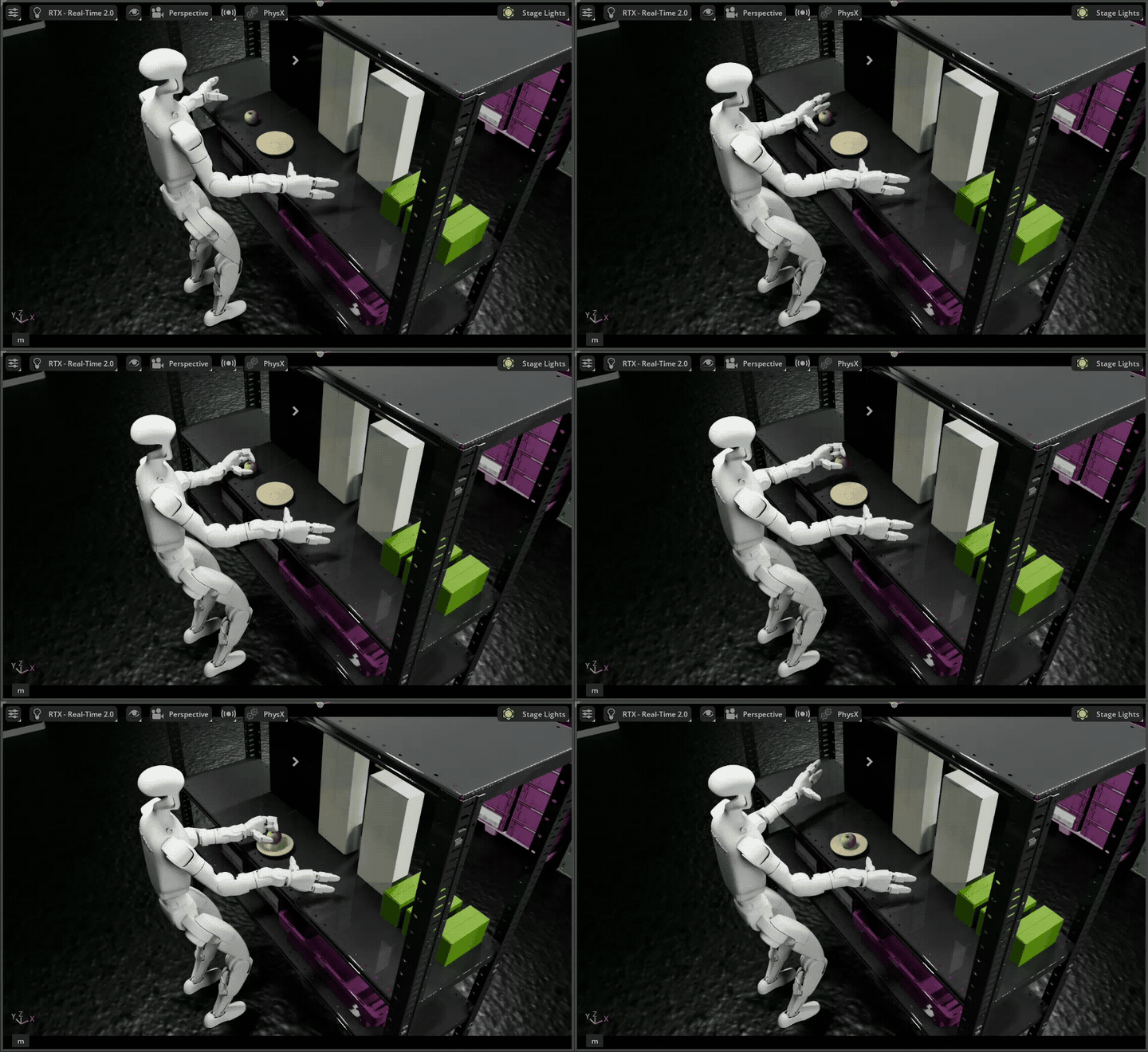
The training step uses a standalone clone of NVIDIA’s Isaac-GR00T (N1.7) repository rather than the GR00T submodule pinned inside Arena, and evaluation runs over Arena’s server-client (remote-policy) architecture: the GR00T server hosts the finetuned checkpoint in its own venv, and Arena’s client runs the simulation in the standard Arena container and queries the server over ZeroMQ. This decoupling means you can iterate on the model side without bumping Arena’s submodule or rebuilding the Arena container.
This workflow is the no-locomotion sibling of the Unitree G1 Loco-Manipulation Box Pick and Place Task. The robot stands in place using the same Whole Body Controller (WBC) for balance, but the destination plate sits on the same shelf as the apple — within arm’s reach — so the lower body never moves. If you want a tabletop manipulation surface for upper-body data collection without the complexity of full-body locomotion, this is the workflow to use.
Task Overview#
Task Name: galileo_g1_static_pick_and_place
Task Description: The Unitree G1 humanoid robot stands in front of a shelf and uses its arms to pick up an apple and place it onto a plate sitting on the same shelf, within arm’s reach. WBC actively balances the standing pose (no locomotion, no squat), and PinkIK drives the upper body via the same 23-D action layout used by the loco-manipulation variant.
Key Specifications:
Property |
Value |
|---|---|
Tags |
Tabletop manipulation, no locomotion |
Skills |
Pick, Place (no walk / squat / turn) |
Embodiment |
Unitree G1 (29 DOF humanoid with Whole Body Controller, balance only) |
Interop |
LeRobot dataset format (direct from teleop HDF5) |
Scene |
Galileo Lab Environment (single shelf, no second table) |
Manipulated Object(s) |
Apple (rigid body), Clay plate (destination, same-shelf placement) |
Policy |
GR00T N1.7 (vision-language-action foundation model, finetuned via standalone Isaac-GR00T) |
Post-training |
Imitation Learning |
Dataset |
|
Checkpoint |
|
Physics |
PhysX (200Hz @ 4 decimation) |
Closed-loop |
Yes (50Hz control) |
Metrics |
Success rate |
Workflow#
This tutorial covers the pipeline between creating an environment, collecting teleoperation demonstrations, fine-tuning a policy (GR00T N1.7, from a standalone Isaac-GR00T checkout) directly on the recorded HDF5, and evaluating the policy in closed-loop over Arena’s server-client architecture. Follow the steps in order from environment setup through closed-loop evaluation; each step consumes the artifacts produced by the previous one.
Note
This workflow trains directly from teleop recordings. The recorded HDF5 from Teleoperation Data Collection is converted to LeRobot format and fed straight into post-training in Policy Post-Training (GR00T N1.7).
Prerequisites#
Start the Isaac Lab Docker container:
./docker/run_docker.sh
Create the folders for the data and models:
export DATASET_DIR=/datasets/isaaclab_arena/static_apple_tutorial
mkdir -p $DATASET_DIR
export MODELS_DIR=/models/isaaclab_arena/static_apple_tutorial
mkdir -p $MODELS_DIR
Standalone Isaac-GR00T (N1.7) checkout (used in Policy Post-Training (GR00T N1.7) and Closed-Loop Policy Inference and Evaluation):
# Clone wherever you want; the docs below refer to it as $ISAAC_GR00T_DIR.
# Pin to the commit this workflow was validated against.
git clone https://github.com/NVIDIA/Isaac-GR00T.git /path/to/Isaac-GR00T
export ISAAC_GR00T_DIR=/path/to/Isaac-GR00T
cd $ISAAC_GR00T_DIR && git checkout 4b1dca9d88d2a0b9ea5a65aa61c82ff89f5c4f0e
Open another terminal outside the Arena Base Docker container and set up the native GR00T
uv environment from $ISAAC_GR00T_DIR by following the
GR00T installation guide.
This venv is separate from Arena’s container, but Arena’s policy runner still imports the
GR00T PolicyClient from the Arena-pinned submodules/Isaac-GR00T checkout. Keep the
standalone GR00T checkout at the pinned commit above for this workflow. If you move the standalone
checkout to a newer GR00T commit, the GR00T server and Arena’s GR00T client may be incompatible
unless Arena’s GR00T client/submodule is updated as well.
Workflow Steps#
Follow the following steps to complete the workflow: