

Collision Handling#
Collision handling is integrated into placement. Users describe where assets belong with spatial relations rather than adding a separate no-collision relation. The solver penalizes disallowed overlaps, and validators check the resulting candidates.
What Collision Avoidance Covers#
Arena checks each movable asset against other movable assets, fixed anchors,
and passive obstacles. A supporting pair connected by On is exempt so that
the placed asset can rest on its support. Fixed background assets can act as
passive obstacles when Arena can obtain their collision bounds. With mesh
collision, background geometry can therefore prevent placement inside
furniture, appliances, and other environment geometry.
In BBOX mode, fixed objects without placement relations can act as passive
bounding-box obstacles. Full-environment Background geometry is included
as a passive obstacle only in MESH mode.
Choosing a Collision Representation#
Arena supports two collision modes:
Mode |
Speed |
Geometry |
Recommended use |
|---|---|---|---|
|
Faster |
Axis-aligned bounding boxes |
Default choice when boxes reasonably approximate the objects |
|
Slower |
Bounding spheres queried against collision-mesh geometry |
Irregular or concave shapes whose boxes reject usable free space |
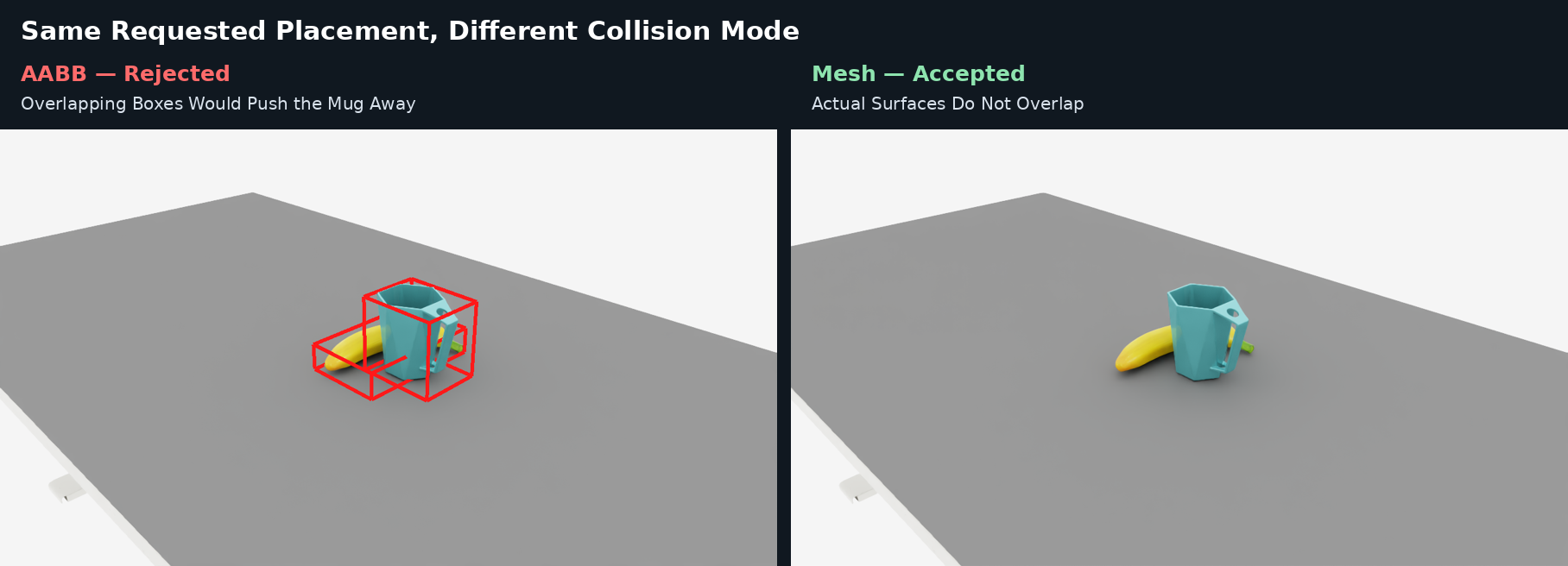
For the same requested placement, BBOX rejects the layout because the
axis-aligned boxes overlap, while MESH accepts it using
sphere-versus-mesh collision checks.#
Start with BBOX. Use MESH only when bounding boxes exclude space that
the actual objects can safely occupy. Collision mode changes overlap checking;
it does not change the meaning of relations such as On or NextTo.
Set the solver-wide default when defining an environment in Python:
from isaaclab_arena.environments.isaaclab_arena_environment import (
    IsaacLabArenaEnvironment,
)
from isaaclab_arena.relations.collision_mode import CollisionMode
from isaaclab_arena.relations.object_placer_params import ObjectPlacerParams
from isaaclab_arena.relations.relation_solver_params import (
    RelationSolverParams,
)

placer_params = ObjectPlacerParams(
    solver_params=RelationSolverParams(
        collision_mode=CollisionMode.MESH,
    )
)
environment = IsaacLabArenaEnvironment(
    name="mesh_placement",
    scene=scene,
    placer_params=placer_params,
)
An individual asset can override that default in either Python or YAML:
from isaaclab_arena.relations.collision_mode import CollisionMode

background = asset_registry.get_asset_by_name(
    "lightwheel_robocasa_kitchen"
)()
background.collision_mode = CollisionMode.MESH
background:
  id: kitchen
  registry_name: lightwheel_robocasa_kitchen
  params:
    collision_mode: mesh
When a non-background asset has no extractable collision mesh, Arena uses its
bounding box as a proxy and logs the fallback. A full-environment
Background in MESH mode requires successful mesh extraction;
environment setup fails if that mesh cannot be extracted.
See RelationSolverParams for clearance, mesh fidelity, and solver tuning fields, and ObjectPlacerParams for placement-level controls.
How Overlap Checking Works#
Overlap checking has two stages:
During optimization, the solver adds a differentiable no-overlap loss.
BBOXexpands the obstacle boxes byclearance_mand penalizes their intersection volume. For mesh-covered pairs,MESHrepresents movable geometry with up tonum_spheresbounding spheres and queries their distance from the target collision mesh. Increasingnum_spheresmay improve sphere coverage, at the cost of slower solving and validation.After optimization, the
no_overlapvalidator applies a discrete pass/fail check to each candidate. A low solver loss does not guarantee that this check passes. Placement uses the validator results to rank and select candidates according to the configured checks and fallback policy. See Placement Validation and Pooled Placement.
MESH enables sphere-to-mesh checks where Arena can obtain the target
collision mesh. Pairs not covered by a mesh check use bounding-box-based
checks.
The solver and validator check the following pairs:
Pair |
Checked |
Notes |
|---|---|---|
Movable / movable |
Yes |
Except when one is directly |
Movable / anchor |
Yes |
Except for the child-parent pair of an |
Movable / passive obstacle |
Yes |
|
Fixed / fixed |
No |
Includes anchor-anchor, anchor-passive, and passive-passive pairs |
The On exemption allows support contact; the On constraint is checked
separately. Two objects placed on the same support are still checked against
each other.
Background and Passive Obstacles#
Assets do not need placement relations to act as obstacles. A table can be an
anchor that supports an On relation, while a nearby appliance can remain a
fixed passive obstacle. This lets Arena place objects on a surface while
avoiding the rest of a complex environment.
Here, passive means that the asset contributes collision geometry but the
solver does not move it. In contrast, placed objects and supported robot
embodiments are active placement participants whose poses the solver computes.
Passive obstacles therefore usually need a fixed initial pose. A
full-environment Background in MESH mode may use identity when its pose
is omitted.
The included kitchen example shows objects placed on a counter while avoiding the background mesh.
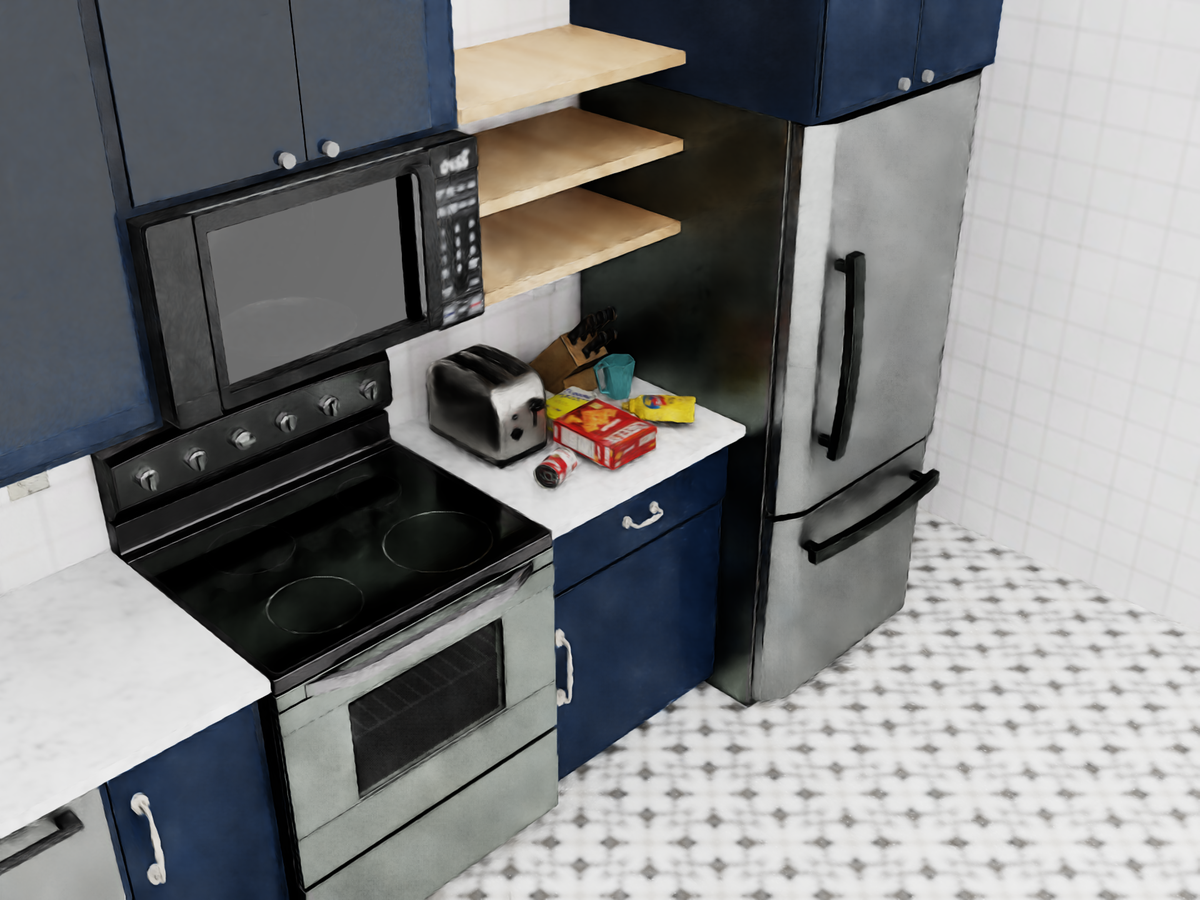
The counter is the placement anchor. The surrounding stove, toaster, and refrigerator remain fixed passive obstacles represented by the kitchen collision mesh.#
Note
This command requires a graphical display. In a remote or container
session, configure display forwarding and set DISPLAY to the active X
display, for example export DISPLAY=:1.
Run the example from the repository root:
python \
  isaaclab_arena_examples/relations/isaac_sim_kitchen_background_collision_notebook.py \
  --viz kit \
  --view_steps 0
--viz kit opens the viewer, and --view_steps 0 keeps it open until you
close the application.
This example is intentionally challenging: it places five objects in a constrained area while enforcing collision checks. Because placement is stochastic, the candidate success rate can be low and some runs may not produce a valid layout. If you encounter a placement error, use the debugging workflow below to reproduce the failure and identify the limiting check.
A Placement pool could not fill error means that the solver did not produce
enough valid layouts to reach the pool’s target after all placement attempts.
Some valid layouts may still have been produced and stored.
Debugging Placement Collisions#
Use the placement seed, verbose output, and Rerun view together to reproduce a failure, identify the failing check or object pair, and inspect the candidate layout:
placer_params = ObjectPlacerParams(
    placement_seed=7,
    verbose=True,
    allow_best_loss_fallbacks=False,
    debug_visualize=True,
    solver_params=RelationSolverParams(
        verbose=True,
    ),
)
The settings expose complementary information:
placement_seedreproduces candidate generation.ObjectPlacerParams.verbosereports validation failures and the first detected overlap pair when available.RelationSolverParams.verbosereports optimization progress and final loss.debug_visualize=Trueopens the Rerun view with candidate geometry. For headless runs, leave itFalseand setdebug_visualize_output_pathto record an.rrdfile.allow_best_loss_fallbacks=Falsekeeps pooled placement from hiding a failed validation behind a fallback layout.
Start with the validation summary. For example, on_relation=1/10 means that
only one complete candidate satisfied every On relation. Verbose output
identifies the first object that failed and whether it was outside the support’s
XY footprint or Z band. After reproducing the failure, try another placement
seed. For repeated failures, increase max_iters or
max_placement_attempts; reducing the object count or disabling random yaw
also makes dense scenes easier to solve.
For no_overlap failures, inspect the reported object pair in Rerun. A
[NoCollision] message means collision-mesh geometry was unavailable and
Arena used a bounding-box-based fallback where possible. A [MeshSDF] warning
means the mesh could not be queried reliably. If BBOX rejects geometry that
is visibly collision-free, retry the relevant asset with MESH.
Next Steps#
Continue to Placement Solver to see how spatial relations and collision constraints produce candidate layouts.