

First Arena Environment#
Our first environment, pick_and_place_maple_table, is a table-top pick-and-place environment
where a robot picks up an object and places it into a destination container.
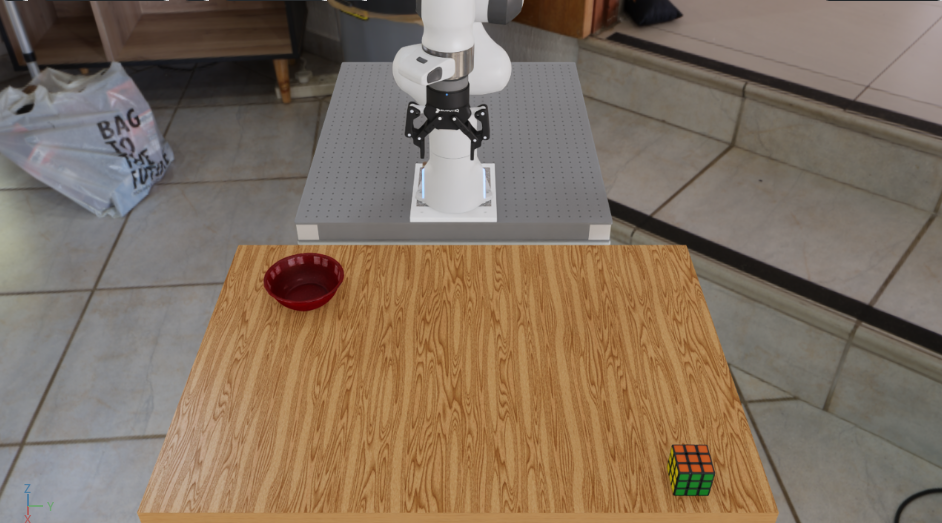
The pick_and_place_maple_table environment: a DROID robot with a Rubik’s cube and bowl on a
maple table.#
Arena builds an environment from three parts that can be changed independently:
Scene — the world around the robot. This includes the room, table, objects, and lighting.
Embodiment — the robot. This defines its cameras, observations, and controls.
Task — the job to complete. Here, the robot must pick up the selected object and place it in the selected destination.
For this environment, the three parts are:
Part |
What this example uses |
|---|---|
Scene |
Maple table, Rubik’s cube, bowl, and lighting |
Embodiment |
DROID with joint-position control |
Task |
Pick up the cube and place it in the bowl |
Keeping these parts separate makes the environment reusable. We can replace the Rubik’s cube with a mustard bottle, choose a different destination or background, or use another compatible robot without rewriting the task.
The following examples reuse the same environment definition. First, we inspect the reference scene. Then we replace the objects and change the background. The final visual previews 64 copies of the scene running in parallel, which you will launch on the next page.
Run the Environment#
For this first look, the Environment Runner opens one environment in Kit and applies zero
actions, so no policy or model weights are required. It keeps running until you close Kit or press
Ctrl-C. While it runs, hold Shift and left-drag an object to move it and inspect its physical
behavior.
Prepare the runtime from the repository root, using either a native uv environment or the base
Docker container (see Installation for the full setup):
uv sync --extra dev
source .venv/bin/activate
export OMNI_KIT_ACCEPT_EULA=YES ACCEPT_EULA=Y
./docker/run_docker.sh
Every command below is identical in both runtimes.
Run the reference scene#
Run the environment with a Rubik’s cube, bowl, and home-office background:
python isaaclab_arena/scripts/environment_runner.py \
  pick_and_place_maple_table \
  --embodiment droid_rel_joint_pos \
  --pick_up_object rubiks_cube_hot3d_robolab \
  --destination_location bowl_ycb_robolab \
  --hdr home_office_robolab
The reference scene opened in Kit.#
Close Kit before starting the next example.
Swap the objects#
Keep the same environment and task, but replace the pick-up object and destination:
python isaaclab_arena/scripts/environment_runner.py \
  pick_and_place_maple_table \
  --embodiment droid_rel_joint_pos \
  --pick_up_object mustard_bottle_hot3d_robolab \
  --destination_location wooden_bowl_hot3d_robolab \
  --hdr home_office_robolab
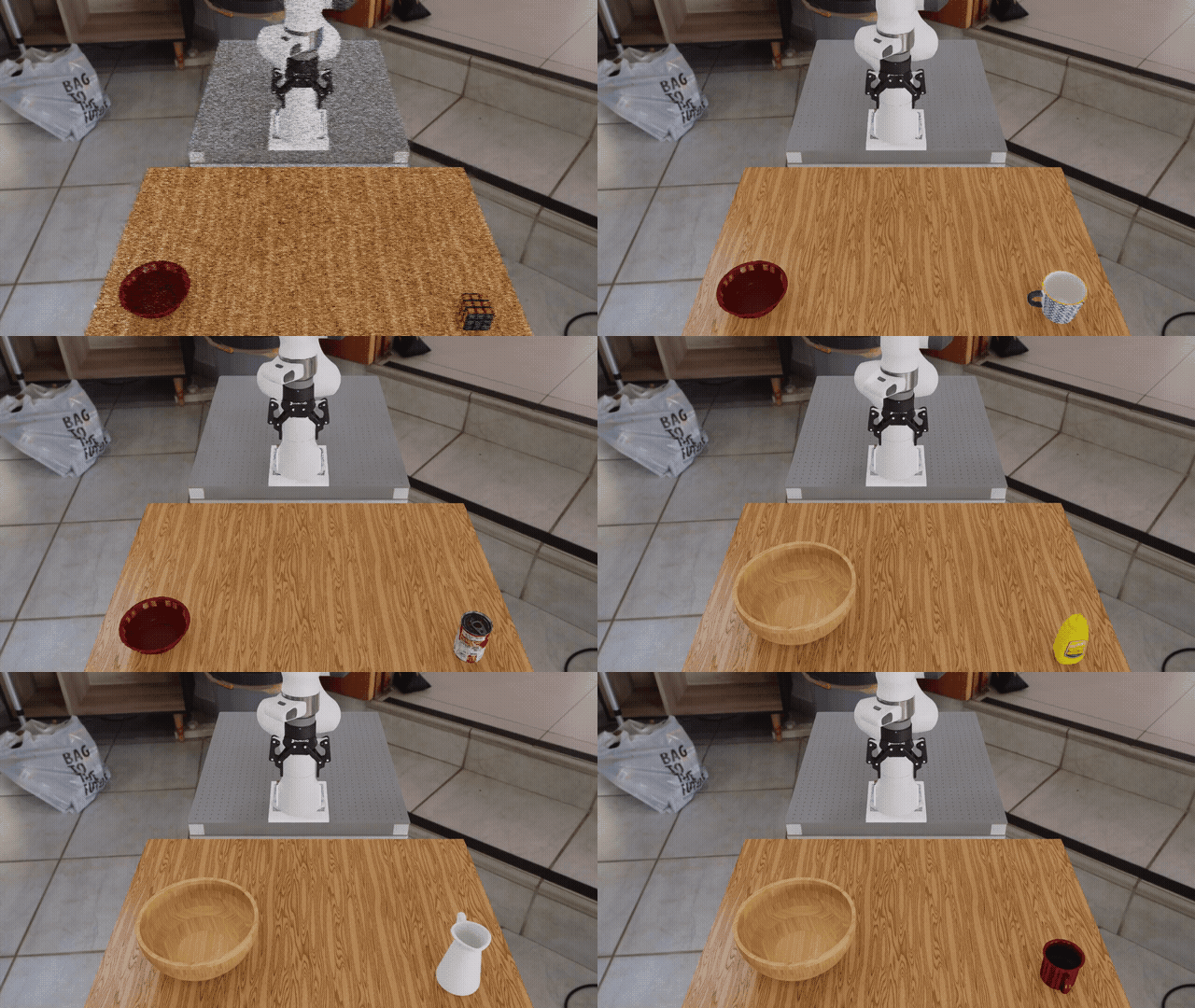
The same environment definition and task with different pick-up and destination objects.#
Change the background#
Keep the original objects, but select a different background panorama and ambient lighting:
python isaaclab_arena/scripts/environment_runner.py \
  pick_and_place_maple_table \
  --embodiment droid_rel_joint_pos \
  --pick_up_object rubiks_cube_hot3d_robolab \
  --destination_location bowl_ycb_robolab \
  --hdr billiard_hall_robolab
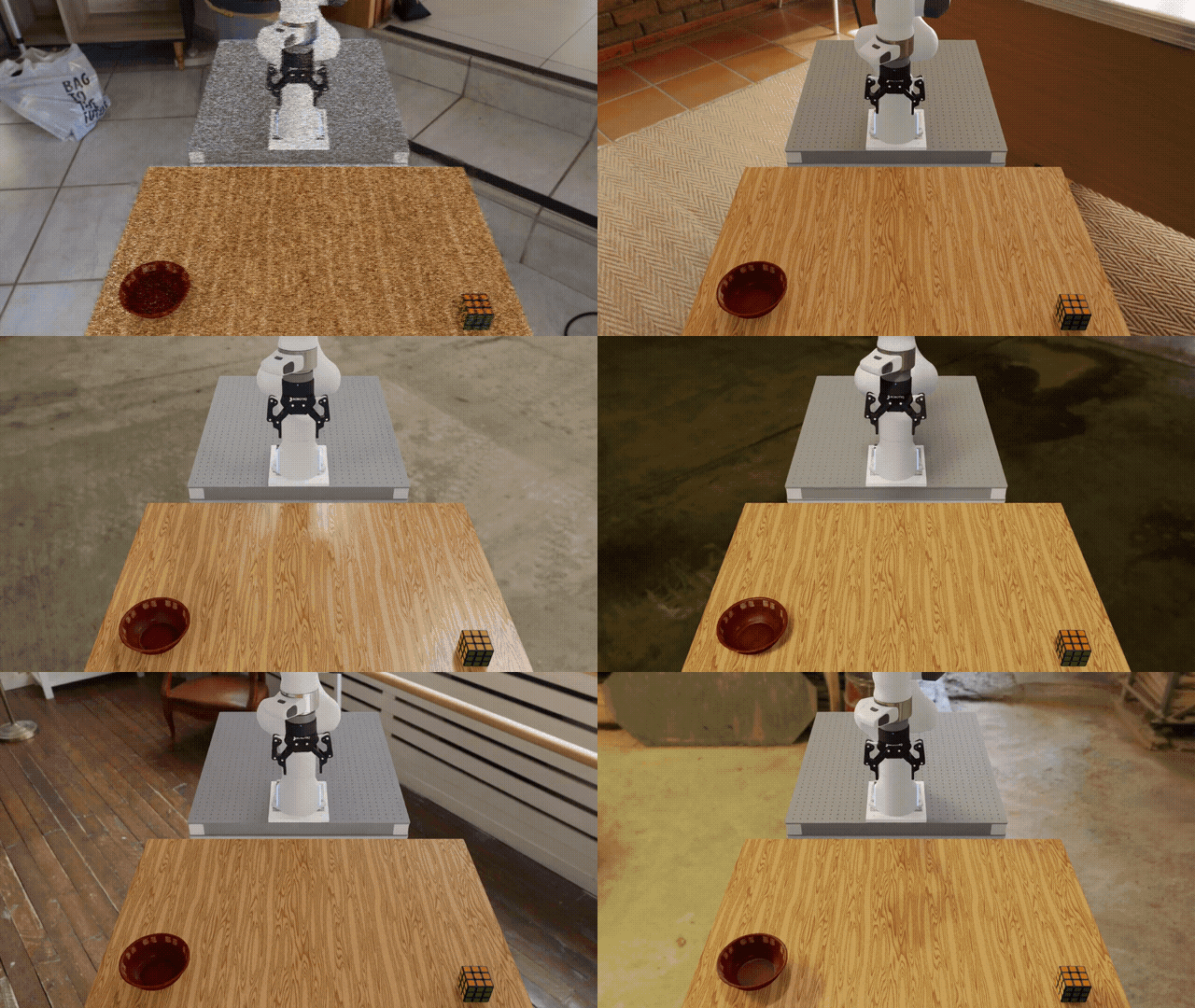
The same environment definition with a different background panorama.#
Preview parallel environments#
The Environment Runner is limited to one interactive environment. On the next page, the Experiment Runner creates 64 copies of the reference scene that step together on the GPU. This is what that setup looks like:

The reference scene scaled from one environment to 64 parallel environments.#
Note
The three commands above make explicit choices for each launch. On the next page, those choices and the parallel setup become four named Runs in one YAML file. Later, Arena variations will choose and record values automatically when an environment is built or reset.
How the Environment Is Assembled#
Under the hood, Arena assembles this environment in seven steps:
Retrieve assets. Arena selects the background, objects, and other scene assets from its registries using the environment configuration. A registry is a catalog of assets that Arena can use.
Describe spatial relationships. The table is marked as an anchor, and the objects are placed on it. Arena turns these relationships into concrete poses when it builds the environment.
Configure lighting. The configuration sets the light intensity and optional HDR background.
Select the embodiment. The chosen embodiment provides the robot, cameras, observations, and controls.
Compose the scene. Arena collects the background, lighting, objects, and their spatial references into a scene. The robot remains separate from the scene.
Define the task. The task describes the objective, success and failure conditions, and evaluation metrics independently of the selected assets.
Assemble the environment. Arena combines the scene, embodiment, and task into an environment that Isaac Lab can run.
For more detail, see Assets,
Scenes, Embodiments,
Tasks, and
Environment Builder.
PhysX vs Newton selection and --presets precedence are described in
Physics backend selection.
Environment definition: pick_and_place_maple_table_environment.py
@dataclass
class PickAndPlaceMapleTableEnvironmentCfg(ArenaEnvironmentCfg):
    """Configure the Maple-table pick-and-place environment."""

    embodiment: str = "droid_abs_joint_pos"
    hdr: str | None = None
    light_intensity: float = 500.0
    pick_up_object: str = "rubiks_cube_hot3d_robolab"
    destination_location: str = "bowl_ycb_robolab"
    additional_table_objects: list[str] = field(default_factory=list)
    episode_length_s: float = 70.0

    def __post_init__(self) -> None:
        assert self.episode_length_s > 0.0, "episode_length_s must be greater than zero"


@register_environment
class PickAndPlaceMapleTableEnvironment(ArenaEnvironmentFactory[PickAndPlaceMapleTableEnvironmentCfg]):
    """Registered provider for the Maple-table pick-and-place environment."""

    name: str = "pick_and_place_maple_table"
    _legacy_argparse_cfg_type = PickAndPlaceMapleTableEnvironmentCfg

    def build(self, cfg: PickAndPlaceMapleTableEnvironmentCfg) -> IsaacLabArenaEnvironment:
        """Build the environment from its typed configuration."""
        from isaaclab.envs.common import ViewerCfg

        from isaaclab_arena.assets.object_reference import ObjectReference
        from isaaclab_arena.assets.object_type import ObjectType
        from isaaclab_arena.environments.isaaclab_arena_environment import IsaacLabArenaEnvironment
        from isaaclab_arena.relations.relations import IsAnchor, On
        from isaaclab_arena.scene.scene import Scene
        from isaaclab_arena.tasks.pick_and_place_task import PickAndPlaceTask

        # Step 1: Retrieve assets from the registry
        background = self.asset_registry.get_asset_by_name("maple_table_robolab")()
        pick_up_object = self.asset_registry.get_asset_by_name(cfg.pick_up_object)()
        destination_location = self.asset_registry.get_asset_by_name(cfg.destination_location)()

        # Step 2: Describe spatial relationships
        table_reference = ObjectReference(
            name="table",
            prim_path="{ENV_REGEX_NS}/maple_table_robolab/table",
            parent_asset=background,
            object_type=ObjectType.RIGID,
        )
        table_reference.add_relation(IsAnchor())

        pick_up_object.add_relation(On(table_reference))
        destination_location.add_relation(On(table_reference))

        additional_table_objects = [
            self.asset_registry.get_asset_by_name(name)() for name in cfg.additional_table_objects
        ]
        for obj in additional_table_objects:
            obj.add_relation(On(table_reference))

        # Step 3: Configure lighting
        light = self.asset_registry.get_asset_by_name("light")()
        light.set_intensity(cfg.light_intensity)
        if cfg.hdr is not None:
            light.add_hdr(self.hdr_registry.get_hdr_by_name(cfg.hdr)())
        directional_light = self.asset_registry.get_asset_by_name("directional_light")()

        # Step 4: Select the embodiment
        embodiment = self.asset_registry.get_asset_by_name(cfg.embodiment)(
            enable_cameras=cfg.enable_cameras,
        )

        # Step 5: Compose the scene
        scene = Scene(
            assets=[
                background,
                light,
                directional_light,
                pick_up_object,
                destination_location,
                table_reference,
                *additional_table_objects,
            ]
        )

        # Step 6: Define the task
        task = PickAndPlaceTask(
            pick_up_object=pick_up_object,
            destination_location=destination_location,
            background_scene=background,
            episode_length_s=cfg.episode_length_s,
        )

        # Set viewport camera to match the robolab droid view
        def _set_viewer_cfg(env_cfg):
            env_cfg.viewer = ViewerCfg(eye=(1.5, 0.0, 1.0), lookat=(0.2, 0.0, 0.0))
            return env_cfg

        # Step 7: Assemble the environment
        isaaclab_arena_environment = IsaacLabArenaEnvironment(
            name=self.name,
            embodiment=embodiment,
            scene=scene,
            task=task,
            env_cfg_callback=_set_viewer_cfg,
        )
        return isaaclab_arena_environment
See the complete source.
Next Steps#
Continue to First Arena Experiment to execute several named Runs from one YAML file.
Using IsaacLab-Arena in Your Own Repository#
See Installing IsaacLab-Arena in Your Repository for the recommended pattern of consuming Arena as an unmodified submodule from an external project.