

GR00T#
GR00T N1.6 is a pre-trained robotic foundation model. No fine-tuning or separate model download is required. The weights are fetched from HuggingFace when the policy server starts for the first time.
Start a GR00T policy server#
The closed-loop policy connects to a GR00T policy server in a separate process. The
server runs from the
Isaac-GR00T
submodule pinned at commit e29d8fc. Populate it if needed:
git submodule update --init submodules/Isaac-GR00T
Note
Blackwell GPUs with compute capability sm_120 require CUDA 12.8 or newer. The
official GR00T documentation
specify CUDA 12.8 and pytorch-cu128 for RTX 5090 systems. Please refer to the
documentation for the latest requirements.
Then start the server from the repository root in a separate shell:
cd submodules/Isaac-GR00T
uv run python gr00t/eval/run_gr00t_server.py \
  --model-path nvidia/GR00T-N1.6-DROID \
  --embodiment-tag OXE_DROID \
  --device cuda --host 127.0.0.1 --port 5555
GR00T N1.6-DROID provides its own modality configuration, so the command does not need
--modality-config-path. The first launch downloads the model weights; later launches
reuse the local cache. Leave this server running.
Run GR00T with the Experiment Runner#
Arena includes a one-Run YAML configuration for the first rollout. It selects the DROID environment, connects the GR00T policy to the server, and stops after three episodes.
Configuration file (droid_pnp_gr00t_experiment.yaml)
# Copyright (c) 2026, The Isaac Lab Arena Project Developers (https://github.com/isaac-sim/IsaacLab-Arena/blob/main/CONTRIBUTORS.md).
# All rights reserved.
#
# SPDX-License-Identifier: Apache-2.0

runs:
  droid_pnp_gr00t:
    environment:
      type: pick_and_place_maple_table
      enable_cameras: true
      embodiment: droid_abs_joint_pos
      pick_up_object: rubiks_cube_hot3d_robolab
      destination_location: bowl_ycb_robolab
      hdr: home_office_robolab
    environment_builder:
      language_instruction: Pick up the Rubik's cube and place it in the bowl.
    policy:
      type: isaaclab_arena_gr00t.policy.gr00t_remote_closedloop_policy.Gr00tRemoteClosedloopPolicy
      policy_config_yaml_path: isaaclab_arena_gr00t/policy/config/droid_manip_gr00t_closedloop_config.yaml
      policy_device: cuda:0
      remote_host: 127.0.0.1
      remote_port: 5555
    rollout_limit:
      num_episodes: 3
GR00T N1.6-DROID uses absolute joint positions. The YAML therefore selects
droid_abs_joint_pos and enables the cameras required by the policy. The natural-language
instruction belongs to the environment builder, while the server connection belongs to the
policy.
Open another shell and prepare the Arena runtime from the repository root, using either a native
uv environment or the base Docker container (see Installation for the full setup):
The GR00T client is not part of a default sync, so select its dependency group:
uv sync --extra dev --group gr00t-client
source .venv/bin/activate
export OMNI_KIT_ACCEPT_EULA=YES ACCEPT_EULA=Y
./docker/run_docker.sh
Then start the rollout with the Experiment Runner:
python isaaclab_arena/evaluation/experiment_runner.py \
  --viz kit \
  --experiment_config isaaclab_arena_environments/experiment_configs/droid_pnp_gr00t_experiment.yaml
The Kit window shows the DROID arm acting on GR00T commands. After every episode, Arena reports whether the pick-and-place task succeeded.
If the server runs on another host or port, override the declared policy value. For example:
python isaaclab_arena/evaluation/experiment_runner.py \
  --viz kit \
  --experiment_config isaaclab_arena_environments/experiment_configs/droid_pnp_gr00t_experiment.yaml \
  runs.droid_pnp_gr00t.policy.remote_port=5556
Evaluate several object variations#
The multi-Run YAML evaluates nine combinations of pick-up object, destination, HDR background,
and language instruction. Its shared mapping keeps the GR00T policy and rollout settings in
one place. Every Run lists only what changes.
Configuration file (droid_pnp_srl_gr00t_experiment.yaml)
# Copyright (c) 2026, The Isaac Lab Arena Project Developers (https://github.com/isaac-sim/IsaacLab-Arena/blob/main/CONTRIBUTORS.md).
# All rights reserved.
#
# SPDX-License-Identifier: Apache-2.0

# Values below shared are used by every Run. Each Run lists only the scene and
# language instruction that differ from these defaults.
shared:
  environment:
    type: pick_and_place_maple_table
    enable_cameras: true
    embodiment: droid_abs_joint_pos
    pick_up_object: rubiks_cube_hot3d_robolab
    destination_location: bowl_ycb_robolab
  environment_builder:
    language_instruction: Pick up the Rubik's cube and place it in the bowl.
  policy:
    type: isaaclab_arena_gr00t.policy.gr00t_remote_closedloop_policy.Gr00tRemoteClosedloopPolicy
    policy_config_yaml_path: isaaclab_arena_gr00t/policy/config/droid_manip_gr00t_closedloop_config.yaml
    policy_device: cuda:0
    remote_host: 127.0.0.1
    remote_port: 5555
  rollout_limit:
    num_episodes: 3

runs:
  droid_pnp_srl_gr00t_billiard_hall:
    environment:
      hdr: billiard_hall_robolab

  droid_pnp_srl_gr00t_blue_block:
    environment:
      pick_up_object: blue_block_basic_robolab
      destination_location: wooden_bowl_hot3d_robolab
      hdr: home_office_robolab
    environment_builder:
      language_instruction: Pick up the blue block and place it in the bowl.

  droid_pnp_srl_gr00t_alphabet_soup_can:
    environment:
      pick_up_object: alphabet_soup_can_hope_robolab
      destination_location: bowl_ycb_robolab
      hdr: empty_warehouse_robolab
    environment_builder:
      language_instruction: Pick up the soup can and place it in the bowl.

  droid_pnp_srl_gr00t_orange:
    environment:
      pick_up_object: orange_01_fruits_veggies_robolab
      destination_location: wooden_bowl_hot3d_robolab
      hdr: aerodynamics_workshop_robolab
    environment_builder:
      language_instruction: Pick up the orange and place it in the bowl.

  droid_pnp_srl_gr00t_lemon:
    environment:
      pick_up_object: lemon_01_fruits_veggies_robolab
      destination_location: bowl_ycb_robolab
      hdr: wooden_lounge_robolab
    environment_builder:
      language_instruction: Pick up the lemon and place it in the bowl.

  droid_pnp_srl_gr00t_tomato_sauce_can:
    environment:
      pick_up_object: tomato_sauce_can_hot3d_robolab
      destination_location: wooden_bowl_hot3d_robolab
      hdr: garage_robolab
    environment_builder:
      language_instruction: Pick up the tomato sauce can and place it in the bowl.

  droid_pnp_srl_gr00t_mustard_bottle:
    environment:
      pick_up_object: mustard_bottle_hot3d_robolab
      destination_location: wooden_bowl_hot3d_robolab
      hdr: kiara_interior_robolab
    environment_builder:
      language_instruction: Pick up the mustard bottle and place it in the bowl.

  droid_pnp_srl_gr00t_sugar_box:
    environment:
      pick_up_object: sugar_box_ycb_robolab
      destination_location: bowl_ycb_robolab
      hdr: brown_photostudio_robolab
    environment_builder:
      language_instruction: Pick up the sugar box and place it in the bowl.

  droid_pnp_srl_gr00t_mug:
    environment:
      pick_up_object: mug_ycb_robolab
      destination_location: wooden_bowl_hot3d_robolab
      hdr: carpentry_shop_robolab
    environment_builder:
      language_instruction: Pick up the mug and place it in the bowl.
Start all nine Runs with one command:
python isaaclab_arena/evaluation/experiment_runner.py \
  --viz kit \
  --experiment_config isaaclab_arena_environments/experiment_configs/droid_pnp_srl_gr00t_experiment.yaml
The runner executes the nine Runs in YAML order. It keeps one SimulationApp open, but builds a fresh environment for every Run.
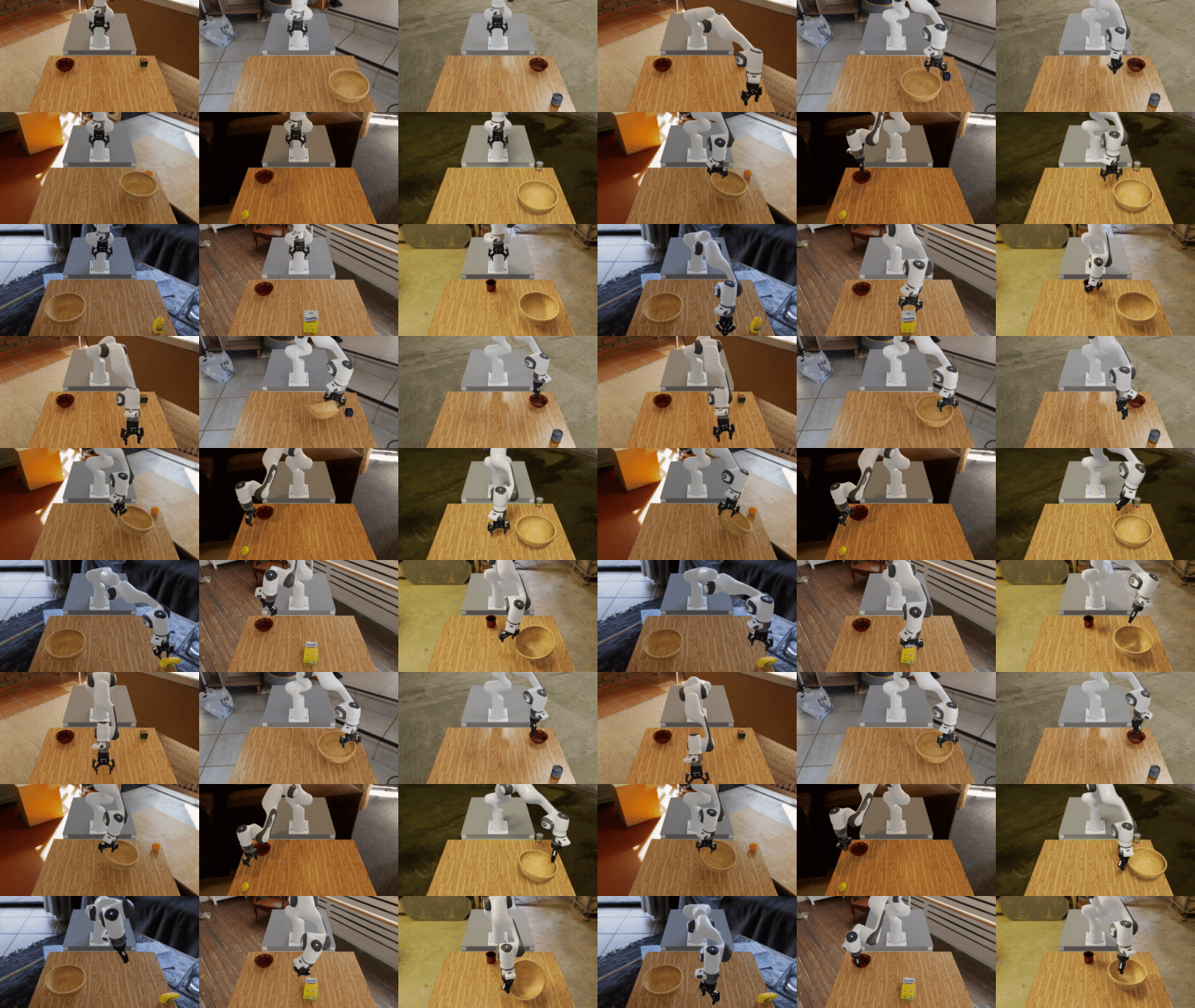
Nine closed-loop Runs of GR00T N1.6 on the DROID embodiment. Each cell changes the pick-up object, HDR background, and destination.#
When all Runs finish, Arena prints a summary table followed by a metrics report:
Example Run summary and metrics
Metric values can vary between evaluations. This is example output:
+---------------------------------------+-----------+-------------------------+----------+-----------+--------------+--------------+
|               Run Name                |  Status   |       Policy Type       | Num Envs | Num Steps | Num Episodes | Num Rebuilds |
+---------------------------------------+-----------+-------------------------+----------+-----------+--------------+--------------+
|   droid_pnp_srl_gr00t_billiard_hall   | completed | gr00t_remote_closedloop |    1     |   None    |      3       |      1       |
|    droid_pnp_srl_gr00t_blue_block     | completed | gr00t_remote_closedloop |    1     |   None    |      3       |      1       |
| droid_pnp_srl_gr00t_alphabet_soup_can | completed | gr00t_remote_closedloop |    1     |   None    |      3       |      1       |
|      droid_pnp_srl_gr00t_orange       | completed | gr00t_remote_closedloop |    1     |   None    |      3       |      1       |
|       droid_pnp_srl_gr00t_lemon       | completed | gr00t_remote_closedloop |    1     |   None    |      3       |      1       |
| droid_pnp_srl_gr00t_tomato_sauce_can  | completed | gr00t_remote_closedloop |    1     |   None    |      3       |      1       |
|  droid_pnp_srl_gr00t_mustard_bottle   | completed | gr00t_remote_closedloop |    1     |   None    |      3       |      1       |
|     droid_pnp_srl_gr00t_sugar_box     | completed | gr00t_remote_closedloop |    1     |   None    |      3       |      1       |
|        droid_pnp_srl_gr00t_mug        | completed | gr00t_remote_closedloop |    1     |   None    |      3       |      1       |
+---------------------------------------+-----------+-------------------------+----------+-----------+--------------+--------------+

======================================================================
METRICS SUMMARY
======================================================================

droid_pnp_srl_gr00t_alphabet_soup_can:
  num_episodes                            3
  object_moved_rate                  0.0000
  success_rate                       0.0000

droid_pnp_srl_gr00t_billiard_hall:
  num_episodes                            3
  object_moved_rate                  0.3333
  success_rate                       0.0000

droid_pnp_srl_gr00t_blue_block:
  num_episodes                            3
  object_moved_rate                  0.0000
  success_rate                       0.0000

droid_pnp_srl_gr00t_lemon:
  num_episodes                            3
  object_moved_rate                  1.0000
  success_rate                       0.6667

...
======================================================================
These results show that zero-shot deployment of robotic foundation models remains challenging. Recent [robolab] results compare GR00T with other vision-language-action models.
View rollouts as an HTML report#
The runner builds an HTML report for the complete evaluation. Add --record_camera_video to
record one video per camera and episode, then use
--serve_evaluation_report to open the report through a local HTTP server:
python isaaclab_arena/evaluation/experiment_runner.py \
  --viz kit \
  --experiment_config isaaclab_arena_environments/experiment_configs/droid_pnp_srl_gr00t_experiment.yaml \
  --output_base_dir ./output \
  --record_camera_video \
  --serve_evaluation_report
You can rebuild and serve a report later by pointing the standalone tool at the output directory. It selects the most recent evaluation:
python isaaclab_arena/visualization/report.py --video_dir ./output
Next steps#
To go beyond the pre-trained GR00T N1.6 foundation model, such as fine-tuning on your own teleoperation data, see Imitation Learning for the complete imitation-learning workflows.