

Workbench Environment#
Study#
We compare how a coding agent authors the same workbench cleanup evaluation environment with and without Arena. As a baseline, we compared against Isaac Lab alone, without the Arena extension, which lacks the evaluation-oriented building blocks that Arena provides.
- TL;DR: With Arena, the agent:
reached a validated environment 5.25× faster,
spent 72% less on model cost,
wrote no custom Python code,
and used Arena’s batched placement solver to get physically stable, collision-free layout variations with no additional setup.
The agent’s task#
The agent receives a single natural-language prompt describing a workbench cleanup evaluation environment: open the cabinet’s top drawer, place five tools from the workbench into it one by one, and close the drawer.
The prompt given to the agent
Set up an environment for evaluation of a workbench cleanup task using PhysX simulation.
Use the following SimReady Central assets from Hugging Face:
furniture_workbench_standard_e01fixture_cabinet_b01testingTool_oscilloscope_a01handTool_screwdriver_slotted_55mm_a01handTool_screwdriver_torx_t10_a01handTool_screwdriver_phillips_ph2_a01handTool_wrench_combination_a01
Five tools, such as wrenches and screwdrivers, are scattered across the center of the workbench, with an oscilloscope on the left. An open toolbox sits on the cabinet to the left of the workbench.
Task: open the top drawer of the cabinet, put the tools into the drawer one by one, then close the drawer.
Validate task success correctly with a force-based demo script.
The agent’s process#
A coding agent authors a workbench cleanup environment, evaluates a VLM-based policy on it, and adds variations.
The video follows the agent through three requests:
Author the environment. The agent loads SimReady assets, exposes the workbench’s tabletop, top drawer, and overhead shelf, places collision-checked clutter on the tabletop, defines a six-step task, and validates each step with physical forces.
Evaluate a policy. The agent adds a DROID robot and runs a local experiment with a VLM (Astra) policy, which shows task progress step by step, including a failed step.
Add variations. The agent adds placement, bin swap, overhead distractor container, and background HDR variations to the experiment YAML.
The agent’s solution#
The agent wrote a 172-line environment YAML. The scene places five tools as clutter on the workbench and varies the tabletop layout between resets. Object references expose the tabletop and nested articulated drawer as placement and task targets without modifying the source workbench USD.
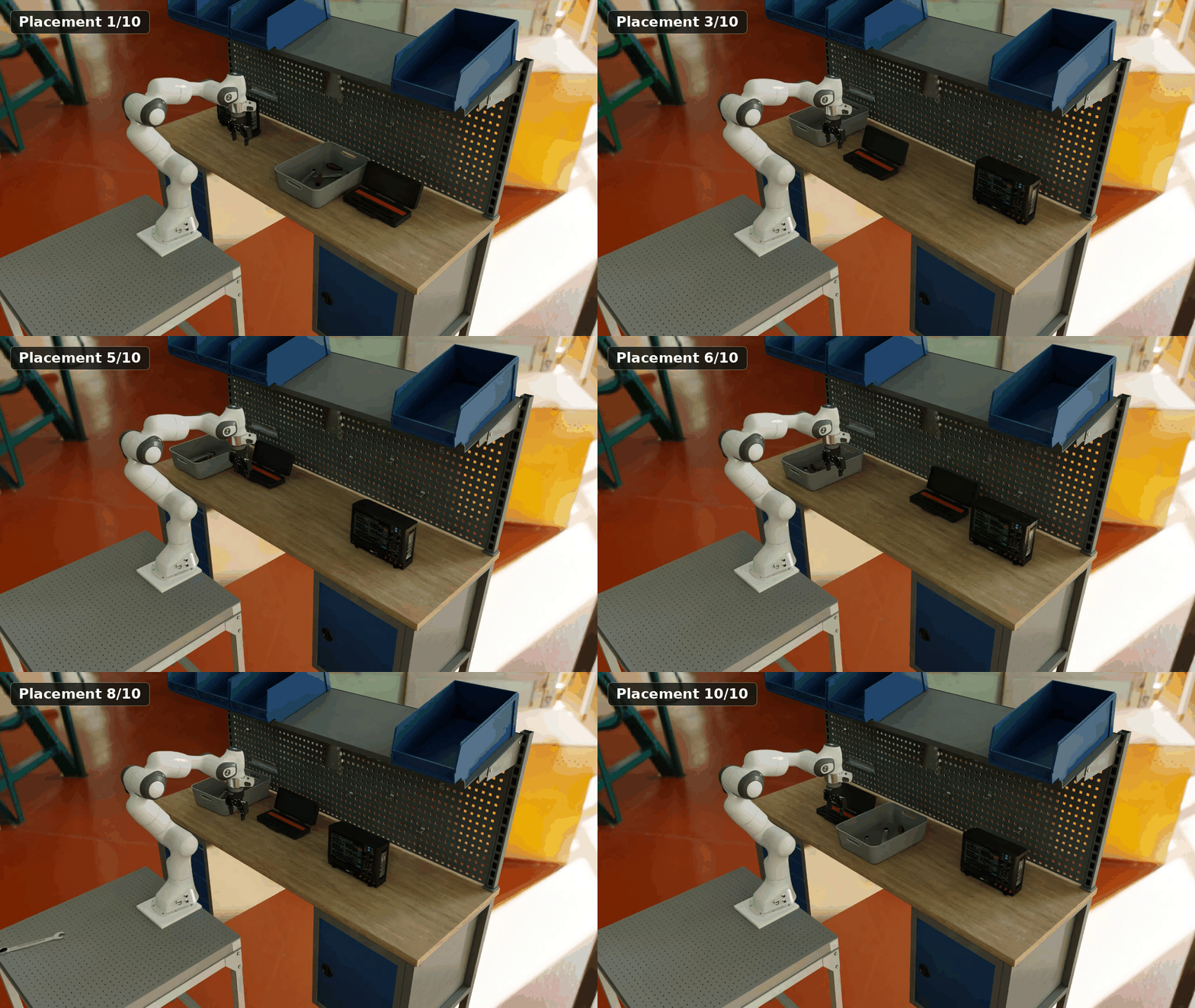
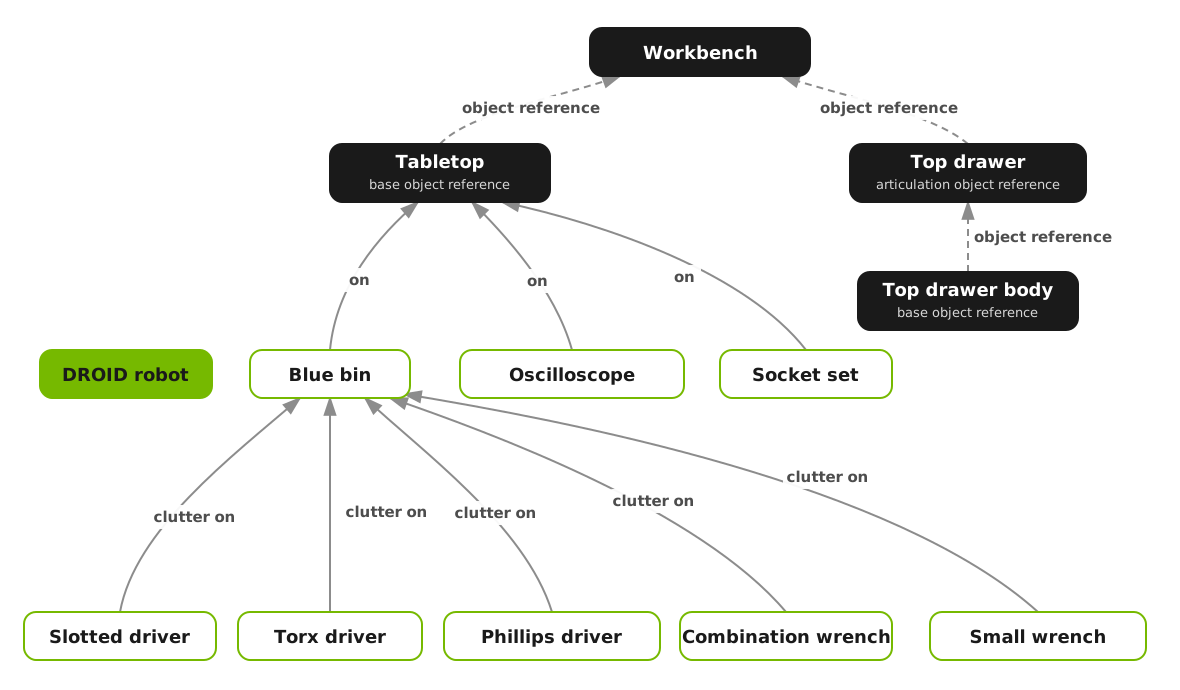
The task has one placement milestone for each tool followed by drawer closure. Success checks use the live drawer body pose and require the tools to remain contained, supported, and settled.
Analysis#
Let’s compare the solution above to the baseline solution written without Arena’s evaluation building blocks.
5.25× faster
to a validated environment (4 min vs. 21 min)
72% lower model cost
$1.88 instead of about $6.72
0 Python
authored for Arena (172 lines of YAML)
Measurement |
Without Arena |
With Arena |
Details |
|---|---|---|---|
Authoring time |
21 min |
4 min 5.25× faster |
Time until the agent reached a validated environment, excluding the force-based demo. |
Tokens |
4.4M |
About 1.2M |
Authoring only. The Arena figure is estimated from the 2.5M total, split by the authoring share of the Arena cost ($1.88 of $3.95). |
Model cost |
About $6.72 |
$1.88 72% lower cost |
GPT-6 Astra, authoring only. The Isaac Lab figure is estimated from the $11.30 total, split by the authoring share of the Isaac Lab tokens (4.4M of 7.4M). |
Environment code |
302 lines of custom Python code |
0 lines of Python + 172 lines of environment YAML no new code to maintain |
Environment is a composition of Arena placement relations, object references, and tasks. |
Debug code |
358 lines of throwaway code |
184 lines of throwaway code |
Code written only to debug the environment. |
Task success |
Hand-written environment-specific code |
Sequential composite task: one placement subtask per tool, then drawer closure |
Reuses Arena’s existing tasks and their success conditions. Checks use the live drawer pose and require the tools to remain contained, supported, and settled. |
Asset placement |
Hand-written placement code |
Spatial relation graph solved to produce collision-free varied placements. |
Arena places objects relative to the tabletop and each other through object references, rejects collisions across the whole layout, and validates robot reachability. |
- In summary, with Arena, the agent:
reached a validated environment 5.25× faster,
spent 72% less on model cost,
wrote no custom Python code,
and used Arena’s batched placement solver to get physically stable layout variations with no additional setup.
Beyond initial setup#
Arena provides more than a shorter environment definition:
Collision-free batched placement. The placement solver samples the full layout together, rejects object collisions, and supports batched collision and robot-reachability validation. The workbench environment gets ten physically stable layout variations without another custom placement script.
Composable environment changes. Swapping the workbench takes a 16-line environment YAML; adding two tasks takes a 35-line environment YAML. Neither requires Python.
Evaluation at scale. A 43-line Experiment YAML runs 100 episodes over two variations either locally or on an OSMO cluster. Experiment runs produce an HTML summary and episode recordings and work with Arena’s built-in sensitivity analysis.
Going further#
The environment YAML plugs straight into an Arena Experiment runner and can be used in all Arena evaluation workflows. For example,
Parallel evaluation: The above environment can be run across many parallel environments. See Run an Evaluation with Recorded Variations.
Multi-node evaluation: The same environment can be evaluated across a multi-node cluster with OSMO. See Multi-Node Evaluation.
Variations: Expose the policy to controlled perturbations through Arena’s variation system. See Run an Evaluation.
Metrics: By default, Arena collects evaluation-oriented metrics which can be viewed after an experiment run. See Sensitivity Analysis.