

OpenPI#
The openpi project (Physical
Intelligence) publishes Pi0 / Pi05 checkpoints fine-tuned on DROID. Arena
ships a thin WebSocket client (Pi0RemotePolicy) that talks to openpi’s
serve_policy.py running in a separate process / container.
The setup uses two terminals: the OpenPI server (terminal 1, hosts the model) and the Arena Experiment Runner (terminal 2, runs the simulation and sends observations and actions over WebSocket).
Terminal 1 — OpenPI server#
Build and run
Arena ships a wrapper script that builds a self-contained Docker image (cloning upstream openpi at a pinned commit on first run) and starts the inference server:
./isaaclab_arena_openpi/docker/run_openpi_server.sh
The first invocation builds isaaclab_arena:openpi_server (~3 min,
~19 GB) and then downloads the ~11 GB checkpoint into the container on startup;
subsequent invocations reuse the cached image. Pass -r to force a rebuild,
-v pi0 to serve the pi0 variant instead of pi05, or -p <port> to bind
the server to a non-default port.
By default, the wrapper binds to port 8000. If OpenPI reports that the
address is already in use, stop the existing process or choose another port:
./isaaclab_arena_openpi/docker/run_openpi_server.sh -p 8001
When you see:
INFO:websockets.server:server listening on 0.0.0.0:8000
the server is ready. Leave the terminal running. If you used -p, the log
will show the selected port instead.
The wrapper passes --policy.config (architecture + data transforms) and
--policy.dir (params + normalization stats) for the selected variant; see
the supported-variants table below for the exact values.
Terminal 2 — Experiment Runner#
Run pi05 closed-loop
Open a second terminal and prepare the Arena runtime from the repository root, using either a
native uv environment or the base Docker container (see
Installation for the full setup):
uv sync --extra dev
source .venv/bin/activate
export OMNI_KIT_ACCEPT_EULA=YES ACCEPT_EULA=Y
./docker/run_docker.sh
Arena includes a one-Run YAML configuration for this rollout:
Configuration file (droid_pnp_openpi_experiment.yaml)
# Copyright (c) 2026, The Isaac Lab Arena Project Developers (https://github.com/isaac-sim/IsaacLab-Arena/blob/main/CONTRIBUTORS.md).
# All rights reserved.
#
# SPDX-License-Identifier: Apache-2.0

runs:
  droid_pnp_openpi:
    environment:
      type: pick_and_place_maple_table
      enable_cameras: true
      embodiment: droid_abs_joint_pos
      pick_up_object: rubiks_cube_hot3d_robolab
      destination_location: bowl_ycb_robolab
      hdr: home_office_robolab
    environment_builder:
      num_envs: 1
      language_instruction: Pick up the Rubik's cube and place it in the bowl.
    policy:
      type: isaaclab_arena_openpi.policy.pi0_remote_policy.Pi0RemotePolicy
      policy_variant: pi05
      policy_device: cuda:0
      remote_host: 127.0.0.1
      remote_port: 8000
      openpi_embodiment_adapter: droid
    rollout_limit:
      num_episodes: 3
Start the rollout to connect to the server:
python isaaclab_arena/evaluation/experiment_runner.py \
  --viz kit \
  --experiment_config isaaclab_arena_environments/experiment_configs/droid_pnp_openpi_experiment.yaml
The YAML selects the pi05 checkpoint, the DROID adapter, and port 8000. If the server is on
another machine, change policy.remote_host. If terminal 1 uses another port, change
policy.remote_port or override it for this Run:
python isaaclab_arena/evaluation/experiment_runner.py \
  --viz kit \
  --experiment_config isaaclab_arena_environments/experiment_configs/droid_pnp_openpi_experiment.yaml \
  runs.droid_pnp_openpi.policy.remote_port=8001
The server terminal will start logging connection and inference events as the arena Kit window shows the droid arm reacting to pi0’s commanded joint positions.
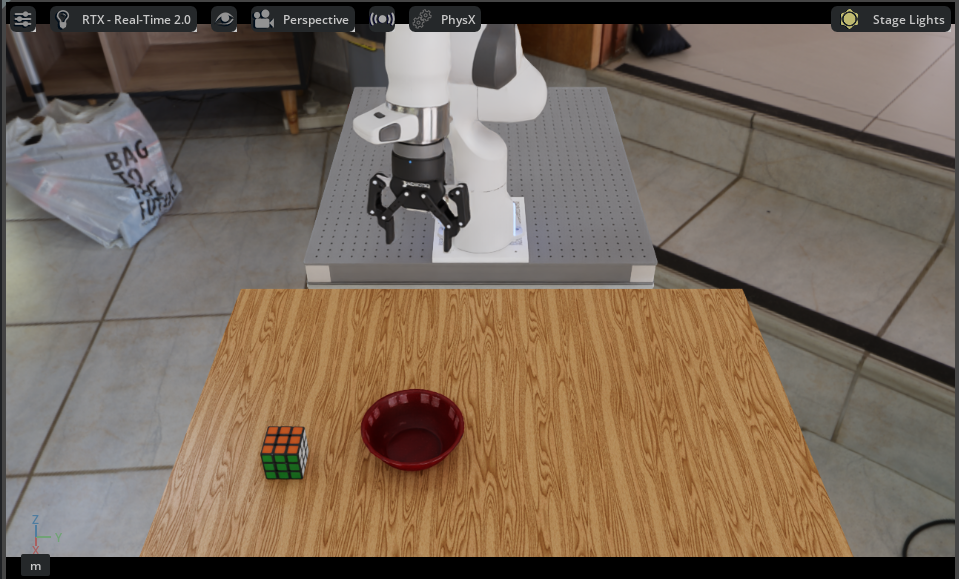
Arena Kit viewport during a pi05 rollout: the DROID arm above the maple table with the Rubik’s cube and destination bowl, with the home_office_robolab HDR.#
Evaluate several variations#
Arena also includes a YAML configuration with nine Runs. Each Run changes the object, background, and destination:
python isaaclab_arena/evaluation/experiment_runner.py \
  --viz kit \
  --experiment_config isaaclab_arena_environments/experiment_configs/droid_pnp_srl_openpi_experiment.yaml
The Runs execute in YAML order and report a success rate for each Run. Arena builds a fresh
environment for every Run without restarting Isaac Sim.
If the OpenPI server uses a non-default port, override each OpenPI run’s
policy.remote_port to the same value, for example
runs.<run_name>.policy.remote_port=8001.
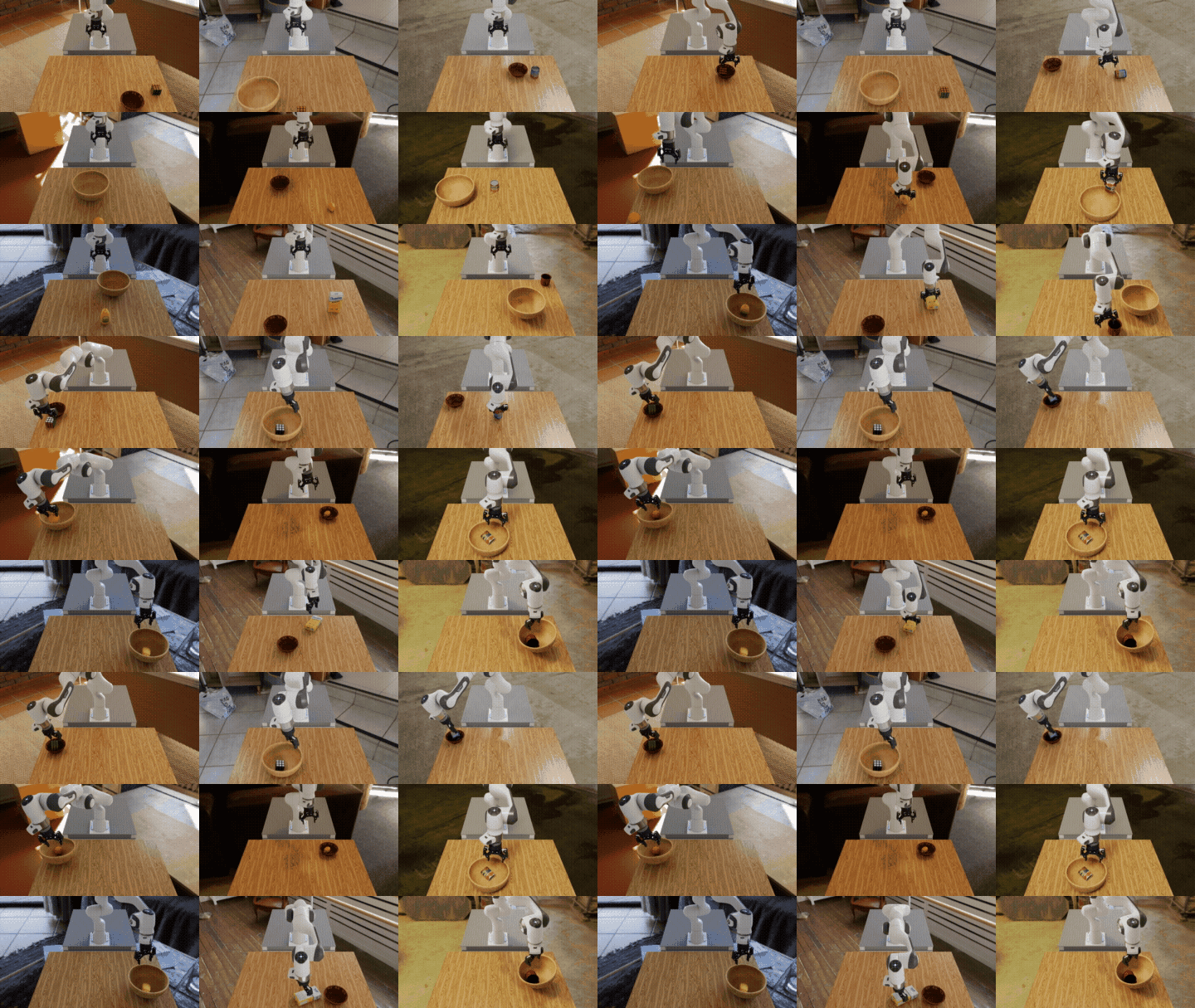
Nine closed-loop evaluation Runs of pi05 on the DROID embodiment. Each cell varies the pick-up object, background HDR, and destination.#
When all Runs finish, you will see a summary table followed by a metrics report:
+----------------------------------------------+-----------+----------------------------------------------------------------+----------+-----------+--------------+--------------+
|                   Run Name                   |   Status  |                          Policy Type                           | Num Envs | Num Steps | Num Episodes | Num Rebuilds |
+----------------------------------------------+-----------+----------------------------------------------------------------+----------+-----------+--------------+--------------+
|      droid_pnp_srl_openpi_billiard_hall      | completed | isaaclab_arena_openpi.policy.pi0_remote_policy.Pi0RemotePolicy |    1     |    None   |      3       |      1       |
| droid_pnp_srl_openpi_rubiks_cube_home_office | completed | isaaclab_arena_openpi.policy.pi0_remote_policy.Pi0RemotePolicy |    1     |    None   |      3       |      1       |
|    droid_pnp_srl_openpi_alphabet_soup_can    | completed | isaaclab_arena_openpi.policy.pi0_remote_policy.Pi0RemotePolicy |    1     |    None   |      3       |      1       |
|         droid_pnp_srl_openpi_orange          | completed | isaaclab_arena_openpi.policy.pi0_remote_policy.Pi0RemotePolicy |    1     |    None   |      3       |      1       |
|          droid_pnp_srl_openpi_lemon          | completed | isaaclab_arena_openpi.policy.pi0_remote_policy.Pi0RemotePolicy |    1     |    None   |      3       |      1       |
|    droid_pnp_srl_openpi_tomato_sauce_can     | completed | isaaclab_arena_openpi.policy.pi0_remote_policy.Pi0RemotePolicy |    1     |    None   |      3       |      1       |
|     droid_pnp_srl_openpi_mustard_bottle      | completed | isaaclab_arena_openpi.policy.pi0_remote_policy.Pi0RemotePolicy |    1     |    None   |      3       |      1       |
|        droid_pnp_srl_openpi_sugar_box        | completed | isaaclab_arena_openpi.policy.pi0_remote_policy.Pi0RemotePolicy |    1     |    None   |      3       |      1       |
|           droid_pnp_srl_openpi_mug           | completed | isaaclab_arena_openpi.policy.pi0_remote_policy.Pi0RemotePolicy |    1     |    None   |      3       |      1       |
+----------------------------------------------+-----------+----------------------------------------------------------------+----------+-----------+--------------+--------------+

======================================================================
METRICS SUMMARY
======================================================================

droid_pnp_srl_openpi_alphabet_soup_can:
  num_episodes                            3
  object_moved_rate                  0.6667
  success_rate                       1.0000

droid_pnp_srl_openpi_billiard_hall:
  num_episodes                            3
  object_moved_rate                  1.0000
  success_rate                       1.0000

droid_pnp_srl_openpi_rubiks_cube_home_office:
  num_episodes                            3
  object_moved_rate                  1.0000
  success_rate                       1.0000

droid_pnp_srl_openpi_sugar_box:
  num_episodes                            3
  object_moved_rate                  1.0000
  success_rate                       0.0000

...
pi05 succeeds on most of these variations zero-shot — eight of the nine Runs hit a 1.0
success rate over three episodes, with sugar_box as the lone outright failure
despite the object being moved in every episode. Performance is strong but not
uniform, consistent with the broader picture that VLA models are improving but
not yet fully robust under zero-shot distribution shift. See
[robolab]
for a cross-model comparison.
Viewing rollouts as an HTML report#
The runner collects the rollouts into a browsable HTML evaluation report. Add
--record_camera_video to record one MP4 per camera and episode. The runner writes an
index.html file and serves it over HTTP when --serve_evaluation_report is set.
python isaaclab_arena/evaluation/experiment_runner.py \
  --viz kit \
  --experiment_config isaaclab_arena_environments/experiment_configs/droid_pnp_srl_openpi_experiment.yaml \
  --output_base_dir ./output \
  --record_camera_video --serve_evaluation_report
You can also (re)build and serve a report later by pointing the standalone tool at the output root — it picks the most recent run:
python isaaclab_arena/visualization/report.py --video_dir ./output
Supported variants#
The Pi0DroidAdapter (selected with openpi_embodiment_adapter: droid in the policy mapping)
supports two OpenPI checkpoint variants on DROID:
|
|
|
Pair with |
|
|---|---|---|---|---|
|
|
|
|
15 |
|
|
|
|
10 |
To add a new embodiment, subclass Pi0EmbodimentAdapter in
isaaclab_arena_openpi/policy/pi0_remote_policy.py and register the adapter in
_resolve_openpi_embodiment_adapter.