



Using a task-space controller#
In the previous tutorials, we have joint-space controllers to control the robot. However, in many cases, it is more intuitive to control the robot using a task-space controller. For example, if we want to teleoperate the robot, it is easier to specify the desired end-effector pose rather than the desired joint positions.
In this tutorial, we will learn how to use a task-space controller to control the robot.
We will use the controllers.DifferentialIKController class to track a desired
end-effector pose command.
The Code#
The tutorial corresponds to the run_diff_ik.py script in the
scripts/tutorials/05_controllers directory.
Code for run_diff_ik.py
  1# Copyright (c) 2022-2026, The Isaac Lab Project Developers (https://github.com/isaac-sim/IsaacLab/blob/main/CONTRIBUTORS.md).
  2# All rights reserved.
  3#
  4# SPDX-License-Identifier: BSD-3-Clause
  5
  6"""
  7This script demonstrates how to use the differential inverse kinematics controller with the simulator.
  8
  9The differential IK controller can be configured in different modes. It uses the Jacobians computed by
 10PhysX. This helps perform parallelized computation of the inverse kinematics.
 11
 12.. code-block:: bash
 13
 14    # Usage
 15    uv run python scripts/tutorials/05_controllers/run_diff_ik.py
 16
 17"""
 18
 19"""Launch Isaac Sim Simulator first."""
 20
 21import argparse
 22
 23from isaaclab.app import AppLauncher
 24
 25# add argparse arguments
 26parser = argparse.ArgumentParser(description="Tutorial on using the differential IK controller.")
 27parser.add_argument("--robot", type=str, default="franka_panda", help="Name of the robot.")
 28parser.add_argument("--num_envs", type=int, default=128, help="Number of environments to spawn.")
 29# append AppLauncher cli args
 30AppLauncher.add_app_launcher_args(parser)
 31# parse the arguments
 32args_cli = parser.parse_args()
 33
 34# launch omniverse app
 35app_launcher = AppLauncher(args_cli)
 36simulation_app = app_launcher.app
 37
 38"""Rest everything follows."""
 39
 40import torch
 41
 42import isaaclab.sim as sim_utils
 43from isaaclab.assets import AssetBaseCfg
 44from isaaclab.controllers import DifferentialIKController, DifferentialIKControllerCfg
 45from isaaclab.managers import SceneEntityCfg
 46from isaaclab.markers import VisualizationMarkers
 47from isaaclab.markers.config import FRAME_MARKER_CFG
 48from isaaclab.scene import InteractiveScene, InteractiveSceneCfg
 49from isaaclab.utils.assets import ISAAC_NUCLEUS_DIR
 50from isaaclab.utils.configclass import configclass
 51from isaaclab.utils.math import subtract_frame_transforms
 52
 53##
 54# Pre-defined configs
 55##
 56from isaaclab_assets import FRANKA_PANDA_HIGH_PD_CFG, UR10_CFG  # isort:skip
 57
 58
 59@configclass
 60class TableTopSceneCfg(InteractiveSceneCfg):
 61    """Configuration for a cart-pole scene."""
 62
 63    # ground plane
 64    ground = AssetBaseCfg(
 65        prim_path="/World/defaultGroundPlane",
 66        spawn=sim_utils.GroundPlaneCfg(),
 67        init_state=AssetBaseCfg.InitialStateCfg(pos=(0.0, 0.0, -1.05)),
 68    )
 69
 70    # lights
 71    dome_light = AssetBaseCfg(
 72        prim_path="/World/Light", spawn=sim_utils.DomeLightCfg(intensity=3000.0, color=(0.75, 0.75, 0.75))
 73    )
 74
 75    # mount
 76    table = AssetBaseCfg(
 77        prim_path="{ENV_REGEX_NS}/Table",
 78        spawn=sim_utils.UsdFileCfg(
 79            usd_path=f"{ISAAC_NUCLEUS_DIR}/Props/Mounts/Stand/stand_instanceable.usd", scale=(2.0, 2.0, 2.0)
 80        ),
 81    )
 82
 83    # articulation
 84    if args_cli.robot == "franka_panda":
 85        robot = FRANKA_PANDA_HIGH_PD_CFG.replace(prim_path="{ENV_REGEX_NS}/Robot")
 86    elif args_cli.robot == "ur10":
 87        robot = UR10_CFG.replace(prim_path="{ENV_REGEX_NS}/Robot")
 88    else:
 89        raise ValueError(f"Robot {args_cli.robot} is not supported. Valid: franka_panda, ur10")
 90
 91
 92def run_simulator(sim: sim_utils.SimulationContext, scene: InteractiveScene):
 93    """Runs the simulation loop."""
 94    # Extract scene entities
 95    # note: we only do this here for readability.
 96    robot = scene["robot"]
 97
 98    # Create controller
 99    diff_ik_cfg = DifferentialIKControllerCfg(command_type="pose", use_relative_mode=False, ik_method="dls")
100    diff_ik_controller = DifferentialIKController(diff_ik_cfg, num_envs=scene.num_envs, device=sim.device)
101
102    # Markers
103    frame_marker_cfg = FRAME_MARKER_CFG.copy()
104    frame_marker_cfg.markers["frame"].scale = (0.1, 0.1, 0.1)
105    ee_marker = VisualizationMarkers(frame_marker_cfg.replace(prim_path="/Visuals/ee_current"))
106    goal_marker = VisualizationMarkers(frame_marker_cfg.replace(prim_path="/Visuals/ee_goal"))
107
108    # Define goals for the arm (x,y,z,qx,qy,qz,qw)
109    ee_goals = [
110        [0.5, 0.5, 0.7, 0, 0.707, 0, 0.707],
111        [0.5, -0.4, 0.6, 0.707, 0, 0, 0.707],
112        [0.5, 0, 0.5, 1.0, 0.0, 0.0, 0.0],
113    ]
114    ee_goals = torch.tensor(ee_goals, device=sim.device)
115    # Track the given command
116    current_goal_idx = 0
117    # Create buffers to store actions
118    ik_commands = torch.zeros(scene.num_envs, diff_ik_controller.action_dim, device=robot.device)
119    ik_commands[:] = ee_goals[current_goal_idx]
120
121    # Specify robot-specific parameters
122    if args_cli.robot == "franka_panda":
123        robot_entity_cfg = SceneEntityCfg("robot", joint_names=["panda_joint.*"], body_names=["panda_hand"])
124    elif args_cli.robot == "ur10":
125        robot_entity_cfg = SceneEntityCfg("robot", joint_names=[".*"], body_names=["ee_link"])
126    else:
127        raise ValueError(f"Robot {args_cli.robot} is not supported. Valid: franka_panda, ur10")
128    # Resolving the scene entities
129    robot_entity_cfg.resolve(scene)
130    # Obtain the frame index of the end-effector
131    # For a fixed base robot, the frame index is one less than the body index. This is because
132    # the root body is not included in the returned Jacobians.
133    if robot.is_fixed_base:
134        ee_jacobi_idx = robot_entity_cfg.body_ids[0] - 1
135    else:
136        ee_jacobi_idx = robot_entity_cfg.body_ids[0]
137
138    # Define simulation stepping
139    sim_dt = sim.get_physics_dt()
140    count = 0
141    # Simulation loop
142    while simulation_app.is_running():
143        # reset
144        if count % 150 == 0:
145            # reset time
146            count = 0
147            # reset joint state
148            joint_pos = robot.data.default_joint_pos.torch.clone()
149            joint_vel = robot.data.default_joint_vel.torch.clone()
150            robot.write_joint_position_to_sim_index(position=joint_pos)
151            robot.write_joint_velocity_to_sim_index(velocity=joint_vel)
152            robot.reset()
153            # reset actions
154            ik_commands[:] = ee_goals[current_goal_idx]
155            joint_pos_des = joint_pos[:, robot_entity_cfg.joint_ids].clone()
156            # reset controller
157            diff_ik_controller.reset()
158            diff_ik_controller.set_command(ik_commands)
159            # change goal
160            current_goal_idx = (current_goal_idx + 1) % len(ee_goals)
161        else:
162            # obtain quantities from simulation. The Jacobian DoF axis prepends
163            # ``num_base_dofs`` floating-base columns (0 for fixed-base, 6 for
164            # floating-base); shift the actuated-joint ids accordingly.
165            jacobi_joint_ids = [j + robot.num_base_dofs for j in robot_entity_cfg.joint_ids]
166            jacobian = robot.data.body_link_jacobian_w.torch[:, ee_jacobi_idx, :, jacobi_joint_ids]
167            ee_pose_w = robot.data.body_pose_w.torch[:, robot_entity_cfg.body_ids[0]]
168            root_pose_w = robot.data.root_pose_w.torch
169            joint_pos = robot.data.joint_pos.torch[:, robot_entity_cfg.joint_ids]
170            # compute frame in root frame
171            ee_pos_b, ee_quat_b = subtract_frame_transforms(
172                root_pose_w[:, 0:3], root_pose_w[:, 3:7], ee_pose_w[:, 0:3], ee_pose_w[:, 3:7]
173            )
174            # compute the joint commands
175            joint_pos_des = diff_ik_controller.compute(ee_pos_b, ee_quat_b, jacobian, joint_pos)
176
177        # apply actions
178        robot.set_joint_position_target_index(target=joint_pos_des, joint_ids=robot_entity_cfg.joint_ids)
179        scene.write_data_to_sim()
180        # perform step
181        sim.step()
182        # update sim-time
183        count += 1
184        # update buffers
185        scene.update(sim_dt)
186
187        # obtain quantities from simulation
188        ee_pose_w = robot.data.body_state_w.torch[:, robot_entity_cfg.body_ids[0], 0:7]
189        # update marker positions
190        ee_marker.visualize(ee_pose_w[:, 0:3], ee_pose_w[:, 3:7])
191        goal_marker.visualize(ik_commands[:, 0:3] + scene.env_origins, ik_commands[:, 3:7])
192
193
194def main():
195    """Main function."""
196    # Load kit helper
197    sim_cfg = sim_utils.SimulationCfg(dt=0.01, device=args_cli.device)
198    sim = sim_utils.SimulationContext(sim_cfg)
199    # Set main camera
200    sim.set_camera_view([2.5, 2.5, 2.5], [0.0, 0.0, 0.0])
201    # Design scene
202    scene_cfg = TableTopSceneCfg(num_envs=args_cli.num_envs, env_spacing=2.0)
203    scene = InteractiveScene(scene_cfg)
204    # Play the simulator
205    sim.reset()
206    # Now we are ready!
207    print("[INFO]: Setup complete...")
208    # Run the simulator
209    run_simulator(sim, scene)
210
211
212if __name__ == "__main__":
213    # run the main function
214    main()
215    # close sim app
216    simulation_app.close()
The Code Explained#
While using any task-space controller, it is important to ensure that the provided
quantities are in the correct frames. When parallelizing environment instances, they are
all existing in the same unique simulation world frame. However, typically, we want each
environment itself to have its own local frame. This is accessible through the
scene.InteractiveScene.env_origins attribute.
In our APIs, we use the following notation for frames:
The simulation world frame (denoted as
w), which is the frame of the entire simulation.The local environment frame (denoted as
e), which is the frame of the local environment.The robot’s base frame (denoted as
b), which is the frame of the robot’s base link.
Since the asset instances are not “aware” of the local environment frame, they return their states in the simulation world frame. Thus, we need to convert the obtained quantities to the local environment frame. This is done by subtracting the local environment origin from the obtained quantities.
Creating an IK controller#
The DifferentialIKController class computes the desired joint
positions for a robot to reach a desired end-effector pose. The included implementation
performs the computation in a batched format and uses PyTorch operations. It supports
different types of inverse kinematics solvers, including the damped least-squares method
and the pseudo-inverse method. These solvers can be specified using the
ik_method argument.
Additionally, the controller can handle commands as both relative and absolute poses.
In this tutorial, we will use the damped least-squares method to compute the desired joint positions. Additionally, since we want to track desired end-effector poses, we will use the absolute pose command mode.
    # Create controller
    diff_ik_cfg = DifferentialIKControllerCfg(command_type="pose", use_relative_mode=False, ik_method="dls")
    diff_ik_controller = DifferentialIKController(diff_ik_cfg, num_envs=scene.num_envs, device=sim.device)
Obtaining the robot’s joint and body indices#
The IK controller implementation is a computation-only class. Thus, it expects the user to provide the necessary information about the robot. This includes the robot’s joint positions, current end-effector pose, and the Jacobian matrix.
While the attribute assets.ArticulationData.joint_pos provides the joint positions,
we only want the joint positions of the robot’s arm, and not the gripper. Similarly, while
the attribute assets.ArticulationData.body_state_w provides the state of all the
robot’s bodies, we only want the state of the robot’s end-effector. Thus, we need to
index into these arrays to obtain the desired quantities.
For this, the articulation class provides the methods find_joints()
and find_bodies(). These methods take in the names of the joints
and bodies and return their corresponding indices.
While you may directly use these methods to obtain the indices, we recommend using the
SceneEntityCfg class to resolve the indices. This class is used in various
places in the APIs to extract certain information from a scene entity. Internally, it
calls the above methods to obtain the indices. However, it also performs some additional
checks to ensure that the provided names are valid. Thus, it is a safer option to use
this class.
    # Specify robot-specific parameters
    if args_cli.robot == "franka_panda":
        robot_entity_cfg = SceneEntityCfg("robot", joint_names=["panda_joint.*"], body_names=["panda_hand"])
    elif args_cli.robot == "ur10":
        robot_entity_cfg = SceneEntityCfg("robot", joint_names=[".*"], body_names=["ee_link"])
    else:
        raise ValueError(f"Robot {args_cli.robot} is not supported. Valid: franka_panda, ur10")
    # Resolving the scene entities
    robot_entity_cfg.resolve(scene)
    # Obtain the frame index of the end-effector
    # For a fixed base robot, the frame index is one less than the body index. This is because
    # the root body is not included in the returned Jacobians.
    if robot.is_fixed_base:
        ee_jacobi_idx = robot_entity_cfg.body_ids[0] - 1
    else:
        ee_jacobi_idx = robot_entity_cfg.body_ids[0]
Computing robot command#
The IK controller separates the operation of setting the desired command and computing the desired joint positions. This is done to allow for the user to run the IK controller at a different frequency than the robot’s control frequency.
The set_command() method takes in
the desired end-effector pose as a single batched array. The pose is specified in
the robot’s base frame.
            # reset controller
            diff_ik_controller.reset()
            diff_ik_controller.set_command(ik_commands)
We can then compute the desired joint positions using the
compute() method.
The method takes in the current end-effector pose (in base frame), Jacobian, and
current joint positions. We read the Jacobian matrix from the robot’s data, which uses
its value computed from the physics engine.
            # obtain quantities from simulation. The Jacobian DoF axis prepends
            # ``num_base_dofs`` floating-base columns (0 for fixed-base, 6 for
            # floating-base); shift the actuated-joint ids accordingly.
            jacobi_joint_ids = [j + robot.num_base_dofs for j in robot_entity_cfg.joint_ids]
            jacobian = robot.data.body_link_jacobian_w.torch[:, ee_jacobi_idx, :, jacobi_joint_ids]
            ee_pose_w = robot.data.body_pose_w.torch[:, robot_entity_cfg.body_ids[0]]
            root_pose_w = robot.data.root_pose_w.torch
            joint_pos = robot.data.joint_pos.torch[:, robot_entity_cfg.joint_ids]
            # compute frame in root frame
            ee_pos_b, ee_quat_b = subtract_frame_transforms(
                root_pose_w[:, 0:3], root_pose_w[:, 3:7], ee_pose_w[:, 0:3], ee_pose_w[:, 3:7]
            )
            # compute the joint commands
            joint_pos_des = diff_ik_controller.compute(ee_pos_b, ee_quat_b, jacobian, joint_pos)
The computed joint position targets can then be applied on the robot, as done in the previous tutorials.
        # apply actions
        robot.set_joint_position_target_index(target=joint_pos_des, joint_ids=robot_entity_cfg.joint_ids)
        scene.write_data_to_sim()
The Code Execution#
Now that we have gone through the code, let’s run the script and see the result:
uv run python scripts/tutorials/05_controllers/run_diff_ik.py --robot franka_panda --num_envs 128
./isaaclab.sh -p scripts/tutorials/05_controllers/run_diff_ik.py --robot franka_panda --num_envs 128
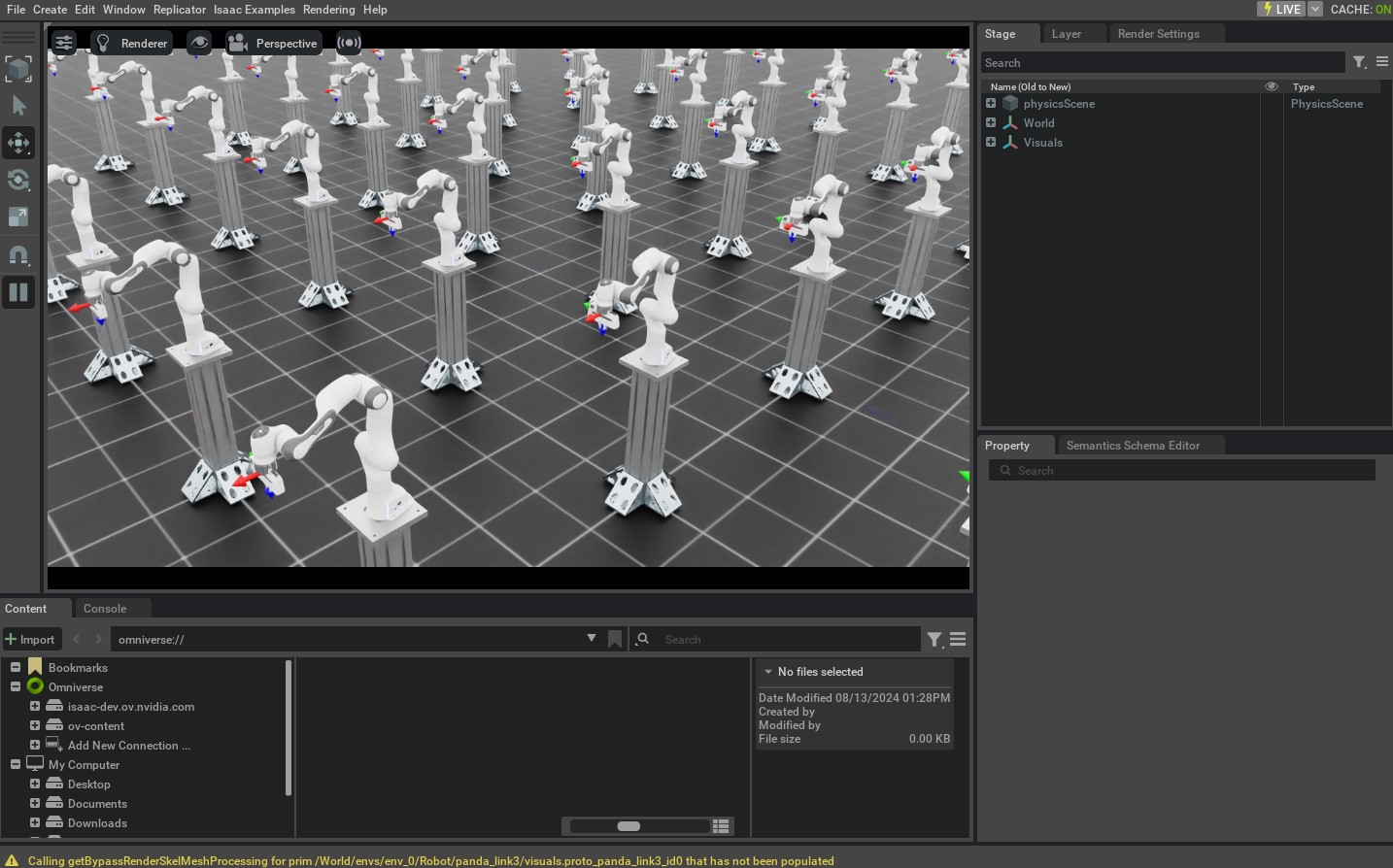
The script will start a simulation with 128 robots. The robots will be controlled using the IK controller. The current and desired end-effector poses should be displayed using frame markers. When the robot reaches the desired pose, the command should cycle through to the next pose specified in the script.
To stop the simulation, you can either close the window, or press Ctrl+C in the terminal.