



Using the Visualizer Streaming Camera View#
For general visualizer documentation, see Visualization.
The visualizer streaming camera view is a live monitoring and debugging tool. It composites per-environment ground-truth camera frames — RGB, depth, segmentation, or surface normals — into a single panel that updates every step. The panel can display cameras that follow the robots automatically, or stream from existing scene camera sensors.
This guide is accompanied by the run_tiled_camera_visualizer.py script in the
IsaacLab/scripts/tutorials/07_visualizers directory.
Running this script demonstrates two ways to use the streaming camera view:
auto-created cameras pointed at and following moving AnymalD robots shown in the Kit visualizer
streaming from existing wrist-mounted robot cameras shown in the Newton visualizer
Note
The streaming camera view is supported in the Kit, Newton GL, Rerun, and Viser visualizers. The Newton RTX visualizer accepts the configuration but does not display the panel (experimental).
Code for run_tiled_camera_visualizer.py
  1# Copyright (c) 2022-2026, The Isaac Lab Project Developers (https://github.com/isaac-sim/IsaacLab/blob/main/CONTRIBUTORS.md).
  2# All rights reserved.
  3#
  4# SPDX-License-Identifier: BSD-3-Clause
  5
  6"""
  7This script demonstrates the visualizer tiled camera panel.
  8
  9.. code-block:: bash
 10
 11    # Kit visualizer tiled camera panel
 12    uv run python scripts/tutorials/07_visualizers/run_tiled_camera_visualizer.py \
 13 --task Isaac-Velocity-Rough-AnymalD --num_envs 256 --viz kit
 14
 15    # Newton visualizer tiled camera panel
 16    uv run python scripts/tutorials/07_visualizers/run_tiled_camera_visualizer.py \
 17        --task IsaacContrib-Stack-Cube-Galbot-Left-Arm-Gripper-Visuomotor --num_envs 25 --viz newton
 18
 19"""
 20
 21from __future__ import annotations
 22
 23import argparse
 24import contextlib
 25import sys
 26
 27import gymnasium as gym
 28import torch
 29
 30import isaaclab_tasks  # noqa: F401
 31
 32with contextlib.suppress(ImportError):
 33    import isaaclab_tasks_experimental  # noqa: F401
 34from isaaclab.app import add_launcher_args, launch_simulation
 35
 36from isaaclab_tasks.utils import resolve_task_config, setup_preset_cli
 37
 38KIT_DEFAULT_TASK = "Isaac-Velocity-Rough-AnymalD"
 39NEWTON_DEFAULT_TASK = "IsaacContrib-Stack-Cube-Galbot-Left-Arm-Gripper-Visuomotor"
 40SUPPORTED_TILED_VISUALIZERS = {"kit", "newton", "newton_gl", "newton_rtx"}
 41UNSUPPORTED_TILED_VISUALIZERS = {"rerun", "viser"}
 42
 43
 44def _resolve_env_regex_path(prim_path: str) -> str:
 45    """Resolve scene config env namespace macros to the cloned-env regex."""
 46    return prim_path.format(ENV_REGEX_NS="/World/envs/env_.*")
 47
 48
 49def _requested_visualizers(args_cli: argparse.Namespace) -> list[str]:
 50    """Return requested visualizers, defaulting to Kit for this tutorial."""
 51    visualizers = args_cli.visualizer or ["kit"]
 52    visualizers = [str(visualizer).lower() for visualizer in visualizers]
 53
 54    if "none" in visualizers:
 55        raise ValueError("This demo requires a tiled-camera visualizer. Use '--viz kit' or '--viz newton_gl'.")
 56    unsupported = sorted(set(visualizers) & UNSUPPORTED_TILED_VISUALIZERS)
 57    if unsupported:
 58        raise ValueError(
 59            "The visualizer tiled camera panel is only implemented for Kit and Newton. "
 60            f"Unsupported selection: {unsupported}."
 61        )
 62    unknown = sorted(set(visualizers) - SUPPORTED_TILED_VISUALIZERS)
 63    if unknown:
 64        raise ValueError(f"Unknown visualizer selection for this demo: {unknown}.")
 65    return visualizers
 66
 67
 68def _make_kit_visualizer_cfg(env_cfg):
 69    """Create the Kit streaming-camera visualizer for the selected task."""
 70    from isaaclab_visualizers.kit import KitVisualizerCfg
 71
 72    visualizer_cfg = KitVisualizerCfg()
 73    visualizer_cfg.streaming_view = True
 74    visualizer_cfg.streaming_envs = 36
 75
 76    ego_cam_cfg = getattr(env_cfg.scene, "ego_cam", None)
 77    if ego_cam_cfg is not None:
 78        visualizer_cfg.streaming_sensor_prim_path = _resolve_env_regex_path(ego_cam_cfg.prim_path)
 79        return visualizer_cfg
 80
 81    visualizer_cfg.streaming_sensor_prim_path = None
 82    visualizer_cfg.streaming_cam_eye = (3.0, 3.0, 3.0)
 83    visualizer_cfg.streaming_cam_target_prim_path = "/World/envs/*/Robot/base"
 84    # Here is an alternative eye position for a top down view
 85    # visualizer_cfg.streaming_cam_eye = (0.0, 0.0, 5.0)
 86    return visualizer_cfg
 87
 88
 89def _make_newton_visualizer_cfg(env_cfg):
 90    """Create the Newton streaming-camera visualizer for the selected task."""
 91    from isaaclab_visualizers.newton import NewtonGLVisualizerCfg
 92
 93    visualizer_cfg = NewtonGLVisualizerCfg()
 94    visualizer_cfg.streaming_view = True
 95    visualizer_cfg.streaming_envs = 12
 96
 97    ego_cam_cfg = getattr(env_cfg.scene, "ego_cam", None)
 98    if ego_cam_cfg is not None:
 99        visualizer_cfg.streaming_sensor_prim_path = _resolve_env_regex_path(ego_cam_cfg.prim_path)
100        return visualizer_cfg
101
102    # Here are other robot mounted camera options for this environment
103    # visualizer_cfg.streaming_sensor_prim_path = "/World/envs/env_.*/Robot/left_arm_camera_sim_view_frame/left_camera"
104    # visualizer_cfg.streaming_sensor_prim_path = (
105    #     "/World/envs/env_.*/Robot/right_arm_camera_sim_view_frame/right_camera"
106    # )
107    visualizer_cfg.streaming_sensor_prim_path = None
108    visualizer_cfg.streaming_cam_eye = (3.0, 3.0, 3.0)
109    visualizer_cfg.streaming_cam_target_prim_path = "/World/envs/*/Robot/base"
110    return visualizer_cfg
111
112
113def _configure_visualizers(env_cfg, args_cli: argparse.Namespace) -> None:
114    """Attach tiled camera visualizer configs to the environment simulation config."""
115    visualizers = _requested_visualizers(args_cli)
116    args_cli.visualizer = visualizers
117    env_cfg.sim.visualizer_cfgs = [
118        _make_kit_visualizer_cfg(env_cfg) if visualizer == "kit" else _make_newton_visualizer_cfg(env_cfg)
119        for visualizer in visualizers
120    ]
121
122
123def _resolve_task(args_cli: argparse.Namespace) -> str:
124    """Resolve the task for the selected visualizer."""
125    if args_cli.task is not None:
126        return args_cli.task
127    if "newton" in _requested_visualizers(args_cli):
128        return NEWTON_DEFAULT_TASK
129    return KIT_DEFAULT_TASK
130
131
132# add argparse arguments
133parser = argparse.ArgumentParser(description="Showcase the Kit/Newton visualizer tiled camera panel.")
134parser.add_argument("--num_envs", type=int, default=None, help="Number of environments to simulate.")
135parser.add_argument("--task", type=str, default=None, help="Name of the task.")
136# append AppLauncher cli args
137add_launcher_args(parser)
138args_cli, hydra_args = setup_preset_cli(parser)
139args_cli.task = _resolve_task(args_cli)
140sys.argv = [sys.argv[0]] + hydra_args
141
142
143def main():
144    """Run a random-action environment with a tiled camera visualizer."""
145    # parse configuration via Hydra (supports preset selection, e.g. presets=newton_mjwarp)
146    env_cfg, _ = resolve_task_config(args_cli.task, "")
147    _configure_visualizers(env_cfg, args_cli)
148
149    with launch_simulation(env_cfg, args_cli):
150        # override with CLI arguments
151        env_cfg.scene.num_envs = args_cli.num_envs if args_cli.num_envs is not None else env_cfg.scene.num_envs
152        env_cfg.sim.device = args_cli.device if args_cli.device is not None else env_cfg.sim.device
153
154        # create environment
155        env = gym.make(args_cli.task, cfg=env_cfg)
156
157        # print info (this is vectorized environment)
158        print(f"[INFO]: Gym observation space: {env.observation_space}")
159        print(f"[INFO]: Gym action space: {env.action_space}")
160        env.reset()
161
162        # keep stepping until all visualizer windows have been closed
163        sim = env.unwrapped.sim
164        if not sim.visualizers:
165            print("[WARN]: No visualizers found. Exiting.")
166            env.close()
167            return
168
169        while True:
170            if sim.visualizers and not any(v.is_running() and not v.is_closed for v in sim.visualizers):
171                break
172            with torch.inference_mode():
173                actions = 2 * torch.rand(env.action_space.shape, device=env.unwrapped.device) - 1
174                env.step(actions)
175
176        env.close()
177
178
179if __name__ == "__main__":
180    main()
Example One: Following AnymalD Robots#
The Kit Visualizer shows the streaming camera view in a separate tab inside the main Viewport window, labelled Streaming View. The highlighted tab area in the figures below shows where to toggle between the interactive viewport and the streaming camera view.

Kit visualizer showing the default interactive viewport.#
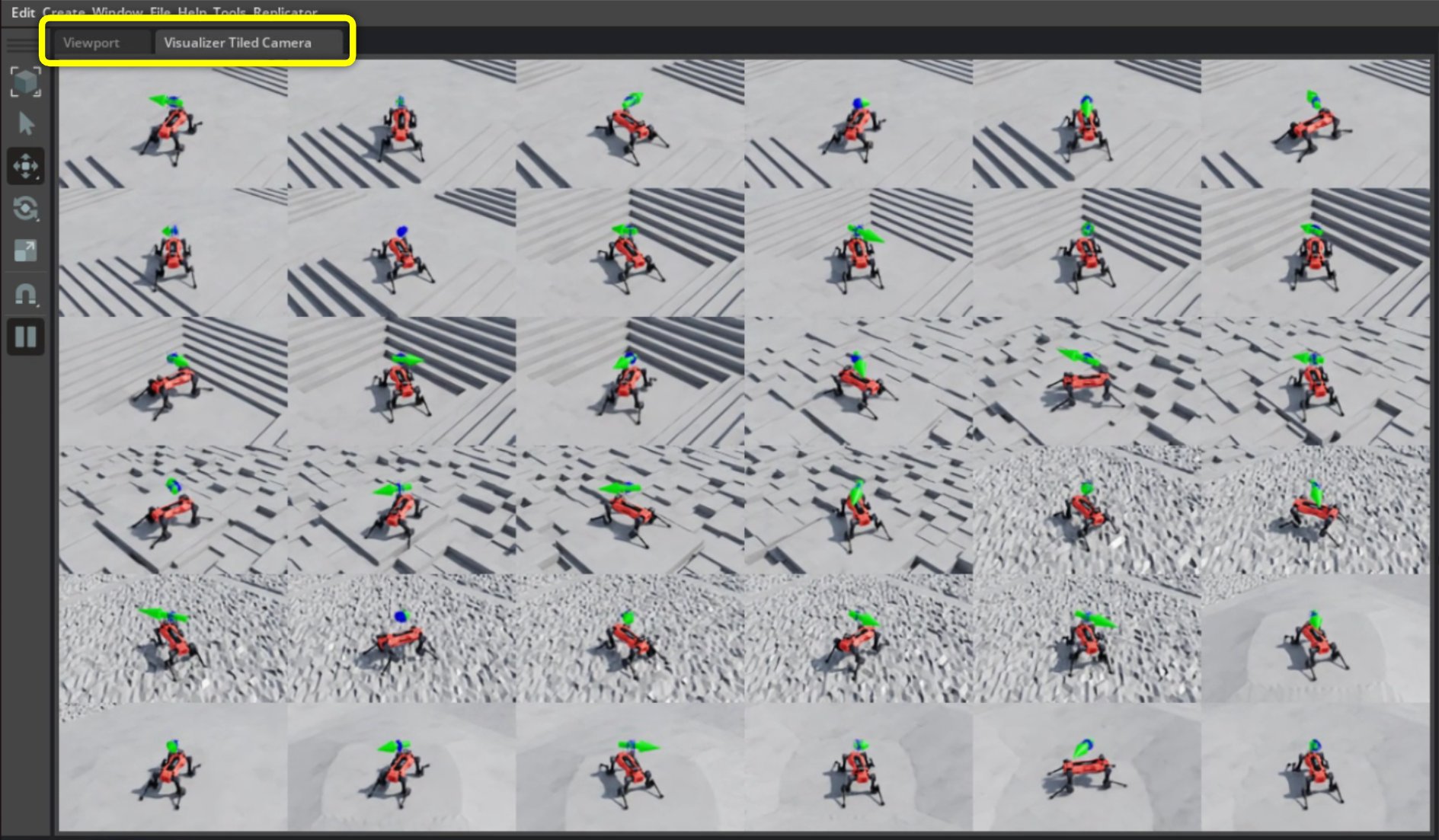
Kit visualizer showing the streaming camera view generated for selected AnymalD robots.#
Note, you can also display the main visualizer camera and the streaming camera view side by side for dual monitoring.
To run the tutorial with the args for this example, use:
uv run python scripts/tutorials/07_visualizers/run_tiled_camera_visualizer.py \
    --task Isaac-Velocity-Rough-AnymalD --num_envs 256 --viz kit
Within the script, you’ll find the KitVisualizerCfg configuration used to
generate this example. You can use this config as a template for your own use
cases.
In this example, a set of cameras is created to point toward each robot’s base
prim and follow its motion. The camera’s position, relative to the prim, is set
by the streaming_cam_eye field of KitVisualizerCfg. For this demo, the
camera is offset by (3.0, 3.0, 3.0) from each robot base. If you change
streaming_cam_eye (for example, to (0, 0, 5)), the panel will show a
top-down view instead.
In this example, there are 256 total environments, and we randomly sample 36 to stream to the camera view.
The Kit visualizer streaming camera view does not require an additional camera option.
Example Two: Streaming from Robot-Mounted Cameras#
The Newton visualizer provides a streaming camera view in a lightweight OpenGL window. The panel is hidden by default. To open it, expand the Streaming View section in the left-hand sidebar and change the toggle from Hide to Open.
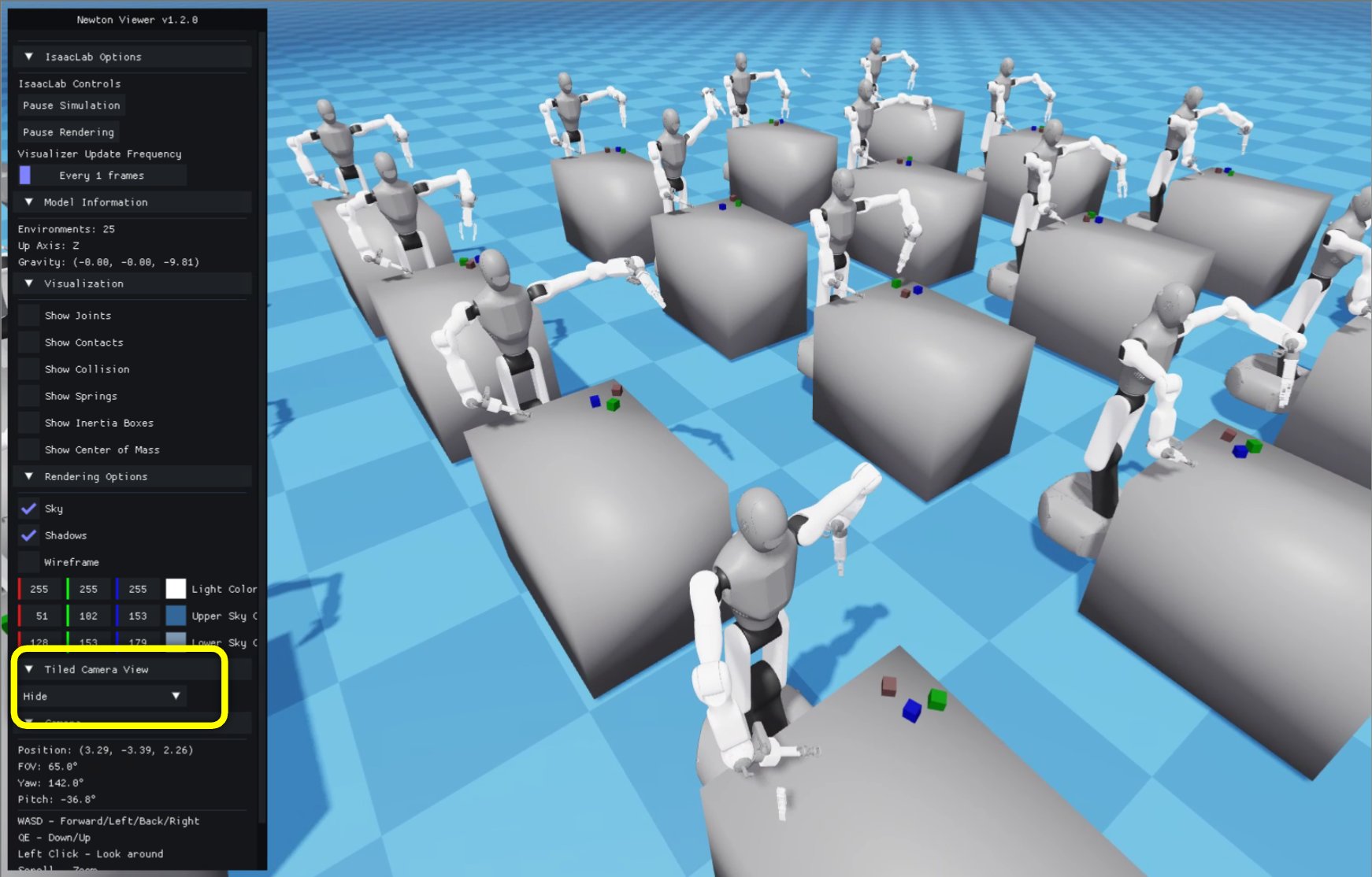
Newton visualizer showing the default interactive viewport.#
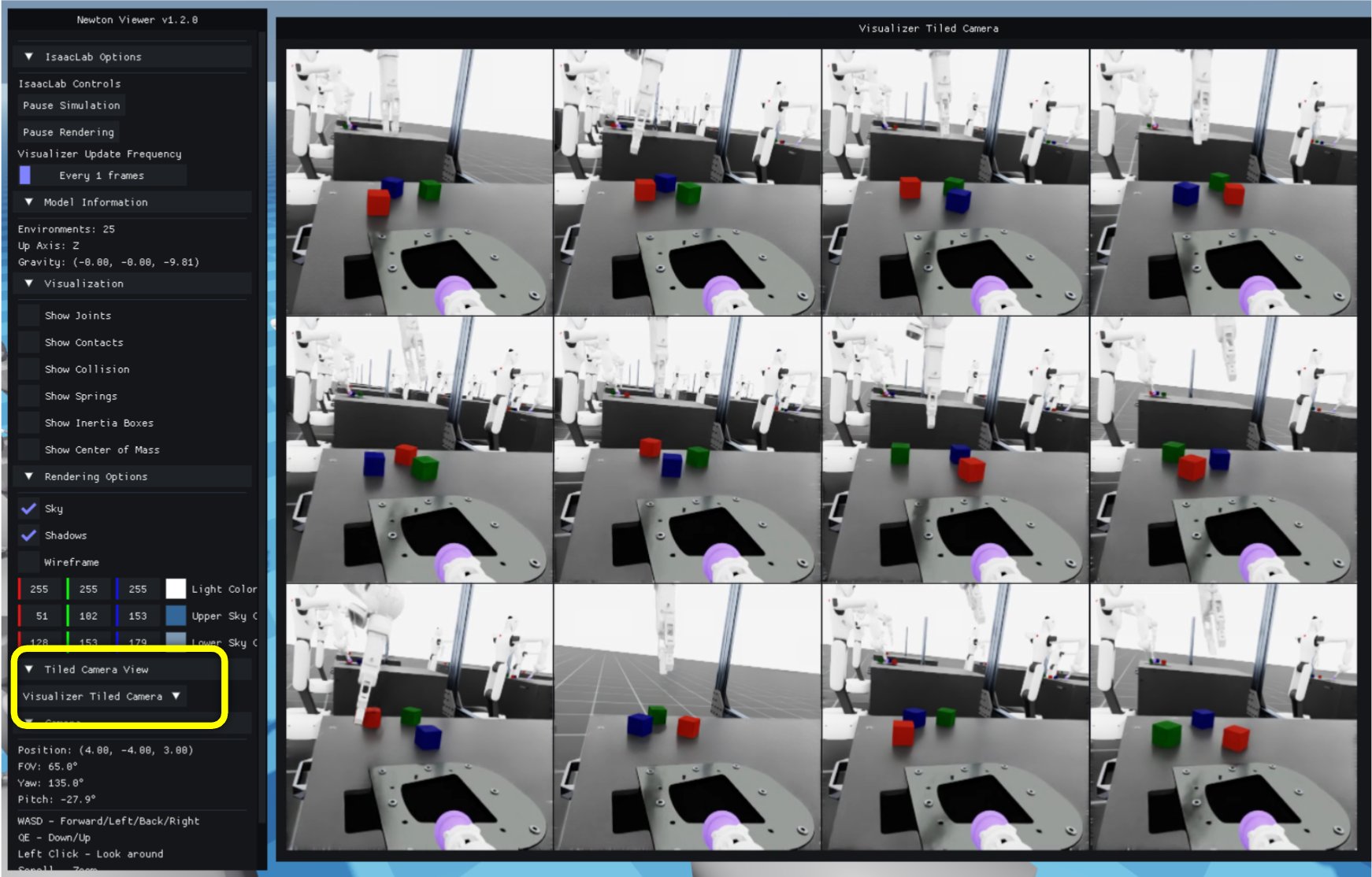
Newton visualizer showing the selected Galbot head-camera feeds in the streaming camera panel.#
In this example, we use the Galbot cube stacking environment, which comes with built-in wrist-mounted cameras. This setup provides an egocentric view of the gripper, table, and cubes in each selected environment.
To launch this example, run:
uv run python scripts/tutorials/07_visualizers/run_tiled_camera_visualizer.py \
    --task IsaacContrib-Stack-Cube-Galbot-Left-Arm-Gripper-Visuomotor --num_envs 25 --viz newton_gl
Within the script, the NewtonGLVisualizerCfg is configured to stream images from the
existing camera sensor located at
/World/envs/env_.*/Robot/head_camera_sim_view_frame/head_camera. This path
points to the head camera, but you can edit the streaming_sensor_prim_path
field of NewtonGLVisualizerCfg in the script to show a different existing camera if
needed.
In this demo, 25 environments are simulated, and 12 camera feeds are shown in the panel by default.
Configuration notes#
To customize streaming camera behavior, edit the highlighted VisualizerCfg fields in
run_tiled_camera_visualizer.py:
For auto-created cameras,
streaming_cam_target_prim_pathchooses the followed prim andstreaming_cam_eyesets the camera offset from that prim. Defaults toNone, which causes the visualizer to adopt the first scene camera it discovers at init — no explicit path is needed when aTiledCamerasensor is already in the scene.For existing scene cameras,
streaming_sensor_prim_pathmust match an Isaac LabCamerasensor prim path in the selected task.streaming_envscontrols how many environment tiles are shown. Pass anintto randomly sample that many environments, or alist[int]to pin specific environment indices.streaming_gt_typesselects which ground-truth types are shown — e.g.["rgb", "depth", "segmentation"].streaming_depth_min/streaming_depth_maxset the depth colormap range in metres.
See Streaming Camera View for the full field reference.
Troubleshooting#
If a generated view fails with a missing prim error, verify that
streaming_cam_target_prim_pathresolves in each selected environment (common template forms:/World/envs/*/...,/World/envs/env_.*/...). In most cases you can leave it asNoneand let the visualizer adopt an existing scene camera automatically.If an existing-camera view reports that no Isaac Lab camera owns the prim, check that
streaming_sensor_prim_pathmatches aCamerasensor in the task.If the depth panel shows a flat color, adjust
streaming_depth_minandstreaming_depth_maxto bracket the expected depth range in your scene.If the view is too expensive, reduce
streaming_envs,--num_envs, or the camera resolution.
See also#
Visualization - visualizer configuration and UI controls.
Configuring RTX Rendering Settings - customizing RTX rendering settings.