



Ray Caster#
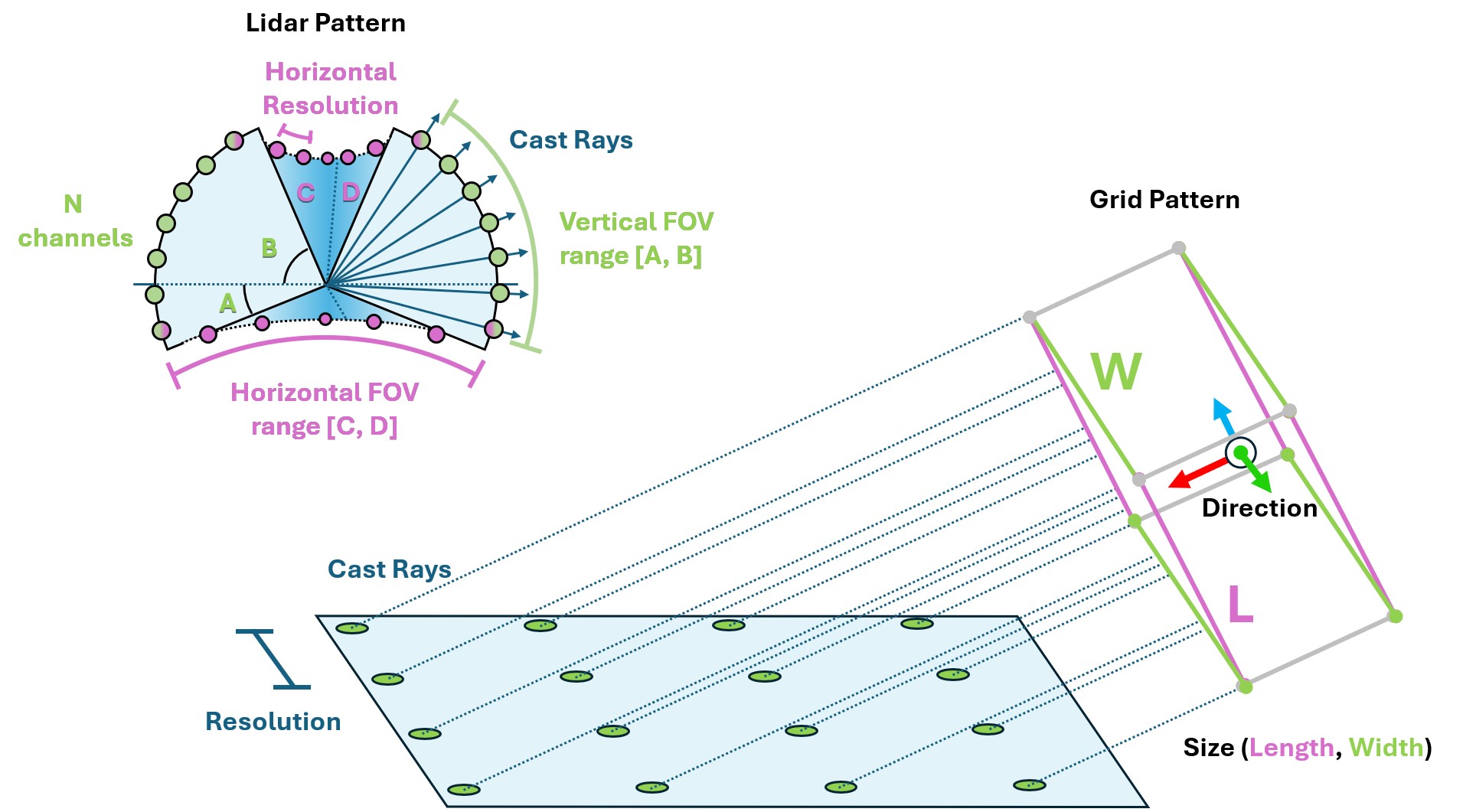
The Ray Caster sensor (and the ray caster camera) are similar to RTX based rendering in that they both involve casting rays. The difference here is that the rays cast by the Ray Caster sensor return strictly collision information along the cast, and the direction of each individual ray can be specified. They do not bounce, nor are they affected by things like materials or opacity. For each ray specified by the sensor, a line is traced along the path of the ray and the location of first collision with the specified mesh is returned. This is the method used by some of our quadruped examples to measure the local height field.
The ray-casting implementation depends on the physics backend. With PhysX and
OV PhysX, configured meshes are loaded into Warp
when the sensor initializes and must remain static. With Newton, the sensor
queries the live scene BVH and therefore sees every collision shape in its
environment, global terrain, and dynamic bodies. Newton ignores
mesh_prim_paths; use
isaaclab_newton.sensors.NewtonRaycastSensorCfg to make that behavior
explicit and to access Newton-specific options.
Using a ray caster sensor requires a pattern and a parent xform to be attached to. The pattern defines how the rays are cast, while the prim properties defines the orientation and position of the sensor (additional offsets can be specified for more exact placement). Isaac Lab supports a number of ray casting pattern configurations, including a generic LIDAR and grid pattern.
from isaaclab.utils.configclass import configclass

##
# Pre-defined configs
##
from isaaclab_assets.robots.anymal import ANYMAL_C_CFG  # isort: skip


@configclass
class RaycasterSensorSceneCfg(InteractiveSceneCfg):
    """Design the scene with sensors on the robot."""

    # ground plane
    ground = AssetBaseCfg(
        prim_path="/World/Ground",
        spawn=sim_utils.UsdFileCfg(
            usd_path=f"{ISAAC_NUCLEUS_DIR}/Environments/Terrains/rough_plane.usd",
            scale=(1, 1, 1),
        ),
    )

    # lights
    dome_light = AssetBaseCfg(
        prim_path="/World/Light", spawn=sim_utils.DomeLightCfg(intensity=3000.0, color=(0.75, 0.75, 0.75))
    )

    # robot
    robot = ANYMAL_C_CFG.replace(prim_path="{ENV_REGEX_NS}/Robot")

    ray_caster = RayCasterCfg(
        prim_path="{ENV_REGEX_NS}/Robot/base",
        update_period=1 / 60,
Notice that the units on the pattern config is in degrees! Also, we enable visualization here to explicitly show the pattern in the rendering, but this is not required and should be disabled for performance tuning.
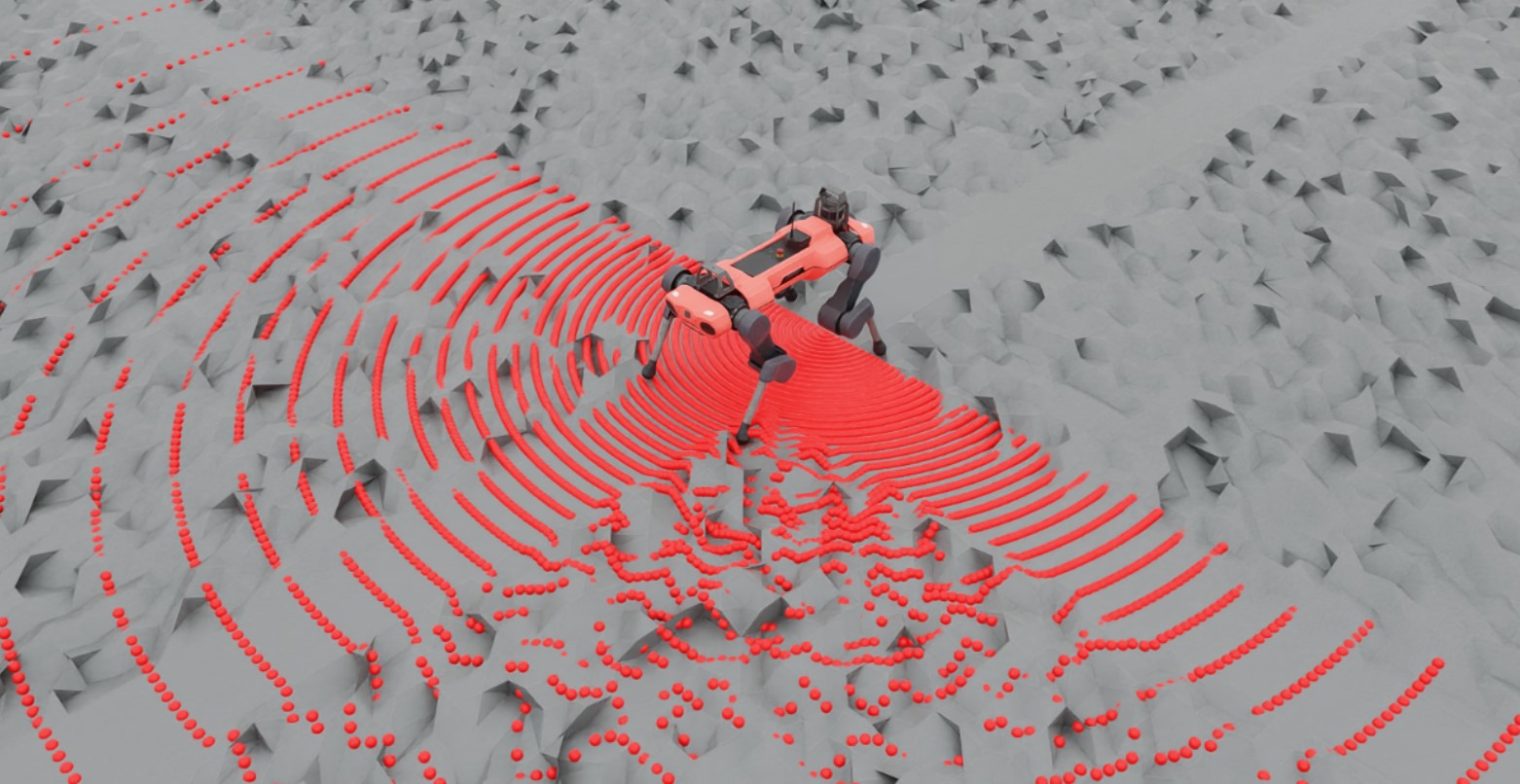
Querying the sensor for data can be done at simulation run time like any other sensor.
def run_simulator(sim: sim_utils.SimulationContext, scene: InteractiveScene):
  .
  .
  .
  # Simulate physics
  while simulation_app.is_running():
    .
    .
    .
    # print information from the sensors
      print("-------------------------------")
      print(scene["ray_caster"])
      print("Ray cast hit results: ", scene["ray_caster"].data.ray_hits_w)
-------------------------------
Ray-caster @ '/World/envs/env_.*/Robot/base/lidar_cage':
        view type            : <class 'isaacsim.core.experimental.prims.xform_prim.XformPrim'>
        update period (s)    : 0.016666666666666666
        number of meshes     : 1
        number of sensors    : 1
        number of rays/sensor: 18000
        total number of rays : 18000
Ray cast hit results:  tensor([[[-0.3698,  0.0357,  0.0000],
        [-0.3698,  0.0357,  0.0000],
        [-0.3698,  0.0357,  0.0000],
        ...,
        [    inf,     inf,     inf],
        [    inf,     inf,     inf],
        [    inf,     inf,     inf]]], device='cuda:0')
-------------------------------
Here we can see the data returned by the sensor itself. Notice first that there are 3 closed brackets at the beginning and the end: this is because the data returned is batched by the number of sensors. The ray cast pattern itself has also been flattened, and so the dimensions of the array are [N, B, 3] where N is the number of sensors, B is the number of cast rays in the pattern, and 3 is the dimension of the casting space. Finally, notice that the first several values in this casting pattern are the same: this is because the lidar pattern is spherical and we have specified our FOV to be hemispherical, which includes the poles. In this configuration, the “flattening pattern” becomes apparent: the first 180 entries will be the same because it’s the bottom pole of this hemisphere, and there will be 180 of them because our horizontal FOV is 180 degrees with a resolution of 1 degree.
You can use this script to experiment with pattern configurations and build an intuition about how the data is stored by altering the triggered variable on line 81.
Code for raycaster_sensor.py
  1# Copyright (c) 2022-2026, The Isaac Lab Project Developers (https://github.com/isaac-sim/IsaacLab/blob/main/CONTRIBUTORS.md).
  2# All rights reserved.
  3#
  4# SPDX-License-Identifier: BSD-3-Clause
  5
  6import argparse
  7
  8from isaaclab.app import AppLauncher
  9
 10# add argparse arguments
 11parser = argparse.ArgumentParser(description="Example on using the raycaster sensor.")
 12parser.add_argument("--num_envs", type=int, default=1, help="Number of environments to spawn.")
 13parser.add_argument(
 14    "--physics",
 15    default="isaacsim_physx",
 16    choices=["isaacsim_physx"],
 17    help="Physics backend.",
 18)
 19# append AppLauncher cli args
 20AppLauncher.add_app_launcher_args(parser)
 21# demos should open Kit visualizer by default
 22parser.set_defaults(visualizer=["kit"])
 23# parse the arguments
 24args_cli = parser.parse_args()
 25
 26# launch omniverse app
 27app_launcher = AppLauncher(args_cli)
 28simulation_app = app_launcher.app
 29
 30"""Rest everything follows."""
 31
 32import numpy as np
 33import torch
 34
 35import isaaclab.sim as sim_utils
 36from isaaclab.assets import AssetBaseCfg
 37from isaaclab.scene import InteractiveScene, InteractiveSceneCfg
 38from isaaclab.sensors.ray_caster import RayCasterCfg, patterns
 39from isaaclab.utils.assets import ISAAC_NUCLEUS_DIR
 40from isaaclab.utils.configclass import configclass
 41
 42##
 43# Pre-defined configs
 44##
 45from isaaclab_assets.robots.anymal import ANYMAL_C_CFG  # isort: skip
 46
 47
 48@configclass
 49class RaycasterSensorSceneCfg(InteractiveSceneCfg):
 50    """Design the scene with sensors on the robot."""
 51
 52    # ground plane
 53    ground = AssetBaseCfg(
 54        prim_path="/World/Ground",
 55        spawn=sim_utils.UsdFileCfg(
 56            usd_path=f"{ISAAC_NUCLEUS_DIR}/Environments/Terrains/rough_plane.usd",
 57            scale=(1, 1, 1),
 58        ),
 59    )
 60
 61    # lights
 62    dome_light = AssetBaseCfg(
 63        prim_path="/World/Light", spawn=sim_utils.DomeLightCfg(intensity=3000.0, color=(0.75, 0.75, 0.75))
 64    )
 65
 66    # robot
 67    robot = ANYMAL_C_CFG.replace(prim_path="{ENV_REGEX_NS}/Robot")
 68
 69    ray_caster = RayCasterCfg(
 70        prim_path="{ENV_REGEX_NS}/Robot/base",
 71        update_period=1 / 60,
 72        offset=RayCasterCfg.OffsetCfg(pos=(0, 0, 0.5)),
 73        mesh_prim_paths=["/World/Ground"],
 74        ray_alignment="yaw",
 75        pattern_cfg=patterns.LidarPatternCfg(
 76            channels=100, vertical_fov_range=[-90, 90], horizontal_fov_range=[-90, 90], horizontal_res=1.0
 77        ),
 78        debug_vis=not args_cli.headless,
 79    )
 80
 81
 82def run_simulator(sim: sim_utils.SimulationContext, scene: InteractiveScene):
 83    """Run the simulator."""
 84    # Define simulation stepping
 85    sim_dt = sim.get_physics_dt()
 86    sim_time = 0.0
 87    count = 0
 88
 89    triggered = True
 90    countdown = 42
 91
 92    # Simulate physics
 93    while simulation_app.is_running():
 94        if count % 500 == 0:
 95            # reset counter
 96            count = 0
 97            # reset the scene entities
 98            # root state
 99            # we offset the root state by the origin since the states are written in simulation world frame
100            # if this is not done, then the robots will be spawned at the (0, 0, 0) of the simulation world
101            root_pose = scene["robot"].data.default_root_pose.torch.clone()
102            root_pose[:, :3] += scene.env_origins
103            scene["robot"].write_root_pose_to_sim_index(root_pose=root_pose)
104            root_vel = scene["robot"].data.default_root_vel.torch.clone()
105            scene["robot"].write_root_velocity_to_sim_index(root_velocity=root_vel)
106            # set joint positions with some noise
107            joint_pos, joint_vel = (
108                scene["robot"].data.default_joint_pos.torch.clone(),
109                scene["robot"].data.default_joint_vel.torch.clone(),
110            )
111            joint_pos += torch.rand_like(joint_pos) * 0.1
112            scene["robot"].write_joint_position_to_sim_index(position=joint_pos)
113            scene["robot"].write_joint_velocity_to_sim_index(velocity=joint_vel)
114            # clear internal buffers
115            scene.reset()
116            print("[INFO]: Resetting robot state...")
117        # Apply default actions to the robot
118        # -- generate actions/commands
119        targets = scene["robot"].data.default_joint_pos.torch
120        # -- apply action to the robot
121        scene["robot"].set_joint_position_target_index(target=targets)
122        # -- write data to sim
123        scene.write_data_to_sim()
124        # perform step
125        sim.step()
126        # update sim-time
127        sim_time += sim_dt
128        count += 1
129        # update buffers
130        scene.update(sim_dt)
131
132        # print information from the sensors
133        print("-------------------------------")
134        print(scene["ray_caster"])
135        print("Ray cast hit results: ", scene["ray_caster"].data.ray_hits_w.torch)
136
137        if not triggered:
138            if countdown > 0:
139                countdown -= 1
140                continue
141            data = scene["ray_caster"].data.ray_hits_w.torch.cpu().numpy()
142            np.save("cast_data.npy", data)
143            triggered = True
144        else:
145            continue
146
147
148def main():
149    """Main function."""
150
151    # Initialize the simulation context
152    sim_cfg = sim_utils.SimulationCfg(dt=0.005, device=args_cli.device)
153    sim = sim_utils.SimulationContext(sim_cfg)
154    # Set main camera
155    sim.set_camera_view(eye=[3.5, 3.5, 3.5], target=[0.0, 0.0, 0.0])
156    # design scene
157    scene_cfg = RaycasterSensorSceneCfg(num_envs=args_cli.num_envs, env_spacing=2.0)
158    scene = InteractiveScene(scene_cfg)
159    # Play the simulator
160    sim.reset()
161    # Now we are ready!
162    print("[INFO]: Setup complete...")
163    # Run the simulator
164    run_simulator(sim, scene)
165
166
167if __name__ == "__main__":
168    # run the main function
169    main()
170    # close sim app
171    simulation_app.close()