



Using an operational space controller#
Sometimes, controlling the end-effector pose of the robot using a differential IK controller is not sufficient. For example, we might want to enforce a very specific pose tracking error dynamics in the task space, actuate the robot with joint effort/torque commands, or apply a contact force at a specific direction while controlling the motion of the other directions (e.g., washing the surface of the table with a cloth). In such tasks, we can use an operational space controller (OSC).
References for the operational space control:
O Khatib. A unified approach for motion and force control of robot manipulators: The operational space formulation. IEEE Journal of Robotics and Automation, 3(1):43–53, 1987. URL http://dx.doi.org/10.1109/JRA.1987.1087068.
Robot Dynamics Lecture Notes by Marco Hutter (ETH Zurich). URL https://ethz.ch/content/dam/ethz/special-interest/mavt/robotics-n-intelligent-systems/rsl-dam/documents/RobotDynamics2017/RD_HS2017script.pdf
In this tutorial, we will learn how to use an OSC to control the robot.
We will use the controllers.OperationalSpaceController class to apply a constant force perpendicular to a
tilted wall surface while tracking a desired end-effector pose in all the other directions.
The Code#
The tutorial corresponds to the run_osc.py script in the
scripts/tutorials/05_controllers directory.
Code for run_osc.py
  1# Copyright (c) 2022-2026, The Isaac Lab Project Developers (https://github.com/isaac-sim/IsaacLab/blob/main/CONTRIBUTORS.md).
  2# All rights reserved.
  3#
  4# SPDX-License-Identifier: BSD-3-Clause
  5
  6"""
  7This script demonstrates how to use the operational space controller (OSC) with the simulator.
  8
  9The OSC controller can be configured in different modes. It uses the dynamical quantities such as Jacobians and
 10mass matricescomputed by PhysX.
 11
 12.. code-block:: bash
 13
 14    # Usage
 15    uv run python scripts/tutorials/05_controllers/run_osc.py
 16
 17"""
 18
 19"""Launch Isaac Sim Simulator first."""
 20
 21import argparse
 22
 23from isaaclab.app import AppLauncher
 24
 25# add argparse arguments
 26parser = argparse.ArgumentParser(description="Tutorial on using the operational space controller.")
 27parser.add_argument("--num_envs", type=int, default=128, help="Number of environments to spawn.")
 28# append AppLauncher cli args
 29AppLauncher.add_app_launcher_args(parser)
 30# parse the arguments
 31args_cli = parser.parse_args()
 32
 33# launch omniverse app
 34app_launcher = AppLauncher(args_cli)
 35simulation_app = app_launcher.app
 36
 37"""Rest everything follows."""
 38
 39import torch
 40
 41import isaaclab.sim as sim_utils
 42from isaaclab.assets import Articulation, AssetBaseCfg
 43from isaaclab.controllers import OperationalSpaceController, OperationalSpaceControllerCfg
 44from isaaclab.markers import VisualizationMarkers
 45from isaaclab.markers.config import FRAME_MARKER_CFG
 46from isaaclab.scene import InteractiveScene, InteractiveSceneCfg
 47from isaaclab.sensors import ContactSensorCfg
 48from isaaclab.utils.configclass import configclass
 49from isaaclab.utils.math import (
 50    combine_frame_transforms,
 51    matrix_from_quat,
 52    quat_apply_inverse,
 53    quat_inv,
 54    subtract_frame_transforms,
 55)
 56
 57##
 58# Pre-defined configs
 59##
 60from isaaclab_assets import FRANKA_PANDA_HIGH_PD_CFG  # isort:skip
 61
 62
 63@configclass
 64class SceneCfg(InteractiveSceneCfg):
 65    """Configuration for a simple scene with a tilted wall."""
 66
 67    # ground plane
 68    ground = AssetBaseCfg(
 69        prim_path="/World/defaultGroundPlane",
 70        spawn=sim_utils.GroundPlaneCfg(),
 71    )
 72
 73    # lights
 74    dome_light = AssetBaseCfg(
 75        prim_path="/World/Light", spawn=sim_utils.DomeLightCfg(intensity=3000.0, color=(0.75, 0.75, 0.75))
 76    )
 77
 78    # Tilted wall
 79    tilted_wall = AssetBaseCfg(
 80        prim_path="{ENV_REGEX_NS}/TiltedWall",
 81        spawn=sim_utils.CuboidCfg(
 82            size=(2.0, 1.5, 0.01),
 83            collision_props=sim_utils.CollisionPropertiesCfg(),
 84            visual_material=sim_utils.PreviewSurfaceCfg(diffuse_color=(1.0, 0.0, 0.0), opacity=0.1),
 85            rigid_props=sim_utils.RigidBodyPropertiesCfg(kinematic_enabled=True),
 86            activate_contact_sensors=True,
 87        ),
 88        init_state=AssetBaseCfg.InitialStateCfg(
 89            pos=(0.6 + 0.085, 0.0, 0.3), rot=(0.0, -0.3826834324, 0.0, 0.9238795325)
 90        ),
 91    )
 92
 93    contact_forces = ContactSensorCfg(
 94        prim_path="/World/envs/env_.*/TiltedWall",
 95        update_period=0.0,
 96        history_length=2,
 97        debug_vis=False,
 98    )
 99
100    robot = FRANKA_PANDA_HIGH_PD_CFG.replace(prim_path="{ENV_REGEX_NS}/Robot")
101    robot.actuators["panda_shoulder"].stiffness = 0.0
102    robot.actuators["panda_shoulder"].damping = 0.0
103    robot.actuators["panda_forearm"].stiffness = 0.0
104    robot.actuators["panda_forearm"].damping = 0.0
105    robot.spawn.rigid_props.disable_gravity = True
106
107
108def run_simulator(sim: sim_utils.SimulationContext, scene: InteractiveScene):
109    """Runs the simulation loop.
110
111    Args:
112        sim: (SimulationContext) Simulation context.
113        scene: (InteractiveScene) Interactive scene.
114    """
115
116    # Extract scene entities for readability.
117    robot = scene["robot"]
118    contact_forces = scene["contact_forces"]
119
120    # Obtain indices for the end-effector and arm joints
121    ee_frame_name = "panda_leftfinger"
122    arm_joint_names = ["panda_joint.*"]
123    ee_frame_idx = robot.find_bodies(ee_frame_name)[0][0]
124    arm_joint_ids = robot.find_joints(arm_joint_names)[0]
125
126    # Create the OSC
127    osc_cfg = OperationalSpaceControllerCfg(
128        target_types=["pose_abs", "wrench_abs"],
129        impedance_mode="variable_kp",
130        inertial_dynamics_decoupling=True,
131        partial_inertial_dynamics_decoupling=False,
132        gravity_compensation=False,
133        motion_damping_ratio_task=1.0,
134        contact_wrench_stiffness_task=[0.0, 0.0, 0.1, 0.0, 0.0, 0.0],
135        motion_control_axes_task=[1, 1, 0, 1, 1, 1],
136        contact_wrench_control_axes_task=[0, 0, 1, 0, 0, 0],
137        nullspace_control="position",
138    )
139    osc = OperationalSpaceController(osc_cfg, num_envs=scene.num_envs, device=sim.device)
140
141    # Markers
142    frame_marker_cfg = FRAME_MARKER_CFG.copy()
143    frame_marker_cfg.markers["frame"].scale = (0.1, 0.1, 0.1)
144    ee_marker = VisualizationMarkers(frame_marker_cfg.replace(prim_path="/Visuals/ee_current"))
145    goal_marker = VisualizationMarkers(frame_marker_cfg.replace(prim_path="/Visuals/ee_goal"))
146
147    # Define targets for the arm (x,y,z,qx,qy,qz,qw)
148    ee_goal_pose_set_tilted_b = torch.tensor(
149        [
150            [0.6, 0.15, 0.3, 0.0, 0.38268343, 0.0, 0.92387953],
151            [0.6, -0.3, 0.3, 0.0, 0.38268343, 0.0, 0.92387953],
152            [0.8, 0.0, 0.5, 0.0, 0.38268343, 0.0, 0.92387953],
153        ],
154        device=sim.device,
155    )
156    ee_goal_wrench_set_tilted_task = torch.tensor(
157        [
158            [0.0, 0.0, 10.0, 0.0, 0.0, 0.0],
159            [0.0, 0.0, 10.0, 0.0, 0.0, 0.0],
160            [0.0, 0.0, 10.0, 0.0, 0.0, 0.0],
161        ],
162        device=sim.device,
163    )
164    kp_set_task = torch.tensor(
165        [
166            [360.0, 360.0, 360.0, 360.0, 360.0, 360.0],
167            [420.0, 420.0, 420.0, 420.0, 420.0, 420.0],
168            [320.0, 320.0, 320.0, 320.0, 320.0, 320.0],
169        ],
170        device=sim.device,
171    )
172    ee_target_set = torch.cat([ee_goal_pose_set_tilted_b, ee_goal_wrench_set_tilted_task, kp_set_task], dim=-1)
173
174    # Define simulation stepping
175    sim_dt = sim.get_physics_dt()
176
177    # Update existing buffers
178    # Note: We need to update buffers before the first step for the controller.
179    robot.update(dt=sim_dt)
180
181    # Get the center of the robot soft joint limits
182    joint_centers = torch.mean(robot.data.soft_joint_pos_limits.torch[:, arm_joint_ids, :], dim=-1)
183
184    # get the updated states
185    (
186        jacobian_b,
187        mass_matrix,
188        gravity,
189        ee_pose_b,
190        ee_vel_b,
191        root_pose_w,
192        ee_pose_w,
193        ee_force_b,
194        joint_pos,
195        joint_vel,
196    ) = update_states(sim, scene, robot, ee_frame_idx, arm_joint_ids, contact_forces)
197
198    # Track the given target command
199    current_goal_idx = 0  # Current goal index for the arm
200    command = torch.zeros(
201        scene.num_envs, osc.action_dim, device=sim.device
202    )  # Generic target command, which can be pose, position, force, etc.
203    ee_target_pose_b = torch.zeros(scene.num_envs, 7, device=sim.device)  # Target pose in the body frame
204    ee_target_pose_w = torch.zeros(scene.num_envs, 7, device=sim.device)  # Target pose in the world frame (for marker)
205
206    # Set joint efforts to zero
207    zero_joint_efforts = torch.zeros(scene.num_envs, robot.num_joints, device=sim.device)
208    joint_efforts = torch.zeros(scene.num_envs, len(arm_joint_ids), device=sim.device)
209
210    count = 0
211    # Simulation loop
212    while simulation_app.is_running():
213        # reset every 500 steps
214        if count % 500 == 0:
215            # reset joint state to default
216            default_joint_pos = robot.data.default_joint_pos.torch.clone()
217            default_joint_vel = robot.data.default_joint_vel.torch.clone()
218            robot.write_joint_position_to_sim_index(position=default_joint_pos)
219            robot.write_joint_velocity_to_sim_index(velocity=default_joint_vel)
220            robot.set_joint_effort_target_index(target=zero_joint_efforts)  # Set zero torques in the initial step
221            robot.write_data_to_sim()
222            robot.reset()
223            # reset contact sensor
224            contact_forces.reset()
225            # reset target pose
226            robot.update(sim_dt)
227            _, _, _, ee_pose_b, _, _, _, _, _, _ = update_states(
228                sim, scene, robot, ee_frame_idx, arm_joint_ids, contact_forces
229            )  # at reset, the jacobians are not updated to the latest state
230            command, ee_target_pose_b, ee_target_pose_w, current_goal_idx = update_target(
231                sim, scene, osc, root_pose_w, ee_target_set, current_goal_idx
232            )
233            # set the osc command
234            osc.reset()
235            command, task_frame_pose_b = convert_to_task_frame(osc, command=command, ee_target_pose_b=ee_target_pose_b)
236            osc.set_command(command=command, current_ee_pose_b=ee_pose_b, current_task_frame_pose_b=task_frame_pose_b)
237        else:
238            # get the updated states
239            (
240                jacobian_b,
241                mass_matrix,
242                gravity,
243                ee_pose_b,
244                ee_vel_b,
245                root_pose_w,
246                ee_pose_w,
247                ee_force_b,
248                joint_pos,
249                joint_vel,
250            ) = update_states(sim, scene, robot, ee_frame_idx, arm_joint_ids, contact_forces)
251            # compute the joint commands
252            joint_efforts = osc.compute(
253                jacobian_b=jacobian_b,
254                current_ee_pose_b=ee_pose_b,
255                current_ee_vel_b=ee_vel_b,
256                current_ee_force_b=ee_force_b,
257                mass_matrix=mass_matrix,
258                gravity=gravity,
259                current_joint_pos=joint_pos,
260                current_joint_vel=joint_vel,
261                nullspace_joint_pos_target=joint_centers,
262            )
263            # apply actions
264            robot.set_joint_effort_target_index(target=joint_efforts, joint_ids=arm_joint_ids)
265            robot.write_data_to_sim()
266
267        # update marker positions
268        ee_marker.visualize(ee_pose_w[:, 0:3], ee_pose_w[:, 3:7])
269        goal_marker.visualize(ee_target_pose_w[:, 0:3], ee_target_pose_w[:, 3:7])
270
271        # perform step
272        sim.step(render=True)
273        # update robot buffers
274        robot.update(sim_dt)
275        # update buffers
276        scene.update(sim_dt)
277        # update sim-time
278        count += 1
279
280
281# Update robot states
282def update_states(
283    sim: sim_utils.SimulationContext,
284    scene: InteractiveScene,
285    robot: Articulation,
286    ee_frame_idx: int,
287    arm_joint_ids: list[int],
288    contact_forces,
289):
290    """Update the robot states.
291
292    Args:
293        sim: (SimulationContext) Simulation context.
294        scene: (InteractiveScene) Interactive scene.
295        robot: (Articulation) Robot articulation.
296        ee_frame_idx: (int) End-effector frame index.
297        arm_joint_ids: (list[int]) Arm joint indices.
298        contact_forces: (ContactSensor) Contact sensor.
299
300    Returns:
301        jacobian_b (torch.tensor): Jacobian in the body frame.
302        mass_matrix (torch.tensor): Mass matrix.
303        gravity (torch.tensor): Gravity vector.
304        ee_pose_b (torch.tensor): End-effector pose in the body frame.
305        ee_vel_b (torch.tensor): End-effector velocity in the body frame.
306        root_pose_w (torch.tensor): Root pose in the world frame.
307        ee_pose_w (torch.tensor): End-effector pose in the world frame.
308        ee_force_b (torch.tensor): End-effector force in the body frame.
309        joint_pos (torch.tensor): The joint positions.
310        joint_vel (torch.tensor): The joint velocities.
311
312    Raises:
313        ValueError: Undefined target_type.
314    """
315    # obtain dynamics related quantities from simulation
316    ee_jacobi_idx = ee_frame_idx - 1
317    # The J / M / g DoF axis prepends ``num_base_dofs`` floating-base columns
318    # (0 for fixed-base, 6 for floating-base); shift the actuated-joint ids by
319    # ``num_base_dofs`` to address the actuated-joint columns directly.
320    jacobi_joint_ids = [j + robot.num_base_dofs for j in arm_joint_ids]
321    jacobian_w = robot.data.body_link_jacobian_w.torch[:, ee_jacobi_idx, :, jacobi_joint_ids]
322    mass_matrix = robot.data.mass_matrix.torch[:, jacobi_joint_ids, :][:, :, jacobi_joint_ids]
323    gravity = robot.data.gravity_compensation_forces.torch[:, jacobi_joint_ids]
324    # Convert the Jacobian from world to root frame
325    jacobian_b = jacobian_w.clone()
326    root_rot_matrix = matrix_from_quat(quat_inv(robot.data.root_quat_w.torch))
327    jacobian_b[:, :3, :] = torch.bmm(root_rot_matrix, jacobian_b[:, :3, :])
328    jacobian_b[:, 3:, :] = torch.bmm(root_rot_matrix, jacobian_b[:, 3:, :])
329
330    # Compute current pose of the end-effector
331    root_pos_w = robot.data.root_pos_w.torch
332    root_quat_w = robot.data.root_quat_w.torch
333    ee_pos_w = robot.data.body_pos_w.torch[:, ee_frame_idx]
334    ee_quat_w = robot.data.body_quat_w.torch[:, ee_frame_idx]
335    ee_pos_b, ee_quat_b = subtract_frame_transforms(root_pos_w, root_quat_w, ee_pos_w, ee_quat_w)
336    root_pose_w = torch.cat([root_pos_w, root_quat_w], dim=-1)
337    ee_pose_w = torch.cat([ee_pos_w, ee_quat_w], dim=-1)
338    ee_pose_b = torch.cat([ee_pos_b, ee_quat_b], dim=-1)
339
340    # Compute the current velocity of the end-effector
341    ee_vel_w = robot.data.body_vel_w.torch[:, ee_frame_idx, :]  # Extract end-effector velocity in the world frame
342    root_vel_w = robot.data.root_vel_w.torch  # Extract root velocity in the world frame
343    relative_vel_w = ee_vel_w - root_vel_w  # Compute the relative velocity in the world frame
344    ee_lin_vel_b = quat_apply_inverse(robot.data.root_quat_w.torch, relative_vel_w[:, 0:3])  # From world to root frame
345    ee_ang_vel_b = quat_apply_inverse(robot.data.root_quat_w.torch, relative_vel_w[:, 3:6])
346    ee_vel_b = torch.cat([ee_lin_vel_b, ee_ang_vel_b], dim=-1)
347
348    # Calculate the contact force
349    ee_force_w = torch.zeros(scene.num_envs, 3, device=sim.device)
350    sim_dt = sim.get_physics_dt()
351    contact_forces.update(sim_dt)  # update contact sensor
352    # Calculate the contact force by averaging over last four time steps (i.e., to smoothen) and
353    # taking the max of three surfaces as only one should be the contact of interest
354    ee_force_w, _ = torch.max(torch.mean(contact_forces.data.net_forces_w_history, dim=1), dim=1)
355
356    # This is a simplification, only for the sake of testing.
357    ee_force_b = ee_force_w
358
359    # Get joint positions and velocities
360    joint_pos = robot.data.joint_pos.torch[:, arm_joint_ids]
361    joint_vel = robot.data.joint_vel.torch[:, arm_joint_ids]
362
363    return (
364        jacobian_b,
365        mass_matrix,
366        gravity,
367        ee_pose_b,
368        ee_vel_b,
369        root_pose_w,
370        ee_pose_w,
371        ee_force_b,
372        joint_pos,
373        joint_vel,
374    )
375
376
377# Update the target commands
378def update_target(
379    sim: sim_utils.SimulationContext,
380    scene: InteractiveScene,
381    osc: OperationalSpaceController,
382    root_pose_w: torch.tensor,
383    ee_target_set: torch.tensor,
384    current_goal_idx: int,
385):
386    """Update the targets for the operational space controller.
387
388    Args:
389        sim: (SimulationContext) Simulation context.
390        scene: (InteractiveScene) Interactive scene.
391        osc: (OperationalSpaceController) Operational space controller.
392        root_pose_w: (torch.tensor) Root pose in the world frame.
393        ee_target_set: (torch.tensor) End-effector target set.
394        current_goal_idx: (int) Current goal index.
395
396    Returns:
397        command (torch.tensor): Updated target command.
398        ee_target_pose_b (torch.tensor): Updated target pose in the body frame.
399        ee_target_pose_w (torch.tensor): Updated target pose in the world frame.
400        next_goal_idx (int): Next goal index.
401
402    Raises:
403        ValueError: Undefined target_type.
404    """
405
406    # update the ee desired command
407    command = torch.zeros(scene.num_envs, osc.action_dim, device=sim.device)
408    command[:] = ee_target_set[current_goal_idx]
409
410    # update the ee desired pose
411    ee_target_pose_b = torch.zeros(scene.num_envs, 7, device=sim.device)
412    for target_type in osc.cfg.target_types:
413        if target_type == "pose_abs":
414            ee_target_pose_b[:] = command[:, :7]
415        elif target_type == "wrench_abs":
416            pass  # ee_target_pose_b could stay at the root frame for force control, what matters is ee_target_b
417        else:
418            raise ValueError("Undefined target_type within update_target().")
419
420    # update the target desired pose in world frame (for marker)
421    ee_target_pos_w, ee_target_quat_w = combine_frame_transforms(
422        root_pose_w[:, 0:3], root_pose_w[:, 3:7], ee_target_pose_b[:, 0:3], ee_target_pose_b[:, 3:7]
423    )
424    ee_target_pose_w = torch.cat([ee_target_pos_w, ee_target_quat_w], dim=-1)
425
426    next_goal_idx = (current_goal_idx + 1) % len(ee_target_set)
427
428    return command, ee_target_pose_b, ee_target_pose_w, next_goal_idx
429
430
431# Convert the target commands to the task frame
432def convert_to_task_frame(osc: OperationalSpaceController, command: torch.tensor, ee_target_pose_b: torch.tensor):
433    """Converts the target commands to the task frame.
434
435    Args:
436        osc: OperationalSpaceController object.
437        command: Command to be converted.
438        ee_target_pose_b: Target pose in the body frame.
439
440    Returns:
441        command (torch.tensor): Target command in the task frame.
442        task_frame_pose_b (torch.tensor): Target pose in the task frame.
443
444    Raises:
445        ValueError: Undefined target_type.
446    """
447    command = command.clone()
448    task_frame_pose_b = ee_target_pose_b.clone()
449
450    cmd_idx = 0
451    for target_type in osc.cfg.target_types:
452        if target_type == "pose_abs":
453            command[:, :3], command[:, 3:7] = subtract_frame_transforms(
454                task_frame_pose_b[:, :3], task_frame_pose_b[:, 3:], command[:, :3], command[:, 3:7]
455            )
456            cmd_idx += 7
457        elif target_type == "wrench_abs":
458            # These are already defined in target frame for ee_goal_wrench_set_tilted_task (since it is
459            # easier), so not transforming
460            cmd_idx += 6
461        else:
462            raise ValueError("Undefined target_type within _convert_to_task_frame().")
463
464    return command, task_frame_pose_b
465
466
467def main():
468    """Main function."""
469    # Load kit helper
470    sim_cfg = sim_utils.SimulationCfg(dt=0.01, device=args_cli.device)
471    sim = sim_utils.SimulationContext(sim_cfg)
472    # Set main camera
473    sim.set_camera_view([2.5, 2.5, 2.5], [0.0, 0.0, 0.0])
474    # Design scene
475    scene_cfg = SceneCfg(num_envs=args_cli.num_envs, env_spacing=2.0)
476    scene = InteractiveScene(scene_cfg)
477    # Play the simulator
478    sim.reset()
479    # Now we are ready!
480    print("[INFO]: Setup complete...")
481    # Run the simulator
482    run_simulator(sim, scene)
483
484
485if __name__ == "__main__":
486    # run the main function
487    main()
488    # close sim app
489    simulation_app.close()
Creating an Operational Space Controller#
The OperationalSpaceController class computes the joint
efforts/torques for a robot to do simultaneous motion and force control in task space.
The reference frame of this task space could be an arbitrary coordinate frame in Euclidean space. By default,
it is the robot’s base frame. However, in certain cases, it could be easier to define target coordinates w.r.t. a
different frame. In such cases, the pose of this task reference frame, w.r.t. to the robot’s base frame, should be
provided in the set_command method’s current_task_frame_pose_b argument. For example, in this tutorial, it
makes sense to define the target commands w.r.t. a frame that is parallel to the wall surface, as the force control
direction would be then only nonzero in the z-axis of this frame. The target pose, which is set to have the same
orientation as the wall surface, is such a candidate and is used as the task frame in this tutorial. Therefore, all
the arguments to the OperationalSpaceControllerCfg should be set with this task reference frame
in mind.
For the motion control, the task space targets could be given as absolute (i.e., defined w.r.t. the robot base,
target_types: "pose_abs") or relative to the end-effector’s current pose (i.e., target_types: "pose_rel").
For the force control, the task space targets could be given as absolute (i.e., defined w.r.t. the robot base,
target_types: "force_abs"). If it is desired to apply pose and force control simultaneously, the target_types
should be a list such as ["pose_abs", "wrench_abs"] or ["pose_rel", "wrench_abs"].
The axes that the motion and force control will be applied can be specified using the motion_control_axes_task and
force_control_axes_task arguments, respectively. These lists should consist of 0/1 for all six axes (position and
rotation) and be complementary to each other (e.g., for the x-axis, if the motion_control_axes_task is 0, the
force_control_axes_task should be 1).
For the motion control axes, desired stiffness, and damping ratio values can be specified using the
motion_control_stiffness and motion_damping_ratio_task arguments, which can be a scalar (same value for all
axes) or a list of six scalars, one value corresponding to each axis. If desired, the stiffness and damping ratio
values could be a command parameter (e.g., to learn the values using RL or change them on the go). For this,
impedance_mode should be either "variable_kp" to include the stiffness values within the command or
"variable" to include both the stiffness and damping ratio values. In these cases, motion_stiffness_limits_task
and motion_damping_limits_task should be set as well, which puts bounds on the stiffness and damping ratio values.
For contact force control, it is possible to apply an open-loop force control by not setting the
contact_wrench_stiffness_task, or apply a closed-loop force control (with the feed-forward term) by setting
the desired stiffness values using the contact_wrench_stiffness_task argument, which can be a scalar or a list
of six scalars. Please note that, currently, only the linear part of the contact wrench (hence the first three
elements of the contact_wrench_stiffness_task) is considered in the closed-loop control, as the rotational part
cannot be measured with the contact sensors.
For the motion control, inertial_dynamics_decoupling should be set to True to use the robot’s inertia matrix
to decouple the desired accelerations in the task space. This is important for the motion control to be accurate,
especially for rapid movements. This inertial decoupling accounts for the coupling between all the six motion axes.
If desired, the inertial coupling between the translational and rotational axes could be ignored by setting the
partial_inertial_dynamics_decoupling to True.
If it is desired to include the gravity compensation in the operational space command, the gravity_compensation
should be set to True.
A final consideration regarding the operational space control is what to do with the null-space of redundant robots.
The null-space is the subspace of the joint space that does not affect the task space coordinates. If nothing is done
to control the null-space, the robot joints will float without moving the end-effector. This might be undesired (e.g.,
the robot joints might get close to their limits), and one might want to control the robot behaviour within its
null-space. One way to do is to set nullspace_control to "position" (by default it is "none") which
integrates a null-space PD controller to attract the robot joints to desired targets without affecting the task
space. The behaviour of this null-space controller can be defined using the nullspace_stiffness and
nullspace_damping_ratio arguments. Please note that theoretical decoupling of the null-space and task space
accelerations is only possible when inertial_dynamics_decoupling is set to True and
partial_inertial_dynamics_decoupling is set to False.
The included OSC implementation performs the computation in a batched format and uses PyTorch operations.
In this tutorial, we will use "pose_abs" for controlling the motion in all axes except the z-axis and
"wrench_abs" for controlling the force in the z-axis. Moreover, we will include the full inertia decoupling in
the motion control and not include the gravity compensation, as the gravity is disabled from the robot configuration.
We set the impedance mode to "variable_kp" to dynamically change the stiffness values
(motion_damping_ratio_task is set to 1: the kd values adapt according to kp values to maintain a critically
damped response). Finally, nullspace_control is set to use "position" where the joint set points are provided
to be the center of the joint position limits.
    # Create the OSC
    osc_cfg = OperationalSpaceControllerCfg(
        target_types=["pose_abs", "wrench_abs"],
        impedance_mode="variable_kp",
        inertial_dynamics_decoupling=True,
        partial_inertial_dynamics_decoupling=False,
        gravity_compensation=False,
        motion_damping_ratio_task=1.0,
        contact_wrench_stiffness_task=[0.0, 0.0, 0.1, 0.0, 0.0, 0.0],
        motion_control_axes_task=[1, 1, 0, 1, 1, 1],
        contact_wrench_control_axes_task=[0, 0, 1, 0, 0, 0],
        nullspace_control="position",
    )
    osc = OperationalSpaceController(osc_cfg, num_envs=scene.num_envs, device=sim.device)
Updating the states of the robot#
The OSC implementation is a computation-only class. Thus, it expects the user to provide the necessary information about the robot. This includes the robot’s Jacobian matrix, mass/inertia matrix, end-effector pose, velocity, contact force (all in the root frame), and finally, the joint positions and velocities. Moreover, the user should provide gravity compensation vector and null-space joint position targets if required.
# Update robot states
def update_states(
    sim: sim_utils.SimulationContext,
    scene: InteractiveScene,
    robot: Articulation,
    ee_frame_idx: int,
    arm_joint_ids: list[int],
    contact_forces,
):
    """Update the robot states.

    Args:
        sim: (SimulationContext) Simulation context.
        scene: (InteractiveScene) Interactive scene.
        robot: (Articulation) Robot articulation.
        ee_frame_idx: (int) End-effector frame index.
        arm_joint_ids: (list[int]) Arm joint indices.
        contact_forces: (ContactSensor) Contact sensor.

    Returns:
        jacobian_b (torch.tensor): Jacobian in the body frame.
        mass_matrix (torch.tensor): Mass matrix.
        gravity (torch.tensor): Gravity vector.
        ee_pose_b (torch.tensor): End-effector pose in the body frame.
        ee_vel_b (torch.tensor): End-effector velocity in the body frame.
        root_pose_w (torch.tensor): Root pose in the world frame.
        ee_pose_w (torch.tensor): End-effector pose in the world frame.
        ee_force_b (torch.tensor): End-effector force in the body frame.
        joint_pos (torch.tensor): The joint positions.
        joint_vel (torch.tensor): The joint velocities.

    Raises:
        ValueError: Undefined target_type.
    """
    # obtain dynamics related quantities from simulation
    ee_jacobi_idx = ee_frame_idx - 1
    # The J / M / g DoF axis prepends ``num_base_dofs`` floating-base columns
    # (0 for fixed-base, 6 for floating-base); shift the actuated-joint ids by
    # ``num_base_dofs`` to address the actuated-joint columns directly.
    jacobi_joint_ids = [j + robot.num_base_dofs for j in arm_joint_ids]
    jacobian_w = robot.data.body_link_jacobian_w.torch[:, ee_jacobi_idx, :, jacobi_joint_ids]
    mass_matrix = robot.data.mass_matrix.torch[:, jacobi_joint_ids, :][:, :, jacobi_joint_ids]
    gravity = robot.data.gravity_compensation_forces.torch[:, jacobi_joint_ids]
    # Convert the Jacobian from world to root frame
    jacobian_b = jacobian_w.clone()
    root_rot_matrix = matrix_from_quat(quat_inv(robot.data.root_quat_w.torch))
    jacobian_b[:, :3, :] = torch.bmm(root_rot_matrix, jacobian_b[:, :3, :])
    jacobian_b[:, 3:, :] = torch.bmm(root_rot_matrix, jacobian_b[:, 3:, :])

    # Compute current pose of the end-effector
    root_pos_w = robot.data.root_pos_w.torch
    root_quat_w = robot.data.root_quat_w.torch
    ee_pos_w = robot.data.body_pos_w.torch[:, ee_frame_idx]
    ee_quat_w = robot.data.body_quat_w.torch[:, ee_frame_idx]
    ee_pos_b, ee_quat_b = subtract_frame_transforms(root_pos_w, root_quat_w, ee_pos_w, ee_quat_w)
    root_pose_w = torch.cat([root_pos_w, root_quat_w], dim=-1)
    ee_pose_w = torch.cat([ee_pos_w, ee_quat_w], dim=-1)
    ee_pose_b = torch.cat([ee_pos_b, ee_quat_b], dim=-1)

    # Compute the current velocity of the end-effector
    ee_vel_w = robot.data.body_vel_w.torch[:, ee_frame_idx, :]  # Extract end-effector velocity in the world frame
    root_vel_w = robot.data.root_vel_w.torch  # Extract root velocity in the world frame
    relative_vel_w = ee_vel_w - root_vel_w  # Compute the relative velocity in the world frame
    ee_lin_vel_b = quat_apply_inverse(robot.data.root_quat_w.torch, relative_vel_w[:, 0:3])  # From world to root frame
    ee_ang_vel_b = quat_apply_inverse(robot.data.root_quat_w.torch, relative_vel_w[:, 3:6])
    ee_vel_b = torch.cat([ee_lin_vel_b, ee_ang_vel_b], dim=-1)

    # Calculate the contact force
    ee_force_w = torch.zeros(scene.num_envs, 3, device=sim.device)
    sim_dt = sim.get_physics_dt()
    contact_forces.update(sim_dt)  # update contact sensor
    # Calculate the contact force by averaging over last four time steps (i.e., to smoothen) and
    # taking the max of three surfaces as only one should be the contact of interest
    ee_force_w, _ = torch.max(torch.mean(contact_forces.data.net_forces_w_history, dim=1), dim=1)

    # This is a simplification, only for the sake of testing.
    ee_force_b = ee_force_w

    # Get joint positions and velocities
    joint_pos = robot.data.joint_pos.torch[:, arm_joint_ids]
    joint_vel = robot.data.joint_vel.torch[:, arm_joint_ids]

    return (
        jacobian_b,
        mass_matrix,
        gravity,
        ee_pose_b,
        ee_vel_b,
        root_pose_w,
        ee_pose_w,
        ee_force_b,
        joint_pos,
        joint_vel,
    )
Computing robot command#
The OSC separates the operation of setting the desired command and computing the desired joint positions.
To set the desired command, the user should provide command vector, which includes the target commands
(i.e., in the order they appear in the target_types argument of the OSC configuration),
and the desired stiffness and damping ratio values if the impedance_mode is set to "variable_kp" or "variable".
They should be all in the same coordinate frame as the task frame (e.g., indicated with _task subscript) and
concatanated together.
In this tutorial, the desired wrench is already defined w.r.t. the task frame, and the desired pose is transformed to the task frame as the following:
# Convert the target commands to the task frame
def convert_to_task_frame(osc: OperationalSpaceController, command: torch.tensor, ee_target_pose_b: torch.tensor):
    """Converts the target commands to the task frame.

    Args:
        osc: OperationalSpaceController object.
        command: Command to be converted.
        ee_target_pose_b: Target pose in the body frame.

    Returns:
        command (torch.tensor): Target command in the task frame.
        task_frame_pose_b (torch.tensor): Target pose in the task frame.

    Raises:
        ValueError: Undefined target_type.
    """
    command = command.clone()
    task_frame_pose_b = ee_target_pose_b.clone()

    cmd_idx = 0
    for target_type in osc.cfg.target_types:
        if target_type == "pose_abs":
            command[:, :3], command[:, 3:7] = subtract_frame_transforms(
                task_frame_pose_b[:, :3], task_frame_pose_b[:, 3:], command[:, :3], command[:, 3:7]
            )
            cmd_idx += 7
        elif target_type == "wrench_abs":
            # These are already defined in target frame for ee_goal_wrench_set_tilted_task (since it is
            # easier), so not transforming
            cmd_idx += 6
        else:
            raise ValueError("Undefined target_type within _convert_to_task_frame().")

    return command, task_frame_pose_b
The OSC command is set with the command vector in the task frame, the end-effector pose in the base frame, and the task (reference) frame pose in the base frame as the following. This information is needed, as the internal computations are done in the base frame.
            # set the osc command
            osc.reset()
            command, task_frame_pose_b = convert_to_task_frame(osc, command=command, ee_target_pose_b=ee_target_pose_b)
            osc.set_command(command=command, current_ee_pose_b=ee_pose_b, current_task_frame_pose_b=task_frame_pose_b)
The joint effort/torque values are computed using the provided robot states and the desired command as the following:
            # compute the joint commands
            joint_efforts = osc.compute(
                jacobian_b=jacobian_b,
                current_ee_pose_b=ee_pose_b,
                current_ee_vel_b=ee_vel_b,
                current_ee_force_b=ee_force_b,
                mass_matrix=mass_matrix,
                gravity=gravity,
                current_joint_pos=joint_pos,
                current_joint_vel=joint_vel,
                nullspace_joint_pos_target=joint_centers,
            )
The computed joint effort/torque targets can then be applied on the robot.
            # apply actions
            robot.set_joint_effort_target_index(target=joint_efforts, joint_ids=arm_joint_ids)
            robot.write_data_to_sim()
The Code Execution#
You can now run the script and see the result:
uv run python scripts/tutorials/05_controllers/run_osc.py --num_envs 128
./isaaclab.sh -p scripts/tutorials/05_controllers/run_osc.py --num_envs 128
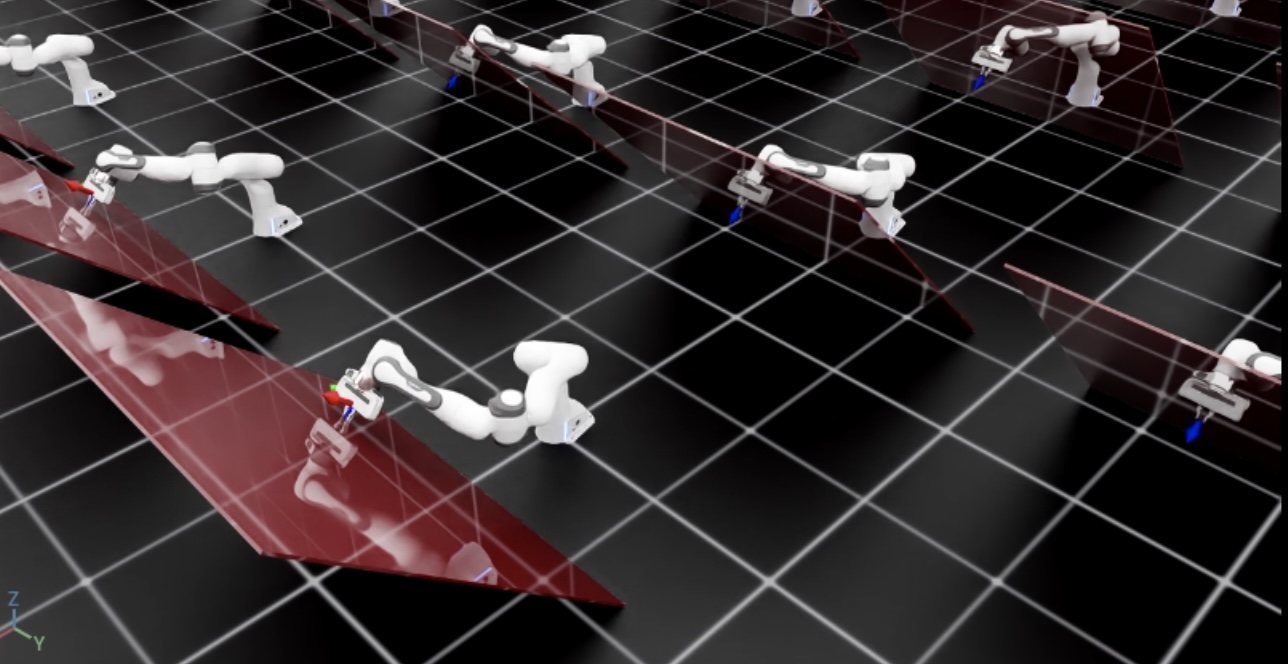
The script will start a simulation with 128 robots. The robots will be controlled using the OSC. The current and desired end-effector poses should be displayed using frame markers in addition to the red tilted wall. You should see that the robot reaches the desired pose while applying a constant force perpendicular to the wall surface.
To stop the simulation, you can either close the window or press Ctrl+C in the terminal.