
Installation using Isaac Sim Source Code#
The following steps first installs Isaac Sim from source, then Isaac Lab from source code.
Note
This is a more advanced installation method and is not recommended for most users. Only follow this method if you wish to modify the source code of Isaac Sim as well.
Installing Isaac Sim#
Building from source#
From Isaac Sim 5.0 release, it is possible to build Isaac Sim from its source code. This approach is meant for users who wish to modify the source code of Isaac Sim as well, or want to test Isaac Lab with the nightly version of Isaac Sim.
The following instructions are adapted from the Isaac Sim documentation for the convenience of users.
Attention
Building Isaac Sim from source requires Ubuntu 22.04 LTS or higher.
Attention
For details on driver requirements, please see the Technical Requirements guide!
On Windows, it may be necessary to enable long path support to avoid installation errors due to OS limitations.
Clone the Isaac Sim repository into your workspace:
git clone https://github.com/isaac-sim/IsaacSim.git
Build Isaac Sim from source:
cd IsaacSim
./build.sh
cd IsaacSim
build.bat
Verifying the Isaac Sim installation#
To avoid the overhead of finding and locating the Isaac Sim installation directory every time, we recommend exporting the following environment variables to your terminal for the remaining of the installation instructions:
# Isaac Sim root directory (use linux-aarch64 instead of linux-x86_64 on aarch64)
export ISAACSIM_PATH="${PWD}/_build/linux-x86_64/release"
# Isaac Sim python executable
export ISAACSIM_PYTHON_EXE="${ISAACSIM_PATH}/python.sh"
:: Isaac Sim root directory
set ISAACSIM_PATH="%cd%\_build\windows-x86_64\release"
:: Isaac Sim python executable
set ISAACSIM_PYTHON_EXE="%ISAACSIM_PATH:"=%\python.bat"
Check that the simulator runs as expected:
# note: you can pass the argument "--help" to see all arguments possible.
${ISAACSIM_PATH}/isaac-sim.sh
:: note: you can pass the argument "--help" to see all arguments possible.
%ISAACSIM_PATH%\isaac-sim.bat
Check that the simulator runs from a standalone python script:
# checks that python path is set correctly
${ISAACSIM_PYTHON_EXE} -c "print('Isaac Sim configuration is now complete.')"
# checks that Isaac Sim can be launched from python
${ISAACSIM_PYTHON_EXE} ${ISAACSIM_PATH}/standalone_examples/api/isaacsim.core.experimental.api/add_cubes.py
:: checks that python path is set correctly
%ISAACSIM_PYTHON_EXE% -c "print('Isaac Sim configuration is now complete.')"
:: checks that Isaac Sim can be launched from python
%ISAACSIM_PYTHON_EXE% %ISAACSIM_PATH%\standalone_examples\api\isaacsim.core.experimental.api\add_cubes.py
Caution
If you have been using a previous version of Isaac Sim, you need to run the following command for the first time after installation to remove all the old user data and cached variables:
${ISAACSIM_PATH}/isaac-sim.sh --reset-user
%ISAACSIM_PATH%\isaac-sim.bat --reset-user
If the simulator does not run or crashes while following the above instructions, it means that something is incorrectly configured. To debug and troubleshoot, please check Isaac Sim documentation and the Isaac Sim Forums.
Installing Isaac Lab#
Cloning Isaac Lab#
Note
We recommend making a fork of the Isaac Lab repository to contribute
to the project but this is not mandatory to use the framework. If you
make a fork, please replace isaac-sim with your username
in the following instructions.
Clone the Isaac Lab repository into your project’s workspace:
git clone git@github.com:isaac-sim/IsaacLab.git --branch develop
cd IsaacLab
git clone https://github.com/isaac-sim/IsaacLab.git --branch develop
cd IsaacLab
We provide helper executables at the repository root — ./isaaclab.sh (Linux) and
isaaclab.bat (Windows) — that provide utilities to manage extensions.
./isaaclab.sh --help

usage: isaaclab.sh [-h] [-i [INSTALL]] [-f] [-p ...] [-s ...] [-t ...] [-o ...] [-v] [-d] [-n ...] [-c [CONDA]] [-u [UV]]

Isaac Lab CLI

options:
  -h, --help            show this help message and exit
  -i [INSTALL], --install [INSTALL]
                        Install Isaac Lab submodules and RL frameworks.
                        Accepts a comma-separated list of submodule names, one of the RL frameworks, or a special value.

                        Isaac Lab Submodules: assets, physx, contrib, mimic, newton, ov, rl, tasks, teleop, visualizers.
                        Any submodule accepts an editable selector, e.g. visualizers[all|kit|newton|rerun|viser], rl[rsl_rl|skrl].
                        RL frameworks: rl_games, rsl_rl, sb3, skrl, robomimic.

                        Passing an RL framework name installs all Isaac Lab submodules + that framework.

                        Special values:
                        - all  - Install all Isaac Lab submodules + all RL frameworks (default).
                        - none - Install only the core 'isaaclab' package.
                        - <empty> (-i or --install without value) - Install all Isaac Lab submodules + all RL frameworks.
  -f, --format          Run pre-commit to format the code and check lints.
  -p ..., --python ...  Run the python executable provided by Isaac Sim or virtual environment (if active).
  -s ..., --sim ...     Run the simulator executable (isaac-sim.sh) provided by Isaac Sim.
  -t ..., --test ...    Run all python pytest tests.
  -o ..., --docker ...  Run the docker container helper script (docker/container.sh).
  -v, --vscode          Generate the VSCode settings file from template.
  -d, --docs            Build the documentation from source using sphinx.
  -n ..., --new ...     Create a new external project or internal task from template.
  -c [CONDA], --conda [CONDA]
                        Create a new conda environment for Isaac Lab. Default name is 'env_isaaclab'.
  -u [UV], --uv [UV]    Create a new uv environment for Isaac Lab. Default name is 'env_isaaclab'.
isaaclab.bat --help

usage: isaaclab.bat [-h] [-i [INSTALL]] [-f] [-p ...] [-s ...] [-t ...] [-o ...] [-v] [-d] [-n ...] [-c [CONDA]] [-u [UV]]

Isaac Lab CLI

options:
  -h, --help            show this help message and exit
  -i [INSTALL], --install [INSTALL]
                        Install Isaac Lab submodules and RL frameworks.
                        Accepts a comma-separated list of submodule names, one of the RL frameworks, or a special value.

                        Isaac Lab Submodules: assets, physx, contrib, mimic, newton, ov, rl, tasks, teleop, visualizers.
                        Any submodule accepts an editable selector, e.g. visualizers[all|kit|newton|rerun|viser], rl[rsl_rl|skrl].
                        RL frameworks: rl_games, rsl_rl, sb3, skrl, robomimic.

                        Passing an RL framework name installs all Isaac Lab submodules + that framework.

                        Special values:
                        - all  - Install all Isaac Lab submodules + all RL frameworks (default).
                        - none - Install only the core 'isaaclab' package.
                        - <empty> (-i or --install without value) - Install all Isaac Lab submodules + all RL frameworks.
  -f, --format          Run pre-commit to format the code and check lints.
  -p ..., --python ...  Run the python executable provided by Isaac Sim or virtual environment (if active).
  -s ..., --sim ...     Run the simulator executable (isaac-sim.bat) provided by Isaac Sim.
  -t ..., --test ...    Run all python pytest tests.
  -o ..., --docker ...  Run the docker container helper script (docker/container.sh).
  -v, --vscode          Generate the VSCode settings file from template.
  -d, --docs            Build the documentation from source using sphinx.
  -n ..., --new ...     Create a new external project or internal task from template.
  -c [CONDA], --conda [CONDA]
                        Create a new conda environment for Isaac Lab. Default name is 'env_isaaclab'.
  -u [UV], --uv [UV]    Create a new uv environment for Isaac Lab. Default name is 'env_isaaclab'.
Creating the Isaac Sim Symbolic Link#
Set up a symbolic link between the installed Isaac Sim root folder
and _isaac_sim in the Isaac Lab directory. This makes it convenient
to index the python modules and look for extensions shipped with Isaac Sim.
# enter the cloned repository
cd IsaacLab
# create a symbolic link
ln -s ${ISAACSIM_PATH} _isaac_sim

# For example:
# Option 1: If pre-built binaries were installed:
# ln -s ${HOME}/isaacsim _isaac_sim
#
# Option 2: If Isaac Sim was built from source
# (use linux-aarch64 instead of linux-x86_64 on aarch64):
# ln -s ${HOME}/IsaacSim/_build/linux-x86_64/release _isaac_sim
:: enter the cloned repository
cd IsaacLab
:: create a symbolic link - requires launching Command Prompt with Administrator access
mklink /D _isaac_sim %ISAACSIM_PATH%

:: For example:
:: Option 1: If pre-built binaries were installed:
:: mklink /D _isaac_sim C:\isaacsim
::
:: Option 2: If Isaac Sim was built from source:
:: mklink /D _isaac_sim C:\IsaacSim\_build\windows-x86_64\release
Installation#
Install dependencies using
apt(on Linux only):# these dependencies are needed by robomimic which is not available on Windows sudo apt install cmake build-essential
On aarch64 systems (e.g., DGX Spark), Python, OpenGL and X11 development packages are also required. Some Python packages, notably
imgui-bundle, do not provide pre-built wheels for aarch64 and must be compiled from source, which needs these headers and libraries:sudo apt install python3.12-dev libgl1-mesa-dev libx11-dev libxcursor-dev libxi-dev libxinerama-dev libxrandr-dev
Install Isaac Lab from the repository root:
./isaaclab.sh --install # or ./isaaclab.sh -i
isaaclab.bat --install :: or isaaclab.bat -i
By default this installs core packages plus optional submodules (
mimic,teleop) and the automatic extra features (newton,rl,visualizer). For the full token reference and examples, see Modularized Installation.
Verifying the Isaac Lab installation#
To verify that the installation was successful, run the following command from the top of the repository:
# Option 1: Using the isaaclab.sh executable
# note: this works for both the bundled python and the virtual environment
./isaaclab.sh -p scripts/tutorials/00_sim/create_empty.py --viz kit

# Option 2: Using python in your virtual environment
python scripts/tutorials/00_sim/create_empty.py --viz kit
:: Option 1: Using the isaaclab.bat executable
:: note: this works for both the bundled python and the virtual environment
isaaclab.bat -p scripts\tutorials\00_sim\create_empty.py --viz kit

:: Option 2: Using python in your virtual environment
python scripts\tutorials\00_sim\create_empty.py --viz kit
The above command should launch the simulator and display a window with a black
viewport. You can exit the script by pressing Ctrl+C on your terminal.
On Windows machines, please terminate the process from Command Prompt using
Ctrl+Break or Ctrl+fn+B.
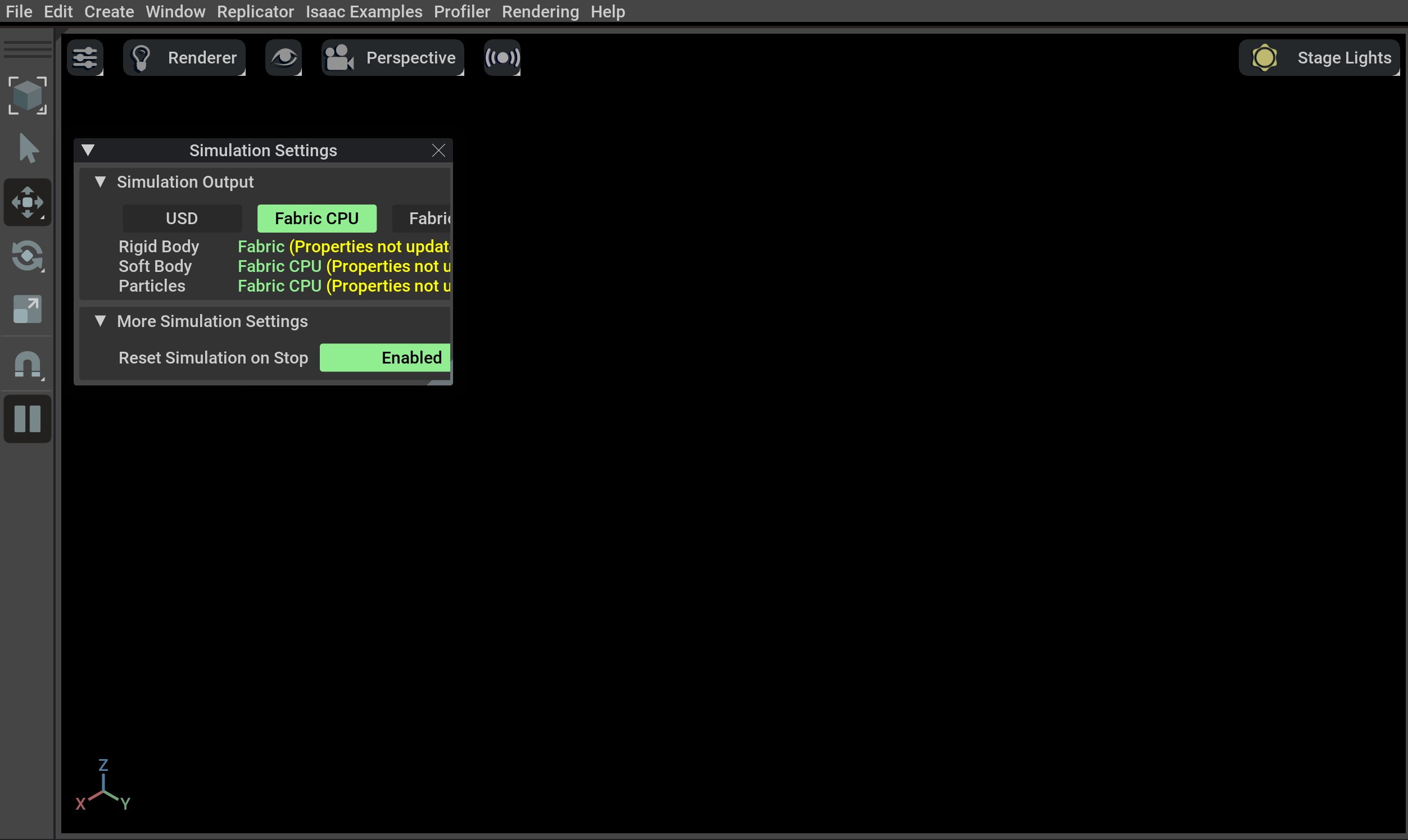
If you see this, then the installation was successful! 🎉
Note
If you see an error ModuleNotFoundError: No module named 'isaacsim', please ensure that the virtual
environment is activated and source _isaac_sim/setup_conda_env.sh has been executed (for uv as well).
Train a robot!#
You can now use Isaac Lab to train a robot through Reinforcement Learning! The quickest way to use Isaac Lab is through the predefined workflows using one of our Batteries-included robot tasks. Execute the following command to quickly train an ant to walk! These commands do not select a visualizer, so they run without a viewer for faster training.
./isaaclab.sh train --rl_library rsl_rl --task=Isaac-Ant
isaaclab.bat train --rl_library rsl_rl --task=Isaac-Ant
… Or a robot dog!
./isaaclab.sh train --rl_library rsl_rl --task=IsaacContrib-Velocity-Rough-AnymalC
isaaclab.bat train --rl_library rsl_rl --task=IsaacContrib-Velocity-Rough-AnymalC
Isaac Lab provides the tools you’ll need to create your own Tasks and Workflows for whatever your project needs may be. Take a look at our How-to Guides like Adding your own learning Library or Wrapping Environments for details.