



Multi-GPU and Multi-Node Training#
Scale one reinforcement learning job across the GPUs in a workstation or across
several nodes with train_multigpu. Isaac Lab starts one training process per
GPU, gives each process its own simulation environments, and synchronizes policy
updates across the processes.
The same launcher model is used in three multi-GPU benchmarks for measuring startup, simulation, and end-to-end training performance.
Attention
Multi-GPU and multi-node training requires Linux and NVIDIA NCCL. Windows is not supported.
Warning
train_multigpu is experimental and may change in a future release.
Start a multi-GPU training run#
First, verify that the task trains on one GPU. This separates task or configuration problems from distributed-launch problems:
uv run isaaclab train --task Isaac-Cartpole
Then run the same task on every visible GPU:
uv run isaaclab train_multigpu --task Isaac-Cartpole
That is the complete transition from a single-GPU run. train_multigpu adds
--distributed and selects the distributed launcher automatically. All other
arguments are the same arguments accepted by train:
uv run isaaclab train_multigpu \
   --task Isaac-Reorient-KukaAllegro \
   --num_envs 4096 \
   --max_iterations 100
--num_envs is the number of environments on each GPU. With four GPUs and
--num_envs 4096, the job collects experience from 16,384 environments in
total.
All ranks write into one run folder. Each rank trains with the launch seed plus
its rank on its own GPU. Rank 0 writes its settings (params/env.yaml and
params/agent.yaml) and videos where a single-GPU run does; every other rank
writes its own params/ and videos to rank_<rank>/.
Tip
Add --dry_run to print the resolved launcher command without starting
training. This is useful when checking GPU counts, rendezvous options, or
forwarded training arguments.
Choose the GPUs#
By default, the launcher uses every visible GPU. Set --num_gpus when you want
a specific worker count:
uv run isaaclab train_multigpu --num_gpus 2 --task Isaac-Cartpole
Use CUDA_VISIBLE_DEVICES to choose the physical devices. The launcher sees
only the devices in that list:
CUDA_VISIBLE_DEVICES=1,3 uv run isaaclab train_multigpu \
   --num_gpus 2 --task Isaac-Cartpole
Run nvidia-smi before launching to confirm that the expected devices are
available and have enough free memory.
Choose an RL library#
Multi-GPU training supports RSL-RL, RL-Games, and skrl. RSL-RL is the default for most core tasks.
Library |
Distributed backend |
Command |
|---|---|---|
RSL-RL |
PyTorch |
|
RL-Games |
PyTorch |
|
skrl |
PyTorch |
|
skrl |
JAX |
|
skrl with JAX uses skrl’s distributed launcher instead of torchrun. Pass an
integer --num_gpus and use --coordinator_address to configure its
coordinator:
uv run --extra skrl isaaclab train_multigpu \
   --rl_library skrl --ml_framework jax --num_gpus 4 \
   --coordinator_address localhost:5000 \
   --task Isaac-Cartpole
Measure scaling with the three multi-GPU benchmarks#
Use the benchmark commands when the goal is to measure performance rather than train a policy for later use. Isaac Lab provides three multi-GPU workflows:
Benchmark |
What it measures |
Use it to answer |
|---|---|---|
|
Startup time for rank 0 while every GPU starts the same workload. |
How does a fully occupied node affect startup? |
|
Simulation throughput for rank 0 while every GPU runs independently. |
How does host contention affect environment stepping? |
|
Global, synchronized training throughput across every rank. |
How well does end-to-end learning scale across GPUs? |
Run each benchmark with the same launcher options used by train_multigpu:
uv run isaaclab benchmark startup_multigpu \
   --num_gpus 2 --task Isaac-Cartpole

uv run isaaclab benchmark runtime_multigpu \
   --num_gpus 2 --task Isaac-Cartpole --num_envs 4096

uv run isaaclab benchmark training_multigpu \
   --rl_library rsl_rl --num_gpus 2 \
   --task Isaac-Cartpole --num_envs 4096 --max_iterations 100
training_multigpu supports RSL-RL, RL-Games, and skrl with PyTorch. It does
not support skrl with JAX or SB3. It also rejects --video and
--capture_env_sensors, which do not produce a meaningful aggregate result
across ranks. --check_success is supported with RSL-RL and RL-Games: the
success metric is averaged over the environments of all ranks, so every rank
stops at the same iteration.
For multi-node benchmarks, pass the same --nnodes, --node_rank, and
rendezvous options described in Train across multiple nodes on every node.
Read multi-GPU benchmark results#
Only global rank 0 writes a result bundle. The extra fields record the rank
layout and clarify which measurements the bundle covers:
|
Meaning |
|---|---|
|
Rank layout of the job. |
|
Environments hosted by each rank. |
|
|
|
|
|
|
When comparing one GPU with multiple GPUs, keep --num_envs constant per
rank. An N-GPU job processes N times as many environments as the one-GPU job
at the same per-rank setting. Compare the global throughput of
training_multigpu against N times the single-GPU throughput. Do not treat
startup_multigpu or runtime_multigpu as aggregate rates; they measure
rank 0 while the other ranks create host contention.
How multi-GPU training works#
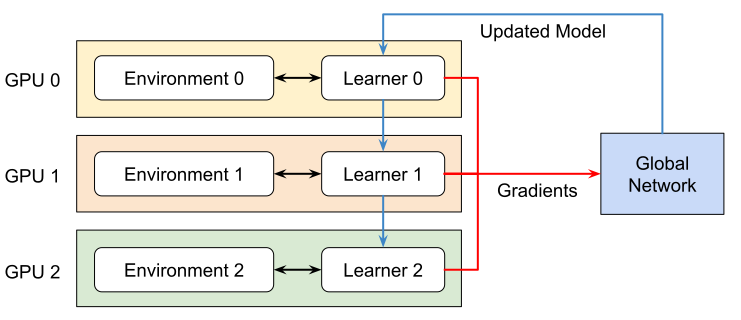
For PyTorch workflows, train_multigpu wraps
torchrun. It launches
one process per GPU. Each process owns:
one Isaac Lab application and its vectorized environments,
one copy of the policy,
one rollout buffer, and
one GPU selected by its local rank.
The processes collect experience independently and synchronize gradients during policy updates with DistributedDataParallel. Simulation does not move between GPUs, so available host CPU, RAM, and I/O can become limiting factors as the GPU count grows.
Read logs from distributed runs#
Every rank produces similar startup messages, warnings, and model summaries. The launcher shows local rank 0 by default so the console remains readable. Training metrics already come from global rank 0, and a crash on any hidden rank still reports the failing rank and its traceback.
Show output from every rank when processes appear to disagree:
uv run isaaclab train_multigpu \
   --task Isaac-Cartpole --log_all_ranks
For a clean console and complete per-rank logs on disk, use torchrun log
redirection:
uv run isaaclab train_multigpu \
   --task Isaac-Cartpole --tee 3 --log_dir /tmp/isaaclab-rank-logs
The log filtering options apply to PyTorch workflows. skrl with JAX writes every rank to the console.
Train across multiple nodes#
Every node must have the same Isaac Lab checkout, dependencies, task configuration, and access to training assets. The nodes must also be able to reach one another on the rendezvous port.
Choose one node as the rendezvous host. For a two-node PyTorch job with four GPUs per node, run the following on the first node:
uv run isaaclab train_multigpu \
   --nnodes 2 --node_rank 0 --num_gpus 4 \
   --master_addr 10.0.0.10 --master_port 29500 \
   --task Isaac-Cartpole
Run the same command on the second node with its own rank:
uv run isaaclab train_multigpu \
   --nnodes 2 --node_rank 1 --num_gpus 4 \
   --master_addr 10.0.0.10 --master_port 29500 \
   --task Isaac-Cartpole
The total world size is nnodes * num_gpus: eight ranks in this example. You
can also use --rdzv_backend, --rdzv_endpoint, and --rdzv_id for an
elastic torchrun rendezvous. Add --dry_run first to verify the command on
each node.
Each node names the run folder from its own launch time. When the nodes share
storage, pass the same --run_timestamp value (format YYYY-MM-DD_HH-MM-SS)
to train_multigpu on every node so that all ranks write into one run folder.
For skrl with JAX, pass --nnodes, --node_rank, an integer
--num_gpus, and the same --coordinator_address on every node. Do not pass
the PyTorch rendezvous options to a JAX launch.
Multi-node scaling depends heavily on the network between nodes. A multi-node job can be slower than a single-node job when gradient synchronization dominates the training iteration.
Troubleshoot distributed training#
Start with the smallest useful diagnosis:
Confirm that the same task, backend, and training arguments work with
isaaclab trainon one GPU.Add
--dry_runand check the selected GPU and node counts.Retry at world sizes 2, 3, and 4. A failure at only one world size often points to the communication transport rather than the task.
Check GPU placement and interconnects with
nvidia-smi topo -m.Set
NCCL_DEBUG=INFOto see which NCCL transport was selected.Apply one workaround at a time and verify that the failure returns when the workaround is removed.
NCCL hangs and errors#
A run that stops without a traceback while every participating GPU remains at 100% utilization is usually stalled in an NCCL collective. The following workarounds address known system-specific transport problems:
Symptom |
Try |
|---|---|
World size 2 hangs on a PCIe system without NVLink. |
|
|
|
A rendered job fails because CUDA and the renderer enumerate GPUs in different orders. |
|
A rendered job times out across NUMA nodes during |
|
Communicator initialization or transport failures persist. |
|
For example, test the first workaround without changing a shared configuration:
NCCL_P2P_DISABLE=1 uv run isaaclab train_multigpu \
   --num_gpus 2 --task Isaac-Cartpole
These variables can reduce communication performance and should be scoped to
the affected machine. Set either NCCL_P2P_DISABLE=1 or
NCCL_P2P_LEVEL=LOC, not both. Each prevents direct P2P communication and
can reduce bandwidth by forcing NCCL to select another transport. Do not commit
a workaround into a task or launcher unless it is required by every supported
system. Use nvidia-smi --query-gpu=name,pci.bus_id to inspect GPU bus IDs
before setting CUDA_DEVICE_ORDER=PCI_BUS_ID.
Isolate a hang from Isaac Lab
Run a minimal NCCL collective at the world size that hangs. Save this as
nccl_probe.py:
import os

import torch
import torch.distributed as dist

local_rank = int(os.environ["LOCAL_RANK"])
torch.cuda.set_device(local_rank)
dist.init_process_group("nccl")
tensor = torch.ones(1024, device=f"cuda:{local_rank}")
dist.all_reduce(tensor)
torch.cuda.synchronize()
print(f"rank {dist.get_rank()} ok", flush=True)
dist.destroy_process_group()
Launch the probe with the same rank count:
uv run python -m torch.distributed.run --nproc_per_node 2 nccl_probe.py
If this probe also hangs, the problem is in NCCL or the system topology, not in Isaac Lab, the task, or the RL library.