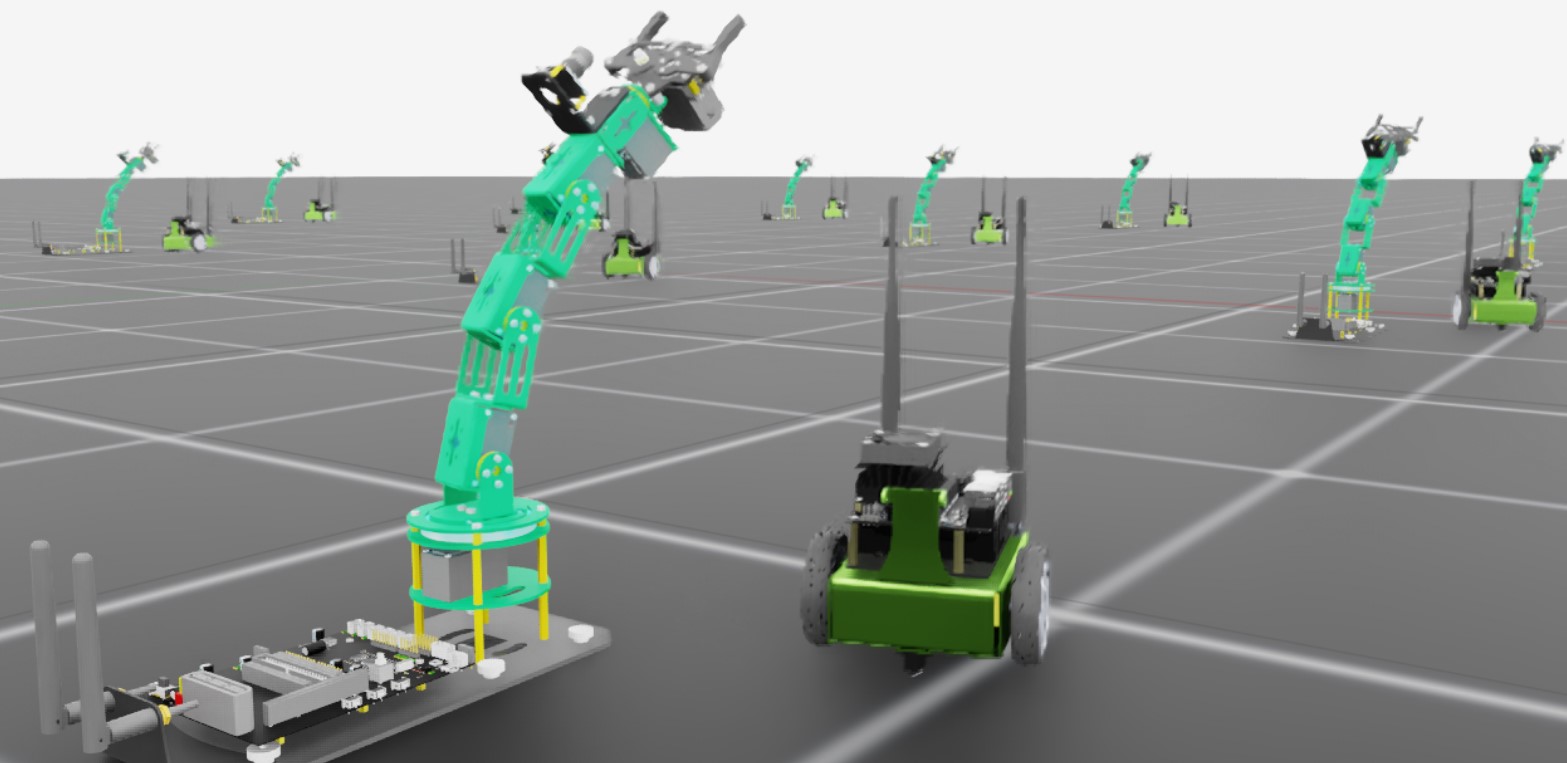
Adding a New Robot to Isaac Lab#
Simulating and training a new robot is a multi-step process that starts with importing the robot into Isaac Sim. This is covered in depth in the Isaac Sim documentation here. Once the robot is imported and tuned for simulation, we must define those interfaces necessary to clone the robot across multiple environments, drive its joints, and properly reset it, regardless of the chosen workflow or training framework.
In this tutorial, we will examine how to add a new robot to Isaac Lab. The key step is creating an AssetBaseCfg that defines
the interface between the USD articulation of the robot and the learning algorithms available through Isaac Lab.
The Code#
The tutorial corresponds to the add_new_robot script in the scripts/tutorials/01_assets directory.
Code for add_new_robot.py
  1# Copyright (c) 2022-2026, The Isaac Lab Project Developers (https://github.com/isaac-sim/IsaacLab/blob/main/CONTRIBUTORS.md).
  2# All rights reserved.
  3#
  4# SPDX-License-Identifier: BSD-3-Clause
  5
  6import argparse
  7
  8from isaaclab.app import AppLauncher
  9
 10# add argparse arguments
 11parser = argparse.ArgumentParser(
 12    description="This script demonstrates adding a custom robot to an Isaac Lab environment."
 13)
 14parser.add_argument("--num_envs", type=int, default=1, help="Number of environments to spawn.")
 15# append AppLauncher cli args
 16AppLauncher.add_app_launcher_args(parser)
 17# parse the arguments
 18args_cli = parser.parse_args()
 19
 20# launch omniverse app
 21app_launcher = AppLauncher(args_cli)
 22simulation_app = app_launcher.app
 23
 24import numpy as np
 25import torch
 26
 27import isaaclab.sim as sim_utils
 28from isaaclab.actuators import ImplicitActuatorCfg
 29from isaaclab.assets import AssetBaseCfg
 30from isaaclab.assets.articulation import ArticulationCfg
 31from isaaclab.scene import InteractiveScene, InteractiveSceneCfg
 32from isaaclab.utils.assets import ISAAC_NUCLEUS_DIR
 33
 34JETBOT_CONFIG = ArticulationCfg(
 35    spawn=sim_utils.UsdFileCfg(usd_path=f"{ISAAC_NUCLEUS_DIR}/Robots/NVIDIA/Jetbot/jetbot.usd"),
 36    actuators={"wheel_acts": ImplicitActuatorCfg(joint_names_expr=[".*"], damping=None, stiffness=None)},
 37)
 38
 39DOFBOT_CONFIG = ArticulationCfg(
 40    spawn=sim_utils.UsdFileCfg(
 41        usd_path=f"{ISAAC_NUCLEUS_DIR}/Robots/Yahboom/Dofbot/dofbot.usd",
 42        rigid_props=sim_utils.RigidBodyPropertiesCfg(
 43            disable_gravity=False,
 44            max_depenetration_velocity=5.0,
 45        ),
 46        articulation_props=sim_utils.ArticulationRootPropertiesCfg(
 47            enabled_self_collisions=True, solver_position_iteration_count=8, solver_velocity_iteration_count=0
 48        ),
 49    ),
 50    init_state=ArticulationCfg.InitialStateCfg(
 51        joint_pos={
 52            "joint1": 0.0,
 53            "joint2": 0.0,
 54            "joint3": 0.0,
 55            "joint4": 0.0,
 56        },
 57        pos=(0.25, -0.25, 0.0),
 58    ),
 59    actuators={
 60        "front_joints": ImplicitActuatorCfg(
 61            joint_names_expr=["joint[1-2]"],
 62            joint_effort_limit=100.0,
 63            joint_velocity_limit=100.0,
 64            stiffness=10000.0,
 65            damping=100.0,
 66        ),
 67        "joint3_act": ImplicitActuatorCfg(
 68            joint_names_expr=["joint3"],
 69            joint_effort_limit=100.0,
 70            joint_velocity_limit=100.0,
 71            stiffness=10000.0,
 72            damping=100.0,
 73        ),
 74        "joint4_act": ImplicitActuatorCfg(
 75            joint_names_expr=["joint4"],
 76            joint_effort_limit=100.0,
 77            joint_velocity_limit=100.0,
 78            stiffness=10000.0,
 79            damping=100.0,
 80        ),
 81    },
 82)
 83
 84
 85class NewRobotsSceneCfg(InteractiveSceneCfg):
 86    """Designs the scene."""
 87
 88    # Ground-plane
 89    ground = AssetBaseCfg(prim_path="/World/defaultGroundPlane", spawn=sim_utils.GroundPlaneCfg())
 90
 91    # lights
 92    dome_light = AssetBaseCfg(
 93        prim_path="/World/Light", spawn=sim_utils.DomeLightCfg(intensity=3000.0, color=(0.75, 0.75, 0.75))
 94    )
 95
 96    # robot
 97    Jetbot = JETBOT_CONFIG.replace(prim_path="{ENV_REGEX_NS}/Jetbot")
 98    Dofbot = DOFBOT_CONFIG.replace(prim_path="{ENV_REGEX_NS}/Dofbot")
 99
100
101def run_simulator(sim: sim_utils.SimulationContext, scene: InteractiveScene):
102    sim_dt = sim.get_physics_dt()
103    sim_time = 0.0
104    count = 0
105
106    # wheel-velocity templates allocated once on the simulation device; the joint
107    # target setters dispatch to GPU Warp kernels and reject CPU tensors.
108    straight_action = torch.tensor([[10.0, 10.0]], device=sim.device)
109    turn_action = torch.tensor([[5.0, -5.0]], device=sim.device)
110
111    while simulation_app.is_running():
112        # reset
113        if count % 500 == 0:
114            # reset counters
115            count = 0
116            # reset the scene entities to their initial positions offset by the environment origins
117            root_jetbot_pose = scene["Jetbot"].data.default_root_pose.torch.clone()
118            root_jetbot_pose[:, :3] += scene.env_origins
119            root_dofbot_pose = scene["Dofbot"].data.default_root_pose.torch.clone()
120            root_dofbot_pose[:, :3] += scene.env_origins
121
122            # copy the default root state to the sim for the jetbot's orientation and velocity
123            scene["Jetbot"].write_root_pose_to_sim_index(root_pose=root_jetbot_pose)
124            root_jetbot_vel = scene["Jetbot"].data.default_root_vel.torch.clone()
125            scene["Jetbot"].write_root_velocity_to_sim_index(root_velocity=root_jetbot_vel)
126            scene["Dofbot"].write_root_pose_to_sim_index(root_pose=root_dofbot_pose)
127            root_dofbot_vel = scene["Dofbot"].data.default_root_vel.torch.clone()
128            scene["Dofbot"].write_root_velocity_to_sim_index(root_velocity=root_dofbot_vel)
129
130            # copy the default joint states to the sim
131            joint_pos, joint_vel = (
132                scene["Jetbot"].data.default_joint_pos.torch.clone(),
133                scene["Jetbot"].data.default_joint_vel.torch.clone(),
134            )
135            scene["Jetbot"].write_joint_position_to_sim_index(position=joint_pos)
136            scene["Jetbot"].write_joint_velocity_to_sim_index(velocity=joint_vel)
137            joint_pos, joint_vel = (
138                scene["Dofbot"].data.default_joint_pos.torch.clone(),
139                scene["Dofbot"].data.default_joint_vel.torch.clone(),
140            )
141            scene["Dofbot"].write_joint_position_to_sim_index(position=joint_pos)
142            scene["Dofbot"].write_joint_velocity_to_sim_index(velocity=joint_vel)
143            # clear internal buffers
144            scene.reset()
145            print("[INFO]: Resetting Jetbot and Dofbot state...")
146
147        # drive around
148        if count % 100 < 75:
149            # Drive straight by setting equal wheel velocities
150            action = straight_action
151        else:
152            # Turn by applying different velocities
153            action = turn_action
154
155        scene["Jetbot"].set_joint_velocity_target_index(target=action)
156
157        # wave
158        wave_action = scene["Dofbot"].data.default_joint_pos.torch.clone()
159        wave_action[:, 0:4] = 0.25 * np.sin(2 * np.pi * 0.5 * sim_time)
160        scene["Dofbot"].set_joint_position_target_index(target=wave_action)
161
162        scene.write_data_to_sim()
163        sim.step()
164        sim_time += sim_dt
165        count += 1
166        scene.update(sim_dt)
167
168
169def main():
170    """Main function."""
171    # Initialize the simulation context
172    sim_cfg = sim_utils.SimulationCfg(device=args_cli.device)
173    sim = sim_utils.SimulationContext(sim_cfg)
174    sim.set_camera_view([3.5, 0.0, 3.2], [0.0, 0.0, 0.5])
175    # Design scene
176    scene_cfg = NewRobotsSceneCfg(args_cli.num_envs, env_spacing=2.0)
177    scene = InteractiveScene(scene_cfg)
178    # Play the simulator
179    sim.reset()
180    # Now we are ready!
181    print("[INFO]: Setup complete...")
182    # Run the simulator
183    run_simulator(sim, scene)
184
185
186if __name__ == "__main__":
187    main()
188    simulation_app.close()
The Code Explained#
Fundamentally, a robot is an articulation with joint drives. To move a robot around in the simulation, we must apply targets to its drives and step the sim forward in time. However, to control a robot strictly through joint drives is tedious, especially if you want to control anything complex, and doubly so if you want to clone the robot across multiple environments.
To facilitate this, Isaac Lab provides a collection of configuration classes that define which parts of the USD need
to be cloned, which parts are actuators to be controlled by an agent, how it should be reset, etc… There are many ways
you can configure a single robot asset for Isaac Lab depending on how much fine tuning the asset requires. To demonstrate,
the tutorial script imports two robots: The first robot, the Jetbot, is configured minimally while the second robot, the Dofbot, is configured with additional parameters.
The Jetbot is a simple, two wheeled differential base with a camera on top. The asset is used for a number of demonstrations and
tutorials in Isaac Sim, so we know it’s good to go! To bring it into Isaac lab, we must first define one of these configurations.
Because a robot is an articulation with joint drives, we define an ArticulationCfg that describes the robot.
import isaaclab.sim as sim_utils
from isaaclab.actuators import ImplicitActuatorCfg
from isaaclab.assets import AssetBaseCfg
from isaaclab.assets.articulation import ArticulationCfg
from isaaclab.scene import InteractiveScene, InteractiveSceneCfg
from isaaclab.utils.assets import ISAAC_NUCLEUS_DIR

JETBOT_CONFIG = ArticulationCfg(
    spawn=sim_utils.UsdFileCfg(usd_path=f"{ISAAC_NUCLEUS_DIR}/Robots/NVIDIA/Jetbot/jetbot.usd"),
    actuators={"wheel_acts": ImplicitActuatorCfg(joint_names_expr=[".*"], damping=None, stiffness=None)},
)
This is the minimal configuration for a robot in Isaac Lab. There are only two required parameters: spawn and actuators.
The spawn parameter is looking for a SpawnerCfg, and is used to specify the USD asset that defines the robot in the sim.
The Isaac Lab simulation utilities, isaaclab.sim, provides us with a USDFileCfg class that consumes a path to our USD
asset, and generates the SpawnerCfg we need. In this case, the jetbot.usd is located
with the Isaac Assets under Robots/Jetbot/jetbot.usd.
The actuators parameter is a dictionary of Actuator Configs and defines what parts of the robot we intend to control with an agent.
There are many different ways to update the state of a joint in time towards some target. Isaac Lab provides a collection of actuator
classes that can be used to match common actuator models or even implement your own! In this case, we are using the ImplicitActuatorCfg class to specify
the actuators for the robot, because they are simple wheels and the defaults are fine.
Specifying joint name keys for this dictionary can be done to varying levels of specificity.
The jetbot only has a few joints, and we are just going to use the defaults specified in the USD asset, so we can use a simple regex, .* to specify all joints.
Other regex can also be used to group joints and associated configurations.
Note
Both stiffness and damping must be specified in the implicit actuator, but a value of None will use the defaults defined in the USD asset.
While this is the minimal configuration, there are a number of other parameters we could specify
DOFBOT_CONFIG = ArticulationCfg(
    spawn=sim_utils.UsdFileCfg(
        usd_path=f"{ISAAC_NUCLEUS_DIR}/Robots/Yahboom/Dofbot/dofbot.usd",
        rigid_props=sim_utils.RigidBodyPropertiesCfg(
            disable_gravity=False,
            max_depenetration_velocity=5.0,
        ),
        articulation_props=sim_utils.ArticulationRootPropertiesCfg(
            enabled_self_collisions=True, solver_position_iteration_count=8, solver_velocity_iteration_count=0
        ),
    ),
    init_state=ArticulationCfg.InitialStateCfg(
        joint_pos={
            "joint1": 0.0,
            "joint2": 0.0,
            "joint3": 0.0,
            "joint4": 0.0,
        },
        pos=(0.25, -0.25, 0.0),
    ),
    actuators={
        "front_joints": ImplicitActuatorCfg(
            joint_names_expr=["joint[1-2]"],
            joint_effort_limit=100.0,
            joint_velocity_limit=100.0,
            stiffness=10000.0,
            damping=100.0,
        ),
        "joint3_act": ImplicitActuatorCfg(
            joint_names_expr=["joint3"],
            joint_effort_limit=100.0,
            joint_velocity_limit=100.0,
            stiffness=10000.0,
            damping=100.0,
        ),
        "joint4_act": ImplicitActuatorCfg(
            joint_names_expr=["joint4"],
            joint_effort_limit=100.0,
            joint_velocity_limit=100.0,
            stiffness=10000.0,
            damping=100.0,
        ),
    },
)
This configuration can be used to add a Dofbot to the scene, and it contains some of those parameters.
The Dofbot is a hobbiest robot arm with several joints, and so we have more options available for configuration.
The two most notable differences though is the addition of configurations for physics properties, and the initial state of the robot, init_state.
The USDFileCfg has special parameters for rigid bodies and robots, among others. The rigid_props parameter expects
a RigidBodyPropertiesCfg that allows you to specify body link properties of the robot being spawned relating to its behavior
as a “physical object” in the simulation. The articulation_props meanwhile governs the properties relating to the solver
being used to step the joints through time, and so it expects an ArticulationRootPropertiesCfg to be configured.
There are many other physics properties and parameters that can be specified through configurations provided by isaaclab.sim.schemas.
The ArticulationCfg can optionally include the init_state parameter, that defines the initial state of the articulation.
The initial state of an articulation is a special, user defined state that is used when the robot is spawned or reset by Isaac Lab.
The initial joint state, joint_pos, is specified by a dictionary of floats with the USD joint names as keys (not the actuator names).
Something else worth noting here is the coordinate system of the initial position, pos, which is that of the environment.
In this case, by specifying a position of (0.25, -0.25, 0.0) we are offsetting the spawn position of the robot from the origin of the environment, and not the world.
Armed with the configurations for these robots, we can now add them to the scene and interact with them in the usual way
for the direct workflow: by defining an InteractiveSceneCfg containing the articulation configs for the robots …
class NewRobotsSceneCfg(InteractiveSceneCfg):
    """Designs the scene."""

    # Ground-plane
    ground = AssetBaseCfg(prim_path="/World/defaultGroundPlane", spawn=sim_utils.GroundPlaneCfg())

    # lights
    dome_light = AssetBaseCfg(
        prim_path="/World/Light", spawn=sim_utils.DomeLightCfg(intensity=3000.0, color=(0.75, 0.75, 0.75))
    )

    # robot
    Jetbot = JETBOT_CONFIG.replace(prim_path="{ENV_REGEX_NS}/Jetbot")
    Dofbot = DOFBOT_CONFIG.replace(prim_path="{ENV_REGEX_NS}/Dofbot")
…and then stepping the simulation while updating the scene entities appropriately.
def run_simulator(sim: sim_utils.SimulationContext, scene: InteractiveScene):
    sim_dt = sim.get_physics_dt()
    sim_time = 0.0
    count = 0

    # wheel-velocity templates allocated once on the simulation device; the joint
    # target setters dispatch to GPU Warp kernels and reject CPU tensors.
    straight_action = torch.tensor([[10.0, 10.0]], device=sim.device)
    turn_action = torch.tensor([[5.0, -5.0]], device=sim.device)

    while simulation_app.is_running():
        # reset
        if count % 500 == 0:
            # reset counters
            count = 0
            # reset the scene entities to their initial positions offset by the environment origins
            root_jetbot_pose = scene["Jetbot"].data.default_root_pose.torch.clone()
            root_jetbot_pose[:, :3] += scene.env_origins
            root_dofbot_pose = scene["Dofbot"].data.default_root_pose.torch.clone()
            root_dofbot_pose[:, :3] += scene.env_origins

            # copy the default root state to the sim for the jetbot's orientation and velocity
            scene["Jetbot"].write_root_pose_to_sim_index(root_pose=root_jetbot_pose)
            root_jetbot_vel = scene["Jetbot"].data.default_root_vel.torch.clone()
            scene["Jetbot"].write_root_velocity_to_sim_index(root_velocity=root_jetbot_vel)
            scene["Dofbot"].write_root_pose_to_sim_index(root_pose=root_dofbot_pose)
            root_dofbot_vel = scene["Dofbot"].data.default_root_vel.torch.clone()
            scene["Dofbot"].write_root_velocity_to_sim_index(root_velocity=root_dofbot_vel)

            # copy the default joint states to the sim
            joint_pos, joint_vel = (
                scene["Jetbot"].data.default_joint_pos.torch.clone(),
                scene["Jetbot"].data.default_joint_vel.torch.clone(),
            )
            scene["Jetbot"].write_joint_position_to_sim_index(position=joint_pos)
            scene["Jetbot"].write_joint_velocity_to_sim_index(velocity=joint_vel)
            joint_pos, joint_vel = (
                scene["Dofbot"].data.default_joint_pos.torch.clone(),
                scene["Dofbot"].data.default_joint_vel.torch.clone(),
            )
            scene["Dofbot"].write_joint_position_to_sim_index(position=joint_pos)
            scene["Dofbot"].write_joint_velocity_to_sim_index(velocity=joint_vel)
            # clear internal buffers
            scene.reset()
            print("[INFO]: Resetting Jetbot and Dofbot state...")

        # drive around
        if count % 100 < 75:
            # Drive straight by setting equal wheel velocities
            action = straight_action
        else:
            # Turn by applying different velocities
            action = turn_action

        scene["Jetbot"].set_joint_velocity_target_index(target=action)

        # wave
        wave_action = scene["Dofbot"].data.default_joint_pos.torch.clone()
Note
You may see a warning that not all actuators are configured! This is expected because we don’t handle the gripper for this tutorial.