



Registering an Environment#
In the previous tutorial, we learned how to create a custom cartpole environment. We manually created an instance of the environment by importing the environment class and its configuration class.
Environment creation in the previous tutorial
    # create environment configuration
    env_cfg = parse_env_cfg("Isaac-Cartpole", device=args_cli.device, num_envs=args_cli.num_envs)
    # setup RL environment
    env = ManagerBasedRLEnv(cfg=env_cfg)
While straightforward, this approach is not scalable as we have a large suite of environments.
In this tutorial, we will show how to use the gymnasium.register() method to register
environments with the gymnasium registry. This allows us to create the environment through
the gymnasium.make() function.
Environment creation in this tutorial
    # parse configuration via Hydra (supports preset selection, e.g. env.sim.physics=newton_mjwarp)
    env_cfg, _ = resolve_task_config(args_cli.task, "")

    with launch_simulation(env_cfg, args_cli):
        # override with CLI arguments
        env_cfg.scene.num_envs = args_cli.num_envs if args_cli.num_envs is not None else env_cfg.scene.num_envs
        env_cfg.sim.device = args_cli.device if args_cli.device is not None else env_cfg.sim.device
        if args_cli.disable_fabric:
            env_cfg.sim.use_fabric = False

        # create environment
        env = gym.make(args_cli.task, cfg=env_cfg)
The Code#
The tutorial corresponds to the random_agent.py script in the scripts/environments directory. The
script is a thin wrapper that calls into the isaaclab_rl.entrypoints module, where the actual
implementation lives.
Code for simple_agents.py
  1# Copyright (c) 2022-2026, The Isaac Lab Project Developers (https://github.com/isaac-sim/IsaacLab/blob/main/CONTRIBUTORS.md).
  2# All rights reserved.
  3#
  4# SPDX-License-Identifier: BSD-3-Clause
  5
  6"""Checkpoint-free playback workflows for Isaac Lab environments.
  7
  8The zero and random agents are variations of playback that need no trained checkpoint:
  9the policy either emits constant zero actions or samples uniform random actions.
 10"""
 11
 12from __future__ import annotations
 13
 14import argparse
 15import contextlib
 16import sys
 17from typing import Literal
 18
 19import gymnasium as gym
 20import torch
 21
 22from isaaclab.app import add_launcher_args, launch_simulation
 23
 24import isaaclab_tasks  # noqa: F401
 25from isaaclab_tasks.utils import (
 26    resolve_task_config,
 27    setup_preset_cli,
 28)
 29
 30with contextlib.suppress(ImportError):
 31    import isaaclab_tasks_experimental  # noqa: F401
 32
 33PolicyName = Literal["zero", "random"]
 34"""Action policies supported by the checkpoint-free agents."""
 35
 36_DESCRIPTIONS: dict[str, str] = {
 37    "zero": "Zero agent for Isaac Lab environments.",
 38    "random": "Random agent for Isaac Lab environments.",
 39}
 40
 41_SEED = 42
 42
 43
 44def run(argv: list[str] | None = None, *, policy: PolicyName) -> None:
 45    """Run an Isaac Lab environment with a checkpoint-free policy.
 46
 47    Args:
 48        argv: Command-line arguments excluding the executable name. Reads ``sys.argv`` when omitted.
 49        policy: Action policy to apply, either constant zero actions or uniform random actions.
 50
 51    Raises:
 52        ValueError: If the requested policy is not supported.
 53    """
 54    if policy not in _DESCRIPTIONS:
 55        raise ValueError(f"Unsupported policy {policy!r}. Expected one of: {sorted(_DESCRIPTIONS)}.")
 56
 57    args_cli = _parse_args(argv, policy)
 58
 59    torch.manual_seed(_SEED)
 60
 61    # parse configuration via Hydra (supports preset selection, e.g. env.sim.physics=newton_mjwarp)
 62    env_cfg, _ = resolve_task_config(args_cli.task, "")
 63
 64    with launch_simulation(env_cfg, args_cli):
 65        # override with CLI arguments
 66        env_cfg.scene.num_envs = args_cli.num_envs if args_cli.num_envs is not None else env_cfg.scene.num_envs
 67        env_cfg.sim.device = args_cli.device if args_cli.device is not None else env_cfg.sim.device
 68        if args_cli.disable_fabric:
 69            env_cfg.sim.use_fabric = False
 70
 71        # create environment
 72        env = gym.make(args_cli.task, cfg=env_cfg)
 73
 74        # print info (this is vectorized environment)
 75        print(f"[INFO]: Gym observation space: {env.observation_space}")
 76        print(f"[INFO]: Gym action space: {env.action_space}")
 77        # reset environment
 78        env.reset()
 79        # simulate environment
 80        # keep running while any visualizer is open, and until the step budget is exhausted
 81        sim = env.unwrapped.sim
 82        device = env.unwrapped.device
 83        zero_actions = torch.zeros(env.action_space.shape, device=device)
 84        step = 0
 85        while sim.is_headless_or_exist_active_visualizer():
 86            if args_cli.max_steps is not None and step >= args_cli.max_steps:
 87                break
 88            step += 1
 89            # run everything in inference mode
 90            with torch.inference_mode():
 91                if policy == "zero":
 92                    actions = zero_actions
 93                else:
 94                    # sample actions from -1 to 1
 95                    actions = 2 * torch.rand(env.action_space.shape, device=device) - 1
 96                # apply actions
 97                env.step(actions)
 98        # close the simulator
 99        env.close()
100
101
102def _parse_args(argv: list[str] | None, policy: PolicyName) -> argparse.Namespace:
103    """Parse the command line of a checkpoint-free agent and hand the remainder to Hydra."""
104    parser = argparse.ArgumentParser(description=_DESCRIPTIONS[policy])
105    parser.add_argument(
106        "--disable_fabric", action="store_true", default=False, help="Disable fabric and use USD I/O operations."
107    )
108    parser.add_argument("--num_envs", type=int, default=None, help="Number of environments to simulate.")
109    parser.add_argument("--task", type=str, default=None, help="Name of the task.")
110    parser.add_argument(
111        "--max_steps", type=int, default=None, help="Number of environment steps to run. Runs unbounded when omitted."
112    )
113    # append AppLauncher cli args
114    add_launcher_args(parser)
115    # simple agents should open Kit visualizer by default
116    parser.set_defaults(visualizer=["kit"])
117    args_cli, hydra_args = setup_preset_cli(parser, argv)
118    sys.argv = [sys.argv[0]] + hydra_args
119    return args_cli
The Code Explained#
The envs.ManagerBasedRLEnv class inherits from the gymnasium.Env class to follow
a standard interface. However, unlike the traditional Gym environments, the envs.ManagerBasedRLEnv
implements a vectorized environment. This means that multiple environment instances
are running simultaneously in the same process, and all the data is returned in a batched
fashion.
Similarly, the envs.DirectRLEnv class also inherits from the gymnasium.Env class
for the direct workflow. For envs.DirectMARLEnv, although it does not inherit
from Gymnasium, it can be registered and created in the same way.
Using the gym registry#
To register an environment, we use the gymnasium.register() method. This method takes
in the environment name, the entry point to the environment class, and the entry point to the
environment configuration class.
Note
The gymnasium registry is a global registry. Hence, it is important to ensure that the
environment names are unique. Otherwise, the registry will throw an error when registering
the environment.
Manager-Based Environments#
For manager-based environments, the following shows the registration
call for the cartpole environment in the isaaclab_tasks.core.cartpole sub-package:
import gymnasium as gym

from . import agents
##

gym.register(
    id="Isaac-Cartpole",
    entry_point="isaaclab.envs:ManagerBasedRLEnv",
    disable_env_checker=True,
    kwargs={
        "env_cfg_entry_point": f"{__name__}.cartpole_manager_env_cfg:CartpoleEnvCfg",
        "rl_games_cfg_entry_point": f"{agents.__name__}:rl_games_manager_ppo_cfg.yaml",
        "rsl_rl_cfg_entry_point": f"{agents.__name__}.rsl_rl_ppo_cfg:CartpolePPORunnerCfg",
        "default_agent": "rsl_rl",
        "rsl_rl_with_symmetry_cfg_entry_point": (
            f"{agents.__name__}.rsl_rl_ppo_cfg:CartpolePPORunnerWithSymmetryCfg"
        ),
        "skrl_cfg_entry_point": f"{agents.__name__}:skrl_manager_ppo_cfg.yaml",
The id argument is the name of the environment. As a convention, we name all the environments
with the prefix Isaac- to make it easier to search for them in the registry. The name of the
environment is typically followed by the name of the task, and then the name of the robot.
For instance, for legged locomotion with ANYmal C on flat terrain, the environment is called
IsaacContrib-Velocity-Flat-AnymalC. The version number v<N> is typically used to specify different
variations of the same environment. Otherwise, the names of the environments can become too long
and difficult to read.
The entry_point argument is the entry point to the environment class. The entry point is a string
of the form <module>:<class>. In the case of the cartpole environment, the entry point is
isaaclab.envs:ManagerBasedRLEnv. The entry point is used to import the environment class
when creating the environment instance.
The env_cfg_entry_point argument specifies the default configuration for the environment. The default
configuration is loaded using the isaaclab_tasks.utils.parse_env_cfg() function.
It is then passed to the gymnasium.make() function to create the environment instance.
The configuration entry point can be both a YAML file or a python configuration class.
Direct Environments#
For direct-based environments, the environment registration follows a similar pattern. Instead of
registering the environment’s entry point as the ManagerBasedRLEnv class,
we register the environment’s entry point as the implementation class of the environment.
Additionally, we add the suffix -Direct to the environment name to differentiate it from the
manager-based environments.
As an example, the following shows the registration call for the cartpole environment in the
isaaclab_tasks.core.cartpole sub-package:
import gymnasium as gym

from . import agents
gym.register(
    id="Isaac-Cartpole-Direct",
    entry_point=f"{__name__}.cartpole_direct_env:CartpoleEnv",
    disable_env_checker=True,
    kwargs={
        "env_cfg_entry_point": f"{__name__}.cartpole_direct_env_cfg:CartpoleEnvCfg",
        "rl_games_cfg_entry_point": f"{agents.__name__}:rl_games_direct_ppo_cfg.yaml",
        "rsl_rl_cfg_entry_point": f"{agents.__name__}.rsl_rl_ppo_cfg:CartpoleDirectPPORunnerCfg",
        "default_agent": "rsl_rl",
        "skrl_cfg_entry_point": f"{agents.__name__}:skrl_direct_ppo_cfg.yaml",
        "sb3_cfg_entry_point": f"{agents.__name__}:sb3_ppo_cfg.yaml",
    },
Creating the environment#
To inform the gym registry with all the environments provided by the isaaclab_tasks
extension, we must import the module at the start of the script. This will execute the __init__.py
file which iterates over all the sub-packages and registers their respective environments.
import isaaclab_tasks # noqa: F401
In this tutorial, the task name is read from the command line. The task name is used to parse the default configuration as well as to create the environment instance. In addition, other parsed command line arguments such as the number of environments, the simulation device, and whether to render, are used to override the default configuration.
    # parse configuration via Hydra (supports preset selection, e.g. env.sim.physics=newton_mjwarp)
    env_cfg, _ = resolve_task_config(args_cli.task, "")

    with launch_simulation(env_cfg, args_cli):
        # override with CLI arguments
        env_cfg.scene.num_envs = args_cli.num_envs if args_cli.num_envs is not None else env_cfg.scene.num_envs
        env_cfg.sim.device = args_cli.device if args_cli.device is not None else env_cfg.sim.device
        if args_cli.disable_fabric:
            env_cfg.sim.use_fabric = False

        # create environment
        env = gym.make(args_cli.task, cfg=env_cfg)
Once creating the environment, the rest of the execution follows the standard resetting and stepping.
The Code Execution#
Now that we have gone through the code, let’s run the script and see the result:
uv run python scripts/environments/random_agent.py --task Isaac-Cartpole --num_envs 32 --viz kit
./isaaclab.sh -p scripts/environments/random_agent.py --task Isaac-Cartpole --num_envs 32 --viz kit
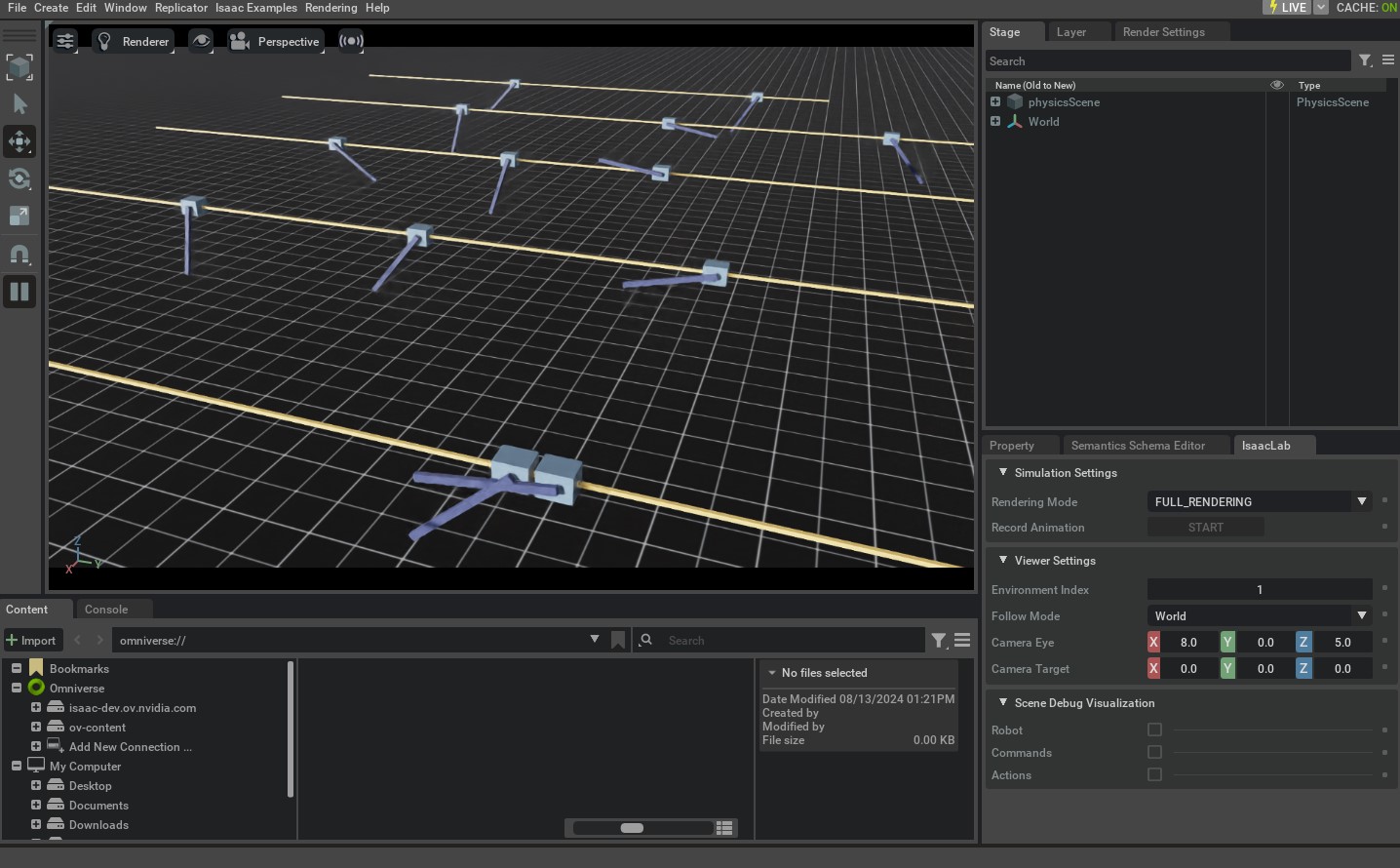
This should open a stage with everything similar to the Creating a Manager-Based RL Environment tutorial.
To stop the simulation, you can either close the window, or press Ctrl+C in the terminal.
In addition, you can also change the simulation device from GPU to CPU by setting the value of the --device flag explicitly:
uv run python scripts/environments/random_agent.py --task Isaac-Cartpole --num_envs 32 --device cpu --viz kit
./isaaclab.sh -p scripts/environments/random_agent.py --task Isaac-Cartpole --num_envs 32 --device cpu --viz kit
With the --device cpu flag, the simulation will run on the CPU. This is useful for debugging the simulation.
However, the simulation will run much slower than on the GPU.