



Creating a Manager-Based RL Environment#
Having learnt how to create a base environment in Creating a Manager-Based Base Environment, we will now look at how to create a manager-based task environment for reinforcement learning.
The base environment is designed as an sense-act environment where the agent can send commands to the environment
and receive observations from the environment. This minimal interface is sufficient for many applications such as
traditional motion planning and controls. However, many applications require a task-specification which often
serves as the learning objective for the agent. For instance, in a navigation task, the agent may be required to
reach a goal location. To this end, we use the envs.ManagerBasedRLEnv class which extends the base environment
to include a task specification.
Similar to other components in Isaac Lab, instead of directly modifying the base class envs.ManagerBasedRLEnv, we
encourage users to simply implement a configuration envs.ManagerBasedRLEnvCfg for their task environment.
This practice allows us to separate the task specification from the environment implementation, making it easier
to reuse components of the same environment for different tasks.
In this tutorial, we will configure the cartpole environment using the envs.ManagerBasedRLEnvCfg to create a manager-based task
for balancing the pole upright. We will learn how to specify the task using reward terms, termination criteria,
curriculum and commands.
The Code#
For this tutorial, we use the cartpole environment defined in isaaclab_tasks.core.cartpole module.
Code for cartpole_manager_env_cfg.py
  1# Copyright (c) 2022-2026, The Isaac Lab Project Developers (https://github.com/isaac-sim/IsaacLab/blob/main/CONTRIBUTORS.md).
  2# All rights reserved.
  3#
  4# SPDX-License-Identifier: BSD-3-Clause
  5
  6import math
  7
  8from isaaclab_newton.physics import (
  9    KaminoPADMMSolverCfg,
 10    MJWarpSolverCfg,
 11    NewtonCfg,
 12)
 13from isaaclab_ov.physics import OvPhysxCfg
 14from isaaclab_physx.physics import PhysxCfg
 15
 16import isaaclab.sim as sim_utils
 17from isaaclab.assets import ArticulationCfg, AssetBaseCfg
 18from isaaclab.envs import ManagerBasedRLEnvCfg
 19from isaaclab.managers import EventTermCfg as EventTerm
 20from isaaclab.managers import ObservationGroupCfg as ObsGroup
 21from isaaclab.managers import ObservationTermCfg as ObsTerm
 22from isaaclab.managers import RewardTermCfg as RewTerm
 23from isaaclab.managers import SceneEntityCfg
 24from isaaclab.managers import TerminationTermCfg as DoneTerm
 25from isaaclab.physics import PhysxAutoCfg
 26from isaaclab.scene import InteractiveSceneCfg
 27from isaaclab.utils.configclass import configclass
 28from isaaclab.visualizers import VisualizerCfg
 29
 30import isaaclab_tasks.core.cartpole.mdp as mdp
 31from isaaclab_tasks.utils import PresetCfg
 32
 33from isaaclab_assets.robots.cartpole import CARTPOLE_CFG  # isort:skip
 34
 35
 36##
 37# Physics backend presets
 38##
 39
 40
 41@configclass
 42class CartpolePhysicsCfg(PresetCfg):
 43    isaacsim_physx: PhysxCfg = PhysxCfg()
 44    ovphysx: OvPhysxCfg = OvPhysxCfg()
 45    physx: PhysxAutoCfg = PhysxAutoCfg(isaacsim_physx=isaacsim_physx, ovphysx=ovphysx)
 46    newton_mjwarp: NewtonCfg = NewtonCfg(
 47        solver_cfg=MJWarpSolverCfg(
 48            njmax=5,
 49            nconmax=3,
 50            cone="pyramidal",
 51            impratio=1,
 52            integrator="implicitfast",
 53        ),
 54        num_substeps=1,
 55        debug_mode=False,
 56        use_cuda_graph=True,
 57    )
 58    default: NewtonCfg = newton_mjwarp
 59    newton_kamino: NewtonCfg = NewtonCfg(
 60        solver_cfg=KaminoPADMMSolverCfg(sparse_jacobian=True),
 61        debug_mode=False,
 62        use_cuda_graph=True,
 63    )
 64
 65
 66##
 67# Scene definition
 68##
 69
 70
 71@configclass
 72class CartpoleSceneCfg(InteractiveSceneCfg):
 73    """Configuration for a cart-pole scene."""
 74
 75    # ground plane
 76    ground = AssetBaseCfg(
 77        prim_path="/World/ground",
 78        spawn=sim_utils.GroundPlaneCfg(size=(100.0, 100.0)),
 79    )
 80
 81    # cartpole
 82    robot: ArticulationCfg = CARTPOLE_CFG.replace(prim_path="{ENV_REGEX_NS}/Robot")
 83
 84    # lights
 85    # rot quaternion for euler angles (roll, pitch, yaw) = (0, -45, -45) degrees
 86    distant_light = AssetBaseCfg(
 87        prim_path="/World/DistantLight",
 88        init_state=AssetBaseCfg.InitialStateCfg(
 89            rot=(-0.14644663035869598, -0.3535534143447876, -0.3535534143447876, 0.8535533547401428)
 90        ),
 91        spawn=sim_utils.DistantLightCfg(color=(1.0, 1.0, 1.0), intensity=2000.0),
 92    )
 93
 94
 95##
 96# MDP settings
 97##
 98
 99
100@configclass
101class ActionsCfg:
102    """Action specifications for the MDP."""
103
104    joint_effort = mdp.JointEffortActionCfg(asset_name="robot", joint_names=["slider_to_cart"], scale=100.0)
105
106
107@configclass
108class ObservationsCfg:
109    """Observation specifications for the MDP."""
110
111    @configclass
112    class PolicyCfg(ObsGroup):
113        """Observations for policy group."""
114
115        # observation terms (order preserved)
116        joint_pos_rel = ObsTerm(func=mdp.joint_pos_rel)
117        joint_vel_rel = ObsTerm(func=mdp.joint_vel_rel)
118
119        def __post_init__(self) -> None:
120            self.enable_corruption = False
121            self.concatenate_terms = True
122
123    # observation groups
124    policy: PolicyCfg = PolicyCfg()
125
126
127@configclass
128class EventCfg:
129    """Configuration for events."""
130
131    # reset
132    reset_cart_position = EventTerm(
133        func=mdp.reset_joints_by_offset,
134        mode="reset",
135        params={
136            "asset_cfg": SceneEntityCfg("robot", joint_names=["slider_to_cart"]),
137            "position_range": (-1.0, 1.0),
138            "velocity_range": (-0.5, 0.5),
139        },
140    )
141
142    reset_pole_position = EventTerm(
143        func=mdp.reset_joints_by_offset,
144        mode="reset",
145        params={
146            "asset_cfg": SceneEntityCfg("robot", joint_names=["cart_to_pole"]),
147            "position_range": (-0.25 * math.pi, 0.25 * math.pi),
148            "velocity_range": (-0.25 * math.pi, 0.25 * math.pi),
149        },
150    )
151
152
153@configclass
154class RewardsCfg:
155    """Reward terms for the MDP."""
156
157    # (1) Constant running reward
158    alive = RewTerm(func=mdp.is_alive, weight=1.0)
159    # (2) Failure penalty
160    terminating = RewTerm(func=mdp.is_terminated, weight=-2.0)
161    # (3) Primary task: keep pole upright
162    pole_pos = RewTerm(
163        func=mdp.joint_pos_target_l2,
164        weight=-1.0,
165        params={"asset_cfg": SceneEntityCfg("robot", joint_names=["cart_to_pole"]), "target": 0.0},
166    )
167    # (4) Shaping tasks: lower cart velocity
168    cart_vel = RewTerm(
169        func=mdp.joint_vel_l1,
170        weight=-0.01,
171        params={"asset_cfg": SceneEntityCfg("robot", joint_names=["slider_to_cart"])},
172    )
173    # (5) Shaping tasks: lower pole angular velocity
174    pole_vel = RewTerm(
175        func=mdp.joint_vel_l1,
176        weight=-0.005,
177        params={"asset_cfg": SceneEntityCfg("robot", joint_names=["cart_to_pole"])},
178    )
179    # (6) Success rate tracking (zero-weight, metric only)
180    success_rate = RewTerm(func=mdp.survival_success_rate, weight=0.0)
181
182
183@configclass
184class TerminationsCfg:
185    """Termination terms for the MDP."""
186
187    # (1) Time out
188    time_out = DoneTerm(func=mdp.time_out, time_out=True)
189    # (2) Cart out of bounds
190    cart_out_of_bounds = DoneTerm(
191        func=mdp.joint_pos_out_of_manual_limit,
192        params={"asset_cfg": SceneEntityCfg("robot", joint_names=["slider_to_cart"]), "bounds": (-3.0, 3.0)},
193    )
194
195
196##
197# Environment configuration
198##
199
200
201@configclass
202class CartpoleEnvCfg(ManagerBasedRLEnvCfg):
203    """Configuration for the cartpole environment."""
204
205    # Scene settings
206    scene: CartpoleSceneCfg = CartpoleSceneCfg(num_envs=4096, env_spacing=4.0, clone_in_fabric=True)
207    # Basic settings
208    observations: ObservationsCfg = ObservationsCfg()
209    actions: ActionsCfg = ActionsCfg()
210    events: EventCfg = EventCfg()
211    # MDP settings
212    rewards: RewardsCfg = RewardsCfg()
213    terminations: TerminationsCfg = TerminationsCfg()
214
215    # Post initialization
216    def __post_init__(self) -> None:
217        """Post initialization."""
218        # general settings
219        self.decimation = 2
220        self.episode_length_s = 5
221        # visualizer camera settings
222        self.sim.default_visualizer_cfg = VisualizerCfg(eye=(8.0, 0.0, 5.0))
223        # simulation settings
224        self.sim.dt = 1 / 120
225        self.sim.render_interval = self.decimation
226        self.sim.physics = CartpolePhysicsCfg()
The script for running the environment run_cartpole_rl_env.py is present in the
isaaclab/scripts/tutorials/03_envs directory. The script is similar to the
cartpole_base_env.py script in the previous tutorial, except that it uses the
envs.ManagerBasedRLEnv instead of the envs.ManagerBasedEnv.
Code for run_cartpole_rl_env.py
 1# Copyright (c) 2022-2026, The Isaac Lab Project Developers (https://github.com/isaac-sim/IsaacLab/blob/main/CONTRIBUTORS.md).
 2# All rights reserved.
 3#
 4# SPDX-License-Identifier: BSD-3-Clause
 5
 6"""
 7This script demonstrates how to run the RL environment for the cartpole balancing task.
 8
 9.. code-block:: bash
10
11    uv run python scripts/tutorials/03_envs/run_cartpole_rl_env.py --num_envs 32
12
13"""
14
15"""Launch Isaac Sim Simulator first."""
16
17import argparse
18
19from isaaclab.app import AppLauncher
20
21# add argparse arguments
22parser = argparse.ArgumentParser(description="Tutorial on running the cartpole RL environment.")
23parser.add_argument("--num_envs", type=int, default=16, help="Number of environments to spawn.")
24
25# append AppLauncher cli args
26AppLauncher.add_app_launcher_args(parser)
27# tutorials should open Kit visualizer by default
28parser.set_defaults(visualizer=["kit"])
29# parse the arguments
30args_cli = parser.parse_args()
31
32# launch omniverse app
33app_launcher = AppLauncher(args_cli)
34simulation_app = app_launcher.app
35
36"""Rest everything follows."""
37
38import torch
39
40from isaaclab.envs import ManagerBasedRLEnv
41
42from isaaclab_tasks.utils import parse_env_cfg
43
44
45def main():
46    """Main function."""
47    # create environment configuration
48    env_cfg = parse_env_cfg("Isaac-Cartpole", device=args_cli.device, num_envs=args_cli.num_envs)
49    # setup RL environment
50    env = ManagerBasedRLEnv(cfg=env_cfg)
51
52    # simulate physics
53    count = 0
54    while simulation_app.is_running():
55        with torch.inference_mode():
56            # reset
57            if count % 300 == 0:
58                count = 0
59                env.reset()
60                print("-" * 80)
61                print("[INFO]: Resetting environment...")
62            # sample random actions
63            joint_efforts = torch.randn_like(env.action_manager.action)
64            # step the environment
65            obs, rew, terminated, truncated, info = env.step(joint_efforts)
66            # print current orientation of pole
67            print("[Env 0]: Pole joint: ", obs["policy"][0][1].item())
68            # update counter
69            count += 1
70
71    # close the environment
72    env.close()
73
74
75if __name__ == "__main__":
76    # run the main function
77    main()
78    # close sim app
79    simulation_app.close()
The Code Explained#
We already went through parts of the above in the Creating a Manager-Based Base Environment tutorial to learn about how to specify the scene, observations, actions and events. Thus, in this tutorial, we will focus only on the RL components of the environment.
In Isaac Lab, we provide various implementations of different terms in the envs.mdp module. We will use
some of these terms in this tutorial, but users are free to define their own terms as well. These
are usually placed in their task-specific sub-package
(for instance, in isaaclab_tasks.core.cartpole.mdp).
Defining rewards#
The managers.RewardManager is used to compute the reward terms for the agent. Similar to the other
managers, its terms are configured using the managers.RewardTermCfg class. The
managers.RewardTermCfg class specifies the function or callable class that computes the reward
as well as the weighting associated with it. It also takes in dictionary of arguments, "params"
that are passed to the reward function when it is called.
For the cartpole task, we will use the following reward terms:
Alive Reward: Encourage the agent to stay alive for as long as possible.
Terminating Reward: Similarly penalize the agent for terminating.
Pole Angle Reward: Encourage the agent to keep the pole at the desired upright position.
Cart Velocity Reward: Encourage the agent to keep the cart velocity as small as possible.
Pole Velocity Reward: Encourage the agent to keep the pole velocity as small as possible.
@configclass
class RewardsCfg:
    """Reward terms for the MDP."""

    # (1) Constant running reward
    alive = RewTerm(func=mdp.is_alive, weight=1.0)
    # (2) Failure penalty
    terminating = RewTerm(func=mdp.is_terminated, weight=-2.0)
    # (3) Primary task: keep pole upright
    pole_pos = RewTerm(
        func=mdp.joint_pos_target_l2,
        weight=-1.0,
        params={"asset_cfg": SceneEntityCfg("robot", joint_names=["cart_to_pole"]), "target": 0.0},
    )
    # (4) Shaping tasks: lower cart velocity
    cart_vel = RewTerm(
        func=mdp.joint_vel_l1,
        weight=-0.01,
        params={"asset_cfg": SceneEntityCfg("robot", joint_names=["slider_to_cart"])},
    )
    # (5) Shaping tasks: lower pole angular velocity
    pole_vel = RewTerm(
        func=mdp.joint_vel_l1,
        weight=-0.005,
        params={"asset_cfg": SceneEntityCfg("robot", joint_names=["cart_to_pole"])},
    )
    # (6) Success rate tracking (zero-weight, metric only)
    success_rate = RewTerm(func=mdp.survival_success_rate, weight=0.0)
Defining termination criteria#
Most learning tasks happen over a finite number of steps that we call an episode. For instance, in the cartpole task, we want the agent to balance the pole for as long as possible. However, if the agent reaches an unstable or unsafe state, we want to terminate the episode. On the other hand, if the agent is able to balance the pole for a long time, we want to terminate the episode and start a new one so that the agent can learn to balance the pole from a different starting configuration.
The managers.TerminationsCfg configures what constitutes for an episode to terminate. In this example,
we want the task to terminate when either of the following conditions is met:
Episode Length The episode length is greater than the defined max_episode_length
Cart out of bounds The cart goes outside of the bounds [-3, 3]
The flag managers.TerminationsCfg.time_out specifies whether the term is a time-out (truncation) term
or terminated term. These are used to indicate the two types of terminations as described in Gymnasium’s documentation.
@configclass
class TerminationsCfg:
    """Termination terms for the MDP."""

    # (1) Time out
    time_out = DoneTerm(func=mdp.time_out, time_out=True)
    # (2) Cart out of bounds
    cart_out_of_bounds = DoneTerm(
        func=mdp.joint_pos_out_of_manual_limit,
        params={"asset_cfg": SceneEntityCfg("robot", joint_names=["slider_to_cart"]), "bounds": (-3.0, 3.0)},
    )
Defining commands#
For various goal-conditioned tasks, it is useful to specify the goals or commands for the agent. These are
handled through the managers.CommandManager. The command manager handles resampling and updating the
commands at each step. It can also be used to provide the commands as an observation to the agent.
For this simple task, we do not use any commands. Hence, we leave this attribute as its default value, which is None. You can see an example of how to define a command manager in the other locomotion or manipulation tasks.
Defining curriculum#
Often times when training a learning agent, it helps to start with a simple task and gradually increase the
tasks’s difficulty as the agent training progresses. This is the idea behind curriculum learning. In Isaac Lab,
we provide a managers.CurriculumManager class that can be used to define a curriculum for your environment.
In this tutorial we don’t implement a curriculum for simplicity, but you can see an example of a curriculum definition in the other locomotion or manipulation tasks.
Tying it all together#
With all the above components defined, we can now create the ManagerBasedRLEnvCfg configuration for the
cartpole environment. This is similar to the ManagerBasedEnvCfg defined in Creating a Manager-Based Base Environment,
only with the added RL components explained in the above sections.
@configclass
class CartpoleEnvCfg(ManagerBasedRLEnvCfg):
    """Configuration for the cartpole environment."""

    # Scene settings
    scene: CartpoleSceneCfg = CartpoleSceneCfg(num_envs=4096, env_spacing=4.0, clone_in_fabric=True)
    # Basic settings
    observations: ObservationsCfg = ObservationsCfg()
    actions: ActionsCfg = ActionsCfg()
    events: EventCfg = EventCfg()
    # MDP settings
    rewards: RewardsCfg = RewardsCfg()
    terminations: TerminationsCfg = TerminationsCfg()

    # Post initialization
    def __post_init__(self) -> None:
        """Post initialization."""
        # general settings
        self.decimation = 2
        self.episode_length_s = 5
        # visualizer camera settings
        self.sim.default_visualizer_cfg = VisualizerCfg(eye=(8.0, 0.0, 5.0))
        # simulation settings
        self.sim.dt = 1 / 120
        self.sim.render_interval = self.decimation
        self.sim.physics = CartpolePhysicsCfg()
Running the simulation loop#
Coming back to the run_cartpole_rl_env.py script, the simulation loop is similar to the previous tutorial.
The only difference is that we create an instance of envs.ManagerBasedRLEnv instead of the
envs.ManagerBasedEnv. Consequently, now the envs.ManagerBasedRLEnv.step() method returns additional signals
such as the reward and termination status. The information dictionary also maintains logging of quantities
such as the reward contribution from individual terms, the termination status of each term, the episode length etc.
def main():
    """Main function."""
    # create environment configuration
    env_cfg = parse_env_cfg("Isaac-Cartpole", device=args_cli.device, num_envs=args_cli.num_envs)
    # setup RL environment
    env = ManagerBasedRLEnv(cfg=env_cfg)

    # simulate physics
    count = 0
    while simulation_app.is_running():
        with torch.inference_mode():
            # reset
            if count % 300 == 0:
                count = 0
                env.reset()
                print("-" * 80)
                print("[INFO]: Resetting environment...")
            # sample random actions
            joint_efforts = torch.randn_like(env.action_manager.action)
            # step the environment
            obs, rew, terminated, truncated, info = env.step(joint_efforts)
            # print current orientation of pole
            print("[Env 0]: Pole joint: ", obs["policy"][0][1].item())
            # update counter
            count += 1

    # close the environment
    env.close()
The Code Execution#
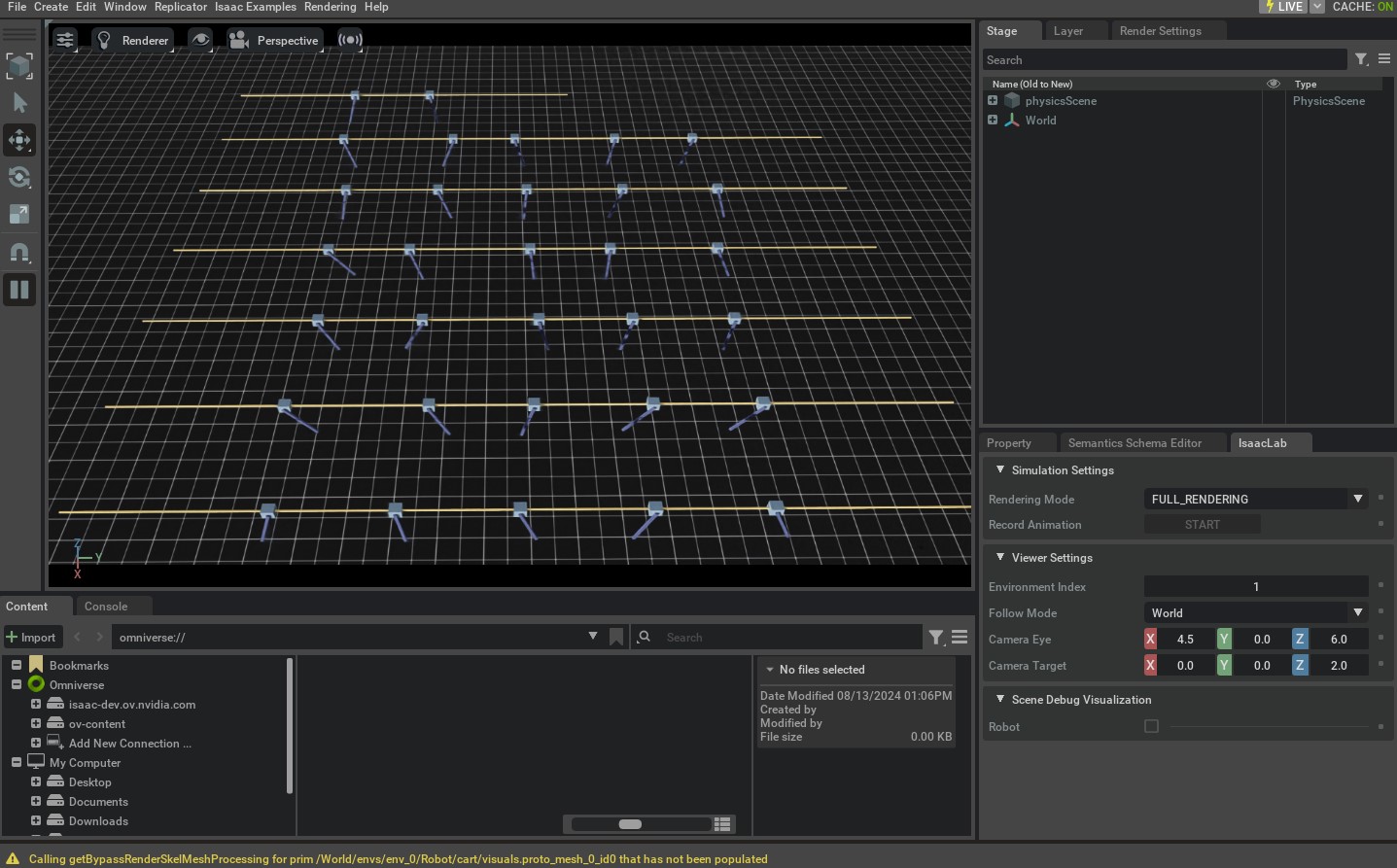
Similar to the previous tutorial, we can run the environment by executing the run_cartpole_rl_env.py script.
python scripts/tutorials/03_envs/run_cartpole_rl_env.py --num_envs 32 --viz kit
This should open a similar simulation as in the previous tutorial. However, this time, the environment returns more signals that specify the reward and termination status. Additionally, the individual environments reset themselves when they terminate based on the termination criteria specified in the configuration.
To stop the simulation, you can either close the window, or press Ctrl+C in the terminal
where you started the simulation.
In this tutorial, we learnt how to create a task environment for reinforcement learning. We do this
by extending the base environment to include the rewards, terminations, commands and curriculum terms.
We also learnt how to use the envs.ManagerBasedRLEnv class to run the environment and receive various
signals from it.
While it is possible to manually create an instance of envs.ManagerBasedRLEnv class for a desired task,
this is not scalable as it requires specialized scripts for each task. Thus, we exploit the
gymnasium.make() function to create the environment with the gym interface. We will learn how to do this
in the next tutorial.