



Ecosystem#
Isaac Lab is a fully open-source framework for building, training, and testing robot-learning systems in simulation. It embraces a modular design that supports multiple physics backends, rendering backends, RL libraries, and various robot-learning workflows spanning from reinforcement learning, imitation learning, teleoperation, and post-training.
At the core of Isaac Lab, we focus heavily on parallelized GPU-accelerated simulation. Isaac Lab provides warp-based integration with Newton, allowing for efficient CUDA graphing of simulation and MDP pipelines. Additionally, the OvPhysX backend provides PhysX support through a lightweight standalone library package. Similarly, OvRTX introduces RTX rendering capabilities through an optional standalone python dependency. This architecture promotes a fully customized experience for users to choose from a selection of different physics and rendering engines.
Isaac Lab is not itself a simulator. It provides a framework for defining concepts such as the scene, asset, sensors, actuators, controllers, and tasks, which can run on multiple physics and rendering backends. The shared backend interface lets a supported environment keep the same structure while its preset selects the runtime. See Backend Architecture for the implementation model.
Modular Multi-Backend Physics and Rendering#
Isaac Lab supports two physics backends, with PhysX support available through either a Kit-based Isaac Sim PhysX implementation and a standalone (Kit-less) OvPhysX implementation.
Backend |
Best fit |
Benefits |
Trade-offs |
|---|---|---|---|
Newton |
Lightweight training and workflows that can use multiple solver families |
Warp-native GPU execution without Isaac Sim; provides MJWarp, VBD, MPM, and other solver paths |
Task and feature coverage varies by solver, and changing solvers can require retuning |
OvPhysX |
Kit-less PhysX workflows |
PhysX SDK available through a standalone runtime and can pair with kit-less OVRTX rendering |
Cannot be mixed together with Isaac Sim workflows |
Isaac Sim PhysX |
Isaac Sim workflows that require full Kit integration |
PhysX SDK through Isaac Sim and Kit |
Requires the larger Isaac Sim and Kit runtime |
Additionally, Isaac Lab provides multiple rendering options through the Newton Tiled Camera sensor and RTX, available as a standalone library OvRTX, as well as Isaac Sim Kit-based Isaac Sim RTX.
Renderer |
Best fit |
Benefits |
Trade-offs |
|---|---|---|---|
Newton Tiled Camera Sensor |
Kit-less training where lightweight camera observations are sufficient at small resolutions |
Warp-native raytraced tiled rendering; supports RGB, depth, normals, and semantic and instance segmentation at high throughput |
Lower fidelity rendering; minimal support for complex lighting and physics-based materials |
OvRTX |
Kit-less rendering workflows that require high-fidelity RTX image quality |
Provides higher throughput minimal mode; supports photo-real rendering and can be combined with Newton or OvPhysX without requiring Isaac Sim |
Requires the optional |
Isaac RTX |
Isaac Sim-based workflows that require full RTX fidelity and the broadest sensor-output coverage |
Provides higher throughput minimal mode and photo-real rendering integrated with PhysX, Kit, and the Isaac Sim toolchain |
Requires the larger Isaac Sim and Kit runtime |

Lightweight Warp sensor for tiled camera observations.

Kit-less RTX materials, lighting, and camera outputs.

Full RTX fidelity and camera-output coverage in Isaac Sim.
See Renderer outputs at a glance for the complete output gallery.
Physics, camera sensor rendering, and interactive visualization are separate choices. For example, Newton can use the lightweight Newton Tiled Camera Sensor or OvRTX for RTX image quality without Isaac Sim. See Physics Backends, Renderers, and Visualization for current support matrices and preset commands.
For the most lightweight installation experience, Newton brings the best experience through an out-of-the-box installation setup, multiple physics solver capabilities with solver coupling mechanisms, as well as lightweight rendering sensors.
Capabilities in motion#
These examples span real-to-sim reconstruction, vision-policy learning, and contact-rich material simulation. Explore the packaged demos and environment catalog for more examples.

NuRec turns real-world captures into simulation-ready scenes for policy training and evaluation. See COMPASS with NuRec.
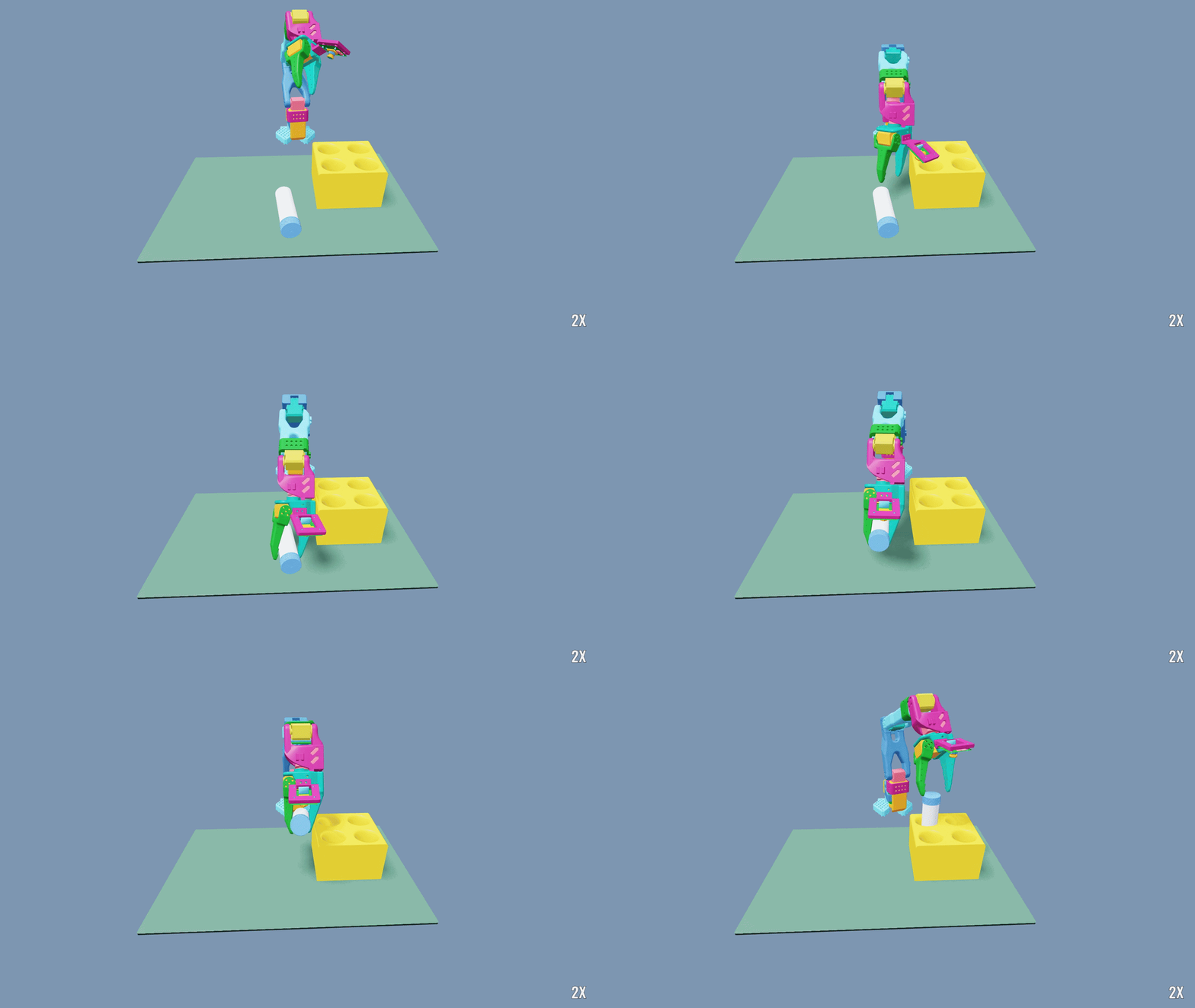
The SO-101 tutorial trains a state teacher and distills it into a wrist-camera policy for vial placement. See the SO-101 tutorial.
A Rizon robot and Sharpa hand demonstrate contact-rich manipulation of an RJ45 cable.
A Rizon robot and Sharpa hand demonstrate dexterous teapot manipulation with MPM fluid simulation.
Is Isaac Lab a simulator?#
At its core, Isaac Lab is not a robotics simulator; it is a framework for building robot learning applications on top of a simulator. An analogous example is RoboSuite, which is built on top of MuJoCo for fixed-base manipulation. Other examples include MuJoCo Playground (built on MJX) and Isaac Gym (built on PhysX).
Isaac Lab’s shared interfaces cover the Newton, Kit-based PhysX, and OvPhysX backends without requiring environment code to import backend-specific modules directly.
The framework addresses a recurring problem with standalone task implementations: because each task reimplements the observation, reward, termination, and randomization logic from scratch, large projects accumulate significant code duplication. Isaac Lab solves this with two complementary patterns:
Manager-based environments defer every behavioral concern to typed, composable manager objects (
ObservationManager,RewardManager,TerminationManager,EventManager,CurriculumManager,CommandManager,ActionManager,RecorderManager). Each manager is driven by small, reusable MDP term functions that live inisaaclab.envs.mdp. This makes it easy to mix and match terms across tasks and to test individual components in isolation.Direct environments implement
_get_observations,_get_rewards,_get_dones, and_reset_idxdirectly in a subclass, similar to the Isaac Gym style. They sacrifice some modularity for simplicity and are a natural starting point for rapid prototyping.
Both patterns expose a standard gymnasium Env interface with vectorized semantics,
so the same environment works unmodified with any of the supported RL libraries.
Configuration management uses Hydra with a preset system that allows selecting physics
backends and hyperparameter sweeps from the command line.
Why should I use Isaac Lab?#
Isaac Lab provides an open-sourced platform for the community to build benchmarks and robot learning systems together. Sharing a common infrastructure lets teams reuse existing components, compare results on the same tasks, and focus on the research problems that matter rather than rebuilding simulation scaffolding from scratch.
Concretely, Isaac Lab offers:
Two authoring patterns — manager-based for modular research and direct for rapid prototyping — with a shared
InteractiveSceneand sensor stack.Multi-backend simulation — select Newton, Kit-based PhysX or OvPhysX from the command line when the task provides the corresponding preset. Additionally, choose from Newton rendering sensor, Kit-based RTX, or OvRTX for rendering pipelines.
Rich sensor suite — cameras, ray-casters, contact sensors, IMU, frame transformers, joint-wrench sensors, and visuo-tactile sensors.
Imitation learning tooling —
isaaclab_mimicprovides cuRobo-based planners and a full dataset-generation pipeline for human demonstration collection.Teleoperation and XR —
isaaclab_teleopsupports OpenXR, CloudXR, gamepads, spacemouses, and Haply devices with retargeters for manipulators and humanoids.Hydra configuration management — hierarchical configs with command-line overrides and a preset system for multi-backend environment variants.
RL library integrations — wrappers for RSL-RL, skrl, Stable Baselines 3, and RL Games ship in
isaaclab_rl. Additionally, integration of RLinf provides RL post-training capabilities for fine-tuning large foundation models.Kit-less deployment — run policies and simulations using the Newton backend without a full Isaac Sim installation. URDF and MJCF command-line conversion can also run kit-less when the standalone
isaacsim-asset-isolatedimporter wheel is installed.
Applications built on Isaac Lab#
The framework also serves as the simulation and environment layer for higher-level applications. These projects have their own releases and installation requirements:
Composes scenes, robot embodiments, and tasks into scalable benchmarks, then evaluates generalist robot policies across controlled environment variations.
Uses Isaac Lab environments for demonstration collection, synthetic trajectory generation, policy training, and closed-loop evaluation of generalist robot models.