

Open a Kitchen Fridge Door#
This example uses the agentic environment-generation GUI to create a DROID
fridge-opening task in the lightwheel_robocasa_kitchen background. The
environment-generation agent identifies the kitchen floor and fridge
articulation, while Arena’s relation solver places the robot on the floor next
to and facing the fridge.
Docker Container: Base (see Installation for more details)
./docker/run_docker.sh
Generate the Environment#
Generate the environment graph spec with either the interactive GUI or the one-shot CLI runner:
Start the live editor and open http://localhost:8501 in a browser:
python isaaclab_arena_examples/agentic_environment_generation/gui_runner.py
In the Generate from prompt panel, enter the prompt and click
Generate spec:
There is a floor and a fridge in the lightwheel_robocasa_kitchen kitchen.
DROID is on the floor, next to the fridge with 0.1 meter distance and facing
it. DROID opens the fridge door to the 0.2 openness threshold.
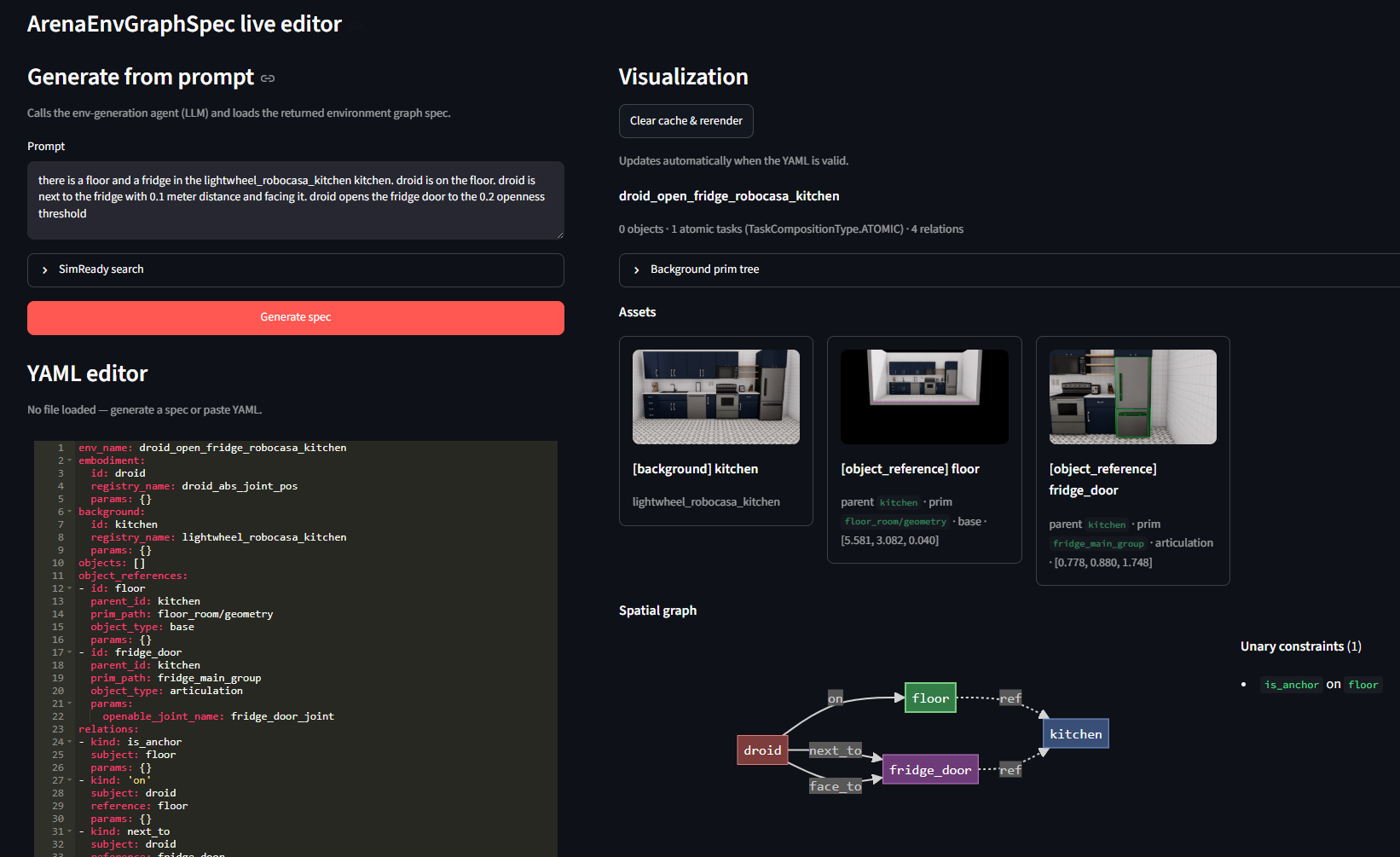
The prompt generates the floor and fridge references, DROID placement relations, and the fridge-opening task.#
Run the runner in resolve mode:
python isaaclab_arena_examples/agentic_environment_generation/environment_generation_runner.py \
   --mode resolve \
   --prompt "There is a floor and a fridge in the lightwheel_robocasa_kitchen kitchen. DROID is on the floor, next to the fridge with 0.1 meter distance and facing it. DROID opens the fridge door to the 0.2 openness threshold."
The runner prints the resolved graph and writes <env_name>.yaml under
isaaclab_arena_environments/agent_generated/.
Review the Generated Spec#
The fridge reference uses object_type: articulation and identifies
fridge_door_joint as its openable joint. The robot is placed on the floor,
0.1 meters from the fridge, and rotated to face it. The task succeeds when the
door reaches the requested openness threshold.
Placement and task parameters may need refinement. For example, adjust
side and distance_m under next_to, yaw_rad under
rotate_around_solution, or openness_threshold under OpenDoorTask.
object_references:
- id: fridge
  parent_id: kitchen
  prim_path: fridge_main_group
  object_type: articulation
  params:
    openable_joint_name: fridge_door_joint
relations:
- kind: 'on'
  subject: droid
  reference: floor
  params: {}
- kind: next_to
  subject: droid
  reference: fridge
  params:
    side: negative_y
    distance_m: 0.1
- kind: rotate_around_solution
  subject: droid
  params:
    yaw_rad: 1.57
task:
  composition: atomic
  subtasks:
  - kind: OpenDoorTask
    params:
      openable_object: fridge
      openness_threshold: 0.2
      reset_openness: 0.0
Make sure to save the edited YAML file to disk.
By default, the GUI and CLI runners save newly generated specs under
isaaclab_arena_environments/agent_generated/ using the spec’s env_name;
for this example, the generated path is
isaaclab_arena_environments/agent_generated/droid_open_kitchen_fridge.yaml.
The repository includes a finalized reference copy at
isaaclab_arena_environments/kitchen_bench/droid_open_fridge_lightwheel_kitchen.yaml.
Run a Policy in the Generated Environment#
Next, run a generalized policy, such as an OpenPI policy, in the generated environment to verify that it works end to end.
Start the OpenPI server as described in Evaluate with OpenPI. In a second
terminal, enter the Arena container with ./docker/run_docker.sh, then run
two episodes as a sanity check that the generated environment works with a PI
policy:
The command below uses the provided reference copy. To run your generated spec
instead, replace the --env_graph_spec_yaml path with the corresponding file
under isaaclab_arena_environments/agent_generated/.
python isaaclab_arena/evaluation/policy_runner.py \
   --viz kit \
   --policy_type isaaclab_arena_openpi.policy.pi0_remote_policy.Pi0RemotePolicy \
   --num_episodes 2 \
   --num_envs 1 \
   --enable_cameras \
   --env_graph_spec_yaml isaaclab_arena_environments/kitchen_bench/droid_open_fridge_lightwheel_kitchen.yaml
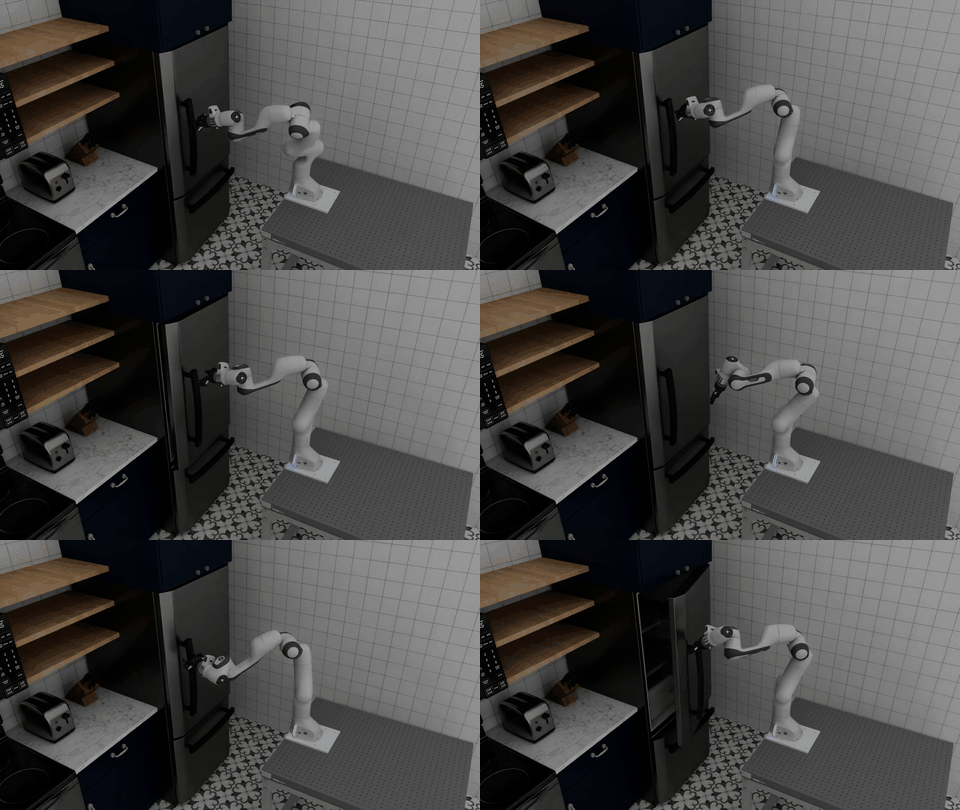
PI controls DROID to reach the fridge and open its door in the agentically generated kitchen environment.#