

Variation System#
A variation is a controlled randomization to one part of an environment. It lets you test the same policy and task under different conditions without creating a separate environment for every case.
Imagine testing a pick-and-place policy under dim, normal, and bright lighting. The robot, objects, and task stay the same; only the light changes. That makes it easier to tell whether lighting affected the result.
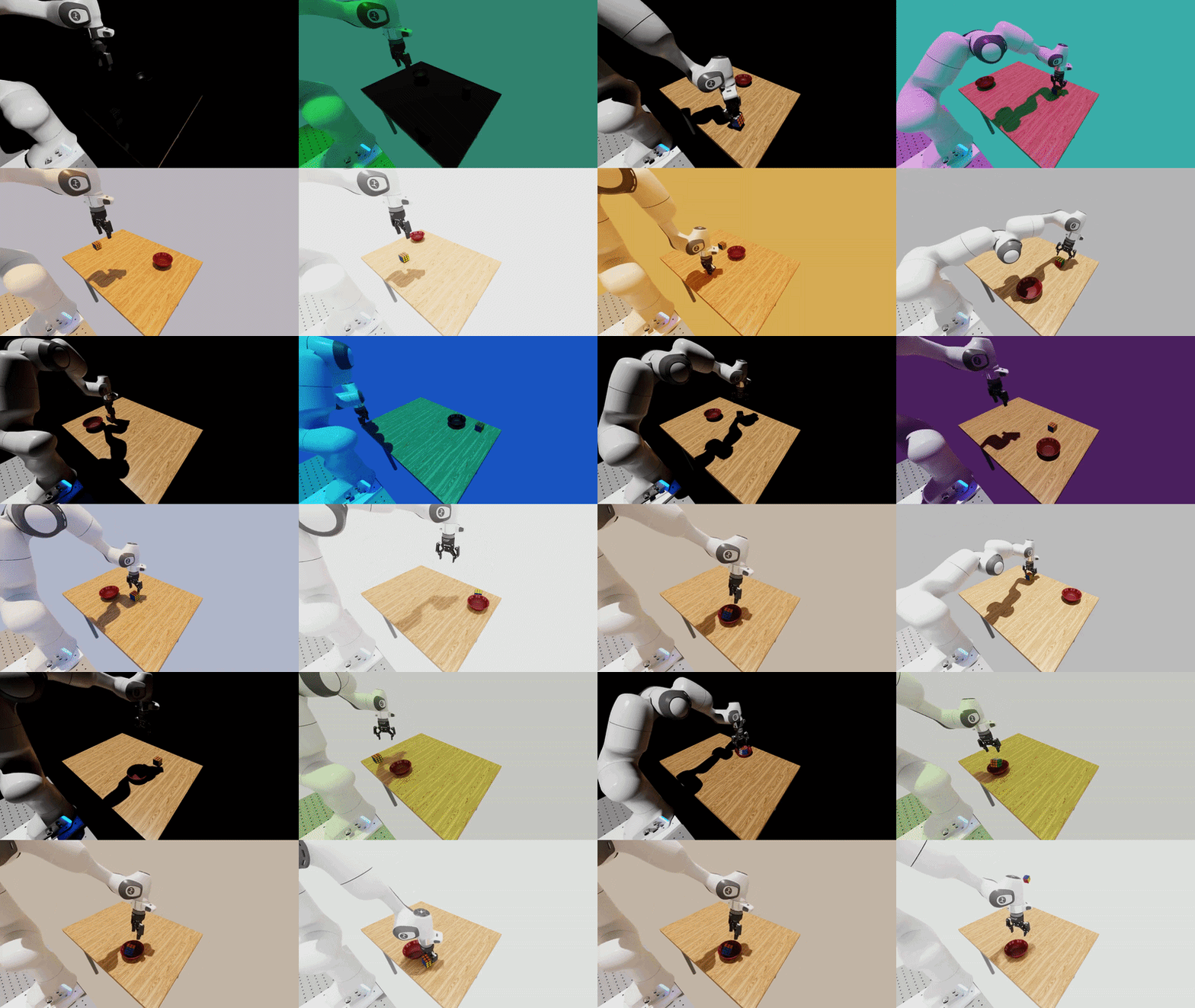
The results of activating several different lighting variations in the same environment. The variations are lighting direction (top-left), lighting color (top-right), lighting temperature (bottom-left), and lighting intensity (bottom-right).#
Lighting is not the only factor that can influence a policy’s performance. We also expose variations for modifying camera parameters.
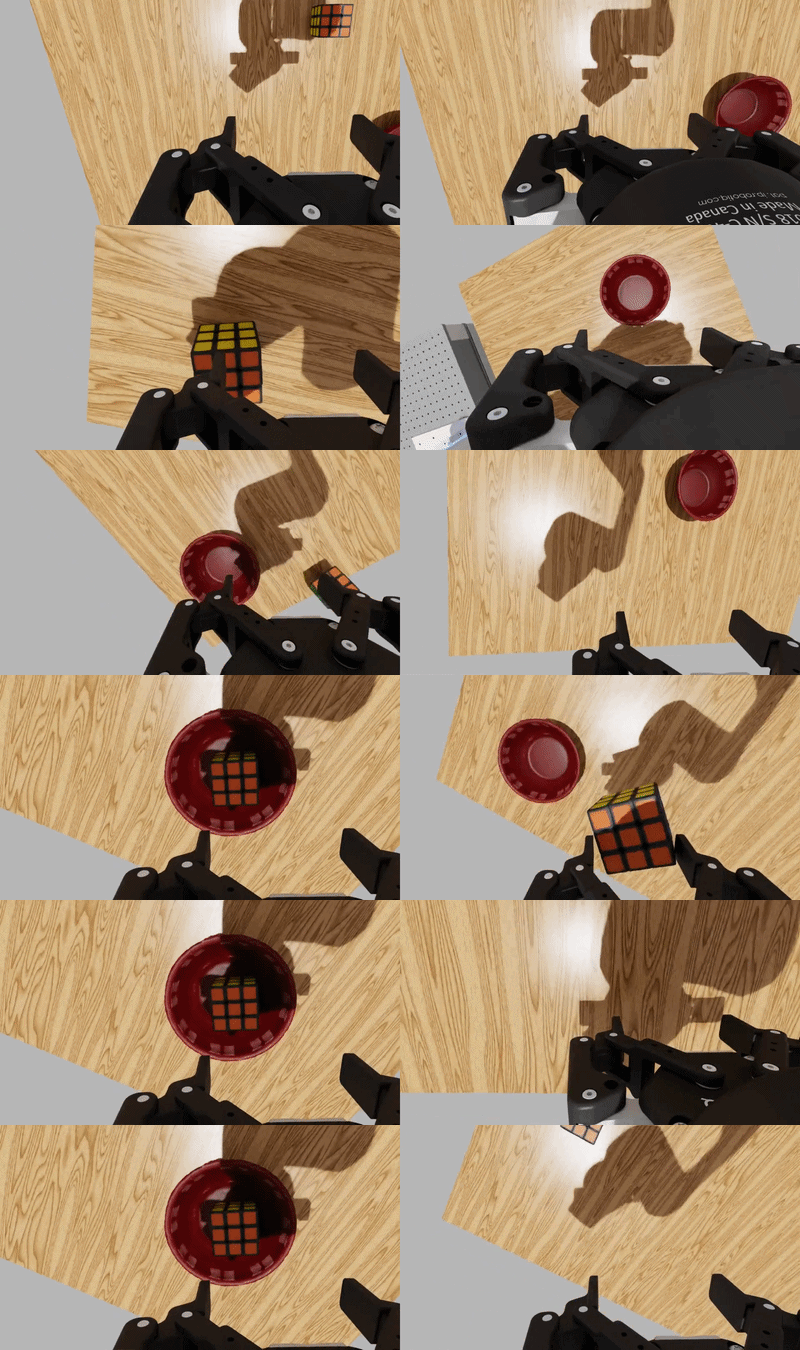
The results of activating several different camera-related variations in the same environment. The variations are wrist-camera intrinsics (left), wrist-camera extrinsics (right).#
The scene background can also be varied by sampling the HDR environment map used by the dome light.
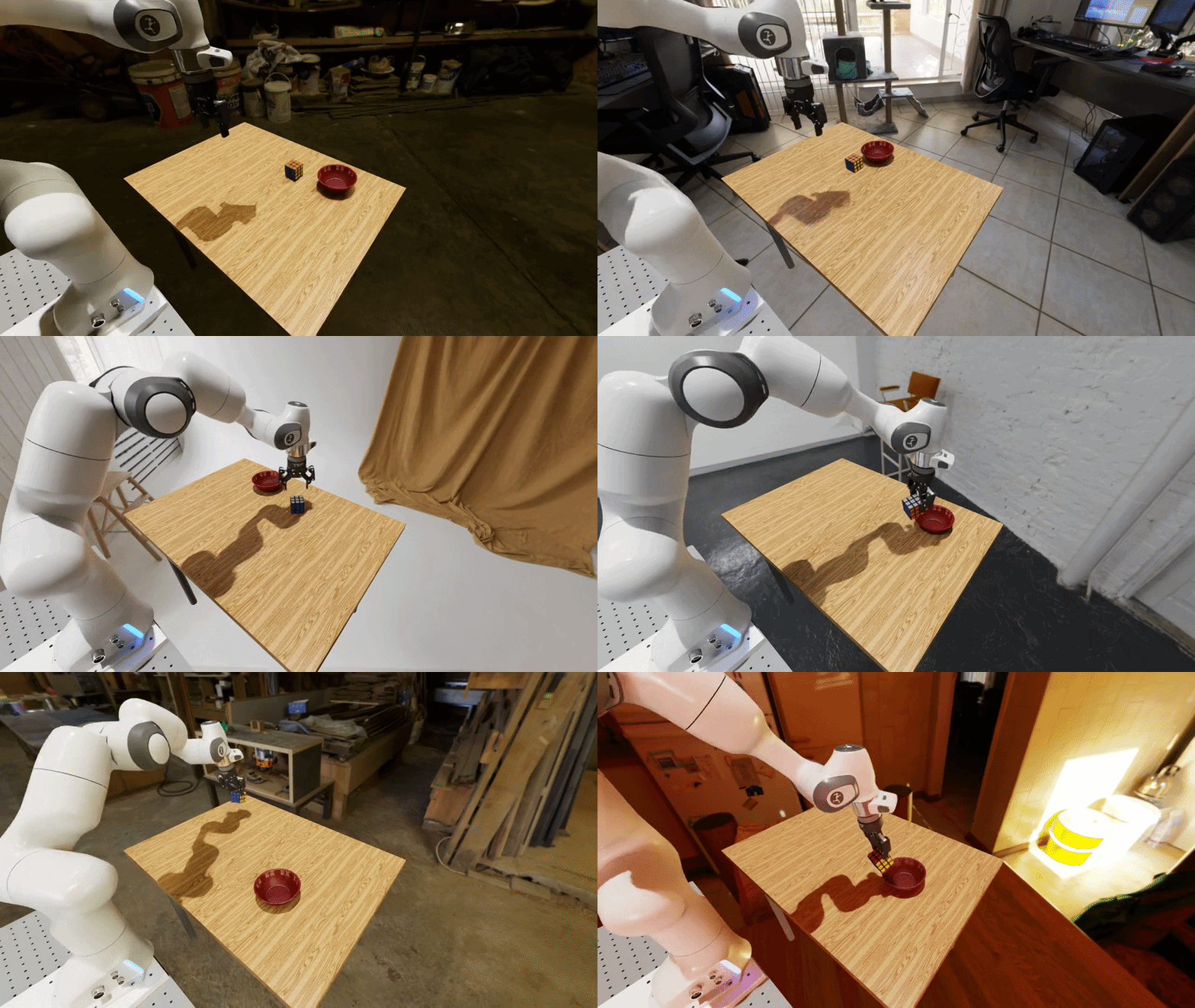
The result of activating the background image (HDR) variation: the same task rendered against backgrounds sampled from the HDR image library.#
See the Available variations table for a complete list of supported variations.
Why use variations?#
A policy can appear reliable when it is always tested in one familiar scene. However, small changes in lighting, camera placement, or object appearance may expose failures that a single fixed test condition cannot show.
Variations help you:
Test a policy across a set of random conditions;
Determine how sensitive the policy is to these varied conditions (covered in the next section);
Arena provides features to make introducing variations easy. In particular:
Allows you to introduce variations without duplicating the full environment definition - variations are available in all Arena-defined environments automatically; no additional code is needed to make them available; and
Arena automatically records the sampled variation value in every episode.
This is the basis for the Sensitivity Analysis that follows.
Run an Example#
The repository includes a ready-to-run variation example. It uses the DROID robot for a pick-and-place task and enables three variations:
the background image;
the light intensity; and
the wrist-camera position.
The example uses a zero-action policy, so the robot remains still while you inspect the scene. It rebuilds the environment five times, drawing a new background and light intensity for each build. The wrist-camera position is drawn when the environment resets.
Configuration file (droid_pnp_variations_experiment.yaml)
# Copyright (c) 2026, The Isaac Lab Arena Project Developers (https://github.com/isaac-sim/IsaacLab-Arena/blob/main/CONTRIBUTORS.md).
# All rights reserved.
#
# SPDX-License-Identifier: Apache-2.0

runs:
  variations_demo:
    environment:
      type: pick_and_place_maple_table
      enable_cameras: true
      embodiment: droid_rel_joint_pos
    policy:
      type: zero_action
    rollout_limit:
      num_steps: 10
    # Number of times the environment is rebuilt with different variation values.
    num_rebuilds: 5
    # The variations to enable for this run.
    variations:
      light.hdr_image.enabled: true
      light.intensity.enabled: true
      droid_rel_joint_pos.camera_extrinsics_wrist_camera.enabled: true
Start the Base Docker container from the repository root:
./docker/run_docker.sh
Then run the example inside the container:
python isaaclab_arena/evaluation/experiment_runner.py \
  --viz kit \
  --enable_cameras \
  --experiment_config isaaclab_arena_environments/experiment_configs/droid_pnp_variations_experiment.yaml
The viewport will show the environment being rebuilt with different variation values:
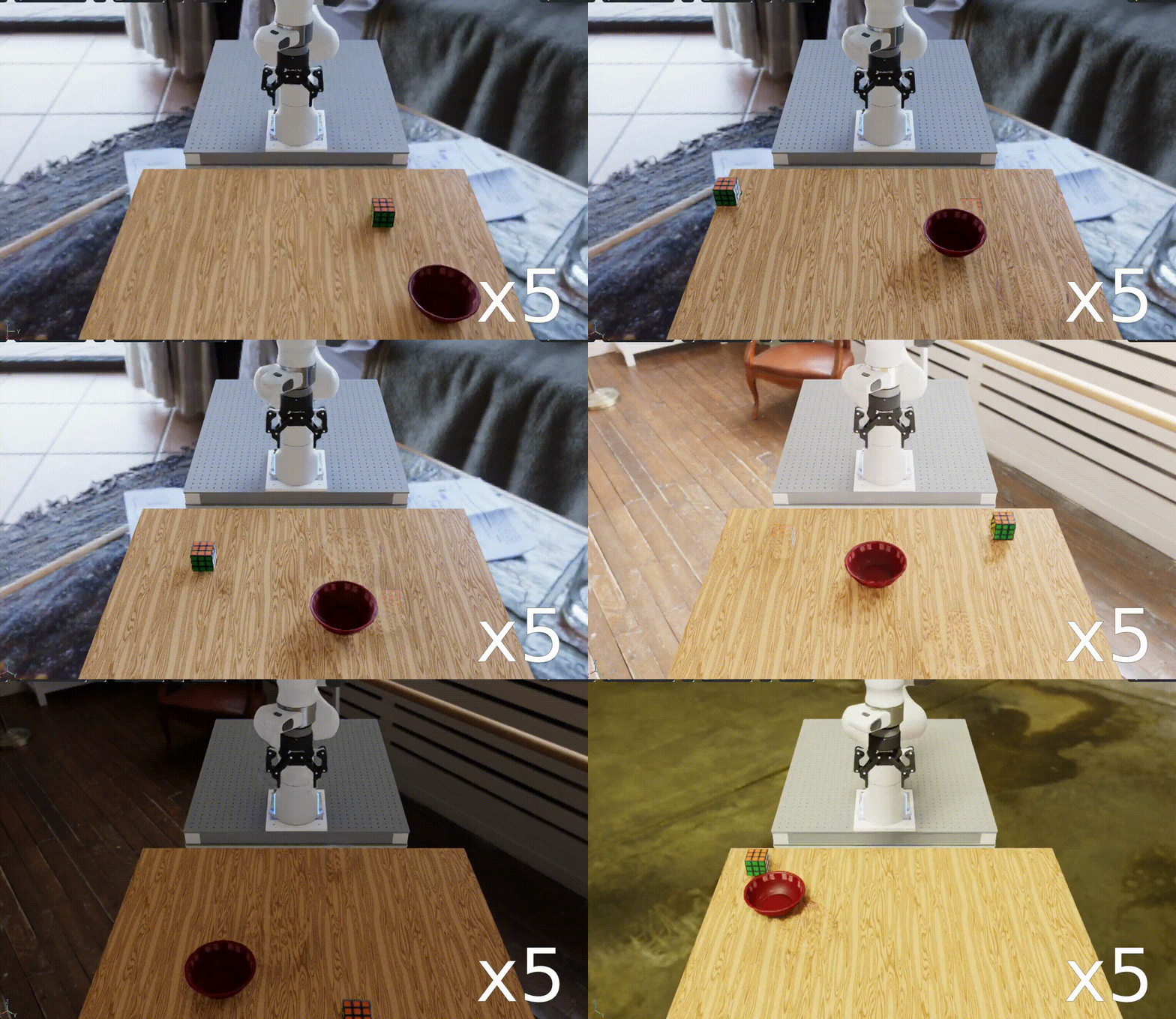
The droid_pnp_variations_experiment.yaml example with variation changes shown at 5x playback
speed. The wrist-camera position also changes, but that change is not visible from the
external viewport.#
Build-time and run-time variations#
Some variations are sampled before the environment is created, while others are sampled whenever each environment is reset. Arena calls these build-time and run-time variations. In this example, the background image and light intensity are build-time (redrawn on each rebuild), while the wrist-camera position is run-time (redrawn on each reset).
See Build-time and run-time variations for a full explanation of the distinction and why it matters when planning an evaluation.
Discovering available variations#
The available variations depend on the assets and embodiment in the selected environment.
Use --list_variations with the policy or experiment runner to see:
For example, to list the variations for the DROID pick-and-place environment, run:
python isaaclab_arena/evaluation/policy_runner.py \
  --list_variations \
  pick_and_place_maple_table
The output will look like this:
Variations (Hydra-configurable)
================================

Asset: bowl_ycb_robolab
  (no variations)

Asset: directional_light
  direction (LightDirectionVariation, build-time)
    Enable: directional_light.direction.enabled=true  (default: False)
    Fields:
      directional_light.direction.sampler_cfg.high = [3.14,1.4]
      directional_light.direction.sampler_cfg.low = [-3.14,0.0]

  intensity (LightIntensityVariation, build-time)
    Enable: directional_light.intensity.enabled=true  (default: False)
    Fields:
      directional_light.intensity.sampler_cfg.high = [2000.0]
      directional_light.intensity.sampler_cfg.low = [100.0]

...
This output shows:
Which assets have variations (e.g.
directional_lightandlightdo, whiletableshows(no variations));Whether each variation is build-time or run-time (e.g.
hdr_imageis build-time, whilecamera_extrinsics_wrist_camerais run-time);The setting used to enable it (e.g.
light.intensity.enabled=true); andThe fields that control sampling (e.g.
light.intensity.sampler_cfg.low = [100.0]andlight.intensity.sampler_cfg.high = [2000.0]).
For the exact commands and configuration format, see Variations.
What Arena records#
At the end of an episode, Arena writes the exact draw from every enabled variation alongside the episode result. A record can look like this:
{
  "success": true,
  "variations": {
    "light.hdr_image": "home_office_robolab",
    "light.intensity": [1250.0],
    "droid_rel_joint_pos.camera_extrinsics_wrist_camera": [0.001, -0.002, 0.0]
  }
}
This link between conditions and results is the foundation of Sensitivity Analysis. Without the recorded draws, a success rate can tell you whether the policy struggled, but not which environment changes were present when it struggled.
The zero-action example on this page is intended to make the variations easy to see. In the next section, you will run the same pick-and-place task with a policy and analyze how the wrist-camera position is associated with success or failure.
Next Steps#
Now that you know how to introduce variations, you can run a Sensitivity Analysis on the results. This will be covered in the next section.