



Creating visualization markers#
This guide shows how to draw visualization markers: debug geometry (frames, arrows, spheres,
custom meshes) rendered over the scene through markers.VisualizationMarkers. Markers are
display-only: they carry no physics and do not affect the simulation.
For plain points, lines, and splines, Isaac Sim’s own isaacsim.util.debug_draw extension
is lighter-weight. Use VisualizationMarkers when you need more complex shapes.
Markers are supported on Kit, Newton GL, Rerun, and Viser, but not yet on Newton RTX. See Visualization for how to enable them on a given visualizer.
Quick Start#
Run the packaged markers example:
uv run --extra isaacsim isaaclab example markers
Pass --visualizer newton_gl (or another supported backend) to switch visualizers; defaults
to kit.
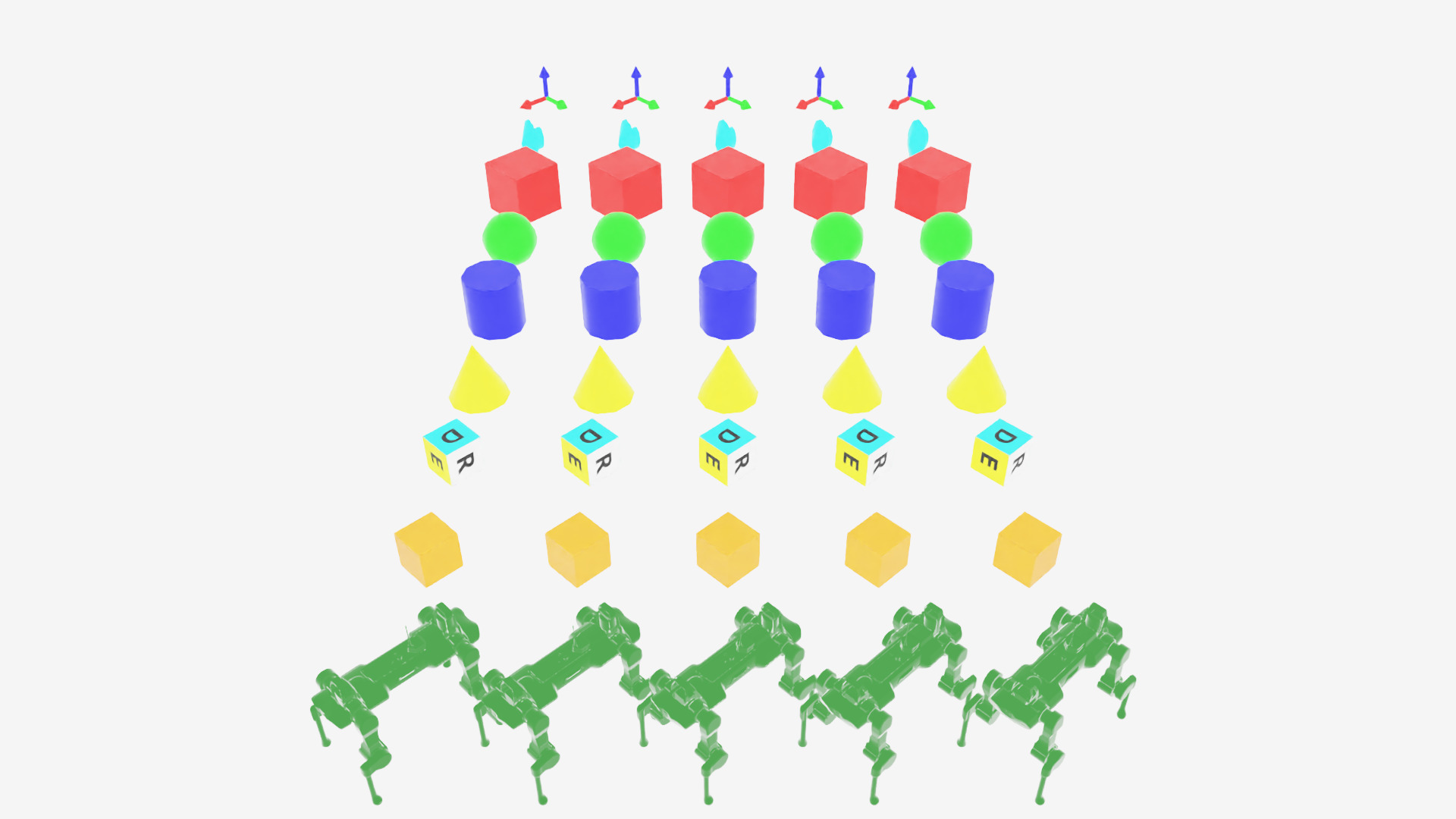
Every marker prototype from the example script, arranged in a grid. Each column rotates in place and periodically rolls forward to the next prototype.#
To stop, close the window or press Ctrl+C.
Code for markers.py
  1# Copyright (c) 2022-2026, The Isaac Lab Project Developers (https://github.com/isaac-sim/IsaacLab/blob/main/CONTRIBUTORS.md).
  2# All rights reserved.
  3#
  4# SPDX-License-Identifier: BSD-3-Clause
  5
  6"""This script demonstrates different types of markers.
  7
  8.. code-block:: bash
  9
 10    # Usage with default PhysX physics and default kit visualizer.
 11    uvx --from 'isaaclab[isaacsim]' isaaclab example markers
 12
 13"""
 14
 15import argparse
 16from typing import TYPE_CHECKING
 17
 18from isaaclab.app import add_launcher_args, launch_simulation
 19from isaaclab.utils import instantiate
 20
 21parser = argparse.ArgumentParser(
 22    description="This script demonstrates different types of markers.",
 23    conflict_handler="resolve",
 24)
 25parser.add_argument("--physics", default="isaacsim_physx", choices=["isaacsim_physx"], help="Physics backend.")
 26parser.add_argument("--max_steps", type=int, default=-1, help="Stop after this many steps; negative runs forever.")
 27add_launcher_args(parser)
 28parser.set_defaults(visualizer=["kit"])
 29args_cli = parser.parse_args()
 30if args_cli.max_steps == 0 or args_cli.max_steps < -1:
 31    parser.error("--max_steps must be positive or -1.")
 32
 33import torch
 34
 35import isaaclab.sim as sim_utils
 36from isaaclab.markers.visualization_markers_cfg import VisualizationMarkersCfg
 37from isaaclab.utils.assets import ISAAC_NUCLEUS_DIR, ISAACLAB_NUCLEUS_DIR
 38from isaaclab.utils.math import quat_from_angle_axis
 39
 40if TYPE_CHECKING:
 41    from isaaclab.markers import VisualizationMarkers
 42
 43
 44def define_markers() -> "VisualizationMarkers":
 45    """Define markers with various different shapes."""
 46    marker_cfg = VisualizationMarkersCfg(
 47        prim_path="/Visuals/myMarkers",
 48        markers={
 49            "frame": sim_utils.UsdFileCfg(
 50                usd_path=f"{ISAAC_NUCLEUS_DIR}/Props/UIElements/frame_prim.usd",
 51                scale=(0.5, 0.5, 0.5),
 52            ),
 53            "arrow_x": sim_utils.UsdFileCfg(
 54                usd_path=f"{ISAAC_NUCLEUS_DIR}/Props/UIElements/arrow_x.usd",
 55                scale=(1.0, 0.5, 0.5),
 56                visual_material=sim_utils.PreviewSurfaceCfg(diffuse_color=(0.0, 1.0, 1.0)),
 57            ),
 58            "cube": sim_utils.CuboidCfg(
 59                size=(1.0, 1.0, 1.0),
 60                visual_material=sim_utils.PreviewSurfaceCfg(diffuse_color=(1.0, 0.0, 0.0)),
 61            ),
 62            "sphere": sim_utils.SphereCfg(
 63                radius=0.5,
 64                visual_material=sim_utils.PreviewSurfaceCfg(diffuse_color=(0.0, 1.0, 0.0)),
 65            ),
 66            "cylinder": sim_utils.CylinderCfg(
 67                radius=0.5,
 68                height=1.0,
 69                visual_material=sim_utils.PreviewSurfaceCfg(diffuse_color=(0.0, 0.0, 1.0)),
 70            ),
 71            "cone": sim_utils.ConeCfg(
 72                radius=0.5,
 73                height=1.0,
 74                visual_material=sim_utils.PreviewSurfaceCfg(diffuse_color=(1.0, 1.0, 0.0)),
 75            ),
 76            "mesh": sim_utils.UsdFileCfg(
 77                usd_path=f"{ISAAC_NUCLEUS_DIR}/Props/Blocks/DexCube/dex_cube_instanceable.usd",
 78                scale=(10.0, 10.0, 10.0),
 79            ),
 80            "mesh_recolored": sim_utils.UsdFileCfg(
 81                usd_path=f"{ISAAC_NUCLEUS_DIR}/Props/Blocks/DexCube/dex_cube_instanceable.usd",
 82                scale=(10.0, 10.0, 10.0),
 83                visual_material=sim_utils.PreviewSurfaceCfg(diffuse_color=(1.0, 0.25, 0.0)),
 84            ),
 85            "robot_mesh": sim_utils.UsdFileCfg(
 86                usd_path=f"{ISAACLAB_NUCLEUS_DIR}/Robots/ANYbotics/ANYmal-C/anymal_c.usd",
 87                scale=(2.0, 2.0, 2.0),
 88                visual_material=sim_utils.GlassMdlCfg(glass_color=(0.0, 0.1, 0.0)),
 89            ),
 90        },
 91    )
 92    return instantiate(marker_cfg)
 93
 94
 95def main():
 96    """Main function."""
 97    sim_cfg = sim_utils.SimulationCfg(dt=0.01, device=args_cli.device)
 98    with launch_simulation(sim_cfg, args_cli):
 99        sim = sim_utils.SimulationContext(sim_cfg)
100        # Set main camera
101        sim.set_camera_view([0.0, 18.0, 12.0], [0.0, 3.0, 0.0])
102
103        # Spawn things into stage
104        # Lights
105        cfg = sim_utils.DomeLightCfg(intensity=3000.0, color=(0.75, 0.75, 0.75))
106        cfg.func("/World/Light", cfg)
107
108        # create markers
109        my_visualizer = define_markers()
110
111        # define a grid of positions where the markers should be placed
112        num_markers_per_type = 5
113        grid_spacing = 2.0
114        # Calculate the half-width and half-height
115        half_width = (num_markers_per_type - 1) / 2.0
116        half_height = (my_visualizer.num_prototypes - 1) / 2.0
117        # Create the x and y ranges centered around the origin
118        x_range = torch.arange(-half_width * grid_spacing, (half_width + 1) * grid_spacing, grid_spacing)
119        y_range = torch.arange(-half_height * grid_spacing, (half_height + 1) * grid_spacing, grid_spacing)
120        # Create the grid
121        x_grid, y_grid = torch.meshgrid(x_range, y_range, indexing="ij")
122        x_grid = x_grid.reshape(-1)
123        y_grid = y_grid.reshape(-1)
124        z_grid = torch.zeros_like(x_grid)
125        # marker locations
126        marker_locations = torch.stack([x_grid, y_grid, z_grid], dim=1)
127        marker_indices = torch.arange(my_visualizer.num_prototypes).repeat(num_markers_per_type)
128
129        sim.reset()
130        print("[INFO]: Setup complete...")
131
132        # Yaw angle
133        yaw = torch.zeros_like(marker_locations[:, 0])
134        step_count = 0
135        # Step while a visualizer window is still open (or none exist, e.g. headless); works for kit and newton.
136        while sim.is_running() and (args_cli.max_steps < 0 or step_count < args_cli.max_steps):
137            # rotate the markers around the z-axis for visualization
138            marker_orientations = quat_from_angle_axis(yaw, torch.tensor([0.0, 0.0, 1.0]))
139            # visualize
140            my_visualizer.visualize(marker_locations, marker_orientations, marker_indices=marker_indices)
141            # roll corresponding indices to show how marker prototype can be changed
142            if yaw[0].item() % (0.5 * torch.pi) < 0.01:
143                marker_indices = torch.roll(marker_indices, 1)
144            # perform step
145            sim.step()
146            step_count += 1
147            # increment yaw
148            yaw += 0.01
149
150
151if __name__ == "__main__":
152    main()
Configuring markers#
VisualizationMarkersCfg takes:
prim_path: prim path where the markerUsdGeom.PointInstanceris created.markers: a dict of marker prototypes. The key names the prototype; the value is its spawn config (anySpawnerCfg, including USD file references).
Note
Physics properties on a marker prototype’s spawn config are stripped on creation, since markers are not simulated.
def define_markers() -> "VisualizationMarkers":
    """Define markers with various different shapes."""
    marker_cfg = VisualizationMarkersCfg(
        prim_path="/Visuals/myMarkers",
        markers={
            "frame": sim_utils.UsdFileCfg(
                usd_path=f"{ISAAC_NUCLEUS_DIR}/Props/UIElements/frame_prim.usd",
                scale=(0.5, 0.5, 0.5),
            ),
            "arrow_x": sim_utils.UsdFileCfg(
                usd_path=f"{ISAAC_NUCLEUS_DIR}/Props/UIElements/arrow_x.usd",
                scale=(1.0, 0.5, 0.5),
                visual_material=sim_utils.PreviewSurfaceCfg(diffuse_color=(0.0, 1.0, 1.0)),
            ),
            "cube": sim_utils.CuboidCfg(
                size=(1.0, 1.0, 1.0),
                visual_material=sim_utils.PreviewSurfaceCfg(diffuse_color=(1.0, 0.0, 0.0)),
            ),
            "sphere": sim_utils.SphereCfg(
                radius=0.5,
                visual_material=sim_utils.PreviewSurfaceCfg(diffuse_color=(0.0, 1.0, 0.0)),
            ),
            "cylinder": sim_utils.CylinderCfg(
                radius=0.5,
                height=1.0,
                visual_material=sim_utils.PreviewSurfaceCfg(diffuse_color=(0.0, 0.0, 1.0)),
            ),
            "cone": sim_utils.ConeCfg(
                radius=0.5,
                height=1.0,
                visual_material=sim_utils.PreviewSurfaceCfg(diffuse_color=(1.0, 1.0, 0.0)),
            ),
            "mesh": sim_utils.UsdFileCfg(
                usd_path=f"{ISAAC_NUCLEUS_DIR}/Props/Blocks/DexCube/dex_cube_instanceable.usd",
                scale=(10.0, 10.0, 10.0),
            ),
            "mesh_recolored": sim_utils.UsdFileCfg(
                usd_path=f"{ISAAC_NUCLEUS_DIR}/Props/Blocks/DexCube/dex_cube_instanceable.usd",
                scale=(10.0, 10.0, 10.0),
                visual_material=sim_utils.PreviewSurfaceCfg(diffuse_color=(1.0, 0.25, 0.0)),
            ),
            "robot_mesh": sim_utils.UsdFileCfg(
                usd_path=f"{ISAACLAB_NUCLEUS_DIR}/Robots/ANYbotics/ANYmal-C/anymal_c.usd",
                scale=(2.0, 2.0, 2.0),
                visual_material=sim_utils.GlassMdlCfg(glass_color=(0.0, 0.1, 0.0)),
            ),
        },
    )
    return instantiate(marker_cfg)
Drawing markers#
visualize() sets marker poses and, optionally, which
prototype each marker instance uses via marker_indices.
my_visualizer.visualize(marker_locations, marker_orientations, marker_indices=marker_indices)
Arguments left as None keep their previous value. Passing a different number of rows than
the last call resizes the marker instance count. See
visualize()’s docstring for the full argument list
(translations, orientations, scales, marker_indices, environment_ids).
Markers in practice#
Markers are commonly used to debug per-environment state during training, such as commanded vs. current velocity, or contact events:
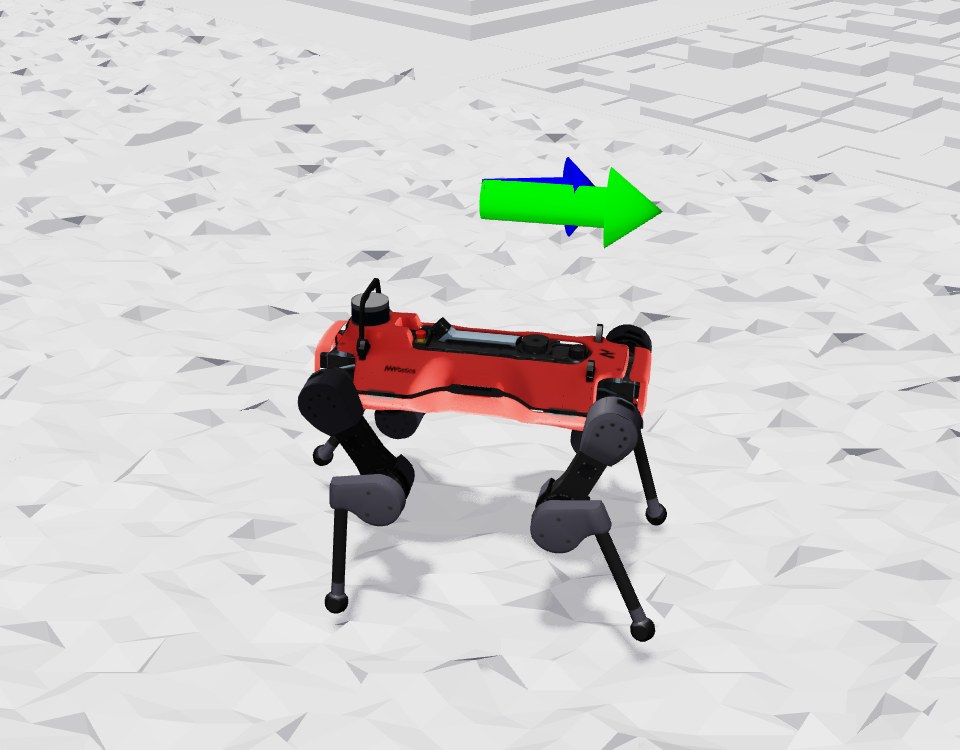
Velocity command (green) and current velocity (blue) arrow markers on an AnymalD robot.
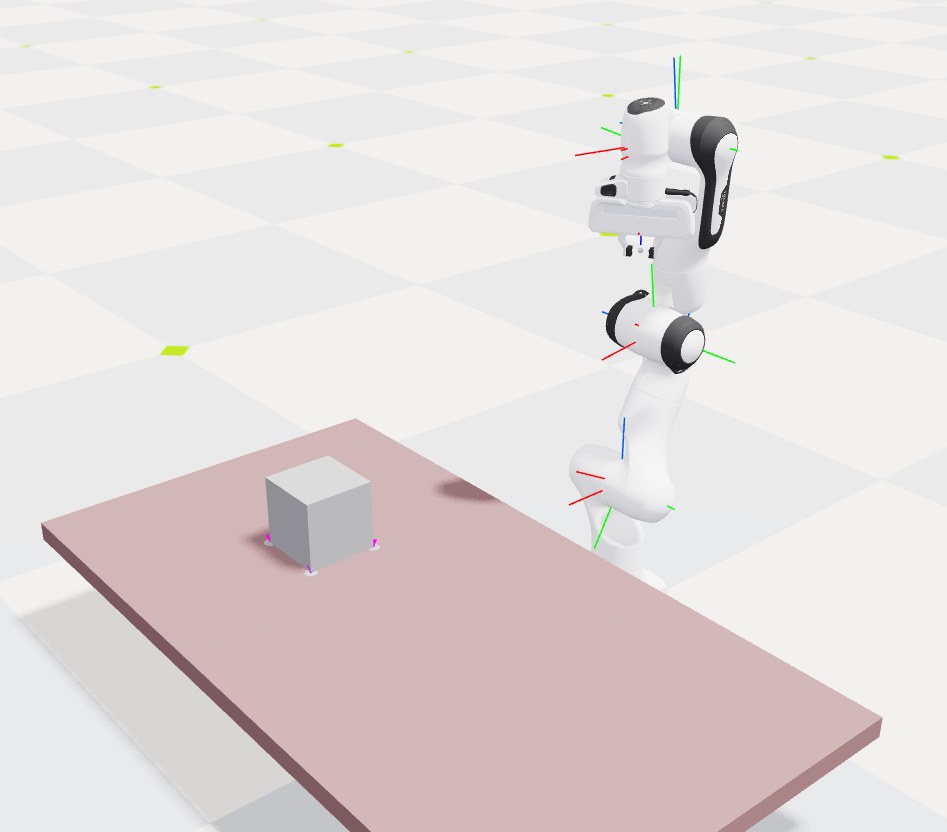
Joint arrow markers on a Franka arm, with contact sensor markers on a cube.
See also#
Visualization: enabling markers per visualizer, and other visualizer features
Recording video: recording a marker-annotated scene to video