



Controllers#
Controllers turn desired motion or contact forces into joint commands. Joint-space controllers act on individual joints; task-space controllers act on an end effector.
Contact tasks often need compliance to tolerate errors in the robot or environment model [SSVO09]. Two common approaches are:
Impedance control: Relates motion error to contact force through a mass-spring-damper model. Stiffness control uses only the static relationship between position error and force.
Hybrid force/motion control: Controls motion along free directions and force along constrained directions. Isaac Lab’s implementation uses operational-space inverse dynamics [Kha87].
Choosing a controller#
The core controllers below live in isaaclab.controllers. Isaac Lab also provides
Newton controllers with additional control options and
an iterative IK solver.
Controller |
Input command |
Output |
Required state |
|---|---|---|---|
End-effector position or pose, absolute or relative |
Joint position targets |
Joint positions, end-effector pose, and Jacobian in a consistent frame |
|
End-effector pose and/or wrench, optionally stiffness and damping ratios |
Joint efforts |
Jacobian; pose and velocity for motion control; mass matrix for inertial decoupling; gravity vector, contact force, and joint state as required by enabled features |
Basic joint-space control sets joint targets directly on the actuators.
For joint-space impedance control, use JointImpedanceController
(see Joint-space controllers).
Start with differential IK for reaching or teleoperation with position-controlled actuators. Choose OSC when you need torque commands, task-space compliance, or simultaneous motion and contact force control. For example, wiping a table requires motion along its surface while maintaining a force normal to it.
The IK walkthrough and OSC walkthrough provide complete scenes, state extraction, and runnable demonstrations. Both tutorial scripts use Isaac Sim PhysX and require an Isaac Sim installation.
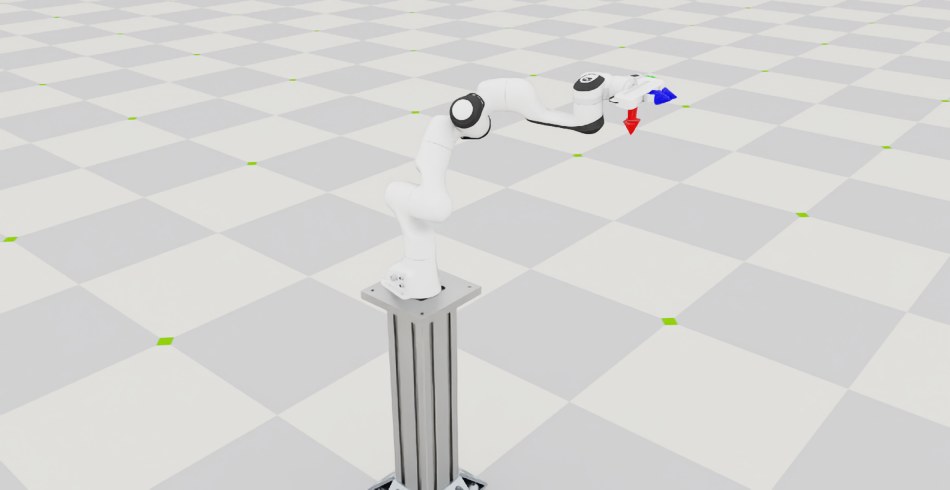
IK: reach a pose. Each arm tracks an end-effector goal through joint position targets. Run the IK demonstration to watch the measured and desired frame markers converge.
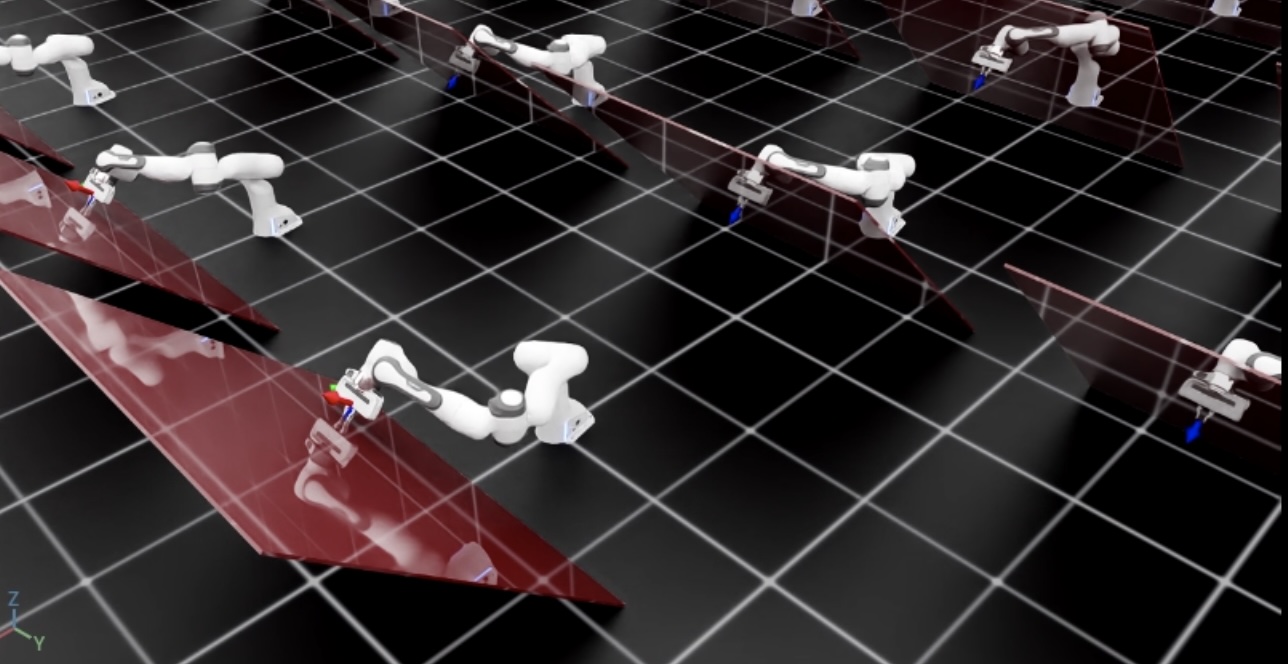
OSC: control motion and contact force. The tilted-wall example commands 10 N along the wall normal while tracking pose in the other directions. Run the OSC demonstration.
Newton controllers#
isaaclab_newton.controllers wraps Newton’s batched controllers for use with
PyTorch tensors. These three controllers work with any physics backend: the caller
supplies the robot state, Jacobian, and dynamics required by the enabled features.
They do not require a Newton simulation model.
Differential IK —
NewtonDifferentialIKControllerproduces joint position targets from an end-effector goal. It supports axis weighting, adaptive damping, truncated SVD, joint-limit avoidance, and null-space posture control. Configure it withNewtonDifferentialIKControllerCfg.Joint impedance —
NewtonJointImpedanceControllerproduces joint efforts from desired joint positions and velocities. Options include inertia decoupling, gravity and Coriolis compensation, acceleration feedforward, and gains that can change each control step. Configure it withNewtonJointImpedanceControllerCfg.Operational-space control —
NewtonOperationalSpaceControllerproduces joint efforts for task-space motion and wrench control. It supports desired end-effector velocity, separate linear and angular selection frames, and null-space posture control. Configure it withNewtonOperationalSpaceControllerCfg.
In a direct environment, create the controller once, pass current state and targets
to compute() each control step, and apply the returned joint targets or efforts
through articulation.actuators. These wrappers have their own configurations and
compute() arguments; they do not use the core controllers’ set_command() API.
They compute in float32, and contiguous float32 inputs can be shared without copies.
Returned tensors reference reusable output buffers, so clone them if you need to
keep a result after the next call.
For manager-based tasks, use
NewtonDifferentialInverseKinematicsActionCfg or
NewtonOperationalSpaceControllerActionCfg to connect
the corresponding controller to the robot. For example, this action commands an
absolute Franka hand position in the robot’s root frame:
from isaaclab_newton.controllers import NewtonDifferentialIKControllerCfg
from isaaclab_newton.envs.mdp import NewtonDifferentialInverseKinematicsActionCfg

arm_action = NewtonDifferentialInverseKinematicsActionCfg(
    asset_name="robot",
    joint_names=["panda_joint[1-7]"],
    body_name="panda_hand",
    command_type="position",
    controller=NewtonDifferentialIKControllerCfg(
        ik_method="damped_least_squares",
        bandwidth=10.0,
        damping=0.05,
    ),
)
Add this term to the task’s actions configuration and match the asset, joint, and body names to your robot. Use position-controlled actuators for differential IK; use effort control for operational-space control.
Iterative IK with Newton#
NewtonIKSolver solves pose objectives
iteratively using a Newton model, rather than taking a differential IK step from
a supplied Jacobian. Combine
NewtonIKPoseObjectiveCfg objectives for one
or more bodies with
NewtonIKJointLimitObjectiveCfg to penalize
joint-limit violations. NewtonIKSolverCfg
selects LM or L-BFGS optimization, the Jacobian method, seed sampling, and iteration
count.
Use NewtonInverseKinematicsActionCfg to drive this
solver from a manager-based task. This action currently requires a fixed-base
articulation with a registered Newton prototype model; its joints and target
bodies must resolve in both Isaac Lab and that model.
See isaaclab_newton.controllers for the full controller, solver, and configuration APIs.
The control loop#
The IK and OSC instances compute targets from state supplied by the caller;
they do not read the simulation or submit actuator commands.
set_command() stores a goal until it is replaced,
and every control cycle reads fresh state, calls compute(), stages the targets,
and steps the simulation; see Practical API examples for the loop from the
IK walkthrough. IK targets are joint positions that the configured position
actuator tracks. OSC targets are joint efforts, so configure zero actuator
stiffness and damping to keep actuator feedback from adding to them.
Keep the command, end-effector pose, and Jacobian in a consistent coordinate frame.
The tutorials use the suffix _b for the robot base frame and _w for the
world frame; these names do not transform the data.
Absolute poses contain position followed by a quaternion in (x, y, z, w) order.
For OSC, commands and axis selections can use a separate task frame, while state
passed to compute() remains in the base frame.
Joint-space controllers#
There is no dedicated configuration class for selecting a joint-space control mode. Instead, the
control mode follows from which targets you set through articulation.actuators: effort targets
for torque control, velocity targets for velocity control, and position targets for position
control. See Runtime API: articulation.actuators for the runtime API.
Torque control#
Action dimensions: "n" (number of joints)
In torque control mode, the input actions are directly set as feed-forward joint torque commands, i.e. at every time-step,
Velocity control#
Action dimensions: "n" (number of joints)
In velocity control mode, a proportional control law is required to reduce the error between the current and desired joint velocities. Based on input actions, the joint torques commands are computed as:
where \(k_d\) are the gains parsed from configuration.
Attention
While performing velocity control, in many cases, gravity compensation is required to ensure better tracking of the command. In this case, we suggest disabling gravity for the links in the articulation in simulation.
Position control with fixed impedance#
Action dimensions: "n" (number of joints)
Position control uses a proportional-derivative (PD) law to track joint positions with zero target velocity:
where \(k_p\) and \(k_d\) are the gains parsed from configuration.
A more complete formulation which considers the dynamics of the articulation would be:
where \(M\) is the joint-space inertia matrix of size \(n \times n\), and \(g\) is the joint-space
gravity vector. This implementation is available through the JointImpedanceController class by setting the
impedance mode to "fixed". The gains \(k_p\) are parsed from the input configuration and \(k_d\)
are computed while considering the system as a decoupled point-mass oscillator, i.e.,
where \(D\) is the damping ratio of the system. Critical damping is achieved for \(D = 1\), overcritical damping for \(D > 1\) and undercritical damping for \(D < 1\).
Additionally, it is possible to disable the inertial or gravity compensation in the controller by setting the
flags inertial_compensation and gravity_compensation in the configuration to False,
respectively.
Position control with variable stiffness#
Action dimensions: "2n" (number of joints)
Variable-stiffness control uses the same law, with \(k_p\) supplied in the
command. Set JointImpedanceController to "variable_kp" mode.
Position control with variable impedance#
Action dimensions: "3n" (number of joints)
Variable-impedance control also supplies damping through the command. Set
JointImpedanceController to "variable" mode.
Task-space controllers#
Differential inverse kinematics (IK)#
Action dimensions: "3" (relative/absolute position), "6" (relative pose), or "7" (absolute pose)
Inverse kinematics converts the task-space tracking error to joint-space error. In its most typical implementation, the pose error in the task-space, \(\Delta \chi_e = (\Delta p_e, \Delta \phi_e)\), is computed as the Cartesian distance between the desired and current task-space positions, and the shortest distance in \(\mathbb{SO}(3)\) between the desired and current task-space orientations.
Using the geometric Jacobian \(J_{eO} \in \mathbb{R}^{6 \times n}\), that relates task-space velocity to joint-space velocities, we design the control law to obtain the desired joint positions as:
where \(\eta\) is a scaling parameter and \(J_{eO}^{-}\) is the pseudo-inverse of the Jacobian.
It is possible to compute the pseudo-inverse of the Jacobian using different formulations:
Moore-Penrose pseudo-inverse (
"pinv"): \(A^{-} = A^T(AA^T)^{-1}\).Levenberg-Marquardt pseudo-inverse (damped least-squares,
"dls"): \(A^{-} = A^T (AA^T + \lambda^2 \mathbb{I})^{-1}\).Transpose pseudo-inverse (
"trans"): \(A^{-} = A^T\).Adaptive singular-value decomposition (SVD) pseudo-inverse (
"svd") from Buss [Bus04].Manipulability-aware damped least-squares (
"adaptive_dls"): the damping \(\lambda\) increases as the Jacobian approaches a singularity.
These implementations are available through the DifferentialIKController class.
See Using a task-space controller for a runnable example.
Impedance controller#
It uses task-space pose error and Jacobian to compute joint torques through mass-spring-damper system with a) fixed stiffness, b) variable stiffness (stiffness control), and c) variable stiffness and damping (impedance control).
Operational-space controller#
Similar to task-space impedance control but uses the Equation of Motion (EoM) for computing the task-space force. See Using an operational space controller for a runnable example.
Closed-loop proportional force controller#
It uses a proportional term to track the desired wrench command with respect to current wrench at the end-effector.
Hybrid force-motion controller#
It combines closed-loop force control and operational-space motion control to compute the desired wrench at the end-effector. It uses selection matrices that define the unconstrained and constrained task directions.
Practical API examples#
Joint targets#
These alternative command examples assume an initialized robot and resolved
arm_joint_ids. Each target has shape (num_envs, len(arm_joint_ids)).
Set position or velocity feedback gains in the actuator configuration; for direct
effort control, set actuator stiffness and damping to zero. See
Runtime API: articulation.actuators for the command API and Actuators for gains.
joint_pos_target = robot.data.default_joint_pos.torch[:, arm_joint_ids].clone()
robot.actuators.target_command.set_position_index(value=joint_pos_target, joint_ids=arm_joint_ids)
robot.write_data_to_sim()
joint_vel_target = robot.data.default_joint_vel.torch[:, arm_joint_ids].clone()
robot.actuators.target_command.set_velocity_index(value=joint_vel_target, joint_ids=arm_joint_ids)
robot.write_data_to_sim()
import torch

joint_effort_target = torch.zeros_like(robot.data.joint_pos.torch[:, arm_joint_ids])
robot.actuators.target_command.set_effort_index(value=joint_effort_target, joint_ids=arm_joint_ids)
robot.write_data_to_sim()
These calls stage and submit commands. Advance physics and update the scene on each cycle as shown in The control loop.
Task-space goals#
The IK walkthrough resets the robot and changes the goal every 150 steps. On intermediate steps, it reads fresh state and computes joint position targets; every step applies the targets and advances the simulation:
if count % 150 == 0:
    # reset time
    count = 0
    # reset joint state
    joint_pos = robot.data.default_joint_pos.torch.clone()
    joint_vel = robot.data.default_joint_vel.torch.clone()
    robot.write_joint_position_to_sim_index(position=joint_pos)
    robot.write_joint_velocity_to_sim_index(velocity=joint_vel)
    robot.reset()
    # reset actions
    ik_commands[:] = ee_goals[current_goal_idx]
    joint_pos_des = joint_pos[:, robot_entity_cfg.joint_ids].clone()
    # reset controller
    diff_ik_controller.reset()
    diff_ik_controller.set_command(ik_commands)
    # change goal
    current_goal_idx = (current_goal_idx + 1) % len(ee_goals)
else:
    # obtain quantities from simulation. The Jacobian DoF axis prepends
    # ``num_base_dofs`` floating-base columns (0 for fixed-base, 6 for
    # floating-base); shift the actuated-joint ids accordingly.
    jacobi_joint_ids = [j + robot.num_base_dofs for j in robot_entity_cfg.joint_ids]
    jacobian = robot.data.body_link_jacobian_w.torch[:, ee_jacobi_idx, :, jacobi_joint_ids]
    ee_pose_w = robot.data.body_pose_w.torch[:, robot_entity_cfg.body_ids[0]]
    root_pose_w = robot.data.root_pose_w.torch
    joint_pos = robot.data.joint_pos.torch[:, robot_entity_cfg.joint_ids]
    # compute frame in root frame
    ee_pos_b, ee_quat_b = subtract_frame_transforms(
        root_pose_w[:, 0:3], root_pose_w[:, 3:7], ee_pose_w[:, 0:3], ee_pose_w[:, 3:7]
    )
    # compute the joint commands
    joint_pos_des = diff_ik_controller.compute(ee_pos_b, ee_quat_b, jacobian, joint_pos)

# apply actions
robot.set_joint_position_target_index(target=joint_pos_des, joint_ids=robot_entity_cfg.joint_ids)
scene.write_data_to_sim()
# perform step
sim.step()
# update sim-time
count += 1
# update buffers
scene.update(sim_dt)
Relative commands also need the measured pose in
DifferentialIKController.set_command() to resolve the delta at command time.
An OperationalSpaceController instance osc similarly stores its
motion/force goal with OperationalSpaceController.set_command(), but
OperationalSpaceController.compute() returns efforts to stage with
set_effort_index. Its required state depends on the configured features.
Use the IK walkthrough and
OSC walkthrough for controller construction, state
extraction, and complete repeated loops.
Reactive planners#
Task-space controllers usually leave joint limits and collision avoidance to a higher-level planner, such as RRT. Reactive planners can instead include these constraints in the optimization that computes motion and control.
Examples of reactive planners include:
RMPFlow (lula): An acceleration-based policy that composes various Reimannian Motion Policies (RMPs) to solve a hierarchy of tasks [CMI+21]. It is capable of performing dynamic collision avoidance while navigating the end-effector to a target.
MPC (OCS2): A receding horizon control policy based on sequential linear-quadratic (SLQ) programming. It formulates various constraints into a single optimization problem via soft-penalties and uses automatic differentiation to compute derivatives of the system dynamics, constraints and costs. The MPC formulation for end-effector trajectory tracking in fixed-arm and mobile manipulators described in [MHF+22] considers a kinematic system model with joint limits and self-collision avoidance. See the OCS2 documentation for the external toolbox and examples.
Warning
RmpFlowController wraps the CPU-based Lula bindings, so its computation can
limit throughput in large batches. It also needs the Lula library and robot description
files; these dependencies are separate from the selected physics backend.