



Renderers#
Renderers produce camera images for policy observations and synthetic data.
Visualizers provide interactive views for inspection and
recording. All renderers implement BaseRenderer.
Isaac Lab supports three rendering backends. See Renderer details for their execution models, output coverage, and limitations, and Renderer support for the output-by-backend support matrix.
Important
OVRTX is the recommended RTX renderer. Isaac RTX is the legacy RTX renderer: it remains available for workflows that must run inside Isaac Sim, but new RTX camera work should use OVRTX.
Choosing a renderer backend#

Warp ray tracing with direct lighting. Use it when camera throughput and memory matter more than material and lighting fidelity.
renderer=newton_renderer

Kit-less RTX rendering with path-traced and Minimal modes. Use it for RTX image quality and RTX outputs without Isaac Sim.
renderer=ovrtx

RTX rendering inside Isaac Sim. Use it only when the workflow must run in an Isaac Sim process.
renderer=isaacsim_rtx
Renderer outputs at a glance#
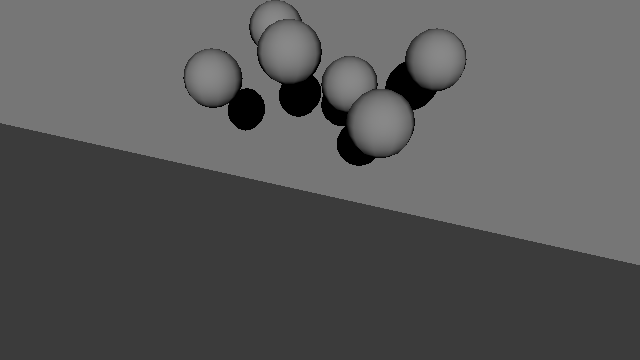
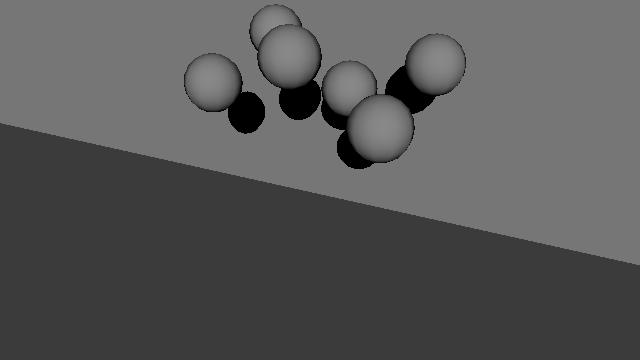
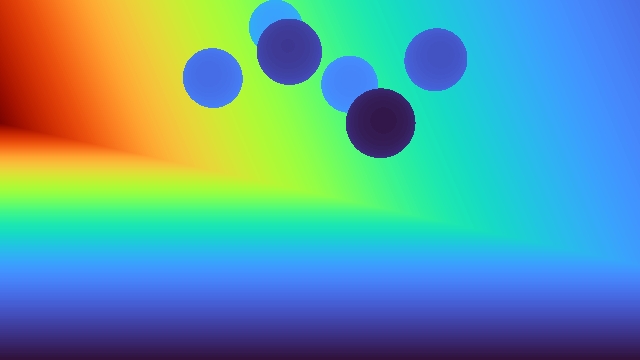
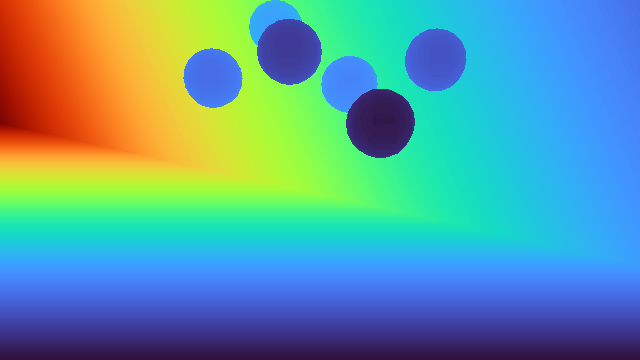
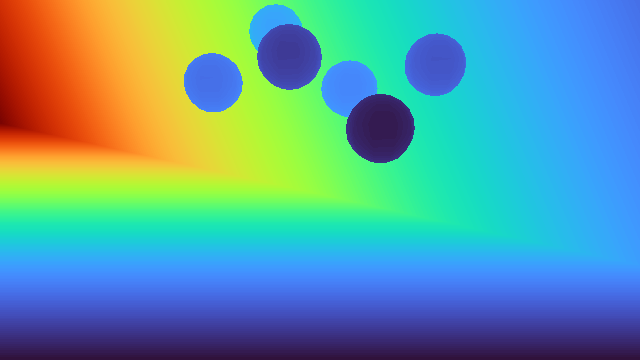
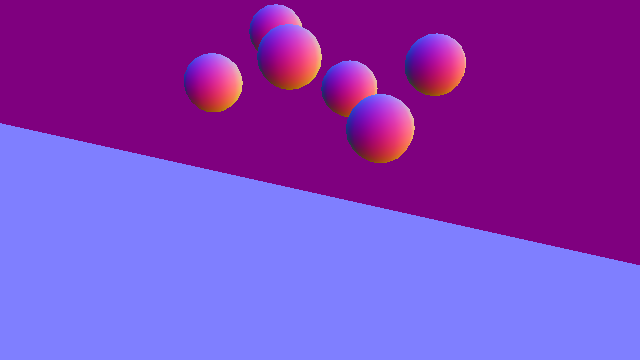
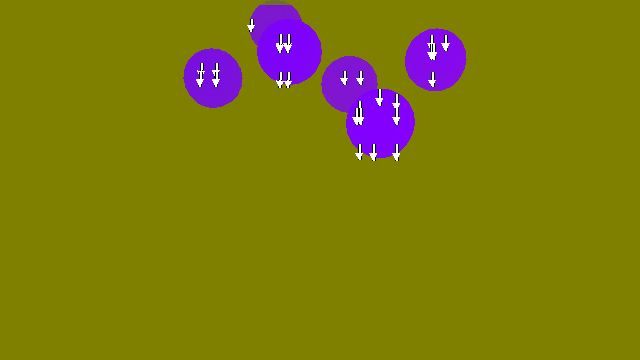
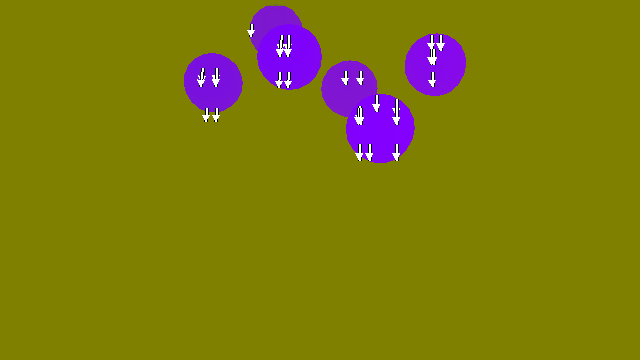
Each renderer draws the same scene, camera, lights, and materials: six spheres with mirror-like, transparent, semi-transparent, matte, glossy, and emissive materials. RGB is animated; the other outputs are stills from the same run. Newton Warp and OVRTX use Newton physics while Isaac RTX uses PhysX, so sphere poses can differ.
Minimal rows are the simple_shading_* outputs. Scalar, vector, and label outputs are color-mapped
for display: depth runs from near (purple) to far (red), normals map X, Y, and Z to red, green, and
blue, and motion-vector arrows show sampled image-space motion. Cameras return the raw tensors
described in Output types.
Output |
Newton Warp |
OVRTX |
Isaac RTX (legacy) |
|---|---|---|---|
RGB |
|
|
|
Minimal, constant diffuse |
Not supported |
|
|
Minimal, diffuse MDL |
Not supported |

|

|
Minimal, full MDL |
Not supported |

|

|
Albedo |

|

|

|
Depth |
|
|
|
Normals |

|

|
|
Semantic segmentation |

|

|

|
Instance segmentation |

|

|

|
Motion vectors |
Not supported |
|
|
Renderer details#
Open a renderer below for its runtime, physics pairing, output coverage, configuration, and typical use case.
Newton Warp renderer
Runtime and physics: A lightweight, kit-less Warp ray tracer included in the base install. Pairs with Newton, OvPhysX, or Isaac Sim PhysX.
Output coverage: Produces RGB, albedo, depth, normals, semantic segmentation, and instance segmentation with direct lighting. It does not produce motion vectors or RTX material transport.
Configuration:
NewtonWarpRendererCfgBest for: Training workflows where throughput matters more than full RTX fidelity.
OVRTX renderer
Runtime and physics: Provides kit-less RTX rendering through the
isaaclab_ovextension and theovrtxv0.5.1 runtime. Pairs with Newton or OvPhysX; it cannot share a process with Kit.Output coverage: Provides RTX Minimal and photo-real rendering with geometry, motion, and label outputs, plus asynchronous rendering.
Configuration:
OVRTXRendererCfgBest for: RTX image quality without running Isaac Sim.
Isaac RTX renderer (legacy)
Runtime and physics: Runs NVIDIA’s Omniverse RTX rendering pipeline inside Isaac Sim and pairs with Isaac Sim PhysX or Newton.
Output coverage: Provides RTX Minimal (Isaac Sim 6.0 or later) and photo-real rendering, plus the broadest camera-output coverage.
Configuration:
IsaacRtxRendererCfgBest for: Workflows that must run inside Isaac Sim or Kit.
Installing the OVRTX renderer#
The OVRTX renderer is provided by the isaaclab_ov extension. The extension’s
source package ships with the core install, but the renderer’s ovrtx runtime
wheel (the ovrtx package, published
on public PyPI) is not installed by default. You must request it
explicitly — OVRTX does not require Isaac Sim.
Add the ovrtx extra to the uv environment:
# Install the ovrtx runtime wheel on top of an existing install
uv sync --inexact --extra ovrtx
Note
The ov extra installs both the OV PhysX and OVRTX runtimes. Use the
ovrtx extra to install only the OVRTX runtime. --inexact preserves
packages already installed through other extras.
Or install the public ovrtx package directly from PyPI:
uv pip install "ovrtx==0.5.1.385782"
Choosing a rendering capability#
Choose simplified rendering for training speed, RTX for realistic lighting, or
additional outputs for geometry and labels. These examples use
Isaac-Cartpole-Camera.
Simplified rendering#
Simplified rendering prioritizes throughput and predictable image formation over full light transport. Newton Warp provides a lightweight ray-traced RGB path. OVRTX and Isaac RTX provide RTX Minimal mode, which disables indirect lighting and offers three levels of material evaluation:
Constant diffuse uses one constant surface color.
Diffuse MDL is Isaac Lab’s stable name for textured diffuse shading.
Full MDL is Isaac Lab’s stable name for diffuse, glossy, and emissive material evaluation.
Requesting a simple_shading_* output switches that camera to RTX Minimal, so request regular color
from a separate camera. RTX Minimal uses the first distant light in the scene and hard shadows. See
the OVRTX Minimal mode and
RTX Minimal renderer
documentation for the renderer-level settings and limitations.


Newton Warp is the kit-less choice when a lightweight RGB observation is sufficient.
uv run isaaclab train --rl_library rsl_rl \
   --task Isaac-Cartpole-Camera \
   physics=newton_mjwarp renderer=newton_renderer presets=rgb
Enable directional-light shadows explicitly:
uv run isaaclab train --rl_library rsl_rl \
   --task Isaac-Cartpole-Camera \
   physics=newton_mjwarp renderer=newton_renderer presets=rgb \
   env.scene.tiled_camera.renderer_cfg.enable_shadows=true
Constant diffuse
uv run isaaclab train --rl_library rsl_rl --task Isaac-Cartpole-Camera \
   physics=newton_mjwarp renderer=ovrtx presets=simple_shading_constant_diffuse
Textured diffuse
uv run isaaclab train --rl_library rsl_rl --task Isaac-Cartpole-Camera \
   physics=newton_mjwarp renderer=ovrtx presets=simple_shading_diffuse_mdl
Diffuse, glossy, and emissive material evaluation
uv run isaaclab train --rl_library rsl_rl --task Isaac-Cartpole-Camera \
   physics=newton_mjwarp renderer=ovrtx presets=simple_shading_full_mdl
Constant diffuse
uv run isaaclab train --rl_library rsl_rl --task Isaac-Cartpole-Camera \
   physics=isaacsim_physx renderer=isaacsim_rtx presets=simple_shading_constant_diffuse
Textured diffuse
uv run isaaclab train --rl_library rsl_rl --task Isaac-Cartpole-Camera \
   physics=isaacsim_physx renderer=isaacsim_rtx presets=simple_shading_diffuse_mdl
Diffuse, glossy, and emissive material evaluation
uv run isaaclab train --rl_library rsl_rl --task Isaac-Cartpole-Camera \
   physics=isaacsim_physx renderer=isaacsim_rtx presets=simple_shading_full_mdl
Photo-real rendering#
Photo-real rendering uses RTX Real-Time Path-Tracing (RTPT) for reflections, transparency, and lighting. It is a rendering mode, not a preset name. OVRTX runs it without Kit; Isaac RTX runs it inside Isaac Sim. See OVRTX Real-Time Path-Tracing and Isaac Sim rendering modes.
uv run isaaclab train --rl_library rsl_rl --task Isaac-Cartpole-Camera \
   physics=newton_mjwarp renderer=ovrtx presets=rgb
uv run isaaclab train --rl_library rsl_rl --task Isaac-Cartpole-Camera \
   physics=isaacsim_physx renderer=isaacsim_rtx presets=rgb
Advanced rendering outputs#
Beyond RGB, renderer-produced buffers expose material, geometry, motion, and labeling information:
Albedo isolates the material base color from lighting.
Depth measures optical-axis distance for geometric perception and reconstruction.
Normals encode local surface orientation.
Semantic segmentation groups pixels by class, while instance segmentation separates individual objects.
Motion vectors encode image-space motion per pixel and require prior-frame history.
Request one or more buffers through data_types. See
Configure a camera for a configuration example and Output types for the
available names, tensor shapes, data types, and meanings. Environment-level presets=...
selectors are task-defined convenience shortcuts, not an exhaustive list of camera outputs.
Output availability differs by backend. Check the camera renderer support matrix before choosing a renderer; for example, OVRTX and Isaac RTX produce motion vectors, while Newton Warp does not. The renderer visual comparison above shows these outputs on the same scene.
Note
Visualization markers are debug overlays provided by visualizers, not camera outputs. Their support is independent of the camera renderer: the Kit, Newton GL, Rerun, and Viser visualizers support markers, while the experimental Newton RTX visualizer does not. See Visualization for the visualizer support matrix.
Note
Temporal information for camera-based RL. Unlike RTX modes with temporal anti-aliasing (DLSS, DLAA, TAA), the Newton Warp renderer does not inject prior-frame information into the current image. Camera-control tasks that depend on velocity-like visual cues should add explicit temporal observations (e.g. task-local frame stacking) rather than relying on renderer-specific artifacts.
Performance#
The environment benchmarks report throughput for each physics and
renderer pair. Select a camera task, such as Isaac-Cartpole-Camera, then open the Release tab
under Benchmarks. These camera benchmarks compare Newton Warp rgb with OVRTX and Isaac RTX in
RTX Minimal mode (simple_shading_full_mdl), the RTX mode
closest to Newton Warp’s direct-lighting RGB. In the release benchmarks, Newton Warp has the highest
throughput, and OVRTX outperforms Isaac RTX.
Per-environment Isaac RTX scene partitioning#
The Isaac RTX renderer enables per-environment scene partitioning by default. It assigns
matching scene-partition tokens to each /World/envs/env_<index> hierarchy and its
camera so tiled views render only that environment’s geometry.
Configure the behavior through IsaacRtxRendererCfg:
from isaaclab_physx.renderers import IsaacRtxRendererCfg

renderer_cfg = IsaacRtxRendererCfg(enable_scene_partitioning=False)
Scene partitioning and the all-environment spectator view are separate controls.
KitLauncher enables spectator support before RTX startup only
when the Kit viewport is enabled or Kit visualization, recording, livestreaming, or XR
is requested. Regular headless training and camera-sensor runs keep it disabled so
tiled cameras are not exposed to the spectator mode’s world-space layout constraints.
global_settings.show_all_partitions_by_default maps to that same process-global RTX
setting; it is not a separate feature. Its default value of None preserves the
launch-time choice made by KitLauncher. An explicit value overrides
that setting when the Isaac RTX renderer is constructed. When enabled, environments must
remain spatially separated because overlapping partition bounds can make content leak into
another environment or disappear. When disabled, the Kit viewport displays only the
selected environment.
This setting does not affect OVRTX, which always partitions multi-environment scenes.
Prims outside the environment hierarchies remain in the shared background partition.
Environment-owned PointInstancer markers can carry one matching scene-partition
token per instance; markers without that ownership information remain shared.
Warning
The Isaac RTX and OVRTX renderers cap the number of scene partitions at 15625.
Requesting more than 15625 environments with scene partitioning enabled discards
the additional partitions, and rtx.scenedb.plugin logs SceneDbContext : Maximum
number of scene partitions (15625) reached. Additional scene partitions will be
discarded. Environments beyond that count then share a partition with another
environment, so their tiled camera views can show another environment’s geometry.
See Scene partitioning is capped at 15625 partitions for details.
Asynchronous Rendering#
async_rendering returns a camera’s previous capture
while rendering its next image. This allows rendering to overlap simulation and Python work.
The first capture, including after reset, waits for a fresh image. The ovstage path stays synchronous.
Latency is one capture, not necessarily one physics or control step. State observations remain current, so enabling this option changes the policy’s observation timing; training may need to account for that delay. Physics and policy computation may also use the GPU.
For a camera capturing once per environment step, steady-state operation is:
Synchronous:   physics k -> submit image k -> wait/read image k -> policy
Asynchronous:  physics k -> submit image k -> wait/read image k-1 -> policy
                                |                                 |
                                +---- image k renders ------------+--> physics k+1
The first image is returned immediately after priming and repeated once on the next capture.
Each camera owns its pending observations. Reading camera A never changes camera B’s pixels or metadata, even when they share a native render submission. Reset discards that camera’s pending observations. A partial environment reset re-primes the whole tiled camera product, without invalidating other cameras.
Live fields such as camera.data.pos_w and camera.data.intrinsic_matrices remain current.
Use the capture metadata when pairing delayed pixels with a pose or calibration, for example
when deprojecting depth:
data = camera.data
depth = data.output["distance_to_image_plane"]
capture = data.info["distance_to_image_plane"]["capture"]
position, orientation = capture["pos_w"], capture["quat_w_world"]
intrinsics, frame = capture["intrinsic_matrices"], capture["frame"]
Capture metadata remains unchanged on later captures. Direct renderer callers use
prepare_capture() before submitting a capture and
read_output() to publish it.
SDP fills renderer-owned transform and geometry buffers, including deformable meshes, particles, and cables. Two buffers alternate per write and are reused only after OVRTX consumes them. Physics can therefore update its live arrays while the previous capture renders.
Architecture Overview#
The renderer system consists of:
BaseRenderer — Abstract base class defining the rendering lifecycle and interface
RendererCfg — A
BackendCfgsubclass; each backend extends it with backend-specific options and declares its implementation inclass_typeConcrete implementations — Backend-specific renderers in extension packages
SimulationContext — Owns renderer instances in its backend registry and shares them across equal configurations of the same concrete type through
get_or_create_backend(renderer_cfg).RenderContext — Coordinates initialization, stage preparation, scene updates, and material writers using a filtered view of the simulation registry. It does not construct, cache, or close renderer instances.
import isaaclab.sim as sim_utils
from isaaclab.renderers import BaseRenderer
from isaaclab_newton.renderers import NewtonWarpRendererCfg

# Create a Newton Warp renderer (no Isaac Sim required)
sim_ctx = sim_utils.SimulationContext.instance()
# Reuse a matching renderer or construct one through instantiate(cfg).
renderer: BaseRenderer = sim_ctx.get_or_create_backend(NewtonWarpRendererCfg())
assert isinstance(renderer, BaseRenderer)
For the RTX renderer (requires Isaac Sim):
import isaaclab.sim as sim_utils
from isaaclab.renderers import BaseRenderer
from isaaclab_physx.renderers import IsaacRtxRendererCfg

# Create an RTX renderer
sim_ctx = sim_utils.SimulationContext.instance()
# Reuse a matching renderer or construct one through instantiate(cfg).
renderer: BaseRenderer = sim_ctx.get_or_create_backend(IsaacRtxRendererCfg())
For RTX renderer settings, see Select and configure a Renderer.
Batching camera renders#
render_batch() accepts a sequence of render-data objects
owned by the same renderer. Prepare the camera poses, intrinsics, and shared scene state before
rendering, then read each camera’s output. An empty sequence performs no rendering.
renderer.render_batch([first_render_data, second_render_data])
renderer.read_output(first_render_data, first_camera_data)
renderer.read_output(second_render_data, second_camera_data)
render() continues to accept a single render-data object.
The default render_batch() implementation calls render() for each entry, so existing
custom renderers and single-camera callers need no changes. OVRTX steps all registered render
products together but publishes only the requested cameras’ observations.
With eager sensor updates (scene.cfg.lazy_sensor_update=False), scene.update() advances
sensor clocks in scene order and collects batch-capable sensors. After the loop, the camera
batch implementation prepares the remaining due captures for submission.
render_into_cameras() groups these requests by renderer
instance, renders each group, and reads its outputs. The context does not retain a pending-camera
queue. Each camera retains its own update period and reset state.
With lazy sensor updates, reading a camera’s data refreshes only that camera’s sensor buffers
and capture timestamps. It does not refresh peer camera sensors sharing the renderer.
Core concepts#
Use the simulation registry: Always acquire renderers with a renderer-specific config class through
sim_ctx.get_or_create_backend(IsaacRtxRendererCfg()). Do not import or instantiate concrete backend classes (e.g.IsaacRtxRenderer,OVRTXRenderer) directly—their names and package locations are implementation details and may change without notice.Lightweight config imports: Importing a renderer configuration class does not pull in backend-specific dependencies.
class_typeis resolved lazily when the renderer is constructed, and construction may fail if the backend is not installed.import isaaclab.sim as sim_utils from isaaclab.renderers import BaseRenderer # Lightweight: does not import OVRTX backend dependencies from isaaclab_ov.renderers import OVRTXRendererCfg # Lazily loads ovrtx when instantiated; may fail if isaaclab_ov / ovrtx is not installed sim_ctx = sim_utils.SimulationContext.instance() renderer: BaseRenderer = sim_ctx.get_or_create_backend(OVRTXRendererCfg())
Opaque render data: The render data object returned by
create_render_data()is passed to subsequent renderer methods. It should be completely opaque to the caller: inspecting or modifying it via get/set attributes is an anti-pattern and breaks the API contract.
Note
The BaseRenderer class is under active development and may change without notice.
Where to go next#
Scene Data Provider: how scene data flows from physics backends to renderers
Visualization — lightweight visualizer backends for interactive feedback