


Exporting Policies with LEAPP#
LEAPP (Lightweight Export Annotations for Policy Pipelines) exports a trained policy together with its observation processing, action processing, and recurrent-state handling. This keeps deployment consistent with training without reimplementing those operations by hand.
The exporter traces tensor operations and records input and output metadata.
Run the exported policy in simulation with LeappDeploymentEnv, on a
robot with Isaac ROS Deploy,
or in a custom runtime that reads the exported YAML.
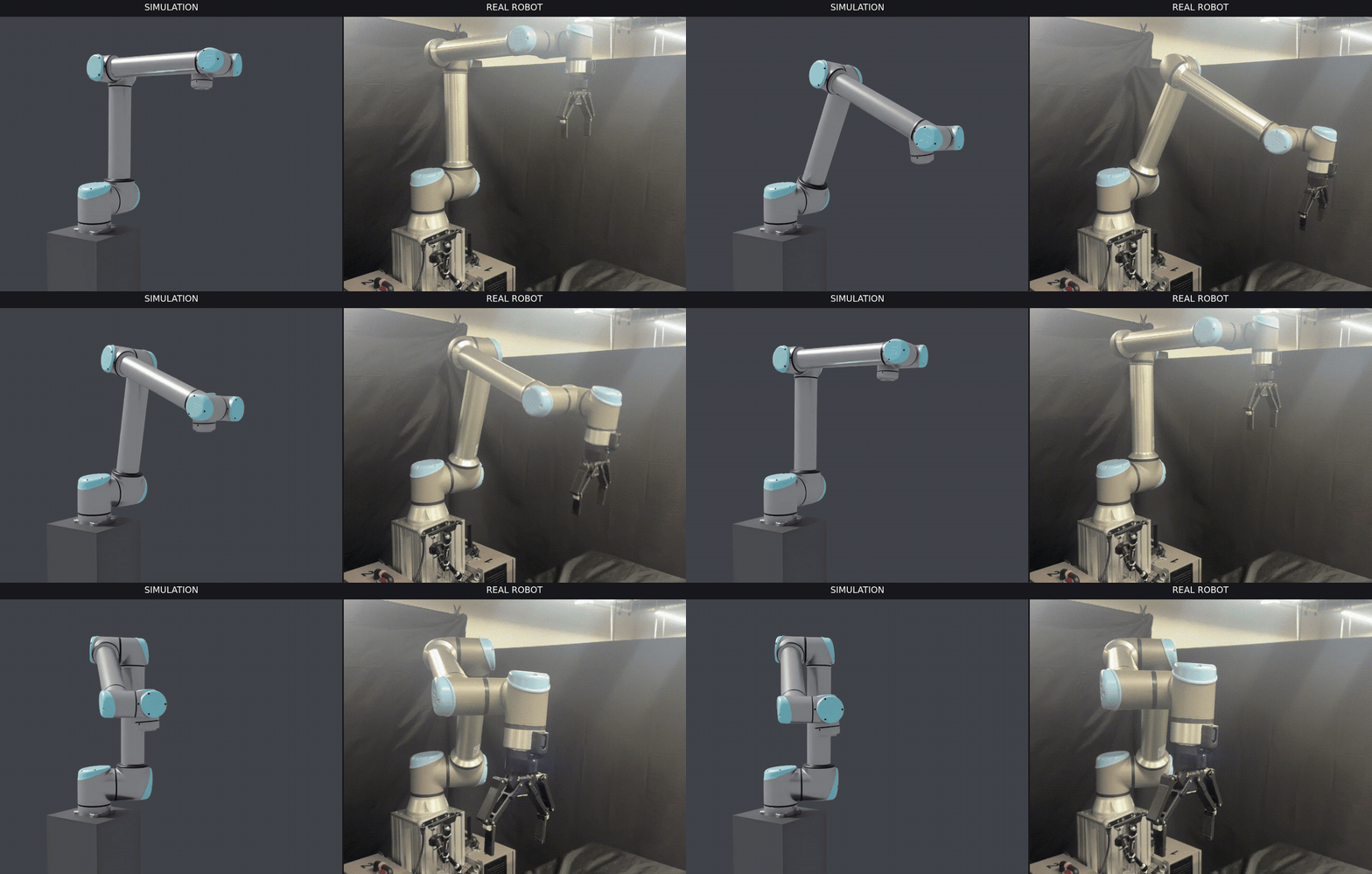
A LEAPP-exported Isaac-Reach-UR10 policy deployed on a physical robot.#
Supported Workflows#
Manager-based RL environments: Export policies trained with
rsl_rl,rl_games,skrl, orsb3and run them in Isaac Lab withLeappDeploymentEnv.Direct RL environments: Export RSL-RL policies after adding LEAPP annotations; see the Direct workflow export guide. These policies are not supported by
LeappDeploymentEnv.Physics backends: Export with Isaac Sim PhysX, Newton MJWarp, or OV PhysX, as supported by your task. Use the same backend and configuration as training.
Note
For more information on LEAPP, please visit the LEAPP documentation.
Prerequisites#
This export flow requires leapp, Python >= 3.10, and PyTorch >= 2.6.
leapp is a specialized optional extra (it is not part of --extra all).
Select extras the same way as isaaclab train: add --extra leapp on every
uv run, and add the backend extra that matches your task. --extra makes the
integration available; physics=... selects it for the task:
Newton (kitless):
--extra leapp(no Isaac Sim extra)OV PhysX:
--extra ovphysx --extra leappwithphysics=ovphysxIsaac Sim PhysX:
--extra isaacsim --extra leappwithphysics=isaacsim_physx
See Install and run your first task and Optional extras for the full extras model used by training and play.
Quick Start#
Export a trained policy, then launch the exported policy in Isaac Lab:
uv run --extra leapp isaaclab leapp export --rl_library <RL_LIBRARY> \
    --task <TASK_NAME> physics=newton_mjwarp

uv run --extra leapp isaaclab leapp deploy \
    --task <TASK_NAME> \
    --pipeline <PATH_TO_EXPORTED_LEAPP_YAML> \
    --viz newton_gl physics=newton_mjwarp
Continue with the sections below to select a different RL library, configure the export, and validate the generated artifacts.
Why Export with LEAPP#
Running the export command generates a self-contained export directory alongside your checkpoint (or at a custom path). The directory contains:
Exported model files —
.onnx(default) or.ptdepending on the chosen backend.Export metadata — LEAPP records the semantic information and wiring needed by downstream deployment runtimes, including the policy execution frequency.
Initial values — a
.safetensorsfile for any feedback state, such as recurrent hidden state or last action.A graph visualization — a
.pngdiagram of the pipeline (can be disabled).
The exported artifact encapsulates the policy and all observation preprocessing and action postprocessing performed in Isaac Lab, so deployment frameworks do not need to replicate that logic.
For a detailed description of LEAPP’s generated artifacts and APIs, refer to the LEAPP documentation.
Exporting a Policy#
Note
Export requires a trained checkpoint. Normally you train a policy first — follow
Install and run your first task and
Reinforcement Learning — and the export
command then discovers the newest matching local run automatically. To get started
without training, RSL-RL can pass --checkpoint pretrained to download a published
policy for a supported core task and backend combination (availability is limited;
see Pretrained checkpoints).
Use --rl_library to select the RL library that produced the checkpoint. The supported
libraries are rsl_rl, rl_games, skrl, and sb3. Export runs headless by default.
Use the same backend extra and physics=... selector that you used for training. For Isaac Sim
Kit launches in non-interactive shells, set the EULA variables so startup does not prompt:
# Newton backend (kitless)
uv run --extra leapp isaaclab leapp export --rl_library <rl_library> \
    --task <TASK_NAME> physics=newton_mjwarp

# OV PhysX backend
uv run --extra ovphysx --extra leapp isaaclab leapp export --rl_library <rl_library> \
    --task <TASK_NAME> physics=ovphysx

# Isaac Sim PhysX backend
OMNI_KIT_ACCEPT_EULA=Y ACCEPT_EULA=Y uv run --extra isaacsim --extra leapp isaaclab leapp export \
    --rl_library <rl_library> \
    --task <TASK_NAME> physics=isaacsim_physx
:: Newton backend (kitless)
uv run --extra leapp isaaclab leapp export --rl_library <rl_library> ^
    --task <TASK_NAME> physics=newton_mjwarp

:: OV PhysX backend
uv run --extra ovphysx --extra leapp isaaclab leapp export --rl_library <rl_library> ^
    --task <TASK_NAME> physics=ovphysx

:: Isaac Sim PhysX backend
set OMNI_KIT_ACCEPT_EULA=Y
set ACCEPT_EULA=Y
uv run --extra isaacsim --extra leapp isaaclab leapp export --rl_library <rl_library> ^
    --task <TASK_NAME> physics=isaacsim_physx
When --checkpoint is omitted, the exporter uses the selected task’s agent configuration to
find the default checkpoint in the newest matching local run. This avoids hardcoding the
experiment directory or training iteration in the command. Pass --checkpoint <PATH_TO_CHECKPOINT>
to export a specific model instead.
For example, to export a Humanoid policy trained with RSL-RL on Isaac Sim PhysX:
OMNI_KIT_ACCEPT_EULA=Y ACCEPT_EULA=Y uv run --extra isaacsim --extra leapp isaaclab leapp export \
    --rl_library rsl_rl \
    --task Isaac-Humanoid physics=isaacsim_physx
set OMNI_KIT_ACCEPT_EULA=Y
set ACCEPT_EULA=Y
uv run --extra isaacsim --extra leapp isaaclab leapp export --rl_library rsl_rl ^
    --task Isaac-Humanoid physics=isaacsim_physx
By default, the export artifacts are saved in the same directory as the checkpoint. The exported graph is named after the task.
CLI Options#
The export command accepts the following common LEAPP-specific arguments in addition to
backend-specific and launcher arguments (see add_launcher_args()):
Argument |
Default |
Description |
|---|---|---|
|
Automatic local discovery |
Path to a specific checkpoint, or |
|
Task name |
Name for the exported graph and output directory. |
|
|
Select the export backend based on the artifact format you need. |
|
Checkpoint dir |
Base directory for export output. |
|
|
Number of environment steps to run during the traced rollout. Set to |
|
|
Skip generating the pipeline graph PNG. |
Note
--checkpoint pretrained is supported by the RSL-RL, RL-Games, skrl, and Stable-Baselines3
exporters, but a published artifact is not available for every task and backend combination.
If no matching artifact has been published, the exporter reports that it is unavailable and
exits. Train the task locally and omit --checkpoint for automatic discovery, or pass an
explicit checkpoint path. See Pretrained checkpoints for checkpoint availability.
How It Works (High Level)#
The export command performs the following steps:
Creates the environment with
num_envs=1and loads the trained checkpoint.Patches the environment for export. This step injects annotations into the environment so that tensor i/o to the pipeline are identified by LEAPP during execution.
Runs a short rollout (controlled by
--validation_steps) with LEAPP tracing active. During this rollout, LEAPP traces all tensor operations in the pipeline and automatically builds an onnx file.Compiles the graph so the exported model and deployment metadata can be consumed by downstream runtimes, and optionally validates that the exported model reproduces the traced outputs.
The patching is transparent to the policy; no changes to your training code or environment configuration are needed.
Warning
LEAPP is designed to support a broad range of model architectures, but the current implementation has a few important limitations:
Dynamic control flow is not supported when the condition depends on runtime tensor values, such as tensor-dependent
if,for, orwhilelogic.Critical traced operations should avoid unsupported third-party libraries. PyTorch operations are the best-supported path. NumPy conversions inside the traced node can be captured when they do not cross the graph boundary, but external library calls may not be traceable. This export path does not currently support Warp operations.
Verifying an Export#
Verify an export in the following order:
Run automatic validation. Keep
--validation_stepsgreater than zero so LEAPP can replay the traced rollout and compare the exported artifact with the original policy. This catches conversion errors, unsupported operations, output mismatches, and common feedback-state issues.Inspect the generated graph. Open the graph PNG to confirm the expected inputs, outputs, and feedback edges are present. Keep graph generation enabled while developing a new export path; use
--disable_graph_visualizationonly when you do not need it.Review the LEAPP log. When validation fails or the artifacts look unexpected, the log is the best starting point for backend errors, missing metadata, and unsupported model patterns.
Use the default onnx-dynamo backend unless your
downstream runtime or workflow requires another format. Backend support can vary by model, so if
one backend fails, try another backend that produces an acceptable artifact format.
For details on ONNX, JIT, and PT2 export formats, see the LEAPP export guide.
To run an exported policy in Isaac Lab, see the deployment guide.
Further Reading#
LeappDeploymentEnvAPI reference