

Foveated Camera#
A FoveatedCamera samples densely at its fixation and sparsely in the periphery.
The fovi library places the viewing rays. Moving the gaze rotates them
relative to the physical camera’s mount. The foveated-camera example lets you explore the scene below by moving
the camera and steering its gaze; the bracketed options render the retina with OVRTX, whose first frame can take
several minutes with a cold shader cache:
uv run --extra fovi [--extra ovrtx] isaaclab example foveated-camera [renderer=ovrtx]
The Newton viewer shows the camera’s image, the foveated camera’s cortical view (see Sampling), covered at launch by
a window that shows the fisheye on a curved viewing sphere beside that view: the green lens boundary follows the camera
mount, and the blue gaze circle and sampling grid show the retina’s coverage. Use WASD or the arrow keys to move the
camera and Q/E to lower or raise it. Drag with the left mouse button, or press I/K and J/L, to steer the gaze. Below
the side panel’s Camera Source selector, gaze sliders follow the gaze and set it, and on Newton a foveation slider
steps the CMF constant, through other stops with --cmf_a_values 0.2,2,20 plus the camera’s own. H shows or hides
the viewer controls. Pass --target power_drill to start fixating the drill.
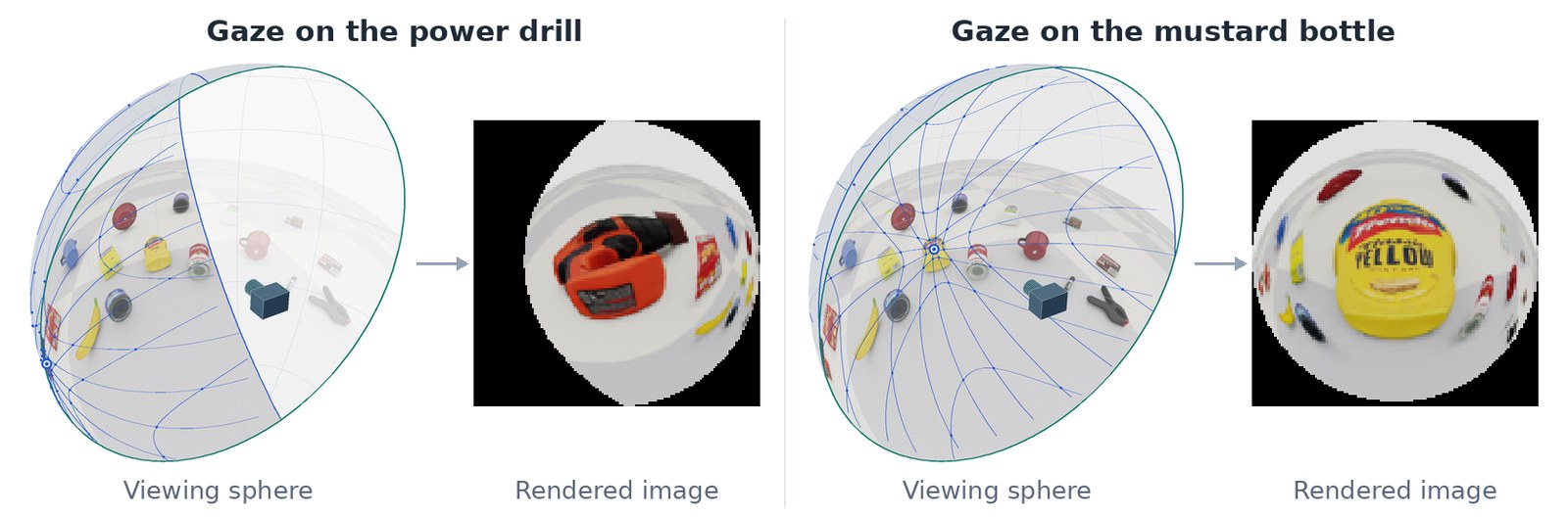
A foveated retina behind a 180° fisheye lens, path-traced with OVRTX. Each pair shows the retina’s rays on the viewing sphere, faded outside the retina’s field, and the rendered image. Fixating the drill puts part of the retina outside the camera’s view, and those samples render black.#
Sampling#
The retina places its samples by visual angle, with a density that falls off from the fixation as the cortical magnification function (CMF) of human vision does. At eccentricity \(r\) from the fixation, in degrees,
where \(a\) is cmf_a_deg, \(M\) is the cortical distance per degree of
visual angle, and \(w\) is the cortical distance from the fixation. Samples spaced evenly in \(w\) are dense
near the fixation and sparse far from it.
The default foveated_style="warped_cartesian_as_grid" warps an \(N \times N\) lattice, with \(N\) =
foveated_res, so that its radius \(\rho \in [0, 1]\) is proportional to
\(w\). A lattice point at radius \(\rho\) samples the eccentricity
where \(r_{\max}\) is half the retina’s field of view, and the camera publishes the lattice as an upright
(num_envs, N, N, channels) image: the foveated camera’s cortical view, laid out by cortical distance rather than
by angle.
foveated_style="isotropic" instead places rings evenly in \(w\), and gives each ring as many samples as keep
neighbours about equally far apart in every direction:
where \(\rho_k\) is ring \(k\)’s radius on the viewing sphere and \(\Delta r_k\) its distance to the
neighbouring rings. The camera publishes at most \(N^2\) samples, (num_envs, num_samples, 1, channels).
These samples lie on an isotropic manifold in 3D, the viewing sphere, rather than on a 2D image grid, so networks
process them with kNN convolution, as in fovi. The isotropic mode is supported
on Newton Warp and OptiX, but not yet recommended on the RTX renderers, whose lens textures and post-processing
need a 2D grid.
The viewer shows both styles for an equidistant fisheye or a pinhole camera.
Camera and gaze#
Declare a FoveatedCameraCfg directly on the scene. For example, a 32 × 32 RGB retina and a
pooled variant can share the same camera setup.
from isaaclab.sim import PinholeCameraCfg
from isaaclab_fovi.sensors import FoveatedCameraCfg

camera = FoveatedCameraCfg(
    prim_path="{ENV_REGEX_NS}/Camera",
    spawn=PinholeCameraCfg(),
    foveated_res=32,
)
pooled_camera = camera.replace(pool_enabled=True)
Newton Warp and OptiX render the retinal rays directly. Isaac RTX and OVRTX use lens lookup textures.
The retinal field of view defaults to the angle across the short side of the physical image. The camera
uses ideal pinhole optics or supported OpenCV distortion from spawn. Supply
camera_model for explicit calibration or an existing camera prim.
Use retinal_window_fraction to shrink this window and
image_rotation_deg to compensate for mount roll.
Call camera.set_gaze_angles(angles) with shape (num_envs, 2) in tilt, pan order and in degrees.
Positive tilt looks up and positive pan looks left. While a foveated camera is a Newton viewer window’s camera
source, tilt and pan sliders for it appear below the Camera Source selector, in the Camera Sensor section; they
follow its gaze and set it in every environment, and a gaze action overrides them each step. A foveation slider
beside them switches the CMF constant among cmf_a_values, which can be assigned
to change the stops, with set_cmf_a(), which re-samples the retina in place. That
works on Newton for styles whose sample count does not depend on the constant, the warped-Cartesian and _fixn
isotropic ones; OVRTX and Isaac RTX read their lens textures once, so there the slider shows the constant as fixed.
get_world_poses() reports the mount pose. Enable
mask_to_sensor_fov to zero rays that fall outside the physical image as the gaze
moves.
Pooling#
Enable pool_enabled to render a denser set of rays and pool their values
into the published retina. Grid styles pool windows, while sample sets pool nearest neighbours.
The neighbour metric applies to nearest-neighbour pooling, and Gaussian sigma applies to Gaussian pooling.
The sensor mask excludes rays outside the physical image from the reduction. Segmentation selects the
modal label in its original dtype.
Active gaze Cartpole#
IsaacContrib-Cartpole-Camera-Fovi uses a 32 × 32 retina and two bounded gaze actions. A pole-tip teacher
supervises the gaze-action means during training. The gaze dimensions use fixed exploration noise.
Select presets=depth for depth images.
uv run --extra fovi --extra rsl-rl isaaclab train --rl_library rsl_rl --task IsaacContrib-Cartpole-Camera-Fovi
For other manager-based tasks, use GazeActionCfg to move gaze, gaze_state() to
observe it, and gaze_teacher_labels for optional supervision.