



Actuators#
An articulated system moves through its actuated joints. Physical joints may use active components, such as electric or hydraulic motors, or passive components, such as springs and friction. These components can introduce finite torque, speed limits, delays, and gearbox effects.
Isaac Lab exposes two ways to reproduce that behavior in simulation:
Implicit actuators pass position and velocity gains to the physics engine, which runs a spring-damper (PD) controller in its solver. This is a low-overhead option when the built-in PD model is sufficient. In isolation, PhysX implicit drives may tolerate higher gains or a larger time step. Contacts, mimic joints, joint limits, large target changes, and insufficient solver convergence can still make them unstable. See the PhysX articulation drive stability guidance.
Explicit actuators run a model that computes joint effort, clips it to the motor’s capabilities, and submits the result. They can model saturation, delay, gearing, and learned motor behavior. Native paths process commands differently: Newton processes them in the solver, while PhysX and OVPhysX use a shared host adapter during
write_data_to_sim().
Actuator groups are configured through actuators and
exposed at runtime through ActuatorCollection on
actuators. The collection routes groups and stages commands
and telemetry. The articulation executes and submits them. LEAPP action terms still use the
articulation setters; see Migrating from the deprecated setters.
Choosing a model#
All models use ActuatorBaseCfg. PD models differ in clipping and
state. Neural models replace the analytical PD law with a learned torque predictor. Choose the
simplest model that meets your requirements.
Model (config) |
Torque / clipping |
Where limits clip |
Extra config fields |
|---|---|---|---|
Solver runs the PD law from the written gains. |
|
– |
|
\(\tau = k_p (q_{des}-q) + k_d(\dot{q}_{des}-\dot{q}) + \tau_{ff}\) |
Model clips directly to \(\pm\,\tau_{max}\) ( |
– |
|
Same PD torque, clipped to a four-quadrant torque-speed envelope. |
Model clips against a velocity-dependent limit. |
|
|
Ideal PD applied to commands delayed by a circular buffer. |
Same as ideal PD ( |
|
|
Delayed PD with an angle-dependent torque ceiling. |
Torque clipped by a joint-angle lookup table. |
|
|
A trained network predicts the torque from the joint history. |
Network output clipped by the DC-motor envelope. |
|
|
|
Identified voltage-domain servo: firmware P law, PWM duty, DC motor, load-dependent gearbox friction. |
Duty clipped by the current limiter, torque by |
|
ImplicitActuator. The default model. The solver applies the gains and limits. Isaac Lab estimates effort telemetry from the current state when the backend does not expose it.
IdealPDActuator. An explicit PD controller with feed-forward effort and a symmetric model-side torque limit at \(\pm\,\tau_{max}\).
DCMotor. Adds a linear four-quadrant torque-speed curve. saturation_effort is the stall
torque, and actuator_velocity_limit is the no-load speed. Both accept a joint-name-pattern
dictionary, so joints behind different gear reductions can share one group and still get their own
curve — for example a quadruped whose knee sits behind an extra reduction relative to its hip.
DelayedPDActuator. An ideal PD controller with delayed position, velocity, and effort commands.
The delay is sampled uniformly from [min_delay, max_delay] at reset.
RemotizedPDActuator. A delayed PD controller with an angle-dependent torque limit. The
joint_parameter_lookup table stores joint angle, transmission ratio, and maximum torque. Use it
for linkages whose effective lever arm changes through their range of motion.
ActuatorNetMLP / ActuatorNetLSTM. Learned torque models that use joint-position error and
velocity history and clip output with the DC-motor envelope. They require a TorchScript checkpoint.
See the isaaclab.actuators API reference for configuration details.
BamActuatorCfg. A parameter-identified model of a small voltage-controlled servo, described in BAM servo model. Unlike the PD models it takes no stiffness or damping: its position loop is the servo firmware’s, and its damping is the motor’s back-EMF.
Quick usage#
Declare one or more actuator groups in the articulation config. Each group selects a disjoint set of joints by regular expression and chooses a model:
from isaaclab.actuators import ImplicitActuatorCfg
from isaaclab.assets import ArticulationCfg

robot_cfg = ArticulationCfg(
    spawn=...,  # your USD / spawner config
    actuators={
        "legs": ImplicitActuatorCfg(
            joint_names_expr=[".*_hip_.*", ".*_knee_.*"],
            stiffness=40.0,
            damping=2.0,
            joint_effort_limit=80.0,
        ),
    },
)
At runtime, send commands through target_command. Position
and velocity commands are expressed in joint-side coordinates, and every command buffer is indexed
by articulation joint. The setters are keyword-only and default to all environments and all joints:
import torch

# desired position for every joint of every environment
values = torch.full((robot.num_instances, robot.num_joints), 0.5, device=robot.device)
robot.actuators.target_command.set_position_index(value=values)
The articulation stages and submits actuator commands inside
write_data_to_sim(). Isaac Lab-managed models and the shared
host adapter run during this call. Newton-native controllers finish processing inside the solver.
The following sections describe this pipeline, the available models, and their parameters.
Runtime API: articulation.actuators#
Group access#
actuators is an
ActuatorCollection, a read-only Mapping from group name to
whoever owns the group. Isaac Lab-executed groups map to their
ActuatorBase model instances. Newton-executed groups map to the
Newton Actuator objects that drive their joints — no Isaac Lab model exists for them, so
their drive parameters are read and modified on the owning object (see
Native actuators). Membership is fixed after construction, so you can look up and iterate
groups but not add, replace, or delete them:
legs = robot.actuators["legs"]          # the group's owner: an ActuatorBase, or a
                                        # Newton Actuator under use_newton_actuators=True
for name, actuator in robot.actuators.items():
    print(name, type(actuator).__name__)
Configure topology before creating the articulation:
robot_cfg.actuators["gripper"] = ImplicitActuatorCfg(...)
robot = Articulation(robot_cfg)
At runtime, both robot.actuators["gripper"] = ... and
del robot.actuators["gripper"] raise TypeError. Group membership and joint coverage
are fixed when the articulation is created.
Logical groups and execution batches#
Named groups such as hips and knees remain distinct when you configure or access them.
A single internal executor computes all plain implicit groups in one fused kernel launch without
changing the tensors returned by robot.actuators["hips"]. Each joint may belong to only one
group; overlapping selections raise ValueError. Explicit, stateful, neural, and
subclassed groups execute one group at a time on the Isaac Lab path, and Newton-executed groups
run inside the solver or host adapter. Fused execution is an internal optimization.
Commands, telemetry, and lifecycle#
Setting actuator commands. The mutable target_command view contains the desired position,
velocity, and effort. Use index setters with environment or joint index lists and tensors. Use mask
setters when you already have boolean Warp masks. All setters are keyword-only:
import torch

ids = torch.tensor([0, 1], device=robot.device)          # first two joints
env_ids = torch.arange(robot.num_instances, device=robot.device)
sub = torch.zeros((env_ids.numel(), ids.numel()), device=robot.device)
robot.actuators.target_command.set_position_index(value=sub, joint_ids=ids, env_ids=env_ids)
env_ids and joint_ids must not contain duplicates. Duplicate indices write to the same
destination concurrently, so the result is undefined. Remove duplicates or use a boolean mask,
which selects each destination at most once.
By default, value has shape (len(env_ids), len(joint_ids)). Pass full_data=True when
value already has shape (num_instances, num_joints). The setter then reads the selected
values directly from the full buffer.
Reading commands and telemetry. target_command contains the desired values staged for
actuator processing. For Isaac Lab-managed models, output_command contains the processed joint
commands.
Native paths bypass this view, so it does not show submitted commands. Newton processes commands in
the solver, while PhysX and OVPhysX process them through the shared host adapter during
write_data_to_sim(). Access the arrays through .torch or .warp:
desired_position = robot.actuators.target_command.position.torch
processed_effort = robot.actuators.output_command.effort.torch  # Isaac Lab-managed path
applied = robot.actuators.applied_effort.torch      # after clipping [N·m or N]
computed = robot.actuators.computed_effort.torch   # before clipping [N·m or N]
computed_effort is the model output before clipping.
applied_effort is the value after clipping. For
implicit actuators, these are approximate efforts recorded for rewards and telemetry.
Randomizing gains. Gain updates depend on the actuator implementation. Managed environments
should use the randomize_actuator_gains event. It updates actuator-owned gains, implicit solver
drives, or native drive parameters as appropriate. There is no generic collection-level
stiffness or damping writer.
Lifecycle. Do not call compute() or submit_commands() directly. The articulation resets
actuators during environment resets. It runs actuator compute, staging, and submission from
write_data_to_sim(). Call this method before advancing the
simulation, or let the scene or environment loop call it. The effort telemetry reflects its most
recent call. Newton-native processing continues inside the solver; host-adapter processing finishes
during the call.
Migrating from the deprecated setters
Joint commands were previously set on the articulation. Those methods now forward to the collection
and emit a DeprecationWarning:
# Before (deprecated)
robot.set_joint_position_target(target, joint_ids=ids)

# After
robot.actuators.target_command.set_position_index(value=target, joint_ids=ids)
LEAPP-exported action terms must keep using the annotated articulation *_index or *_mask
setters until the exporter supports collection setters. Other runtime code should migrate to the
collection API.
The data accessors also moved: articulation.data.joint_pos_target becomes
robot.actuators.target_command.position, and data.computed_torque / data.applied_torque become
robot.actuators.computed_effort / robot.actuators.applied_effort. See the
Isaac Lab 3.0 migration guide for the full table.
Value resolution: USD vs. ActuatorCfg#
Gains and limits can come from the USD joint-drive prim or the actuator config. If a config field is
None, Isaac Lab uses the USD value. A value set in the config overrides the USD value. The robot
schema supplies joint and body ordering, not actuator parameters.
Set actuator_value_resolution_debug_print to True to
log the USD, configuration, and applied values for every joint when the sources differ or the
configuration leaves a value unspecified. Unspecified values appear as Not Specified. See
Robot and articulation configuration for examples and the limit table.
Parameter reference#
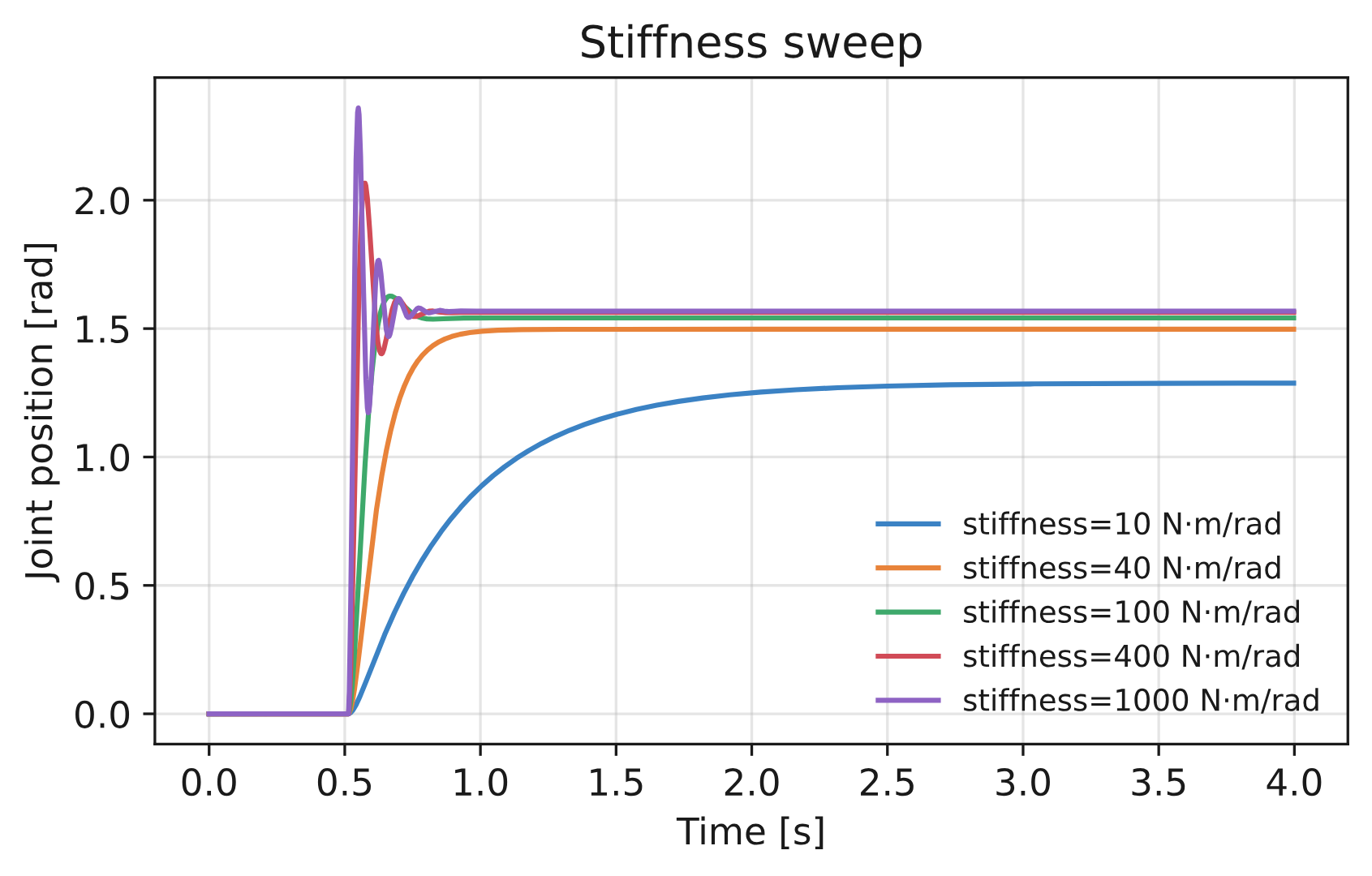
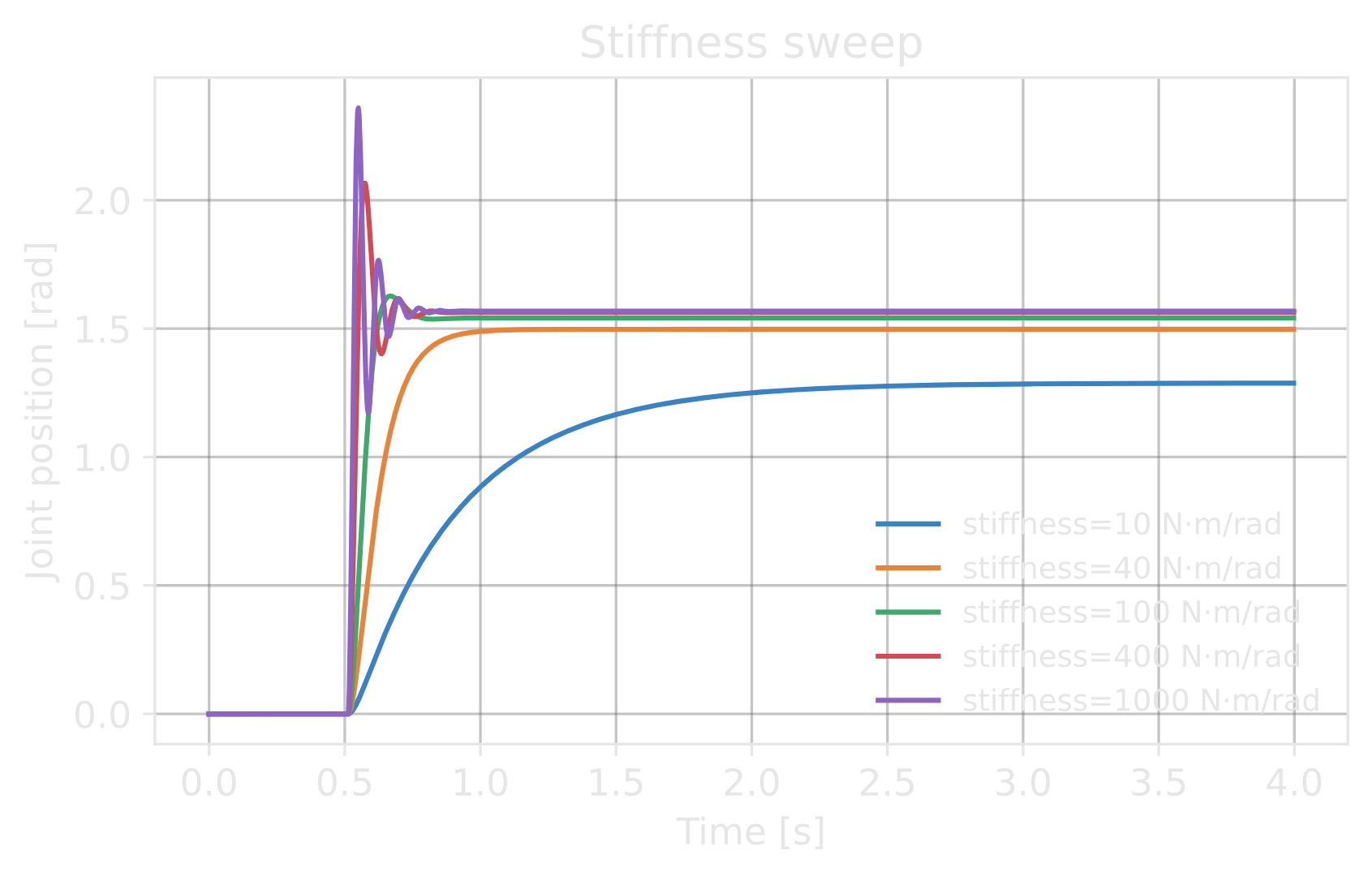
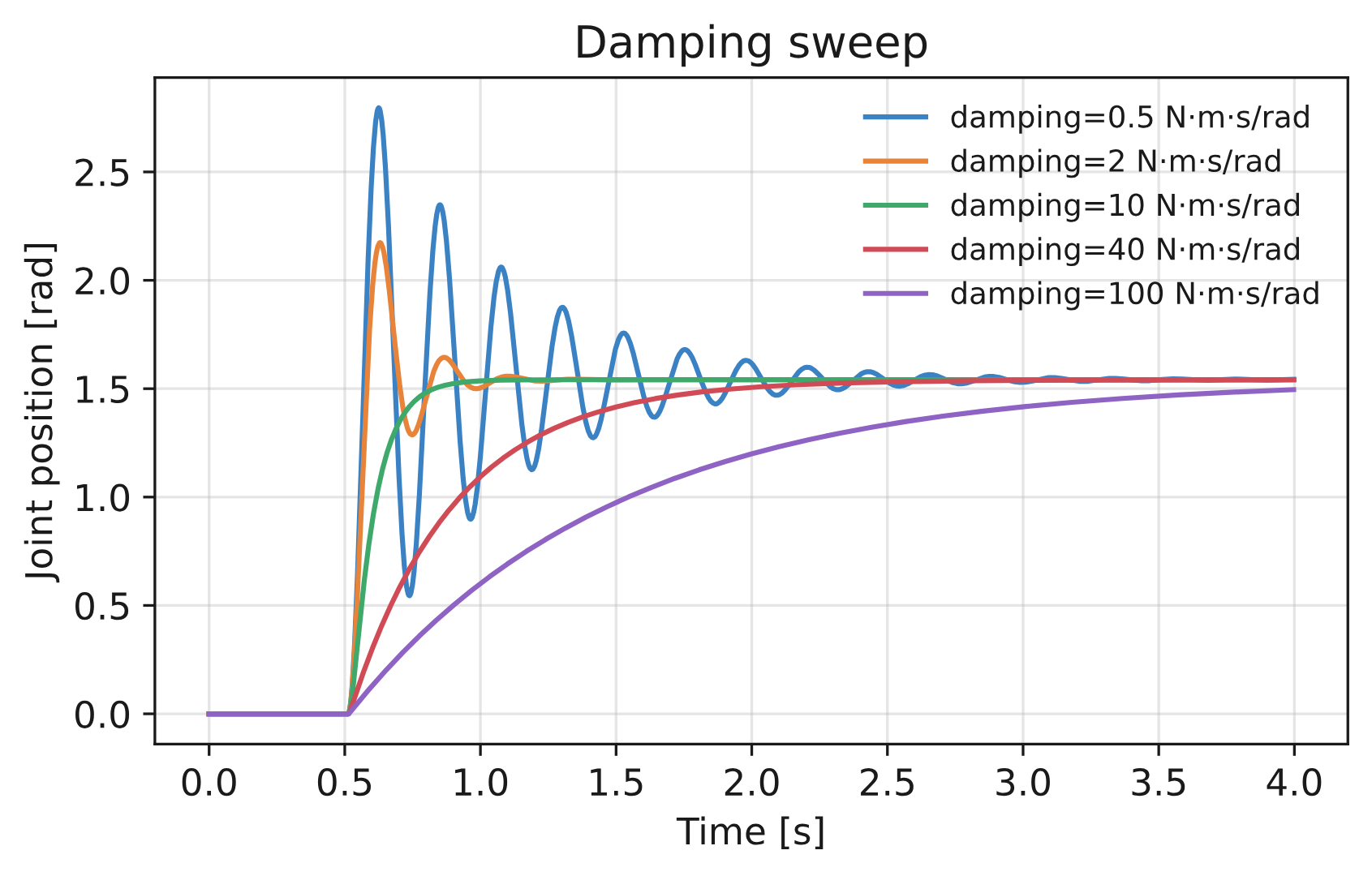
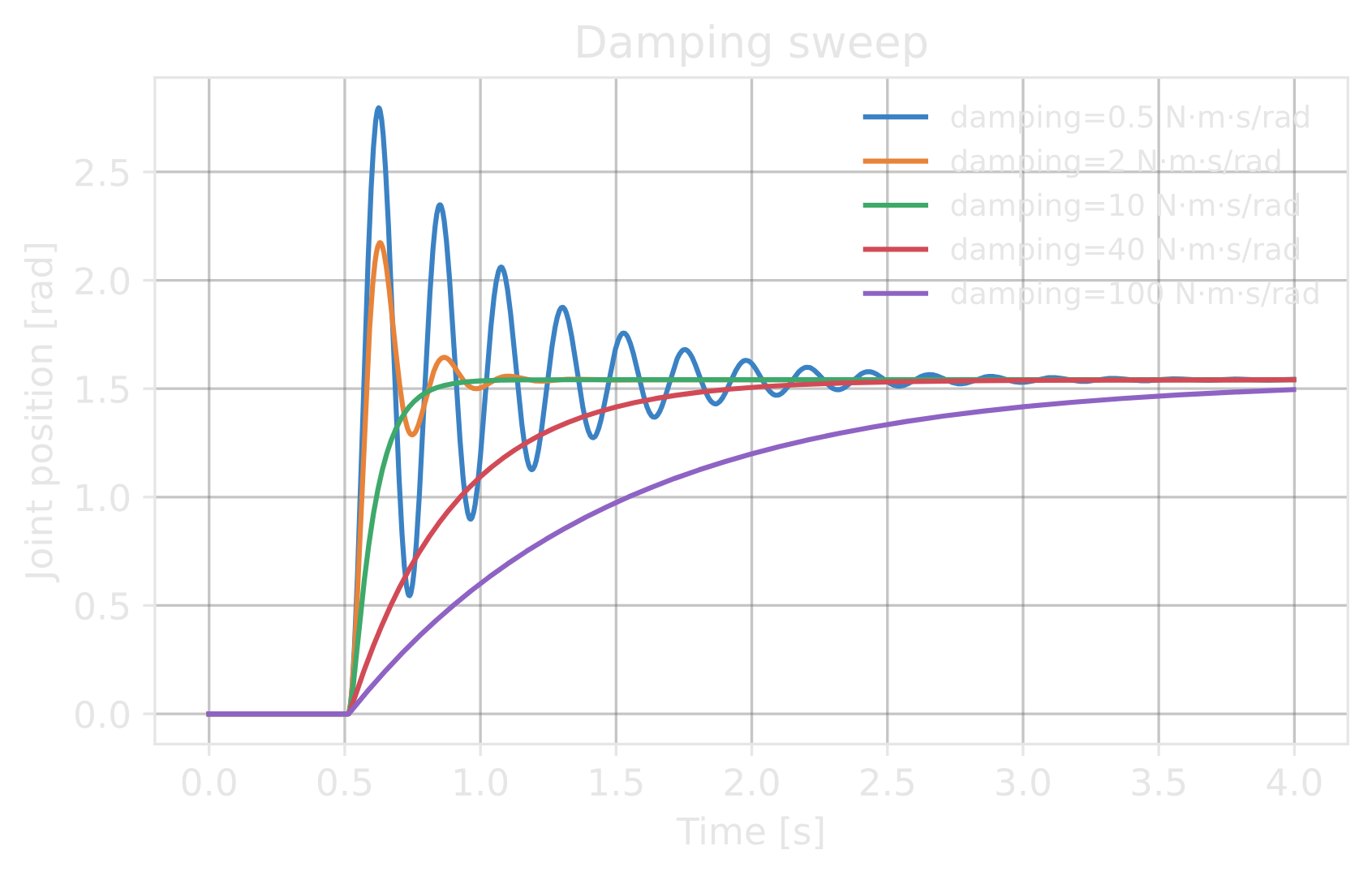
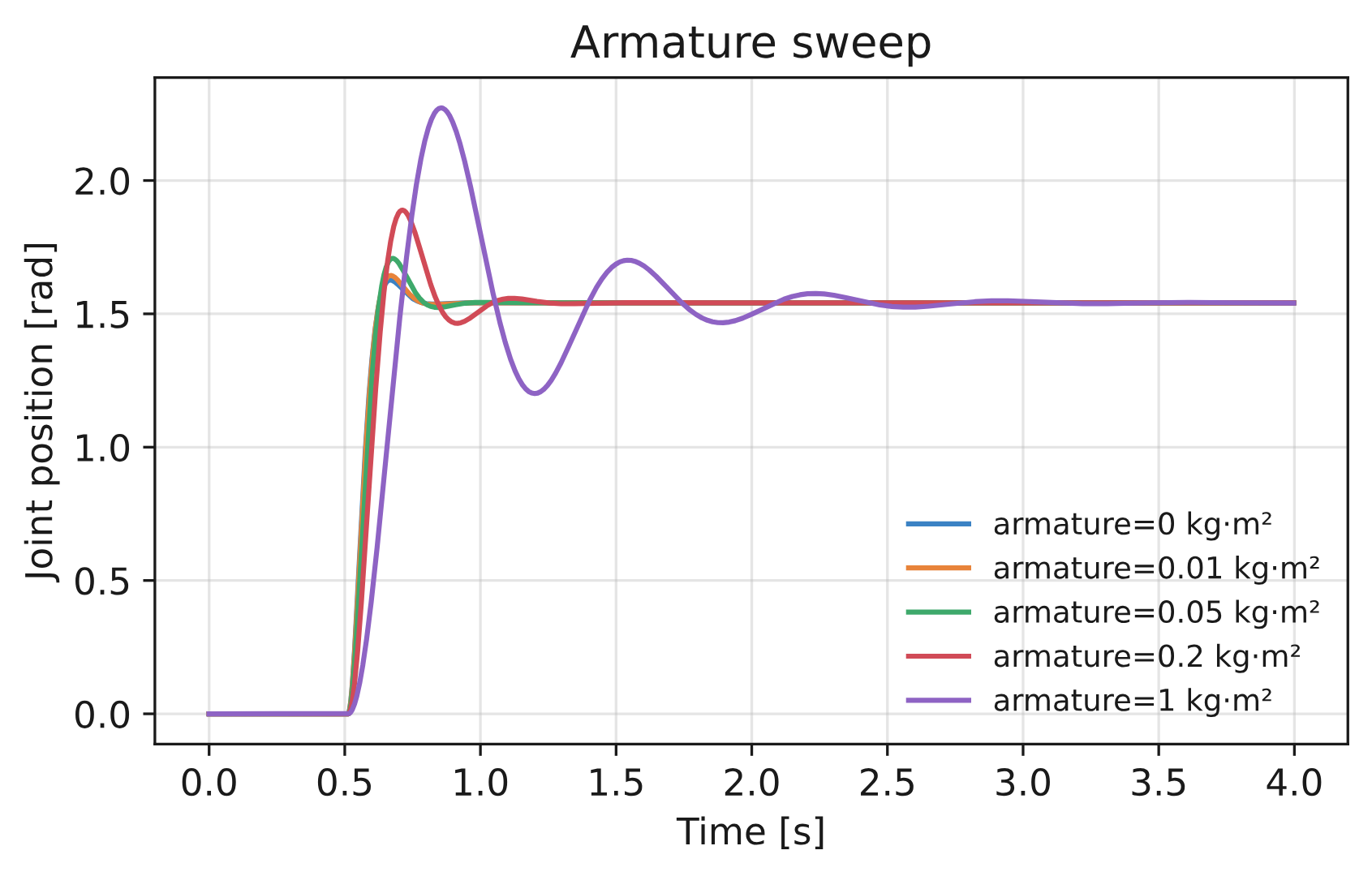
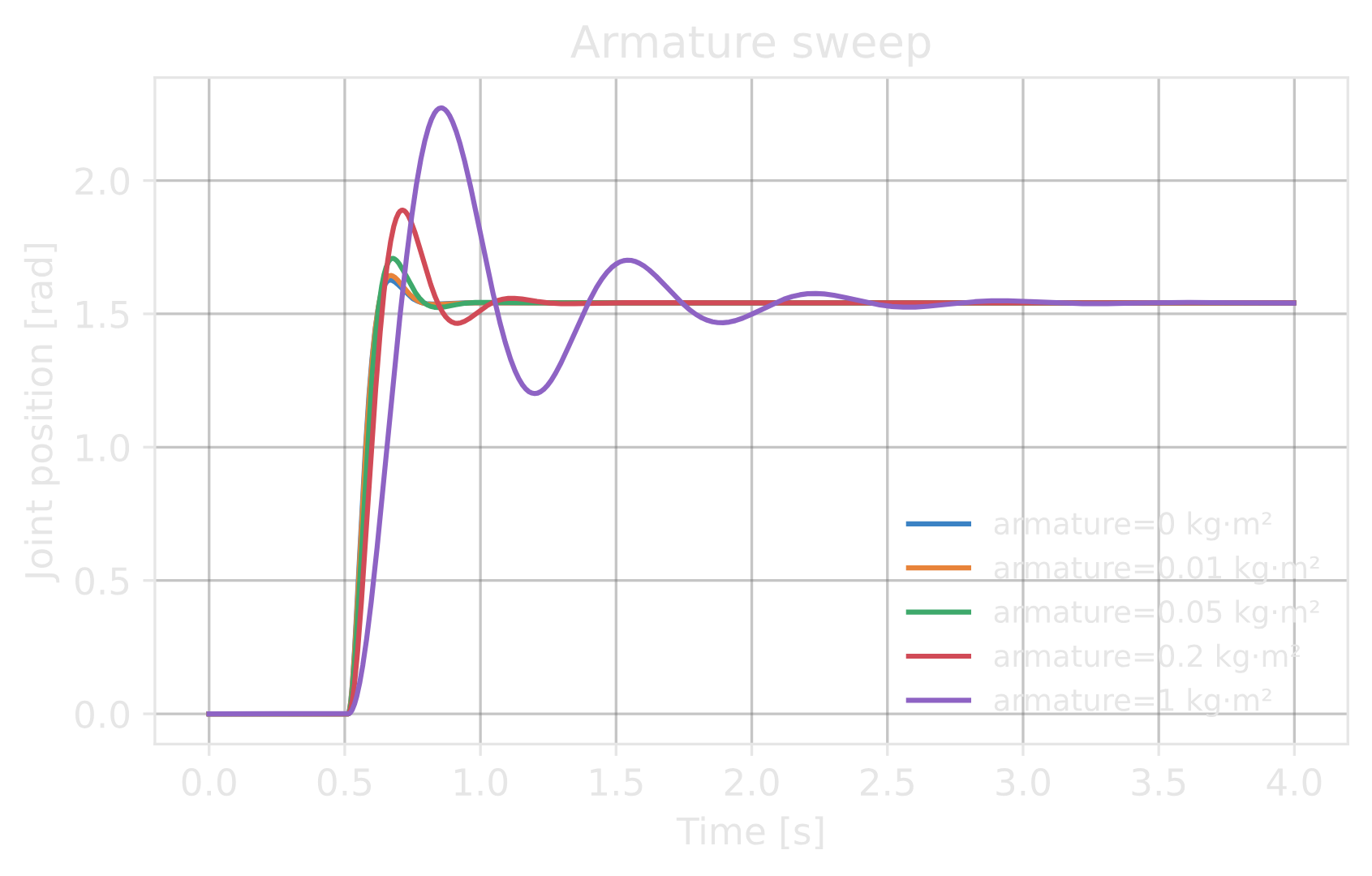
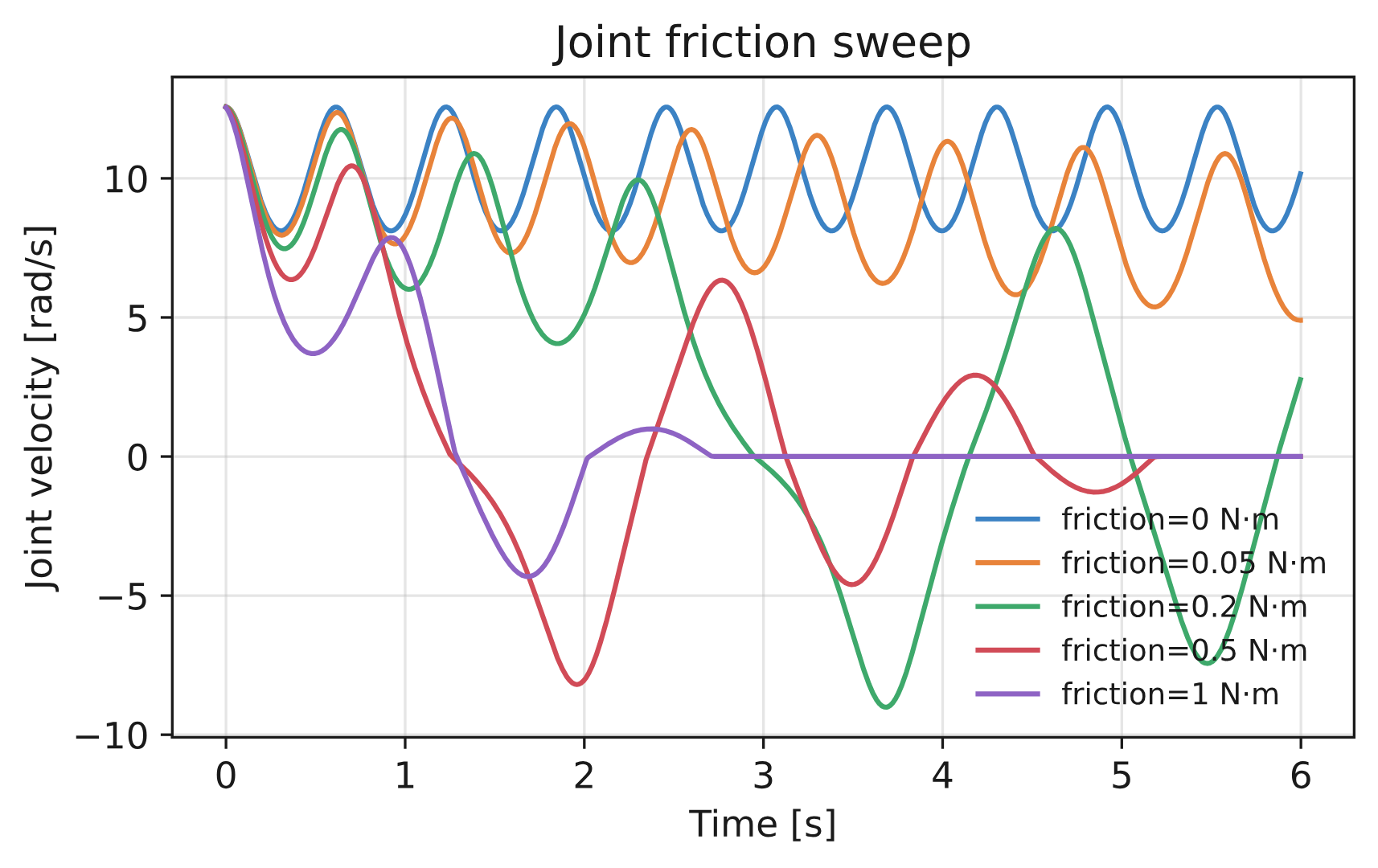
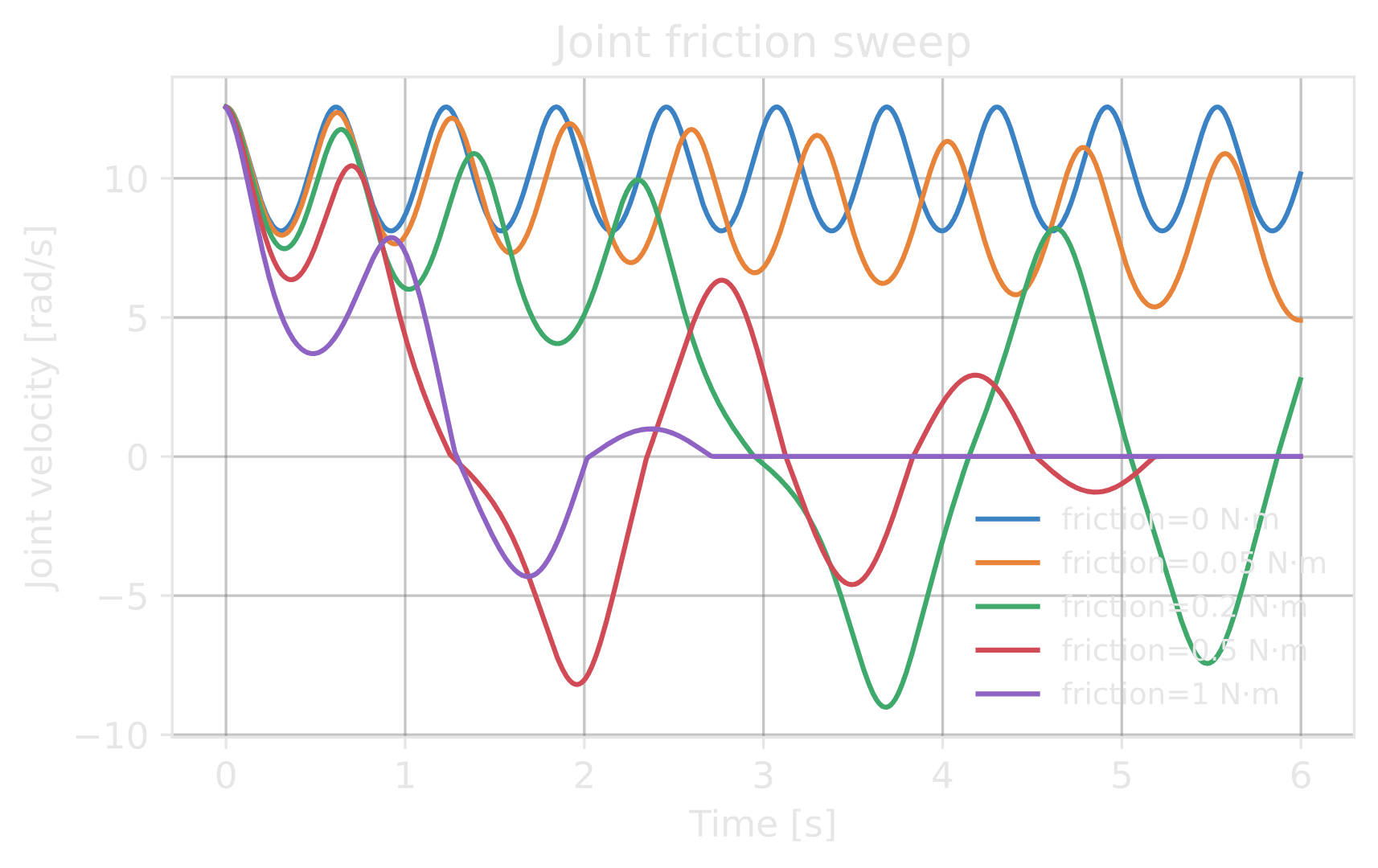
Each subsection compares five actuators while varying one parameter. All clips use a single-joint pendulum stepped at \(dt = 1/360\text{ s}\), with commands issued at 60 Hz. The stiffness, damping, and armature sweeps use the implicit path.
Important
Explicit groups keep the solver effort limit. The solver retains the authored
joint_effort_limit for explicit groups, so effort
submitted by an explicit model is clipped a second time by the solver. Configure
joint_effort_limit at least as large as actuator_effort_limit when the model should be
the only clip. See Joint and actuator property ownership for model-limit, joint-limit, and
implicit-alias semantics.
Stiffness#
Stiffness (\(k_p\), the proportional gain) controls how strongly the joint moves toward its position target. Higher stiffness improves tracking but can increase overshoot and oscillation. Too little stiffness leaves steady-state error under load. Tune stiffness together with damping. Units are [N·m/rad] for revolute joints and [N/m] for prismatic joints.

Damping#
Damping (\(k_d\), the derivative gain) resists joint velocity. Too little damping allows a stiff joint to oscillate. More damping reduces overshoot until the joint becomes critically damped; beyond that point, the response becomes sluggish. Damping also sets the tracking gain for velocity targets. Units are [N·m·s/rad] for revolute joints and [N·s/m] for prismatic joints.

Adjust stiffness and damping on a suspended arm with step and sine commands. The live plot compares target and measured angles. Tune a real robot using its own mass, actuator model, effort limits, and timestep.
Interactive demos load when this section is visible.
Armature#
Armature [kg or kg·m², depending on joint type] represents the reflected inertia of the motor and gearbox. It is added to the joint-space inertia, so it changes the physical model. In this single-joint comparison, more armature slows the response and increases the stability margin for the selected gains. It can also improve numerical conditioning for low-inertia joints.
Explicit and implicit actuators may require different stability settings because explicit models submit effort while implicit models use solver drives. If an explicit simulation diverges, check mass and inertia, target scaling and update rate, effort limits, gains, time step, and solver convergence. Choose armature from the motor and transmission model. See the OmniPhysics articulation stability guide for more information.

Friction#
Joint friction acts independently of the PD command. On a freely spinning joint, higher friction
removes velocity faster. Isaac Lab supports static
(friction), dynamic
(dynamic_friction), and viscous
(viscous_friction) friction. Use it to model gearbox
stiction and drag, not to stabilize a controller.
Note
Friction conventions depend on the backend. PhysX uses dimensionless static and dynamic coefficients in Isaac Sim 4.5, and effort values [N or N·m, depending on joint type] in 5.0 and later. OVPhysX uses static and dynamic effort values [N or N·m, depending on joint type]. Newton uses a dry-friction effort and has no separate dynamic-friction value. All three use viscous damping [N·s/m or N·m·s/rad, depending on joint type].

Effort limit#
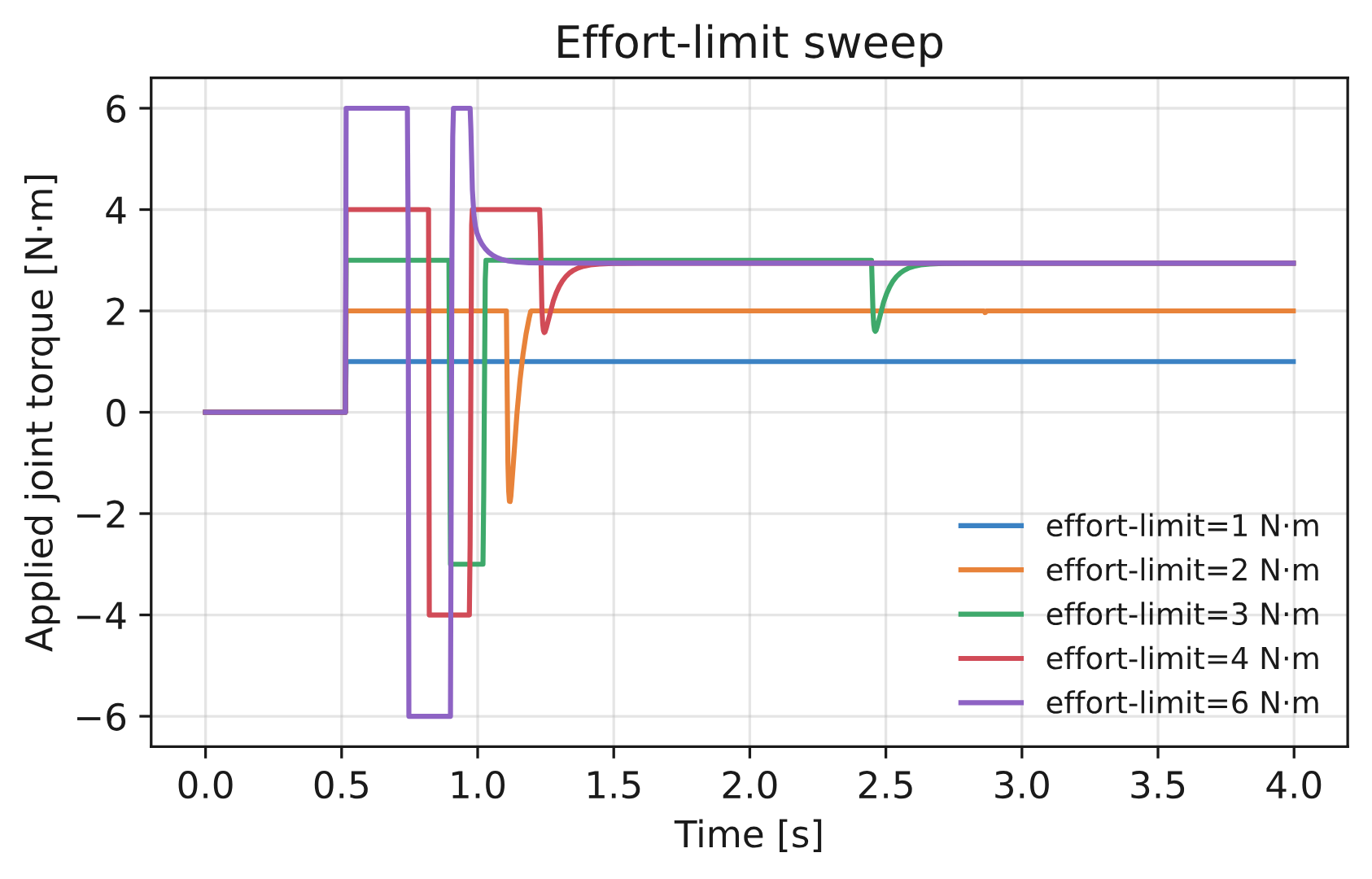
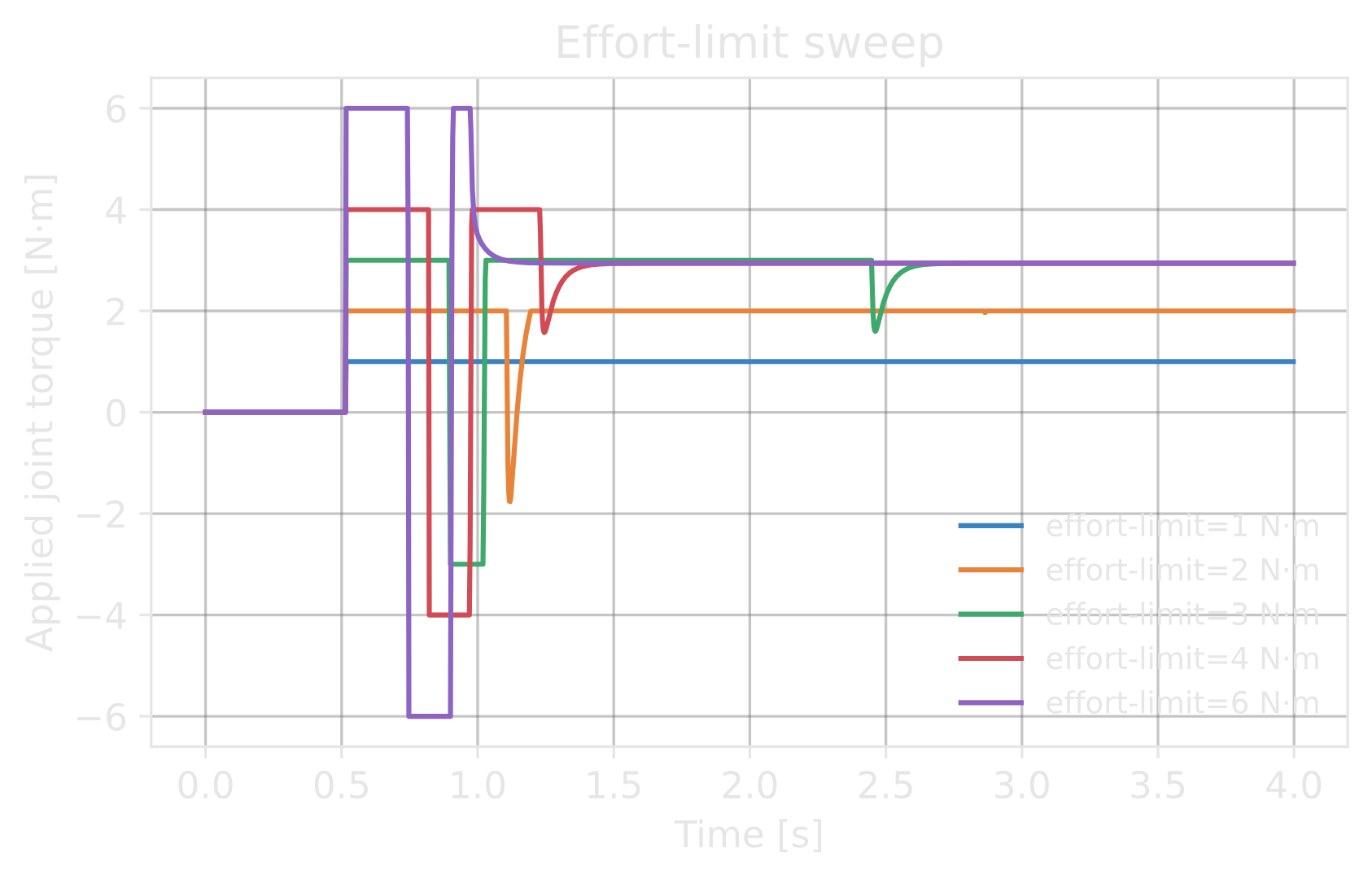
The effort limit is the torque ceiling the motor can produce [N·m or N]. The clip below drives an
IdealPDActuator swing-up from hanging to horizontal against a
~2.94 N·m gravity-hold torque, with the model’s actuator_effort_limit swept over
\([1, 2, 3, 4, 6]\) N·m.
The limit shapes the transient response, while gravity determines the steady state. Limits above the approximately 2.94 N·m hold torque reach the horizontal target. Lower limits leave the joint below it, where gravity torque (\(\approx 2.94 \sin\theta\)) matches the limit. When the PD demand exceeds the limit, the applied torque and damping term are both clipped. The joint can therefore oscillate until the demand returns within the limit. An effort limit below the load’s static demand prevents the controller from damping the joint effectively.

Velocity limit#
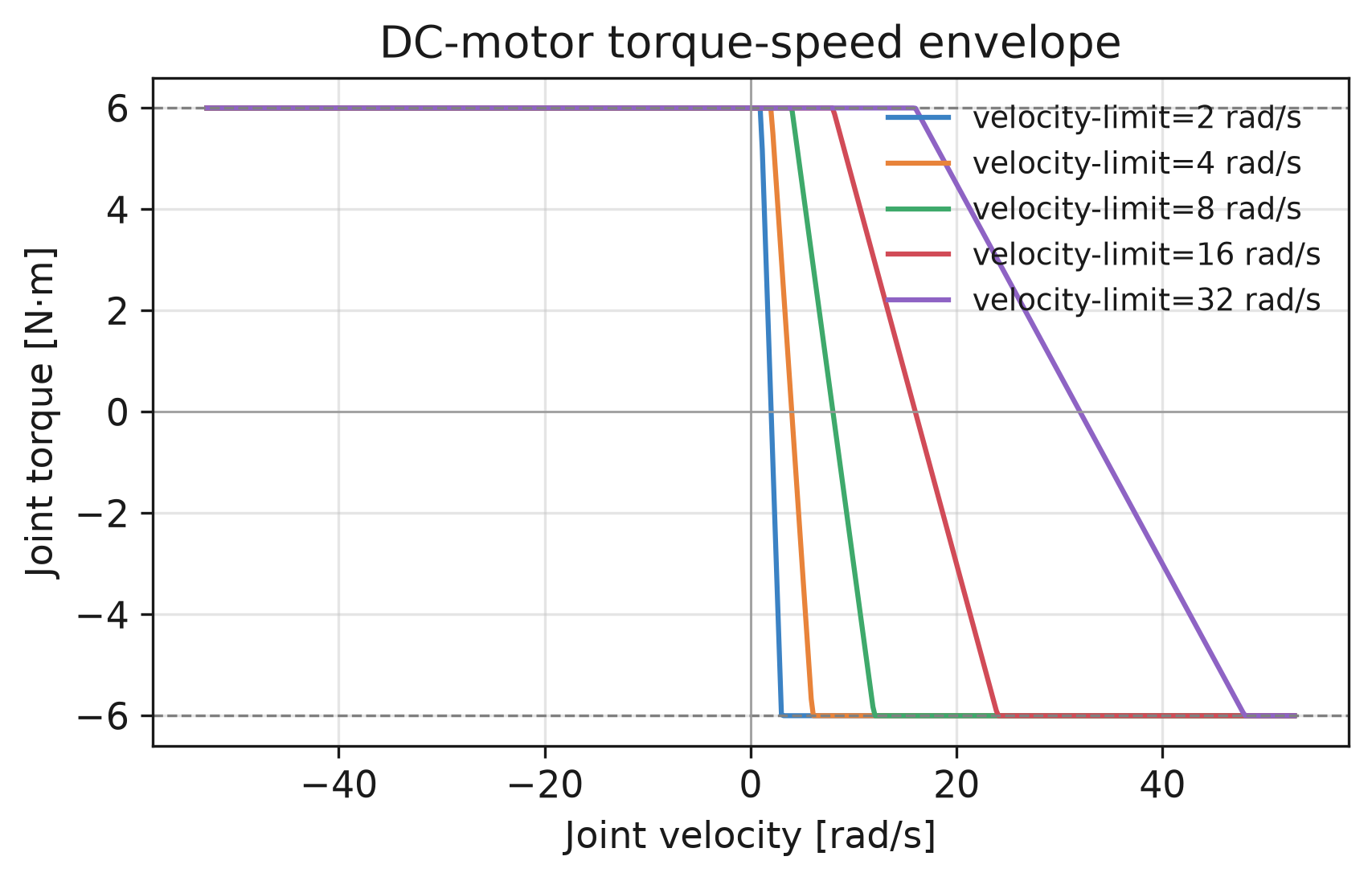
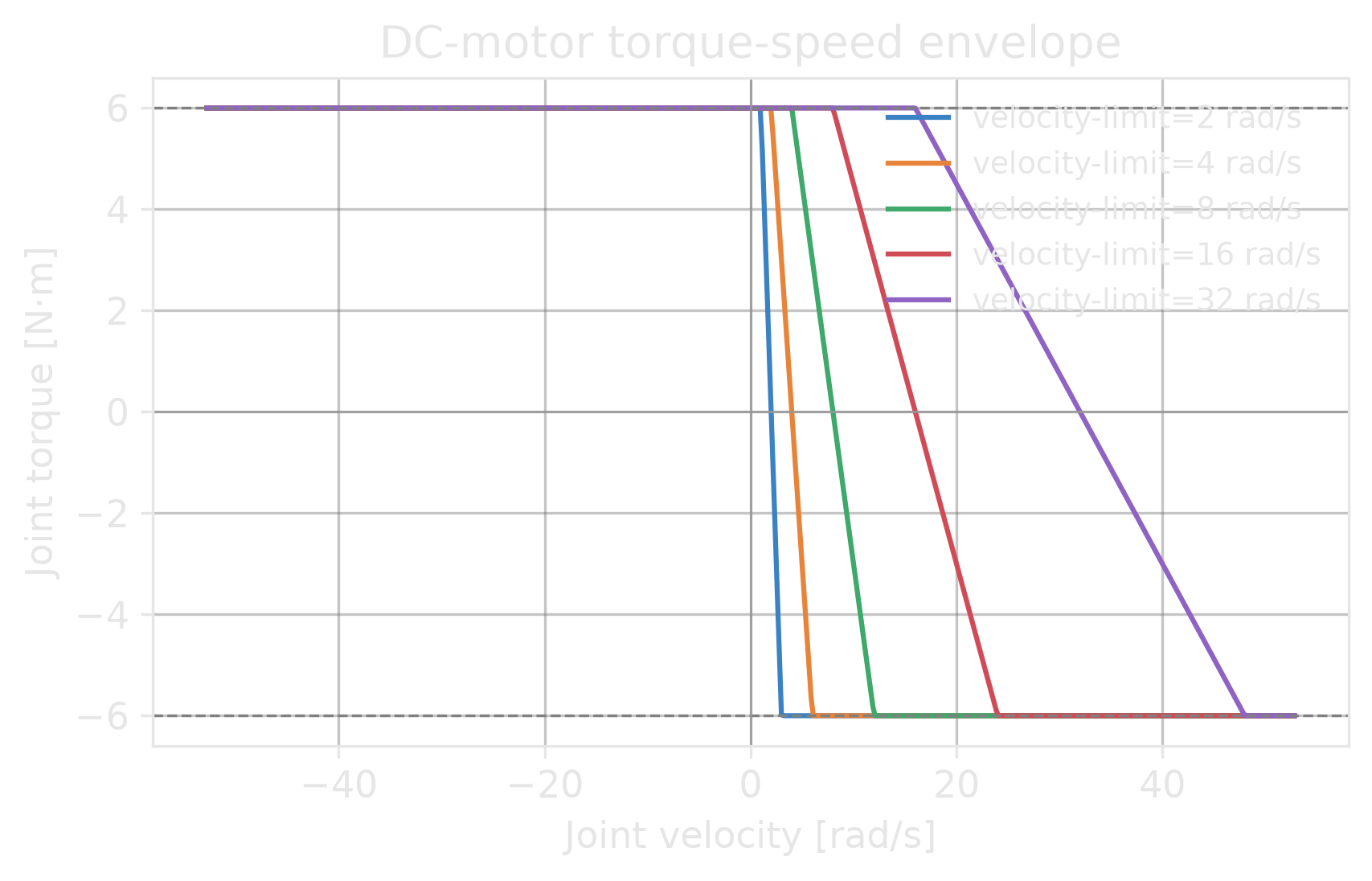
For a DCMotor, actuator_velocity_limit is the no-load speed [rad/s or m/s].
Torque decreases as the joint approaches this speed, forming the four-quadrant torque-speed
envelope. Lower limits reduce the usable speed range and cause earlier clipping. For an implicit
group, the value is exposed through the soft velocity-limit view. joint_velocity_limit instead
requests a solver constraint. Enforcement depends on the backend; see
Validate actuators and limits.

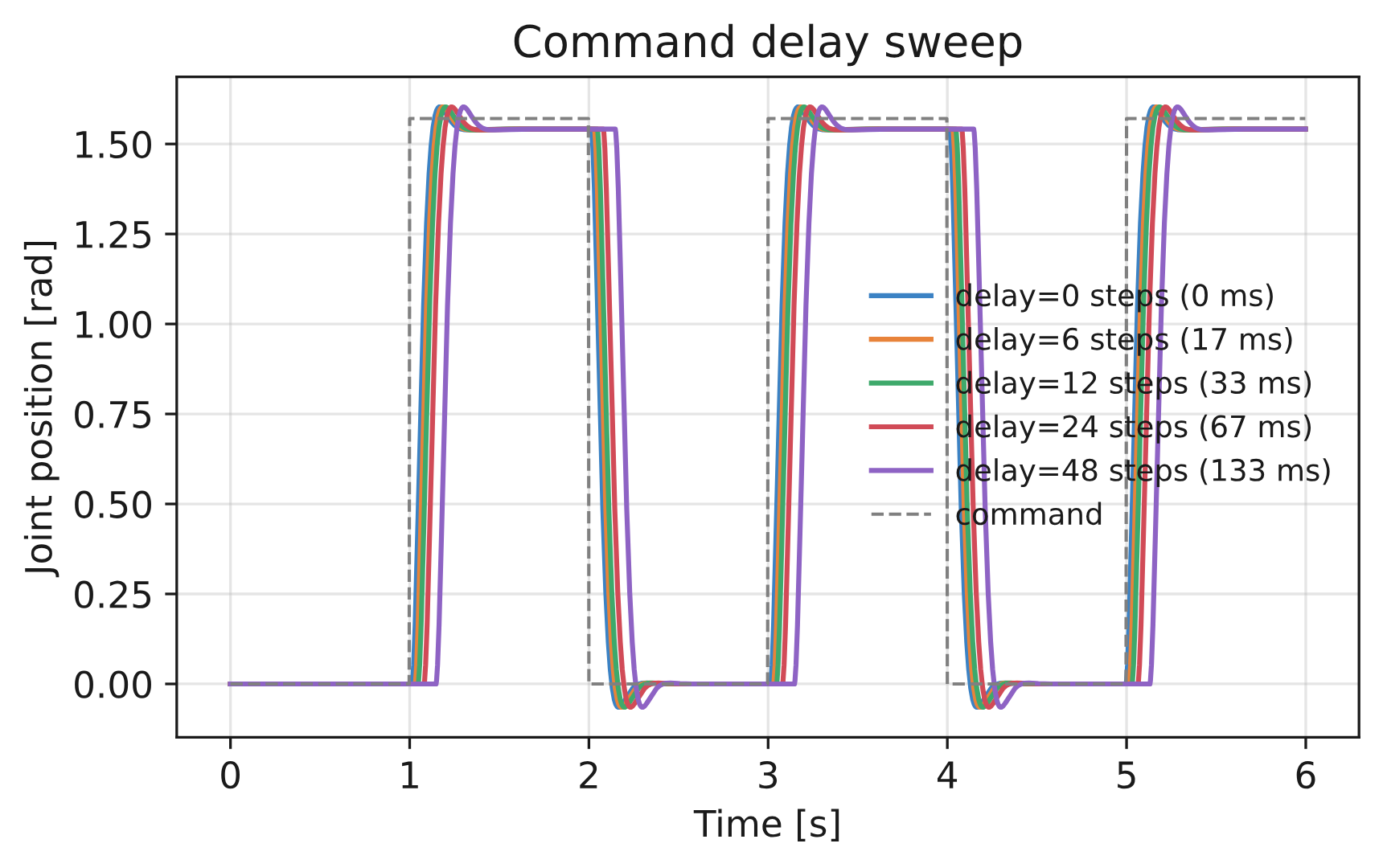
Command delay#
A DelayedPDActuator delays every command by a fixed number of physics
steps sampled from [min_delay, max_delay] at reset. The clip compares delays of
\([0, 6, 12, 24, 48]\) steps (0–133 ms at \(dt = 1/360\text{ s}\)) for a square-wave
position command. Longer delays make the pendulum trail the reference. Randomizing delay between
resets can model transport delay during sim-to-real training.
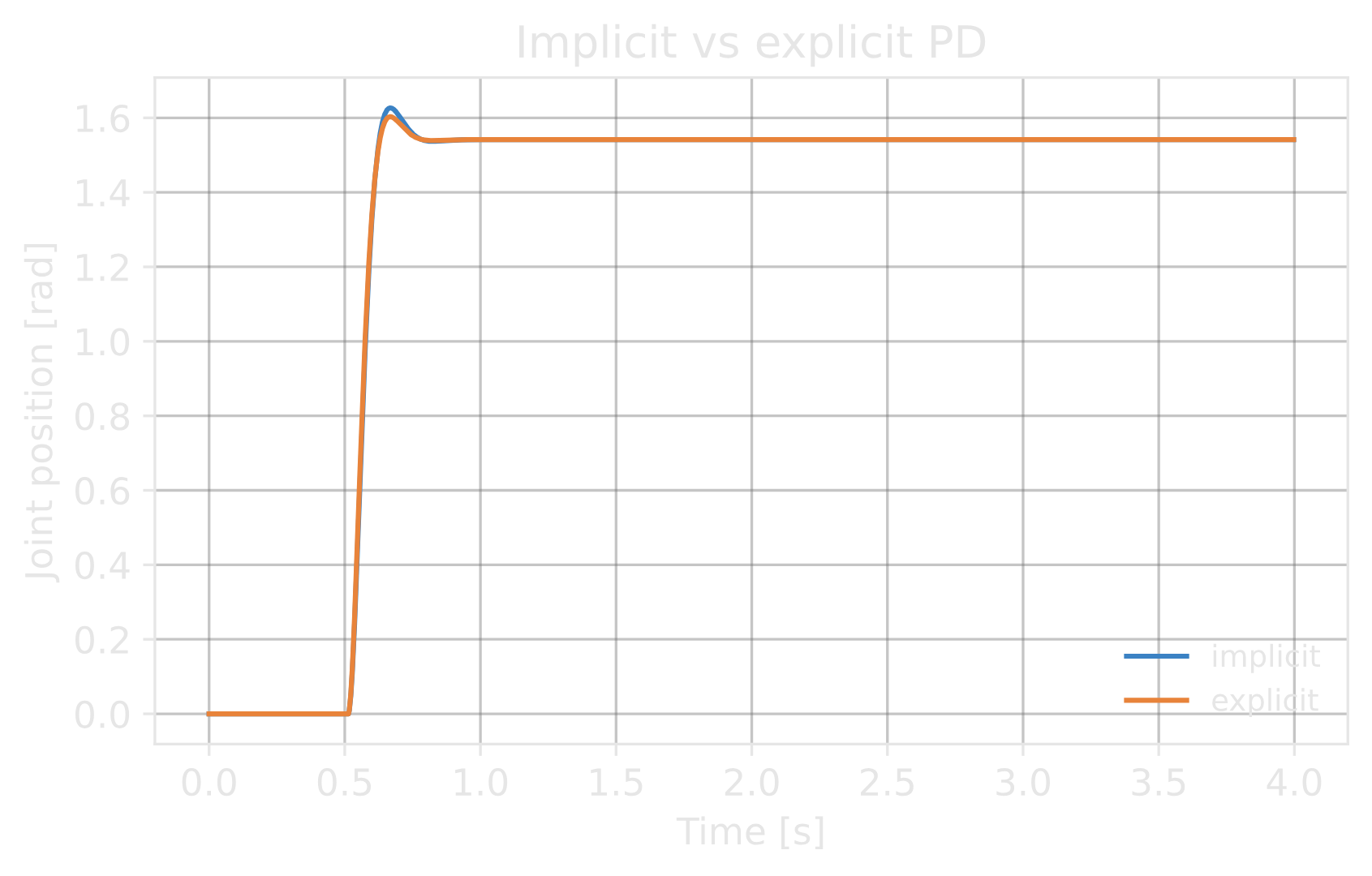
Implicit vs. explicit#
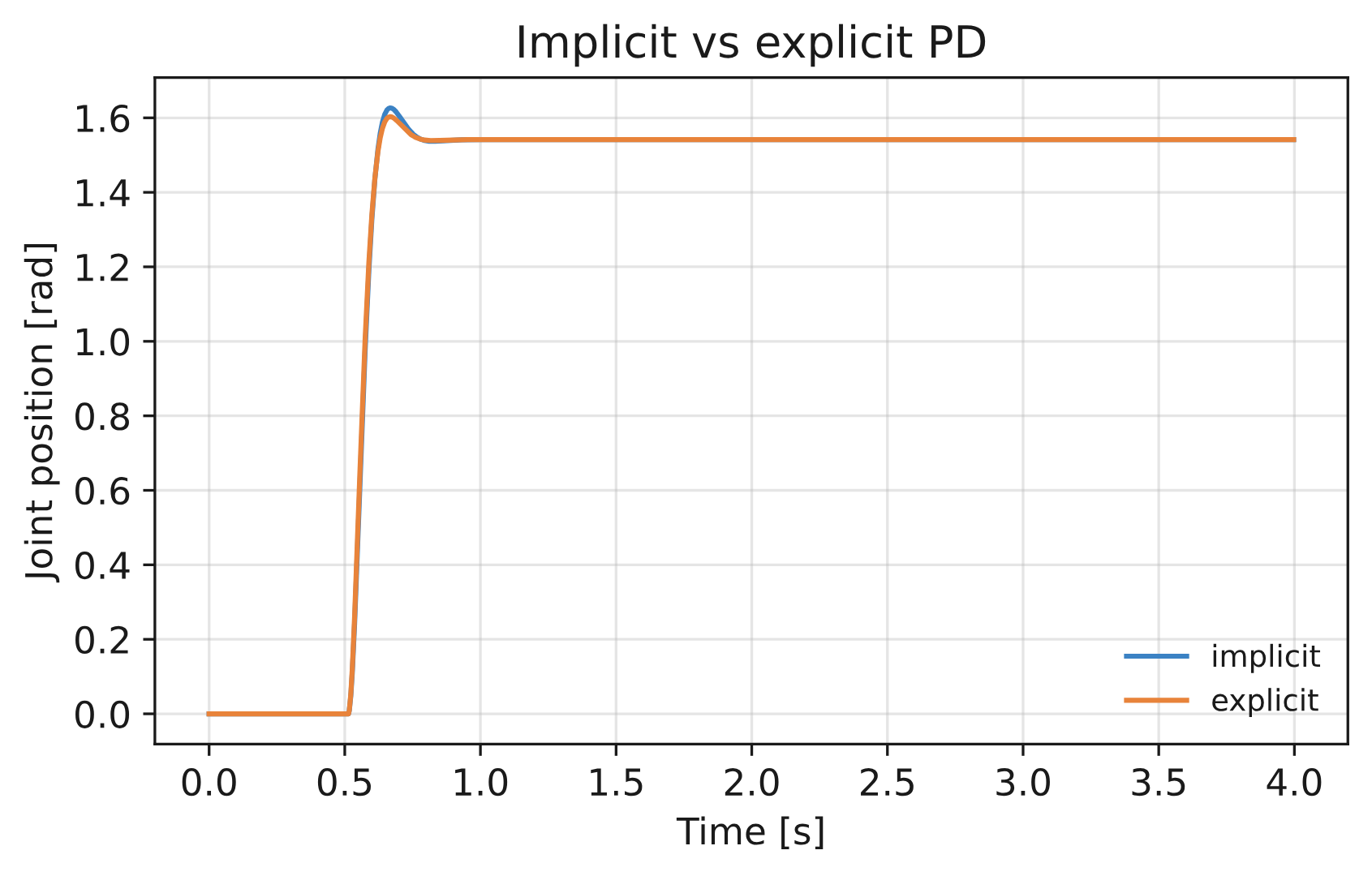
In this single-joint demo at \(dt = 1/360\text{ s}\), implicit and ideal-PD explicit actuators
with identical gains produce nearly the same response. Outside this example, their response and
stability can differ. The solver applies the implicit drive, whereas the explicit model evaluates
PD once per step. Policies trained with implicit actuators may therefore need adjustment for
explicit actuators. For explicit joints, data.joint_stiffness and data.joint_damping are
zero because the gains belong to the actuator model.
The actuator pipeline#
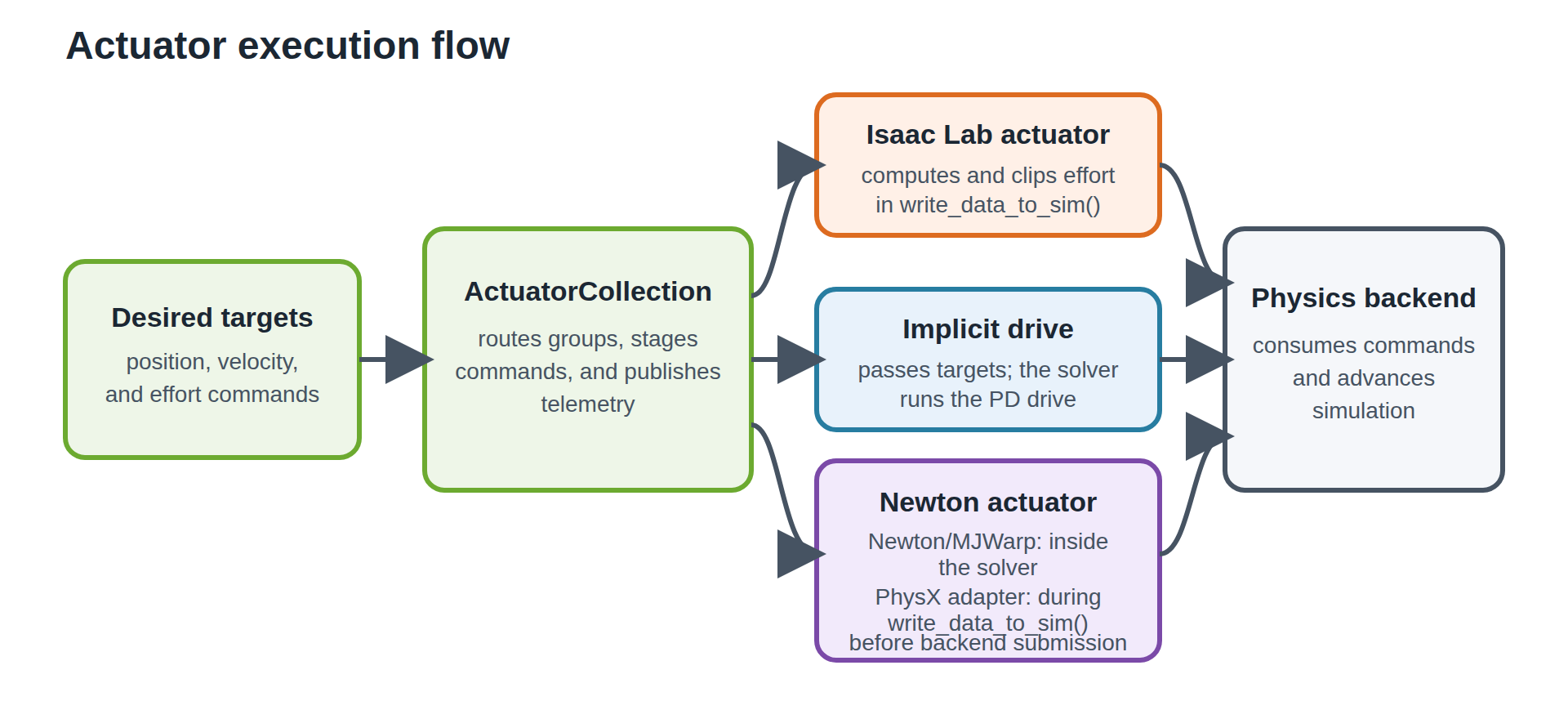
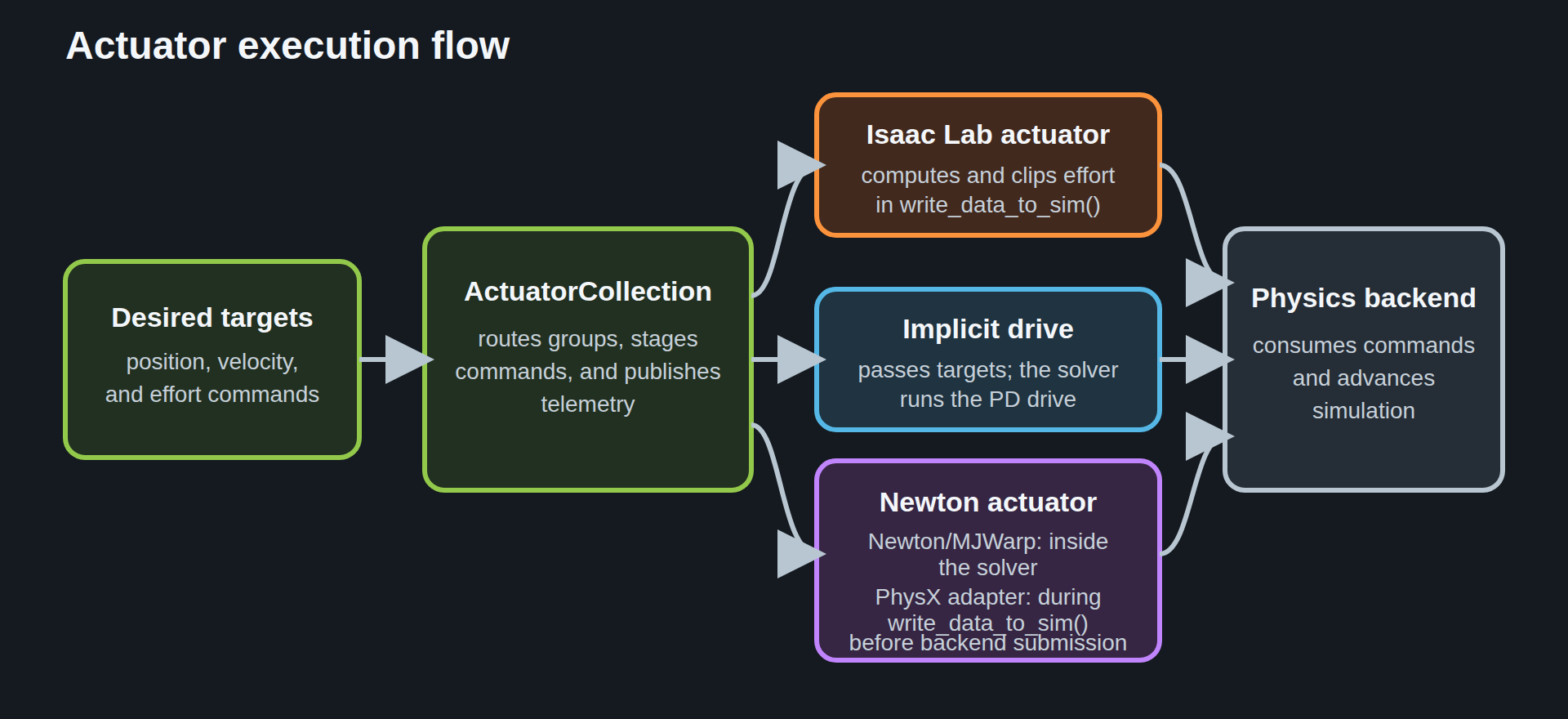
Setting an actuator command does not write directly to the solver. Commands first enter the collection. Each group then follows one of three execution paths:
Command view –
actuators.target_command.set_*_indexand_maskwrite desired position, velocity, and effort into joint-indexed buffers.ActuatorCollection – routes groups and stages full-articulation commands, processed joint commands, and telemetry. Actuator models retain their own gains and temporary state.
Execution path – an Isaac Lab explicit model computes and clips effort, an implicit drive applies targets with solver-side PD gains, or a native actuator runs through Newton or the shared host adapter.
For Isaac Lab-managed models, actuators.output_command contains the processed position,
velocity, and effort submitted to the backend. Native paths bypass this view, so it is not
submitted-command telemetry for them. PhysX and OVPhysX process commands during
write_data_to_sim(), while Newton-native controllers process them inside the solver. See
Native actuators for supported native models and limitations.
Implicit and explicit groups store gains differently:
For an implicit group,
stiffnessanddampingare written to the solver, which runs the PD law.compute()passes the desired targets through unchanged while recording an approximate torque for telemetry.For an explicit group, the same gains are consumed by the model to compute a torque, and the solver’s own PD gains for those joints are set to zero. Reading
data.joint_stiffnessordata.joint_dampingon an explicit joint therefore returns zero – the gains live in the actuator model, not the solver.
Gains configured for an actuator group are separate from
joint_stiffness and
joint_damping. Those data fields report solver drive
gains. They match implicit gains after initialization and are zero for explicit actuator joints.
They do not mirror actuator-model gains.
Joint and actuator property ownership#
An actuator configuration selects joints and can override their properties during construction.
Isaac Lab resolves joint_effort_limit, joint_velocity_limit, armature, friction, and
implicit drive gains when it builds the articulation.
ArticulationData holds the live values, including
joint_effort_limits, joint_vel_limits, joint_armature, and supported friction
properties. Use articulation data and joint writers to read or change them.
ActuatorCollection has no joint-property API.
The runtime group properties effort_limit_sim, velocity_limit_sim, armature,
friction, dynamic_friction, and viscous_friction were removed. Read their live values
from articulation data and use the corresponding joint writers. The deprecated
effort_limit_sim and velocity_limit_sim configuration aliases remain available through 3.x.
See Actuator effort and joint-limit names for replacement data views and writers.
Explicit actuators store model state such as actuator_effort_limit, rated actuator_velocity_limit, gains,
delay, and motor curves. They do not store separate solver-limit or friction values. Because the
backend runs their drives, implicit actuators read stiffness, damping, and effort projection from
live articulation properties; assigning to these properties is ignored with a warning — use the
articulation joint writers or the randomize_actuator_gains event instead.
Newton-executed groups have no Isaac Lab model at all: the collection mapping entry is the owning
Newton Actuator object, whose drive keeps its parameters separate from solver gains.
Read or modify its components (drive, delay, clamping) directly for raw access,
or use read_group_parameter() and
write_group_parameter() for group-scoped access in
public joint order with environment selection.
actuator_effort_limit and actuator_velocity_limit apply to the actuator model.
joint_effort_limit and joint_velocity_limit apply to the joint or solver and can have
different values. Explicit models clip output to actuator_effort_limit;
joint_effort_limit limits the solver.
actuator_velocity_limit is the model’s rated joint-side speed, or a soft-limit snapshot for
implicit actuators. joint_velocity_limit requests a solver constraint. Because backends
enforce it differently, solver velocity limits are not portable clamps. effort_limit and
velocity_limit are deprecated configuration and runtime group aliases. velocity_limit
resolves to actuator_velocity_limit; effort_limit resolves to actuator_effort_limit.
An implicit group may configure actuator_effort_limit separately from joint_effort_limit
to keep a rated model-facing limit distinct from the solver clamp; when unset, it tracks the
live solver limit.
Native actuators#
By default, Isaac Lab uses the native path for supported explicit actuator models. Each explicit
model runs either inside the solver or through a shared host adapter. To restore the deprecated
Isaac Lab execution path, set use_newton_actuators to False:
from isaaclab.sim import SimulationCfg

sim_cfg = SimulationCfg(use_newton_actuators=False)
With the default native path enabled, each supported explicit actuator config becomes a
NewtonActuator USD prim. Newton executes it in the solver. PhysX and OVPhysX execute the same
model through the shared host adapter during
write_data_to_sim().
On Newton, native actuators run in the CUDA-graph-captured region. Implicit actuators are unchanged: the solver still applies their PD gains. On CUDA, the host adapter captures actuator staging, model execution, and telemetry publication when possible; otherwise it uses eager execution. Stateful native actuators cannot run in a caller-owned CUDA graph, so the host adapter manages them.
Newton executes native actuators through drives, and the collection exposes that ownership
directly: robot.actuators[name] returns the Newton Actuator object driving the group’s
joints instead of an Isaac Lab model. Newton merges structurally identical joints into one
actuator, so several groups can share an object (a group spanning several returns them as a
tuple). Raw component access through actuator.drive reads and writes drive storage in Newton’s layout; for
group-scoped access in public joint order, use
read_group_parameter() and
write_group_parameter():
# raw ownership: the Newton actuator object itself
legs = robot.actuators["legs"]
print(type(legs.drive).__name__)

# group-scoped, user-ordered parameter access
from isaaclab.actuators.newton import read_group_parameter, write_group_parameter

kp = read_group_parameter(robot.actuators, "legs", "drive", "kp")
write_group_parameter(robot.actuators, "legs", "drive", "kp", values=kp * 2.0)
Isaac Lab retains named groups for configuration, joint bookkeeping, and command and telemetry staging.
Supported models. Each supported config maps to USD schemas:
Config |
USD schemas |
|---|---|
|
|
|
|
ideal PD + |
|
delayed PD + |
|
|
|
|
Existing USD actuators. For joints covered by an explicit Lab actuator config, the config
replaces any existing NewtonActuator prim. Joints not covered by a Lab config keep their
USD-authored actuators. USD-authored and Lab-configured actuators can therefore coexist on different
joints.
Warning
With the default use_newton_actuators=True, every explicit actuator config must be
supported. An unsupported config raises an error before native authoring. Disable
use_newton_actuators to use the Isaac Lab execution path, or select a supported config.
Note
Under native execution, delay is fixed. The schema stores only max_delay, so min_delay
is ignored. A DelayedPDActuator does not randomize delay between
resets as it does on the Isaac Lab path.
BamActuatorCfg is the exception: its drive owns its own
delay, honors both bounds and resamples one lag per environment, shared by the group’s joints.
Note
Stateful native actuators, including the BAM drive, support CUDA graph capture at any positive decimation. For an odd decimation, Newton copies the final actuator state into the starting buffer so its history advances across graph replays.
BAM servo model#
BamActuatorCfg models a small smart servo in the voltage domain. It
ports BAM (Better Actuator Models), whose parameters are
identified from bench measurements. Use it when the servo’s own dynamics matter for transfer: it
cannot hold its target under load, its gearbox sticks, and its supply sags.
BAM requires Newton with MJWarpSolverCfg and
use_newton_actuators set to True; other backends and solvers
raise an error. Its drive, DriveBam, runs as Warp kernels on
every physics step:
the position command is delayed by a randomly resampled lag;
the supply sags with the summed torque of the drive’s joints in that environment,
vin_eff = max(vin - sag_gain * sum_j |tau_j|, vin_min, 0);the firmware law
duty = (q_des - q) * kp_fw * error_gainis clipped by the current limiter and the PWM range;the DC motor gives
tau = kt * vin_eff * duty / R - kt^2 * dq / R, so damping is back-EMF;the gearbox friction budget (Coulomb, Stribeck, and load-dependent terms selected by
m1,m2,m5, orm6) is applied by MJWarp as a friction constraint.
import math

from isaaclab.actuators import BamActuatorCfg, BamMotorCfg

# Illustrative coefficients; use your servo's identified fit.
motor = BamMotorCfg(
    model="m1",
    kt=0.36,                                   # torque constant [N.m/A]
    resistance=2.8,                            # winding resistance [Ohm]
    error_gain=(4096 / (2 * math.pi)) / (256 * 885),
    max_current=1.75,                          # firmware current limit [A]
    friction_base=0.005,                       # Coulomb friction [N.m]
    friction_viscous=0.006,                    # viscous friction [N.m.s/rad]
)

robot_cfg = ArticulationCfg(
    spawn=...,
    actuators={
        "servos": BamActuatorCfg(
            joint_names_expr=[".*"],
            motor=motor,
            armature=0.00181,                  # reflected rotor inertia [kg.m^2]
            kp_fw=200.0,                       # firmware proportional gain
            vin=7.4,                           # nominal voltage [V]
            vin_range=(7.0, 8.0),              # per-robot battery voltage [V]
            vin_drop_gain_range=(0.0, 3.0),    # per-robot supply sag [V/(N*m)]
            vin_min=6.0,                       # supply floor under sag [V]
            max_delay=2,                       # command lag [physics steps]
        ),
    },
)
When the USD models gearbox play as a passive revolute hinge in series with each servo, set
backlash_joint_template to the hinge name pattern, e.g. "passive_{}_backlash". The firmware
then reads servo angle plus play angle; missing or non-revolute pairs raise before stepping.
stiffness and damping are unused; the firmware gain is kp_fw. Like other explicit
actuators, BAM replaces existing actuator prims on the selected joints, and one motor fit applies to
every joint in a group. Set the reflected rotor inertia through armature or on the joint.
Name |
Meaning and units |
|---|---|
|
|
|
Torque/back-EMF constant [N.m/A or V.s/rad] and winding resistance [Ohm]. Required. |
|
Position-error-to-duty-cycle factor per unit of firmware gain [1/rad]. Required. |
|
Maximum duty cycle [-], default 1, and current limit [A], required; 0 disables it. |
|
Coulomb friction [N.m] and viscous coefficient [N.m.s/rad]. Required. |
|
Near-rest friction [N.m], decay velocity [rad/s], and exponent [-]. Defaults: 0, 1, and 1. |
|
Friction per transmitted motor/external torque [-]. Defaults: 0. |
|
Near-rest load-dependent coefficients [-]. Defaults: 0. |
|
Quadratic load-coupling coefficients [1/(N.m)]. Defaults: 0. |
Without an explicit actuator_effort_limit, motor torque is capped at the stall torque
max(vin_range) * motor.kt / motor.resistance. joint_effort_limit is unchanged; keep it at
least as large as the actuator cap.
MJWarp coupling#
Each physics step the drive writes its friction budget into MuJoCo’s dof_frictionloss, so the
solver resolves static friction with the other constraints. The external load is the previous
solve’s bias and constraint forces without the drive’s own friction; applied body wrenches are not
included. The viscous coefficient is applied once as passive joint damping and is visible through
data.joint_viscous_friction_coeff. stiff_frictionloss=True uses a stiff friction-constraint
reference to reduce creep, since MJWarp has no noslip solver.
applied_effort reports motor torque only, and
data.joint_friction reports the authored seed. Read the live budget with
robot.actuators["servos"].drive.friction_budget.
The drive draws one command lag per environment, shared by its joints, honoring min_delay,
max_delay, delay_hold_prob and delay_update_period. Reset redraws the lag only for the
selected environments, including during CUDA graph replay.
Randomization hooks#
The drive exposes these fields through read_group_parameter()
and write_group_parameter():
Drive field |
Meaning |
Start-up range |
|---|---|---|
|
Supply voltage [V] |
|
|
Supply sag under load [V/(N·m)] |
|
|
Multiplier of the dry-friction budget [-] |
– (defaults to 1) |
|
Firmware gain multiplier [-] |
– |
|
Multiplier of the velocity the motor sees [-] |
– |
Start-up ranges are sampled once per environment and kept across resets. To resample friction every episode, add a reset event:
import torch

from isaaclab.actuators.newton import write_group_parameter
from isaaclab.envs import ManagerBasedEnv
from isaaclab.managers import EventTermCfg
from isaaclab.utils import configclass

def randomize_bam_friction(env: ManagerBasedEnv, env_ids: torch.Tensor | slice | None) -> None:
    rows = torch.arange(env.num_envs, device=env.device)
    if env_ids is not None:
        rows = rows[env_ids]
    scales = torch.empty((len(rows), 1), device=env.device).uniform_(0.8, 1.2)
    write_group_parameter(
        env.scene["robot"].actuators, "servos", "drive", "friction_scale",
        values=scales, env_ids=rows,
    )

@configclass
class EventsCfg:
    bam_friction = EventTermCfg(func=randomize_bam_friction, mode="reset")
Known constraints#
Supply and delay are per drive, not per robot. Newton builds one drive per set of BAM joints with the same friction
model, backlash on or off,vin_min, and delay settings; the other coefficients are per joint. Separate drives sag and delay independently even on one robot. Groups and robots that merge into one drive share its supply and delay within an environment, and must use the same start-up ranges,stiff_frictionloss, andbacklash_joint_template.Friction feedback ignores extra clipping. If a tighter solver joint limit clips the drive output, the load-dependent friction does not see it.
Example: MicroDuck walking#
IsaacContrib-Velocity-Flat-MicroDuck and IsaacContrib-Velocity-Rough-MicroDuck train the
MicroDuck biped to walk on flat ground and on rough terrain, with its 14 servos modeled by BAM on
Newton MJWarp. Add presets=backlash to either task to train the robot variant with a passive play
hinge in series with each servo, bound through backlash_joint_template.
See Training MicroDuck for the walking recipe, terrain curriculum, and distributed training options.
Backend submission#
Submission differs by backend, but the collection interface is the same:
Backend |
Submit behavior |
|---|---|
PhysX |
The Isaac Lab-managed path pushes processed position, velocity, and effort staging buffers
through the PhysX Tensor API. The shared host adapter processes native commands during
|
OVPhysX |
The native path uses the shared host adapter during |
Newton / MJWarp |
Newton writes targets to solver-bound control arrays. Effort is feed-forward, and native
actuators also use |
For explicit actuators, solver stiffness and damping are zero on every backend because the actuator model owns the gains.
Where to go next#
Motion generators or low-level control modes – see Controllers.
Cross-backend policy transfer and solver-dynamics differences – see Transfer Policies Between PhysX and Newton.
See also
Robot and articulation configuration – authoring configs and the full gain/limit value resolution walkthrough.
Joint drives on each physics backend – making sure joint drives exist on an imported asset so actuators can bind.
Joints actuate in PhysX but not in a Newton-based backendin Tricks and Troubleshooting – the USD drive / backend actuation pitfall.isaaclab.actuators– the full actuator model and config API reference.