



Visualization#
Visualizers let you inspect, debug, and record a running simulation. Isaac Lab offers five options, from lightweight viewers to the Isaac Sim viewport. You can also view camera-sensor output in the streaming camera panel.
Try Franka cube stacking for a compact simulation running directly in the browser. Orbit its camera, watch the scripted grasp, or control the end effector in Manual mode.
5 visualizers running Isaac-Velocity-Flat-AnymalD with a circular velocity command
Green arrow: commanded velocity. Blue arrow: current velocity.
Note: Newton RTX has no velocity arrows, since it doesn't yet support visualization markers.
Quick Start#
Pass --viz to any train command to launch a visualizer. --visualizer is an equivalent
alias.
# Newton GL: lightweight OpenGL viewport
uv run isaaclab train --rl_library rsl_rl --task Isaac-Cartpole --viz newton_gl

# Viser: browser-based viewer
uv run isaaclab train --rl_library rsl_rl --task Isaac-Cartpole --viz viser

# Kit viewport
uv run isaaclab train --rl_library rsl_rl --task Isaac-Cartpole --viz kit

# Multiple visualizers simultaneously (comma-separated, no spaces)
uv run isaaclab train --rl_library rsl_rl --task Isaac-Cartpole --viz rerun,newton_rtx
Note
Most tasks default to a PhysX backend, which requires Isaac Sim. If it isn’t installed yet,
add --extra isaacsim to the uv run commands above; see
Optional extras for details.
Note
train and play run without a visualizer unless --viz is passed, while packaged demos and
examples open their own default visualizer. --viz none turns it off.
For combining visualizers, running headless, and other common use cases, see Usage below.
Visualizer presets#
Task commands accept visualizer=newton_gl, visualizer=kit, or
visualizer=rerun,newton_gl. --viz and --visualizer are aliases for the same
selection. visualizer=none disables viewers. Selection happens during configuration
composition, before choosing process runtimes or creating the scene.
Task scripts can declare alternatives with isaaclab_tasks.utils.presets.MultiBackendVisualizerCfg.
Customize them with configured instances; no preset subclass is needed. Resolve them in the
script before calling launch_simulation:
from isaaclab.sim import SimulationCfg
from isaaclab_visualizers.newton import NewtonGLVisualizerCfg
from isaaclab_tasks.utils import resolve_presets
from isaaclab_tasks.utils.presets import MultiBackendVisualizerCfg

sim_cfg = SimulationCfg(
    visualizer_cfgs=MultiBackendVisualizerCfg(
        newton_gl=NewtonGLVisualizerCfg(max_visible_envs=16)
    )
)

sim_cfg = resolve_presets(sim_cfg, overrides={"visualizer_cfgs": "newton_gl"})
Task entry points perform this selection through resolve_task_config when given
visualizer=newton_gl or --viz newton_gl. The launcher and simulation receive concrete configs.
After task composition, visualizer_cfgs contains the selected concrete config or list of configs.
Standalone scripts can supply concrete visualizer configs directly, without task presets.
Viewer implementations are imported only when constructed.
For --video without a selected capture-capable viewer, launch selects a headless Newton GL
producer. visualizer=none disables windows; recording still runs its producer on demand.
Use --video sensor:<name> to record a scene camera without a visualizer producer.
Visualizer Overview#
Visualizer |
Description |
|---|---|
Newton GL |
Lightweight, strong feature support; Recommended |
Viser |
Web-based, supports recording and replay; Recommended |
Newton RTX |
High-quality RTX rendering; experimental, missing some features |
Rerun |
Web-based, supports recording and replay; limited UI toggles |
Kit |
High-quality RTX rendering, rich Isaac Sim tooling; longer start-up time |
The Newton GL visualizer is a lightweight OpenGL window with minimal startup overhead.
Isaac-Reorient-Cube-Allegro in Newton GL Visualizer
Each Allegro hand reorients
its cube to match the target shown by the marker above it
Visualizer-specific features:
Pause Rendering, Pause Simulation, and Reset Episode ImGui controls
Rigid-body dragging via right-click, see right (Newton solvers only)
Adjustable render update frequency
newton-dominoes example
Right-click dragging the first domino
triggers the cascade across an NVIDIA-logo domino layout
Try Domino cascade for a compact 24-slab version running locally in the browser, with friction and a repeatable toppling pulse.
Core configuration:
from isaaclab.visualizers import WindowCfg
from isaaclab_visualizers.newton import NewtonGLVisualizerCfg

visualizer_cfg = NewtonGLVisualizerCfg(
    eye=(8.0, 8.0, 3.0),
    lookat=(0.0, 0.0, 0.0),
    window=WindowCfg(size=(1920, 1080), fps=30.0),
    show_joints=False,
    show_contacts=False,
    enable_live_plots=True,
)
For the full config reference, see the config classes below.
NewtonGLVisualizerCfg source
@configclass
class NewtonGLVisualizerCfg(NewtonVisualizerCfg):
    """Configuration for the Newton OpenGL rasterizer visualizer.

    Selects Newton's OpenGL backend — fast local window with the full Isaac Lab
    feature set: scene-camera display, particle color override, and live scalar/array plots.

    A scene-camera view replaces perspective rendering. With no explicit camera selection,
    the viewer starts in perspective mode and the sidebar can switch to a scene camera.
    """

    class_type: type[NewtonGLVisualizer] | str = "{DIR}.newton_visualizer:NewtonGLVisualizer"
    """Visualizer implementation class."""

    visualizer_type: str = "newton_gl"
    """Visualizer selector identifier. Do not change."""

    streaming_view: bool = True
    """Make scene cameras available in the view selector.

    A SceneCameraCfg selection enables this automatically. Otherwise the viewer starts in perspective.
    """
Newton GL model options
@configclass
class NewtonVisualizerCfg(VisualizerCfg):
    """Deprecated configuration base for the Newton GL visualizer.

    .. deprecated::
        :class:`NewtonVisualizerCfg` is deprecated. Use :class:`NewtonGLVisualizerCfg` for the
        OpenGL rasterizer or :class:`NewtonRTXVisualizerCfg` for the OVRTX path tracer.
    """

    class_type: type[NewtonGLVisualizer] | str = "{DIR}.newton_visualizer:NewtonGLVisualizer"
    """Deprecated alias for the Newton GL visualizer implementation."""

    # Deprecated alias: "newton" routes to the GL backend via visualizer_cfg.VISUALIZER_ALIASES.
    visualizer_type: str = "newton_gl"

    cloning_contexts: tuple[type | str, ...] = ("isaaclab_newton.cloner:NewtonReplicateContext",)

    def __post_init__(self) -> None:
        super().__post_init__()
        if type(self) is NewtonVisualizerCfg:
            warnings.warn(
                "NewtonVisualizerCfg is deprecated and will be removed in a future release. "
                "Use NewtonGLVisualizerCfg (OpenGL rasterizer) or NewtonRTXVisualizerCfg (OVRTX path tracer) instead.",
                DeprecationWarning,
                stacklevel=3,
            )

    world_spacing: tuple[float, float, float] = (0.0, 0.0, 0.0)
    """Visual spacing between simulation worlds along each axis [m].

    Non-zero axes arrange visible worlds in a compact grid without changing their simulated poses.
    """

    show_joints: bool = False
    """Show joint visualization."""

    show_contacts: bool = False
    """Show contact visualization."""

    show_collision: bool = False
    """Show collision visualization."""

    show_springs: bool = False
    """Show spring visualization."""

    show_inertia_boxes: bool = False
    """Show inertia box visualization."""

    show_com: bool = False
    """Show center of mass visualization."""

    show_particles: bool = False
    """Show particle visualization."""

    particle_color: tuple[float, float, float] | None = None
    """Optional particle color RGB [0, 1]. Uses Newton viewer defaults when ``None``."""

    enable_picking: bool = True
    """Enable right-click dragging with Newton rigid-body solvers.

    Supported coupled solvers may expose dragging through a rigid-body entry.
    Disabled automatically for headless viewers, standalone MPM, and non-Newton
    physics. MPM particles are not pickable.
    """

    enable_shadows: bool = True
    """Enable shadow rendering."""

    enable_sky: bool = True
    """Enable procedural sky rendering when ``background_color`` is ``None``."""

    enable_wireframe: bool = False
    """Enable wireframe rendering."""

    sky_upper_color: tuple[float, float, float] = (0.2, 0.4, 0.6)
    """Sky upper color RGB [0, 1]."""

    sky_lower_color: tuple[float, float, float] = (0.5, 0.6, 0.7)
    """Sky lower color RGB [0, 1]."""

    light_color: tuple[float, float, float] = (1.0, 1.0, 1.0)
    """Light color RGB [0, 1]."""
VisualizerCfg source (shared base class)
@configclass
class VisualizerCfg:
    """Base configuration for all visualizer backends.

    Note:
        This configuration can be used directly as
        :attr:`~isaaclab.sim.SimulationCfg.default_visualizer_cfg` to provide shared defaults.
        To create a visualizer, use a concrete config from ``isaaclab_visualizers``, such as
        ``KitVisualizerCfg`` or ``NewtonGLVisualizerCfg``.
    """

    class_type: type[BaseVisualizer] | str | None = None
    """Visualizer implementation class. Concrete configs must set this field."""

    cloning_contexts: tuple[type[ReplicateContext] | str, ...] = ()
    """Clone contexts that build this visualizer's scene representation from the asset plan."""

    view: ImageViewCfg | None = None
    """Shared image view, or None to use the visualizer's camera selection."""

    window: WindowCfg = WindowCfg()
    """Native window settings used by Newton and Kit; network visualizers manage their own presentation."""

    headless: bool = False
    """Render on demand without opening a native viewer window."""

    # Primary interactive camera settings
    cameras: list[PerspectiveCameraCfg | SceneCameraCfg] | None = None
    """Camera sources available to the visualizer.

    PerspectiveCameraCfg configures the interactive view; SceneCameraCfg refers to an existing scene
    sensor. Newton GL and RTX display the first source and offer a dropdown for switching sources.
    Kit, Rerun, and Viser display the first scene source in their camera panel.
    None uses eye/lookat/focal_length and the streaming settings below.
    Every explicit scene source must provide all requested streaming_gt_types channels.
    """

    eye: tuple[float, float, float] = (4.0, -4.0, 3.0)
    """Interactive visualizer camera eye position in world coordinates."""

    lookat: tuple[float, float, float] = (0.0, 0.0, 0.0)
    """Interactive visualizer camera look-at target in world coordinates."""

    focal_length: float = 12.0
    """Camera focal length in millimeters for visualizer camera views."""

    background_color: tuple[float, float, float] | None = None
    """Viewer perspective-camera background as normalized RGB values in ``[0, 1]``.

    None preserves the scene HDR background in Kit and Newton RTX, or Newton GL's procedural sky.
    An explicit color changes only the visible background, not scene lighting or reflections.
    Scene-camera images retain their sensor's :attr:`~isaaclab.sensors.CameraCfg.background_color`.
    """

    # ── Streaming view ────────────────────────────────────────────────────────
    # Reads pixels from a scene-declared camera sensor, tiles them
    # across envs and GT types, and shows the result as an image panel in interactive
    # visualizers (Newton GL, Kit) or pushes it per-step to sink-based ones (Rerun, Viser).

    streaming_view: bool = False
    """Enable the streaming camera image view (opt-in, disabled by default)."""

    streaming_sensor_prim_path: str | None = None
    """Prim path of a scene-declared :class:`~isaaclab.sensors.Camera` to display.

    Use the camera's configured prim path, including ``{ENV_REGEX_NS}`` when applicable.
    None selects the first compatible camera in the scene. Without one the panel stays empty.
    The scene owns camera construction, updates, and lifetime; visualizers only read its output.
    """

    # Shared settings
    streaming_envs: int | list[int] = 32
    """Environments to display, limited to 100 tiles.

    * ``int`` — sample this many envs once at initialization (from all visible envs).
    * ``list[int]`` — display exactly these env indices.
    """

    streaming_gt_types: tuple[str, ...] = ("rgb",)
    """GT data types displayed left-to-right per environment row.

    Valid values: ``"rgb"``, ``"depth"``, ``"segmentation"``, ``"normals"``.
    Validated at initialization when :attr:`streaming_view` is ``True``.
    """

    streaming_depth_min: float = 0.1
    """Near-clip for the turbo depth colormap [m].  Used when ``"depth"`` is in
    :attr:`streaming_gt_types`."""

    streaming_depth_max: float = 10.0
    """Far-clip for the turbo depth colormap [m].  Used when ``"depth"`` is in
    :attr:`streaming_gt_types`."""

    # Partial visualization settings
    max_visible_envs: int | None = None
    """Upper bound on how many envs are shown.

    * If visible_env_indices is not None, then this field will apply also
      to the explicit env indices set to the visible_env_indices.
    """

    visible_env_indices: list[int] | None = None
    """env indices to visualize in order (out-of-range indices are dropped)."""

    randomly_sample_visible_envs: bool = True
    """If ``max_visible_envs`` is provided, when enabled, selected visible envs are randomly sampled.
       If disabled, the first ``max_visible_envs`` envs are selected.

    * Note: ``visible_env_indices`` overrides this field.
    """

    # Visualization Markers
    enable_markers: bool = True
    """Enable visualization markers (debug drawing)."""

    # Live Plots
    enable_live_plots: bool = True
    """Stream per-step scalar data (manager terms, episode reward, episode length) into the visualizer.

    Plot windows start hidden or collapsed by default and can be toggled open at runtime.
    Set to ``False`` to disable live plots entirely and avoid any collection overhead.
    """

    live_plots_update_interval: int = 5
    """Collect and push live plot data every ``N`` simulation steps (default: every 5 steps)."""

    # Internal
    launcher_type: ClassVar[str | None] = None
    """Process runtime required by this visualizer, if any."""

    visualizer_type: str | None = None
    """Type identifier (e.g., 'newton', 'rerun', 'viser', 'kit'). Must be overridden by subclasses."""

    def validate_config(self) -> None:
        """Reject ambiguous sources and unsupported native-window configurations."""
        if self.view is not None:
            if self.visualizer_type not in ("newton_gl", "newton_rtx"):
                raise ValueError("VisualizerCfg.view requires a Newton GL or RTX visualizer.")
            if self.cameras is not None or self.streaming_sensor_prim_path is not None:
                raise ValueError("Choose view or legacy cameras/streaming_sensor_prim_path, not both.")

    def __post_init__(self) -> None:
        if self.background_color is not None:
            if len(self.background_color) != 3 or any(not 0.0 <= value <= 1.0 for value in self.background_color):
                raise ValueError("background_color must contain three normalized RGB values in [0, 1].")
            self.background_color = tuple(float(value) for value in self.background_color)

        if self.cameras is not None:
            if not self.cameras:
                raise ValueError("cameras must contain at least one display source.")
            self.streaming_view = any(isinstance(camera, SceneCameraCfg) for camera in self.cameras)
            if isinstance(camera := self.cameras[0], PerspectiveCameraCfg):
                self.eye, self.lookat, self.focal_length = camera.eye, camera.lookat, camera.focal_length
Viser streams the Newton Warp renderer to a local web server,
at http://localhost:8080 by default, with optional public share URLs via share=True and
.viser recording files for replay.
Isaac-Lift-KukaAllegro in Viser Visualizer
Each Kuka arm and Allegro hand lifts
its cube off the table
Table color shows success: red until the cube reaches its target pose, green
once it does.
Visualizer-specific features:
Public share URL for remote access, set
share=TruePause Rendering, Pause Simulation, and Reset Episode sidebar controls
Important
A URL is printed before training begins. Set open_browser=True to open it
automatically. For remote access, set display_address to the machine hostname or IP
and ensure the configured port is reachable from the browser.
╭────── viser (listening *:8080) ───────╮
│   URL  │  http://localhost:8080        │
╰───────────────────────────────────────╯
Core configuration:
from isaaclab_visualizers.viser import ViserVisualizerCfg

visualizer_cfg = ViserVisualizerCfg(
    port=8080,
    bind_address="0.0.0.0",       # use 0.0.0.0 for remote access
    display_address="localhost",   # hostname shown in the printed URL
    open_browser=False,
    share=False,                   # request a public share URL
    record_to_viser=None,          # set a path to save a .viser recording
)
For the full config reference, see the config classes below.
ViserVisualizerCfg source
@configclass
class ViserVisualizerCfg(VisualizerCfg):
    """Configuration for Viser visualizer (web-based visualization)."""

    class_type: type[ViserVisualizer] | str = "{DIR}.viser_visualizer:ViserVisualizer"
    """Visualizer implementation class."""

    visualizer_type: str = "viser"
    """Type identifier for Viser visualizer."""

    cloning_contexts: tuple[type | str, ...] = ("isaaclab_newton.cloner:NewtonReplicateContext",)

    port: int = 8080
    """Port of the local viser web server."""

    bind_address: str = "0.0.0.0"
    """Host/interface for the Viser server to bind.

    Use ``"0.0.0.0"`` to listen on all interfaces for remote access.
    """

    display_address: str = "localhost"
    """Host name or IP address shown in the printed browser URL.

    For remote access, set this to the hostname/IP reachable from your browser.
    """

    open_browser: bool = False
    """Whether to attempt opening the viser web viewer URL in a browser.

    The viewer URL is always logged during initialization. Set this to ``True`` to auto-launch it.
    """

    verbose: bool = True
    """Whether to print viewer server startup information."""

    share: bool = False
    """Whether to request a public share URL from viser."""

    record_to_viser: str | None = None
    """Path to save a .viser recording file. None = no recording."""

    show_particles: bool = True
    """Whether to render particle systems (MPM, VBD) in the Viser viewer.

    Defaults to ``True`` so particle simulations (granular, cloth, soft-body) are
    visible on startup.  Can also be toggled at runtime via the Visualization Markers
    panel in the Viser sidebar.
    """
VisualizerCfg source (shared base class)
@configclass
class VisualizerCfg:
    """Base configuration for all visualizer backends.

    Note:
        This configuration can be used directly as
        :attr:`~isaaclab.sim.SimulationCfg.default_visualizer_cfg` to provide shared defaults.
        To create a visualizer, use a concrete config from ``isaaclab_visualizers``, such as
        ``KitVisualizerCfg`` or ``NewtonGLVisualizerCfg``.
    """

    class_type: type[BaseVisualizer] | str | None = None
    """Visualizer implementation class. Concrete configs must set this field."""

    cloning_contexts: tuple[type[ReplicateContext] | str, ...] = ()
    """Clone contexts that build this visualizer's scene representation from the asset plan."""

    view: ImageViewCfg | None = None
    """Shared image view, or None to use the visualizer's camera selection."""

    window: WindowCfg = WindowCfg()
    """Native window settings used by Newton and Kit; network visualizers manage their own presentation."""

    headless: bool = False
    """Render on demand without opening a native viewer window."""

    # Primary interactive camera settings
    cameras: list[PerspectiveCameraCfg | SceneCameraCfg] | None = None
    """Camera sources available to the visualizer.

    PerspectiveCameraCfg configures the interactive view; SceneCameraCfg refers to an existing scene
    sensor. Newton GL and RTX display the first source and offer a dropdown for switching sources.
    Kit, Rerun, and Viser display the first scene source in their camera panel.
    None uses eye/lookat/focal_length and the streaming settings below.
    Every explicit scene source must provide all requested streaming_gt_types channels.
    """

    eye: tuple[float, float, float] = (4.0, -4.0, 3.0)
    """Interactive visualizer camera eye position in world coordinates."""

    lookat: tuple[float, float, float] = (0.0, 0.0, 0.0)
    """Interactive visualizer camera look-at target in world coordinates."""

    focal_length: float = 12.0
    """Camera focal length in millimeters for visualizer camera views."""

    background_color: tuple[float, float, float] | None = None
    """Viewer perspective-camera background as normalized RGB values in ``[0, 1]``.

    None preserves the scene HDR background in Kit and Newton RTX, or Newton GL's procedural sky.
    An explicit color changes only the visible background, not scene lighting or reflections.
    Scene-camera images retain their sensor's :attr:`~isaaclab.sensors.CameraCfg.background_color`.
    """

    # ── Streaming view ────────────────────────────────────────────────────────
    # Reads pixels from a scene-declared camera sensor, tiles them
    # across envs and GT types, and shows the result as an image panel in interactive
    # visualizers (Newton GL, Kit) or pushes it per-step to sink-based ones (Rerun, Viser).

    streaming_view: bool = False
    """Enable the streaming camera image view (opt-in, disabled by default)."""

    streaming_sensor_prim_path: str | None = None
    """Prim path of a scene-declared :class:`~isaaclab.sensors.Camera` to display.

    Use the camera's configured prim path, including ``{ENV_REGEX_NS}`` when applicable.
    None selects the first compatible camera in the scene. Without one the panel stays empty.
    The scene owns camera construction, updates, and lifetime; visualizers only read its output.
    """

    # Shared settings
    streaming_envs: int | list[int] = 32
    """Environments to display, limited to 100 tiles.

    * ``int`` — sample this many envs once at initialization (from all visible envs).
    * ``list[int]`` — display exactly these env indices.
    """

    streaming_gt_types: tuple[str, ...] = ("rgb",)
    """GT data types displayed left-to-right per environment row.

    Valid values: ``"rgb"``, ``"depth"``, ``"segmentation"``, ``"normals"``.
    Validated at initialization when :attr:`streaming_view` is ``True``.
    """

    streaming_depth_min: float = 0.1
    """Near-clip for the turbo depth colormap [m].  Used when ``"depth"`` is in
    :attr:`streaming_gt_types`."""

    streaming_depth_max: float = 10.0
    """Far-clip for the turbo depth colormap [m].  Used when ``"depth"`` is in
    :attr:`streaming_gt_types`."""

    # Partial visualization settings
    max_visible_envs: int | None = None
    """Upper bound on how many envs are shown.

    * If visible_env_indices is not None, then this field will apply also
      to the explicit env indices set to the visible_env_indices.
    """

    visible_env_indices: list[int] | None = None
    """env indices to visualize in order (out-of-range indices are dropped)."""

    randomly_sample_visible_envs: bool = True
    """If ``max_visible_envs`` is provided, when enabled, selected visible envs are randomly sampled.
       If disabled, the first ``max_visible_envs`` envs are selected.

    * Note: ``visible_env_indices`` overrides this field.
    """

    # Visualization Markers
    enable_markers: bool = True
    """Enable visualization markers (debug drawing)."""

    # Live Plots
    enable_live_plots: bool = True
    """Stream per-step scalar data (manager terms, episode reward, episode length) into the visualizer.

    Plot windows start hidden or collapsed by default and can be toggled open at runtime.
    Set to ``False`` to disable live plots entirely and avoid any collection overhead.
    """

    live_plots_update_interval: int = 5
    """Collect and push live plot data every ``N`` simulation steps (default: every 5 steps)."""

    # Internal
    launcher_type: ClassVar[str | None] = None
    """Process runtime required by this visualizer, if any."""

    visualizer_type: str | None = None
    """Type identifier (e.g., 'newton', 'rerun', 'viser', 'kit'). Must be overridden by subclasses."""

    def validate_config(self) -> None:
        """Reject ambiguous sources and unsupported native-window configurations."""
        if self.view is not None:
            if self.visualizer_type not in ("newton_gl", "newton_rtx"):
                raise ValueError("VisualizerCfg.view requires a Newton GL or RTX visualizer.")
            if self.cameras is not None or self.streaming_sensor_prim_path is not None:
                raise ValueError("Choose view or legacy cameras/streaming_sensor_prim_path, not both.")

    def __post_init__(self) -> None:
        if self.background_color is not None:
            if len(self.background_color) != 3 or any(not 0.0 <= value <= 1.0 for value in self.background_color):
                raise ValueError("background_color must contain three normalized RGB values in [0, 1].")
            self.background_color = tuple(float(value) for value in self.background_color)

        if self.cameras is not None:
            if not self.cameras:
                raise ValueError("cameras must contain at least one display source.")
            self.streaming_view = any(isinstance(camera, SceneCameraCfg) for camera in self.cameras)
            if isinstance(camera := self.cameras[0], PerspectiveCameraCfg):
                self.eye, self.lookat, self.focal_length = camera.eye, camera.lookat, camera.focal_length
The experimental Newton RTX visualizer, launched with --viz newton_rtx, uses the
OVRTX path-tracer for photorealistic rendering without a Kit process. It is slightly
slower than the Newton GL visualizer due to the cost of high-quality RTX rendering.
Isaac-Velocity-Rough-H1 in Newton RTX Visualizer
Each H1 humanoid climbs a
staircase sub-terrain
Visualizer-specific features:
OVRTX path-traced rendering for photorealistic, physically-based lighting
Note
The following features are not yet supported and will be added in a future release: live plots and rigid-body dragging. Visualization markers, camera selection, scene-camera display, pause controls, and headless recording are supported.
Core configuration:
from isaaclab_visualizers.newton import NewtonRTXVisualizerCfg

visualizer_cfg = NewtonRTXVisualizerCfg(
    eye=(8.0, 8.0, 3.0),
    lookat=(0.0, 0.0, 0.0),
)
For the full config reference, see the config classes below.
NewtonRTXVisualizerCfg source
@configclass
class NewtonRTXVisualizerCfg(VisualizerCfg):
    """Simulation-owned OVRTX rendering displayed in a Newton GL window.

    Launch preparation expands perspective sources into ordinary scene CameraCfg entries.
    All views borrow camera output. Scripts without a SceneCfg declare cameras through ReplicateSession,
    construct them with instantiate(camera_cfg), and select them with SceneCameraCfg.
    Window resizing scales the displayed image without changing either source's resolution.
    Scene USD owns lighting, materials, and environment placement. Newton-model overlays,
    rigid-body dragging, and viewer-only lighting or world offsets are not supported.
    Environment selection controls tiled sensor views; the perspective camera sees the full scene.
    """

    class_type: type[NewtonRTXVisualizer] | str = "{DIR}.newton_visualizer:NewtonRTXVisualizer"
    """Visualizer implementation class."""

    launcher_type: ClassVar[str] = "isaaclab_ov.app:OvrtxLauncher"

    visualizer_type: str = "newton_rtx"
    """Visualizer selector identifier. Do not change."""

    render_settings: dict[str, Any] = dict()
    """RTX attributes to author on the OVRTX render product, as ``{name: (usd_type_name, value)}``.

    ``usd_type_name`` names an ``Sdf.ValueTypeNames`` member, as a string so the config stays
    copyable. For example, ``{"omni:rtx:quality": ("Int", 100)}`` re-enables the path tracer's
    quality convergence loop, disabled by default to keep interactive latency down."""

    renderer_cfg: OVRTXRendererCfg = OVRTXRendererCfg()
    """Shared scene renderer. Use the same configuration as scene cameras to share their instance.

    Used when declaring perspective CameraCfg entries. SceneCameraCfg retains its sensor's renderer.
    """

    streaming_view: bool = True
    """Display the cameras declared by :attr:`view` or :attr:`cameras`; default to a perspective camera."""
Shared window options
@configclass
class WindowCfg:
    """Native window presentation, independent of the camera's image resolution."""

    size: tuple[int, int] = (1920, 1080)
    """Initial window width and height [px]."""

    fps: float = 30.0
    """Maximum Newton window update rate [Hz], measured in wall-clock time.

    Headless on-demand recording is independent of this limit. Kit owns its application update cadence.
    """

    def validate_config(self) -> None:
        """Require positive dimensions and a finite, positive presentation rate."""
        if len(self.size) != 2 or any(not isinstance(value, int) or value < 1 for value in self.size):
            raise ValueError("WindowCfg.size must contain positive integer width and height.")
        if not math.isfinite(self.fps) or self.fps <= 0:
            raise ValueError("WindowCfg.fps must be finite and positive.")
VisualizerCfg source (shared base class)
@configclass
class VisualizerCfg:
    """Base configuration for all visualizer backends.

    Note:
        This configuration can be used directly as
        :attr:`~isaaclab.sim.SimulationCfg.default_visualizer_cfg` to provide shared defaults.
        To create a visualizer, use a concrete config from ``isaaclab_visualizers``, such as
        ``KitVisualizerCfg`` or ``NewtonGLVisualizerCfg``.
    """

    class_type: type[BaseVisualizer] | str | None = None
    """Visualizer implementation class. Concrete configs must set this field."""

    cloning_contexts: tuple[type[ReplicateContext] | str, ...] = ()
    """Clone contexts that build this visualizer's scene representation from the asset plan."""

    view: ImageViewCfg | None = None
    """Shared image view, or None to use the visualizer's camera selection."""

    window: WindowCfg = WindowCfg()
    """Native window settings used by Newton and Kit; network visualizers manage their own presentation."""

    headless: bool = False
    """Render on demand without opening a native viewer window."""

    # Primary interactive camera settings
    cameras: list[PerspectiveCameraCfg | SceneCameraCfg] | None = None
    """Camera sources available to the visualizer.

    PerspectiveCameraCfg configures the interactive view; SceneCameraCfg refers to an existing scene
    sensor. Newton GL and RTX display the first source and offer a dropdown for switching sources.
    Kit, Rerun, and Viser display the first scene source in their camera panel.
    None uses eye/lookat/focal_length and the streaming settings below.
    Every explicit scene source must provide all requested streaming_gt_types channels.
    """

    eye: tuple[float, float, float] = (4.0, -4.0, 3.0)
    """Interactive visualizer camera eye position in world coordinates."""

    lookat: tuple[float, float, float] = (0.0, 0.0, 0.0)
    """Interactive visualizer camera look-at target in world coordinates."""

    focal_length: float = 12.0
    """Camera focal length in millimeters for visualizer camera views."""

    background_color: tuple[float, float, float] | None = None
    """Viewer perspective-camera background as normalized RGB values in ``[0, 1]``.

    None preserves the scene HDR background in Kit and Newton RTX, or Newton GL's procedural sky.
    An explicit color changes only the visible background, not scene lighting or reflections.
    Scene-camera images retain their sensor's :attr:`~isaaclab.sensors.CameraCfg.background_color`.
    """

    # ── Streaming view ────────────────────────────────────────────────────────
    # Reads pixels from a scene-declared camera sensor, tiles them
    # across envs and GT types, and shows the result as an image panel in interactive
    # visualizers (Newton GL, Kit) or pushes it per-step to sink-based ones (Rerun, Viser).

    streaming_view: bool = False
    """Enable the streaming camera image view (opt-in, disabled by default)."""

    streaming_sensor_prim_path: str | None = None
    """Prim path of a scene-declared :class:`~isaaclab.sensors.Camera` to display.

    Use the camera's configured prim path, including ``{ENV_REGEX_NS}`` when applicable.
    None selects the first compatible camera in the scene. Without one the panel stays empty.
    The scene owns camera construction, updates, and lifetime; visualizers only read its output.
    """

    # Shared settings
    streaming_envs: int | list[int] = 32
    """Environments to display, limited to 100 tiles.

    * ``int`` — sample this many envs once at initialization (from all visible envs).
    * ``list[int]`` — display exactly these env indices.
    """

    streaming_gt_types: tuple[str, ...] = ("rgb",)
    """GT data types displayed left-to-right per environment row.

    Valid values: ``"rgb"``, ``"depth"``, ``"segmentation"``, ``"normals"``.
    Validated at initialization when :attr:`streaming_view` is ``True``.
    """

    streaming_depth_min: float = 0.1
    """Near-clip for the turbo depth colormap [m].  Used when ``"depth"`` is in
    :attr:`streaming_gt_types`."""

    streaming_depth_max: float = 10.0
    """Far-clip for the turbo depth colormap [m].  Used when ``"depth"`` is in
    :attr:`streaming_gt_types`."""

    # Partial visualization settings
    max_visible_envs: int | None = None
    """Upper bound on how many envs are shown.

    * If visible_env_indices is not None, then this field will apply also
      to the explicit env indices set to the visible_env_indices.
    """

    visible_env_indices: list[int] | None = None
    """env indices to visualize in order (out-of-range indices are dropped)."""

    randomly_sample_visible_envs: bool = True
    """If ``max_visible_envs`` is provided, when enabled, selected visible envs are randomly sampled.
       If disabled, the first ``max_visible_envs`` envs are selected.

    * Note: ``visible_env_indices`` overrides this field.
    """

    # Visualization Markers
    enable_markers: bool = True
    """Enable visualization markers (debug drawing)."""

    # Live Plots
    enable_live_plots: bool = True
    """Stream per-step scalar data (manager terms, episode reward, episode length) into the visualizer.

    Plot windows start hidden or collapsed by default and can be toggled open at runtime.
    Set to ``False`` to disable live plots entirely and avoid any collection overhead.
    """

    live_plots_update_interval: int = 5
    """Collect and push live plot data every ``N`` simulation steps (default: every 5 steps)."""

    # Internal
    launcher_type: ClassVar[str | None] = None
    """Process runtime required by this visualizer, if any."""

    visualizer_type: str | None = None
    """Type identifier (e.g., 'newton', 'rerun', 'viser', 'kit'). Must be overridden by subclasses."""

    def validate_config(self) -> None:
        """Reject ambiguous sources and unsupported native-window configurations."""
        if self.view is not None:
            if self.visualizer_type not in ("newton_gl", "newton_rtx"):
                raise ValueError("VisualizerCfg.view requires a Newton GL or RTX visualizer.")
            if self.cameras is not None or self.streaming_sensor_prim_path is not None:
                raise ValueError("Choose view or legacy cameras/streaming_sensor_prim_path, not both.")

    def __post_init__(self) -> None:
        if self.background_color is not None:
            if len(self.background_color) != 3 or any(not 0.0 <= value <= 1.0 for value in self.background_color):
                raise ValueError("background_color must contain three normalized RGB values in [0, 1].")
            self.background_color = tuple(float(value) for value in self.background_color)

        if self.cameras is not None:
            if not self.cameras:
                raise ValueError("cameras must contain at least one display source.")
            self.streaming_view = any(isinstance(camera, SceneCameraCfg) for camera in self.cameras)
            if isinstance(camera := self.cameras[0], PerspectiveCameraCfg):
                self.eye, self.lookat, self.focal_length = camera.eye, camera.lookat, camera.focal_length
Warning
Newton RTX (OVRTX) is a kitless renderer and cannot be used in the same process as Kit
(presets=isaacsim_physx). presets=ovphysx is itself kitless and works fine with
Newton RTX. Use presets=newton_mjwarp,ovrtx or presets=ovphysx,ovrtx with
--viz newton_rtx, or switch to --viz newton_gl, --viz viser, --viz rerun,
or --viz kit with a Kit-compatible physics backend.
Like Viser, Rerun streams simulation state to a local web server, for
remote monitoring, timeline playback, and recording to .rrd files.
Isaac-Reorient-Cube-Shadow-Direct in Rerun Visualizer
Each Shadow Hand reorients
its cube to match the target pose
Visualizer-specific features:
Timeline scrubbing and playback of
.rrdrecordingsPause Rendering and Reset Episode controls via the ImGui sidebar
Note
The native Play/Pause timeline controls in the Rerun visualizer UI do not work while
visualizing a live simulation or training run. They are hidden by default, but Rerun’s
dock panel UI can still be used to reveal them; when revealed, clicking them has no
effect. Use Isaac Lab’s own Pause Rendering / Reset Episode controls instead.
The timeline controls are only meaningful when replaying a saved .rrd recording.
Important
A highlighted URL is printed to the terminal before training begins. Ctrl-click it to
open the viewer, or set open_browser=True to open it automatically.
╭─────────────────────────── rerun (listening *:9090) ───────────────────────────╮
│   URL  │  http://127.0.0.1:9090/?url=rerun%2Bhttp://127.0.0.1:9876/proxy       │
╰────────────────────────────────────────────────────────────────────────────────╯
Core configuration:
from isaaclab_visualizers.rerun import RerunVisualizerCfg

visualizer_cfg = RerunVisualizerCfg(
    eye=(8.0, 8.0, 3.0),
    lookat=(0.0, 0.0, 0.0),
    keep_historical_data=False,   # enable for time scrubbing
    keep_scalar_history=False,    # enable for scalar time-series
    record_to_rrd=None,           # set a path to save a .rrd recording
    open_browser=False,
)
For the full config reference, see the config classes below.
RerunVisualizerCfg source
@configclass
class RerunVisualizerCfg(VisualizerCfg):
    """Configuration for Rerun visualizer (web-based visualization)."""

    class_type: type[RerunVisualizer] | str = "{DIR}.rerun_visualizer:RerunVisualizer"
    """Visualizer implementation class."""

    visualizer_type: str = "rerun"
    """Type identifier for Rerun visualizer."""

    cloning_contexts: tuple[type | str, ...] = ("isaaclab_newton.cloner:NewtonReplicateContext",)

    app_id: str = "isaaclab-simulation"
    """Application identifier shown in viewer title."""

    web_port: int = 9090
    """Port of the local rerun web viewer whose URL is logged during initialization."""

    grpc_port: int = 9876
    """Port of the rerun gRPC server (used when serving web viewer externally)."""

    bind_address: str | None = "0.0.0.0"
    """Host used for endpoint formatting and reuse checks.

    Notes:
    - If an existing rerun server is reachable on ``grpc_port``, it is reused.
    - New server startup is managed by ``newton.viewer.ViewerRerun`` via the rerun Python SDK.
    - Local browser links normalize common loopback/wildcard hosts to ``127.0.0.1``.
    """

    open_browser: bool = False
    """Whether to attempt opening the rerun web viewer URL in a browser.

    The viewer URL is always logged during initialization. Set this to ``True`` to auto-launch it.
    """

    keep_historical_data: bool = False
    """Keep transform history for time scrubbing (False = constant memory for training)."""

    keep_scalar_history: bool = False
    """Accumulate scalars as a time-series in the Rerun timeline (True = live plot history, False = constant memory).

    When :attr:`~isaaclab.visualizers.VisualizerCfg.enable_live_plots` is ``True`` (the default),
    this is automatically forced to ``True`` so that scalar values accumulate as a time series in
    the Rerun viewer.  Set to ``False`` explicitly to reduce memory usage when scalar history is
    not needed, but note this will disable live plot curves.
    """

    show_particles: bool = True
    """Whether to show model particles.

    Disable this option to reduce streaming overhead for large particle clouds.
    """

    record_to_rrd: str | None = None
    """Path to save .rrd recording file. None = no recording."""
VisualizerCfg source (shared base class)
@configclass
class VisualizerCfg:
    """Base configuration for all visualizer backends.

    Note:
        This configuration can be used directly as
        :attr:`~isaaclab.sim.SimulationCfg.default_visualizer_cfg` to provide shared defaults.
        To create a visualizer, use a concrete config from ``isaaclab_visualizers``, such as
        ``KitVisualizerCfg`` or ``NewtonGLVisualizerCfg``.
    """

    class_type: type[BaseVisualizer] | str | None = None
    """Visualizer implementation class. Concrete configs must set this field."""

    cloning_contexts: tuple[type[ReplicateContext] | str, ...] = ()
    """Clone contexts that build this visualizer's scene representation from the asset plan."""

    view: ImageViewCfg | None = None
    """Shared image view, or None to use the visualizer's camera selection."""

    window: WindowCfg = WindowCfg()
    """Native window settings used by Newton and Kit; network visualizers manage their own presentation."""

    headless: bool = False
    """Render on demand without opening a native viewer window."""

    # Primary interactive camera settings
    cameras: list[PerspectiveCameraCfg | SceneCameraCfg] | None = None
    """Camera sources available to the visualizer.

    PerspectiveCameraCfg configures the interactive view; SceneCameraCfg refers to an existing scene
    sensor. Newton GL and RTX display the first source and offer a dropdown for switching sources.
    Kit, Rerun, and Viser display the first scene source in their camera panel.
    None uses eye/lookat/focal_length and the streaming settings below.
    Every explicit scene source must provide all requested streaming_gt_types channels.
    """

    eye: tuple[float, float, float] = (4.0, -4.0, 3.0)
    """Interactive visualizer camera eye position in world coordinates."""

    lookat: tuple[float, float, float] = (0.0, 0.0, 0.0)
    """Interactive visualizer camera look-at target in world coordinates."""

    focal_length: float = 12.0
    """Camera focal length in millimeters for visualizer camera views."""

    background_color: tuple[float, float, float] | None = None
    """Viewer perspective-camera background as normalized RGB values in ``[0, 1]``.

    None preserves the scene HDR background in Kit and Newton RTX, or Newton GL's procedural sky.
    An explicit color changes only the visible background, not scene lighting or reflections.
    Scene-camera images retain their sensor's :attr:`~isaaclab.sensors.CameraCfg.background_color`.
    """

    # ── Streaming view ────────────────────────────────────────────────────────
    # Reads pixels from a scene-declared camera sensor, tiles them
    # across envs and GT types, and shows the result as an image panel in interactive
    # visualizers (Newton GL, Kit) or pushes it per-step to sink-based ones (Rerun, Viser).

    streaming_view: bool = False
    """Enable the streaming camera image view (opt-in, disabled by default)."""

    streaming_sensor_prim_path: str | None = None
    """Prim path of a scene-declared :class:`~isaaclab.sensors.Camera` to display.

    Use the camera's configured prim path, including ``{ENV_REGEX_NS}`` when applicable.
    None selects the first compatible camera in the scene. Without one the panel stays empty.
    The scene owns camera construction, updates, and lifetime; visualizers only read its output.
    """

    # Shared settings
    streaming_envs: int | list[int] = 32
    """Environments to display, limited to 100 tiles.

    * ``int`` — sample this many envs once at initialization (from all visible envs).
    * ``list[int]`` — display exactly these env indices.
    """

    streaming_gt_types: tuple[str, ...] = ("rgb",)
    """GT data types displayed left-to-right per environment row.

    Valid values: ``"rgb"``, ``"depth"``, ``"segmentation"``, ``"normals"``.
    Validated at initialization when :attr:`streaming_view` is ``True``.
    """

    streaming_depth_min: float = 0.1
    """Near-clip for the turbo depth colormap [m].  Used when ``"depth"`` is in
    :attr:`streaming_gt_types`."""

    streaming_depth_max: float = 10.0
    """Far-clip for the turbo depth colormap [m].  Used when ``"depth"`` is in
    :attr:`streaming_gt_types`."""

    # Partial visualization settings
    max_visible_envs: int | None = None
    """Upper bound on how many envs are shown.

    * If visible_env_indices is not None, then this field will apply also
      to the explicit env indices set to the visible_env_indices.
    """

    visible_env_indices: list[int] | None = None
    """env indices to visualize in order (out-of-range indices are dropped)."""

    randomly_sample_visible_envs: bool = True
    """If ``max_visible_envs`` is provided, when enabled, selected visible envs are randomly sampled.
       If disabled, the first ``max_visible_envs`` envs are selected.

    * Note: ``visible_env_indices`` overrides this field.
    """

    # Visualization Markers
    enable_markers: bool = True
    """Enable visualization markers (debug drawing)."""

    # Live Plots
    enable_live_plots: bool = True
    """Stream per-step scalar data (manager terms, episode reward, episode length) into the visualizer.

    Plot windows start hidden or collapsed by default and can be toggled open at runtime.
    Set to ``False`` to disable live plots entirely and avoid any collection overhead.
    """

    live_plots_update_interval: int = 5
    """Collect and push live plot data every ``N`` simulation steps (default: every 5 steps)."""

    # Internal
    launcher_type: ClassVar[str | None] = None
    """Process runtime required by this visualizer, if any."""

    visualizer_type: str | None = None
    """Type identifier (e.g., 'newton', 'rerun', 'viser', 'kit'). Must be overridden by subclasses."""

    def validate_config(self) -> None:
        """Reject ambiguous sources and unsupported native-window configurations."""
        if self.view is not None:
            if self.visualizer_type not in ("newton_gl", "newton_rtx"):
                raise ValueError("VisualizerCfg.view requires a Newton GL or RTX visualizer.")
            if self.cameras is not None or self.streaming_sensor_prim_path is not None:
                raise ValueError("Choose view or legacy cameras/streaming_sensor_prim_path, not both.")

    def __post_init__(self) -> None:
        if self.background_color is not None:
            if len(self.background_color) != 3 or any(not 0.0 <= value <= 1.0 for value in self.background_color):
                raise ValueError("background_color must contain three normalized RGB values in [0, 1].")
            self.background_color = tuple(float(value) for value in self.background_color)

        if self.cameras is not None:
            if not self.cameras:
                raise ValueError("cameras must contain at least one display source.")
            self.streaming_view = any(isinstance(camera, SceneCameraCfg) for camera in self.cameras)
            if isinstance(camera := self.cameras[0], PerspectiveCameraCfg):
                self.eye, self.lookat, self.focal_length = camera.eye, camera.lookat, camera.focal_length
The Kit visualizer embeds Isaac Lab inside a Kit process, providing access to the full Isaac Sim USD stage, RTX renderer, and GUI tooling. It has the highest startup and runtime overhead of the five visualizers.
Isaac-Reach-Franka in Kit Visualizer
Each Franka arm reaches its end-effector
toward a randomized target pose
Visualizer-specific features:
Direct access to the Isaac Sim USD stage for inspecting and editing prims at runtime
Full Isaac Sim GUI tooling (Property, Layers, and Stage panels)
Note
Kit’s ImGui-based UI writes an imgui.ini file, recording window layout (panel
positions, docking, collapsed state), to the process working directory. If that is the
repository root, it shows up as an untracked file. imgui.ini is already listed in
.gitignore; delete it or launch from outside the repository if you would rather it
not appear at all.
Core configuration:
from isaaclab.visualizers import WindowCfg
from isaaclab_visualizers.kit import KitVisualizerCfg

visualizer_cfg = KitVisualizerCfg(
    eye=(8.0, 8.0, 3.0),
    lookat=(0.0, 0.0, 0.0),
    window=WindowCfg(size=(1280, 720)),
    enable_markers=True,
    enable_live_plots=True,
)
For the full config reference, see the config classes below.
KitVisualizerCfg source
@configclass
class KitVisualizerCfg(VisualizerCfg):
    """Configuration for Kit visualizer using Isaac Sim viewport.

    .. note::
        The streaming panel displays a scene-declared camera. Isaac RTX cameras require
        ``--enable_cameras``. Set ``dock_position="RIGHT"`` to display the panel beside the viewport.
    """

    class_type: type[KitVisualizer] | str = "{DIR}.kit_visualizer:KitVisualizer"
    """Visualizer implementation class."""

    visualizer_type: str = "kit"
    """Type identifier for Kit visualizer."""

    launcher_type: ClassVar[str] = "isaaclab_physx.app:KitLauncher"

    viewport_name: str | None = None
    """Name for a new viewport window when :attr:`create_viewport` is ``True``.

    If ``None``, a default name (``"Visualizer Viewport"``) is used.
    """

    create_viewport: bool = False
    """If ``True``, create a new viewport window; if ``False``, use the active viewport window."""

    dock_position: str = "SAME"
    """Dock position for the streaming image panel and any new viewport window.

    Options: ``'LEFT'``, ``'RIGHT'``, ``'BOTTOM'``, ``'SAME'``.

    .. note::
        ``'SAME'`` (the default) places the streaming panel as a hidden tab in the
        same dock group as the main Viewport — you must click the panel's tab to see it.
        Use ``'RIGHT'`` to keep both the Viewport and the streaming panel visible
        side-by-side.
    """

    window: WindowCfg = WindowCfg(size=(1280, 720))
    """Viewport and capture dimensions. Kit owns the application update cadence."""

    origin_type: str = "world"
    """Frame in which :attr:`~isaaclab.visualizers.VisualizerCfg.eye` and
    :attr:`~isaaclab.visualizers.VisualizerCfg.lookat` are interpreted.

    Options:

    * ``"world"``: global origin.
    * ``"env"``: origin of the environment at :attr:`origin_env_index`.
    * ``"asset"``: a scene asset (or body) specified by :attr:`origin_track_path`.
    """

    origin_env_index: int = 0
    """Index of the environment used as the viewport camera origin.

    Only meaningful when :attr:`origin_type` is ``"env"`` or ``"asset"``.
    """

    origin_track_path: str | None = None
    """Asset tracking path for the viewport camera origin.

    Format: ``"<asset_name>"`` to track the asset root, or ``"<asset_name>/<body_name>"``
    to track a specific body on the asset.  Required when :attr:`origin_type` is ``"asset"``.

    Examples::

        origin_track_path = "robot"             # track robot root
        origin_track_path = "robot/panda_hand"  # track panda_hand body on robot
    """
VisualizerCfg source (shared base class)
@configclass
class VisualizerCfg:
    """Base configuration for all visualizer backends.

    Note:
        This configuration can be used directly as
        :attr:`~isaaclab.sim.SimulationCfg.default_visualizer_cfg` to provide shared defaults.
        To create a visualizer, use a concrete config from ``isaaclab_visualizers``, such as
        ``KitVisualizerCfg`` or ``NewtonGLVisualizerCfg``.
    """

    class_type: type[BaseVisualizer] | str | None = None
    """Visualizer implementation class. Concrete configs must set this field."""

    cloning_contexts: tuple[type[ReplicateContext] | str, ...] = ()
    """Clone contexts that build this visualizer's scene representation from the asset plan."""

    view: ImageViewCfg | None = None
    """Shared image view, or None to use the visualizer's camera selection."""

    window: WindowCfg = WindowCfg()
    """Native window settings used by Newton and Kit; network visualizers manage their own presentation."""

    headless: bool = False
    """Render on demand without opening a native viewer window."""

    # Primary interactive camera settings
    cameras: list[PerspectiveCameraCfg | SceneCameraCfg] | None = None
    """Camera sources available to the visualizer.

    PerspectiveCameraCfg configures the interactive view; SceneCameraCfg refers to an existing scene
    sensor. Newton GL and RTX display the first source and offer a dropdown for switching sources.
    Kit, Rerun, and Viser display the first scene source in their camera panel.
    None uses eye/lookat/focal_length and the streaming settings below.
    Every explicit scene source must provide all requested streaming_gt_types channels.
    """

    eye: tuple[float, float, float] = (4.0, -4.0, 3.0)
    """Interactive visualizer camera eye position in world coordinates."""

    lookat: tuple[float, float, float] = (0.0, 0.0, 0.0)
    """Interactive visualizer camera look-at target in world coordinates."""

    focal_length: float = 12.0
    """Camera focal length in millimeters for visualizer camera views."""

    background_color: tuple[float, float, float] | None = None
    """Viewer perspective-camera background as normalized RGB values in ``[0, 1]``.

    None preserves the scene HDR background in Kit and Newton RTX, or Newton GL's procedural sky.
    An explicit color changes only the visible background, not scene lighting or reflections.
    Scene-camera images retain their sensor's :attr:`~isaaclab.sensors.CameraCfg.background_color`.
    """

    # ── Streaming view ────────────────────────────────────────────────────────
    # Reads pixels from a scene-declared camera sensor, tiles them
    # across envs and GT types, and shows the result as an image panel in interactive
    # visualizers (Newton GL, Kit) or pushes it per-step to sink-based ones (Rerun, Viser).

    streaming_view: bool = False
    """Enable the streaming camera image view (opt-in, disabled by default)."""

    streaming_sensor_prim_path: str | None = None
    """Prim path of a scene-declared :class:`~isaaclab.sensors.Camera` to display.

    Use the camera's configured prim path, including ``{ENV_REGEX_NS}`` when applicable.
    None selects the first compatible camera in the scene. Without one the panel stays empty.
    The scene owns camera construction, updates, and lifetime; visualizers only read its output.
    """

    # Shared settings
    streaming_envs: int | list[int] = 32
    """Environments to display, limited to 100 tiles.

    * ``int`` — sample this many envs once at initialization (from all visible envs).
    * ``list[int]`` — display exactly these env indices.
    """

    streaming_gt_types: tuple[str, ...] = ("rgb",)
    """GT data types displayed left-to-right per environment row.

    Valid values: ``"rgb"``, ``"depth"``, ``"segmentation"``, ``"normals"``.
    Validated at initialization when :attr:`streaming_view` is ``True``.
    """

    streaming_depth_min: float = 0.1
    """Near-clip for the turbo depth colormap [m].  Used when ``"depth"`` is in
    :attr:`streaming_gt_types`."""

    streaming_depth_max: float = 10.0
    """Far-clip for the turbo depth colormap [m].  Used when ``"depth"`` is in
    :attr:`streaming_gt_types`."""

    # Partial visualization settings
    max_visible_envs: int | None = None
    """Upper bound on how many envs are shown.

    * If visible_env_indices is not None, then this field will apply also
      to the explicit env indices set to the visible_env_indices.
    """

    visible_env_indices: list[int] | None = None
    """env indices to visualize in order (out-of-range indices are dropped)."""

    randomly_sample_visible_envs: bool = True
    """If ``max_visible_envs`` is provided, when enabled, selected visible envs are randomly sampled.
       If disabled, the first ``max_visible_envs`` envs are selected.

    * Note: ``visible_env_indices`` overrides this field.
    """

    # Visualization Markers
    enable_markers: bool = True
    """Enable visualization markers (debug drawing)."""

    # Live Plots
    enable_live_plots: bool = True
    """Stream per-step scalar data (manager terms, episode reward, episode length) into the visualizer.

    Plot windows start hidden or collapsed by default and can be toggled open at runtime.
    Set to ``False`` to disable live plots entirely and avoid any collection overhead.
    """

    live_plots_update_interval: int = 5
    """Collect and push live plot data every ``N`` simulation steps (default: every 5 steps)."""

    # Internal
    launcher_type: ClassVar[str | None] = None
    """Process runtime required by this visualizer, if any."""

    visualizer_type: str | None = None
    """Type identifier (e.g., 'newton', 'rerun', 'viser', 'kit'). Must be overridden by subclasses."""

    def validate_config(self) -> None:
        """Reject ambiguous sources and unsupported native-window configurations."""
        if self.view is not None:
            if self.visualizer_type not in ("newton_gl", "newton_rtx"):
                raise ValueError("VisualizerCfg.view requires a Newton GL or RTX visualizer.")
            if self.cameras is not None or self.streaming_sensor_prim_path is not None:
                raise ValueError("Choose view or legacy cameras/streaming_sensor_prim_path, not both.")

    def __post_init__(self) -> None:
        if self.background_color is not None:
            if len(self.background_color) != 3 or any(not 0.0 <= value <= 1.0 for value in self.background_color):
                raise ValueError("background_color must contain three normalized RGB values in [0, 1].")
            self.background_color = tuple(float(value) for value in self.background_color)

        if self.cameras is not None:
            if not self.cameras:
                raise ValueError("cameras must contain at least one display source.")
            self.streaming_view = any(isinstance(camera, SceneCameraCfg) for camera in self.cameras)
            if isinstance(camera := self.cameras[0], PerspectiveCameraCfg):
                self.eye, self.lookat, self.focal_length = camera.eye, camera.lookat, camera.focal_length
Shared Features#
Streaming Camera View#
The streaming camera view is a live monitoring and debugging tool. It combines ground-truth camera frames from multiple environments (RGB, depth, segmentation, or surface normals) into a single panel. Cameras are declared in the scene before cloning; visualizers only read their output. Multiple visualizers can display the same sensor with different tile selections.
Interactive view of the Galbot cube stacking environment
Streaming view showing tiled Galbot wrist-camera feeds
Attach a camera to a robot body to follow its motion, or select an existing view such as the Galbot task’s wrist-mounted and ego cameras. The view is supported in the Kit, Newton GL, Newton RTX, Rerun, and Viser visualizers. Kit opens it as a separate Streaming View viewport, which can sit side by side with the default viewport for dual monitoring. Newton GL and Newton RTX provide a Camera View selector in the sidebar for switching between perspective and scene-camera views.
See Streaming a camera view in a visualizer for the VisualizerCfg options, display
sources, troubleshooting, migration from generated cameras, and step-by-step examples.
Visualization Markers#
Visualization markers draw debug geometry over the scene via
VisualizationMarkers.
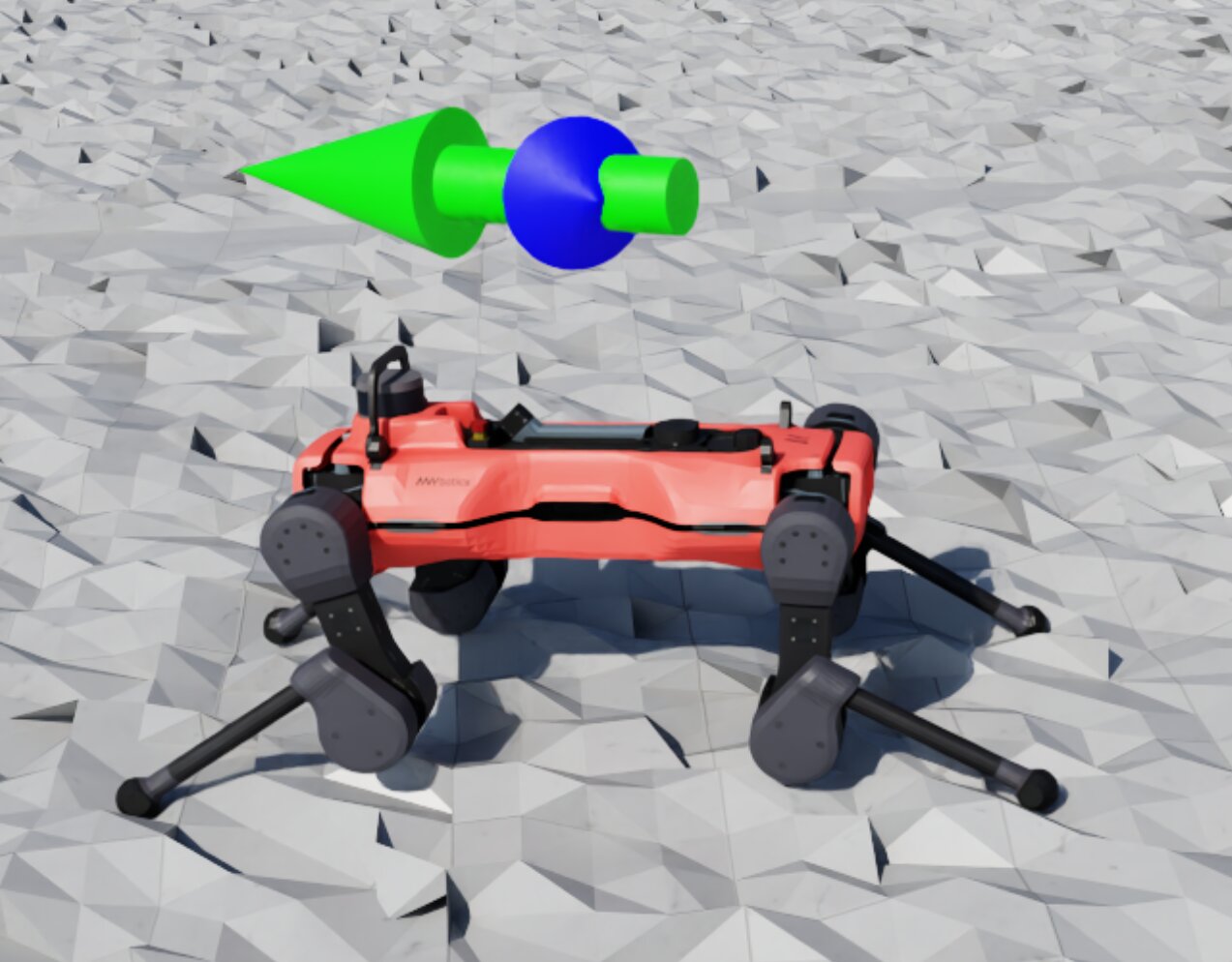
Large green/blue arrow markers showing target and base velocity for an AnymalD robot
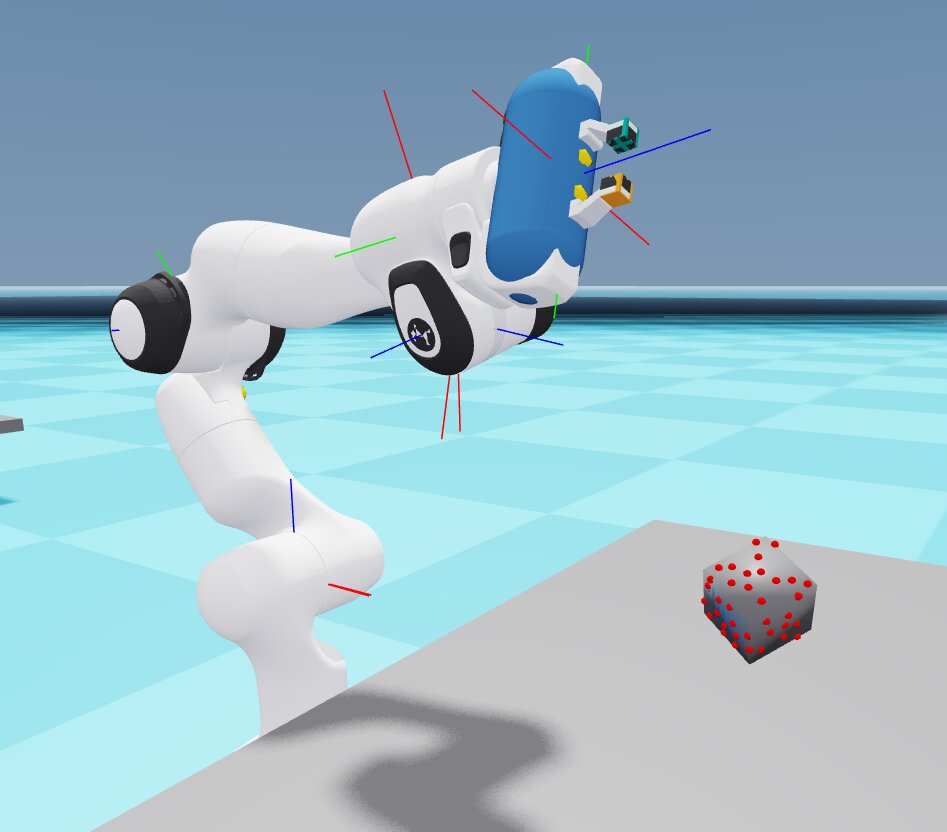
Arrow markers on the Franka arm's joints, with contact sensor markers on the cube
See Creating visualization markers for creating and configuring custom markers.
There are 2 types of visualization markers:
Built-in marker types:
Sensor markers: contact hit/no-contact spheres, ray-caster hit points, deformable-object kinematic targets, visuo-tactile contact points
Frame markers: coordinate frame with a connecting line
Colored arrows (red, blue, green) for direction and velocity indicators
Goal shapes: cuboid, sphere, and multi-state position-goal markers
Center of mass markers
In the Newton GL visualizer’s HUD, built-in marker types that aren’t currently active are shown greyed out.
Custom Markers:
Defined by individual tasks and MDP terms that instantiate their own
VisualizationMarkersCfgExample: the AnymalD velocity command draws its green/blue velocity arrows this way
Example: the Isaac-Reorient-Cube-Allegro task defines its own goal marker (a DexCube asset) to show the target cube orientation
Note
Visualization markers are supported on Kit, Newton GL, Rerun, and Viser; not yet supported on Newton RTX (experimental).
Live Plots#
Live plots stream per-step scalar data into the visualizer.
Newton GL visualizer, with 3 plots opened
Viser visualizer, with 1 plot opened
Live Plot windows start hidden or collapsed, except for Rerun, where the Live Plots can be collapsed by selecting the “eye” icon. Supported on Kit, Newton GL, Rerun, and Viser; not yet supported on Newton RTX (experimental).
What’s plotted: per-episode total reward and episode length, plus any active manager
term for manager-based environments (e.g. joint_pos).
Video Recording#
Video Recording supports capturing feed from any visualizer view, both interactive and streaming views, and renderer-based sensor data capture.
Kit visualizer tiled streaming
Recorded clip with ground-truth sensor views
Pass --video [SOURCE] on the command line for a quick recording, or define multiple
VideoRecorderCfg entries to record multiple sources at once. --viz still decides which
visualizers open a window; a visualizer that only records runs headless:
Command line |
Records from |
|---|---|
|
the first capture-capable visualizer |
|
a |
|
the selected |
|
|
|
that scene sensor; no visualizer is added |
A Hydra override after --video is never taken as its source: --video presets=newton_mjwarp
records from viz and applies the preset.
Kit, Newton GL, and Newton RTX visualizers can be recorded from; the web-based visualizers Viser and Rerun cannot.
See Recording video for the full guide and tutorial.
Usage#
Common Recipes#
Headless training with video recording
Run without a window and record clips from a headless Newton GL visualizer, or name another
capture source, e.g. --video viz:kit:
uv run isaaclab train --rl_library rsl_rl --task Isaac-Cartpole --video
See Recording video for clip length, interval, and multi-source options.
Combining an interactive view with a headless recording source
Watch training live in Kit while recording from a separate headless Newton GL angle by running with
--viz kit --video viz:newton_gl and giving each visualizer its own camera. See
Recording from an independent camera angle for the configuration.
Following a moving robot (Kit)
Lock the Kit camera to a moving asset instead of updating eye/lookat yourself every
step, running with --viz kit:
from isaaclab_visualizers.kit import KitVisualizerCfg

sim_cfg.visualizer_cfgs = [
    KitVisualizerCfg(
        origin_type="asset",
        origin_track_path="robot",  # or "robot/panda_hand" to track a specific body
        eye=(4.0, 4.0, 2.0),  # offset from the tracked asset
    )
]
Sharing a live view with a remote teammate
Viser can request a public share URL for the running session, useful for remote pairing
without screen-sharing, running with --viz viser:
from isaaclab_visualizers.viser import ViserVisualizerCfg

sim_cfg.visualizer_cfgs = [ViserVisualizerCfg(share=True, open_browser=True)]
The share URL is logged on startup. Rerun has no equivalent config field, but exposes its own share button in the native UI.
Resolution Rules#
--viz (comma-separated, e.g. --viz kit,newton_gl) selects which visualizers run, and
SimulationCfg.visualizer_cfgs configures them. Each selected type uses its configured settings,
or else that type’s default config. Concrete visualizer configs run as given when no CLI selection
is supplied. SimulationCfg.visualizer_cfgs defaults to an empty list.
Isaac Sim opens a window when CLI or config selects kit, and never with HEADLESS=1 or
livestreaming. A visualizer a --video source adds for recording always runs headless.
Task configurations may use MultiBackendVisualizerCfg to declare inactive alternatives.
Task composition selects the requested alternative before launch. Standalone scripts can configure
concrete viewers directly:
from isaaclab.sim import SimulationCfg
from isaaclab_visualizers.kit import KitVisualizerCfg
from isaaclab_visualizers.newton import NewtonGLVisualizerCfg

sim_cfg = SimulationCfg(
    visualizer_cfgs=[
        KitVisualizerCfg(eye=(0.0, 0.0, 20.0)),
        NewtonGLVisualizerCfg(eye=(5.0, 5.0, 5.0), show_joints=True),
    ]
)
CLI args |
|
Effective behavior |
|---|---|---|
no |
|
No visualizer launches; no window, no capture source. |
|
|
Launch default Kit and Newton GL visualizers. |
|
|
Launch Newton GL without a window, only as the |
|
|
Launch default Kit and custom Newton GL; Rerun is not launched. |
no |
|
Launch both configured visualizers. |
no |
Task preset: |
No visualizer launches; the customized choice remains inactive until selected. |
|
|
Launch custom Newton GL and Rerun from config. |
For migration context, see Migrating To 3.0.
Partial Visualization#
Visualizers can be configured to visualize just a subset of environments. This is called partial visualization.
There are 3 fields exposed in the VisualizerCfg for selecting environments for partial visualization:
max_visible_envscaps how many envs are shown.visible_env_indicesexplicitly selects the envs to visualize, in the order given. It takes precedence overrandomly_sample_visible_envsand is also capped bymax_visible_envs.randomly_sample_visible_envs(defaultTrue): whenvisible_env_indicesis unset andmax_visible_envsis set, enables randomly sampling the selected envs. If disabled, the firstmax_visible_envsenvs are selected.
Also, there is a CLI arg --max_visible_envs that overrides VisualizerCfg.max_visible_envs for the run.
Note
By default, selected envs keep their simulated positions, so a random sample or the first envs of a large grid can lie
outside the camera view. Choose indices near the camera target, or move eye and lookat.
Scene Background#
Kit and Newton RTX use the scene’s authored lights and HDR background by default. Configure the environment once on the scene, without repeating its HDR path or intensity in the visualizer:
env_cfg.scene.sky_light.spawn.texture_file = "/path/to/evening.hdr"
env_cfg.scene.sky_light.spawn.intensity = 1000.0
VisualizerCfg.background_color defaults to None. An explicit normalized RGB color changes
only the visible background; the scene lights continue to illuminate objects and contribute
reflections. Newton GL uses its procedural sky when no color override is supplied:
from isaaclab.visualizers import VisualizerCfg

env_cfg.sim.default_visualizer_cfg = VisualizerCfg(background_color=(0.1, 0.2, 0.3))
Performance#
Visualizer |
Tips |
|---|---|
Newton GL |
Lowest overhead; lower |
Viser |
Newton Warp renderer; use |
Newton RTX |
Native Newton RTX rendering; reduce configured perspective resolution or lower |
Rerun |
Web viewer may slow down with many environments; use |
Kit |
Highest overhead of the five visualizers; reduce |
Limitations#
Backend feature support:
Feature |
Newton GL |
Newton RTX |
Viser |
Rerun |
Kit |
|---|---|---|---|---|---|
Visualization markers |
✓ |
✗ |
✓ |
✓ |
✓ |
Live plots |
✓ |
✗ |
✓ |
✓ |
✓ |
Streaming camera panel |
✓ |
✗ |
✓ |
✓ |
✓ |
Video recording, |
✓ |
✓ |
✗ |
✗ |
✓ |
Pause rendering |
✓ |
✗ |
✓ |
✓ |
✓ |
Headless mode |
✓ |
✓ |
✓ |
✓ |
✓ |
Lighting differences across visualizers
Each backend lights the scene differently, so the same environment can look noticeably
different across visualizers. Kit renders the scene’s actual authored USD lights. Newton GL
uses a fixed sky-gradient and single directional light color
(sky_upper_color,
sky_lower_color, light_color), independent of scene USD lights. Newton RTX renders the
authored scene through Isaac Lab’s OVRTX renderer, shared with cameras using the same
OVRTXRendererCfg. Newton GL displays the rendered GPU image and handles window controls;
Newton’s ViewerRTX is not constructed. Scene transforms, deformable geometry, and material
updates follow the camera renderer’s normal synchronization. Perspective resolution stays
fixed when the window is resized; the window scales the image for presentation.
Configure lights and environment placement in the scene. Viewer-only rtx_environment rigs
and world_spacing are no longer supported: declare scene lights for studio lighting, remove
scene lights for an unlit scene, and set InteractiveSceneCfg.env_spacing for world placement.
Particle color overrides and rigid-body picking remain GL-only. Viser uses a single ambient light
with no directional key light, so scenes tend to look darker and flatter than the other backends.
Rerun uses fixed built-in viewer shading with no scene-driven lighting.
Kit: incompatible with ovphysx / ovrtx presets
--viz kit cannot be used with presets=ovphysx or presets=ovrtx in the same process.
Use --viz newton_gl, --viz rerun, or --viz viser with those presets, or omit
--viz for headless execution.
Newton RTX: incompatible with Kit
--viz newton_rtx raises a RuntimeError at startup if the active physics backend is
isaacsim_physx (i.e. presets=isaacsim_physx), since OVRTX is a kitless renderer and cannot share
a process with Kit. presets=ovphysx is itself kitless and remains supported. Use
presets=newton_mjwarp,ovrtx or presets=ovphysx,ovrtx with --viz newton_rtx, or switch
to --viz newton_gl, --viz viser, --viz rerun, or --viz kit with a Kit-compatible
physics backend.
Rerun: large environment performance
The Rerun web viewer may slow down or crash with many environments. Reduce load with
--num_envs:
uv run isaaclab train --rl_library rsl_rl --task Isaac-Cartpole --viz rerun --num_envs 512
Rerun: blank page until the first payload loads
Rerun may show a blank browser tab for up to about 10 seconds while it connects and receives scene data. Wait for the first frame; no action is needed.
Newton GL: CUDA/OpenGL interoperability warnings
In some configurations, the Newton GL visualizer emits warnings about CUDA/OpenGL interoperability:
Warning: Could not get MSAA config, falling back to non-AA.
Warp CUDA error 999: unknown error (in function wp_cuda_graphics_register_gl_buffer)
Warp UserWarning: Could not register GL buffer …
The visualizer still functions correctly but falls back to CPU copy operations, which reduces performance.
Newton GL: OpenGL context failures
If pyglet reports that glCreateShader is not exported or that OpenGL 2.0 is required, the
process is running without a GPU-backed display context (for example, in a service session or
a remote desktop without GPU acceleration). Run from a GPU-backed interactive display session,
or omit --viz newton_gl for headless execution.
Where to go next#
Streaming a camera view in a visualizer: stream a camera view step by step
Recording video: recording MP4 clips from a visualizer or sensor
Creating visualization markers: creating and configuring custom visualization markers
Capturing sensor frames during training: saving per-frame sensor outputs during training
Renderers: renderer backends (RTX, Newton Warp, OVRTX)
Scene Data Provider: how scene data flows to visualizers
Newton: Newton backend guide
Migrating To 3.0: visualizer migration reference