

Data Generation#
This workflow covers generating a new dataset using Isaac Lab Mimic.
Note that this tutorial assumes that you’ve completed the preceding step (Teleoperation Data Collection). If you do not want to do the preceding step of recording demonstrations, you can jump to you can download the pre-generated dataset either in Step 1: Annotate Demonstrations or Step 2: Generate Augmented Dataset below.
Docker Container: Base (see Docker Containers for more details)
./docker/run_docker.sh
Step 1: Annotate Demonstrations#
This step describes how to manually annotate the demonstrations recorded in the preceding step such that they can be used by Isaac Lab Mimic. For automatic annotation the user needs to define subtasks in their task definition, we do not show how to do this in this tutorial. The process of annotation involves segmenting demonstrations into two subtasks (reach, open door): For more details on mimic annotation, please refer to the Isaac Lab Mimic documentation.
To skip this step, you can download the pre-annotated dataset from Hugging Face as described below.
Download Pre-annotated Dataset (skip annotation step)
These commands can be used to download the pre-annotated dataset, such that the annotation step can be skipped.
To download run:
hf download \
   nvidia/Arena-GR1-Manipulation-Task \
   arena_gr1_manipulation_dataset_annotated.hdf5 \
   --repo-type dataset \
   --local-dir $DATASET_DIR
To start the annotation process run the following command:
python isaaclab_arena/scripts/annotate_demos.py \
  --device cpu \
  --input_file $DATASET_DIR/arena_gr1_manipulation_dataset_recorded.hdf5 \
  --output_file $DATASET_DIR/arena_gr1_manipulation_dataset_annotated.hdf5 \
  --enable_pinocchio \
  --mimic \
  gr1_open_microwave
Follow the instructions described on the CLI to mark subtask boundaries:
Reach: Robot reaches toward the microwave door
Open door: Robot opens the door
Step 2: Generate Augmented Dataset#
Isaac Lab Mimic generates additional demonstrations from a small set of annotated demonstrations by using rigid body transformations to introduce variations.
This step can be skipped by downloading the pre-generated dataset from Hugging Face as described below.
Download Pre-generated Dataset (skip data generation step)
These commands can be used to download the pre-generated dataset, such that the data generation step can be skipped.
hf download \
   nvidia/Arena-GR1-Manipulation-Task \
   arena_gr1_manipulation_dataset_generated.hdf5 \
   --repo-type dataset \
   --local-dir $DATASET_DIR
Generate the dataset:
python isaaclab_arena/scripts/generate_dataset.py \
  --device cpu \
  --generation_num_trials 50 \
  --num_envs 10 \
  --input_file $DATASET_DIR/arena_gr1_manipulation_dataset_annotated.hdf5 \
  --output_file $DATASET_DIR/arena_gr1_manipulation_dataset_generated.hdf5 \
  --enable_pinocchio \
  --enable_cameras \
  --headless \
  --mimic \
  gr1_open_microwave
Data generation takes 30-60 minutes depending on hardware.
If you want to visualize the data generation process, remove --headless
to visualize data generation.
Step 3: Validate Generated Data (Optional)#
In order to validation the generated dataset, you can replay the generated data through the robot, in order to check (visually) if the robot is able to perform the task successfully. To do so, run the following command:
python isaaclab_arena/scripts/replay_demos.py \
  --device cpu \
  --enable_cameras \
  --dataset_file $DATASET_DIR/arena_gr1_manipulation_dataset_generated.hdf5 \
  gr1_open_microwave \
  --embodiment gr1_pink
You should see the robot successfully perform the task.
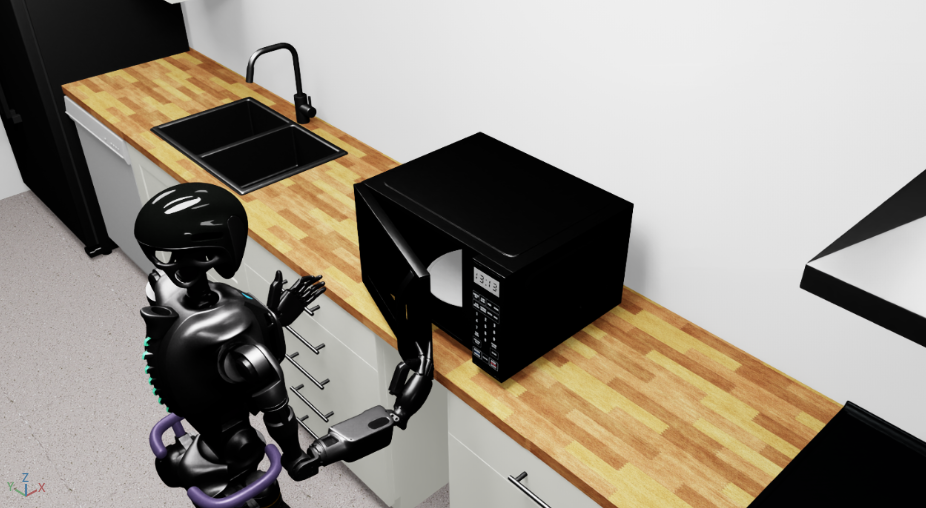
IsaacLab Arena GR1 opening the microwave door#
Note
The dataset was generated using CPU device physics, therefore the replay uses --device cpu to ensure reproducibility.