

Environment Setup and Validation#
Docker Container: Base (see Docker Containers for more details)
On this page we briefly describe the environment used in this example workflow and validate that we can load it in Isaac Lab.
Docker Container: Base (see Docker Containers for more details)
./docker/run_docker.sh
Environment Description#
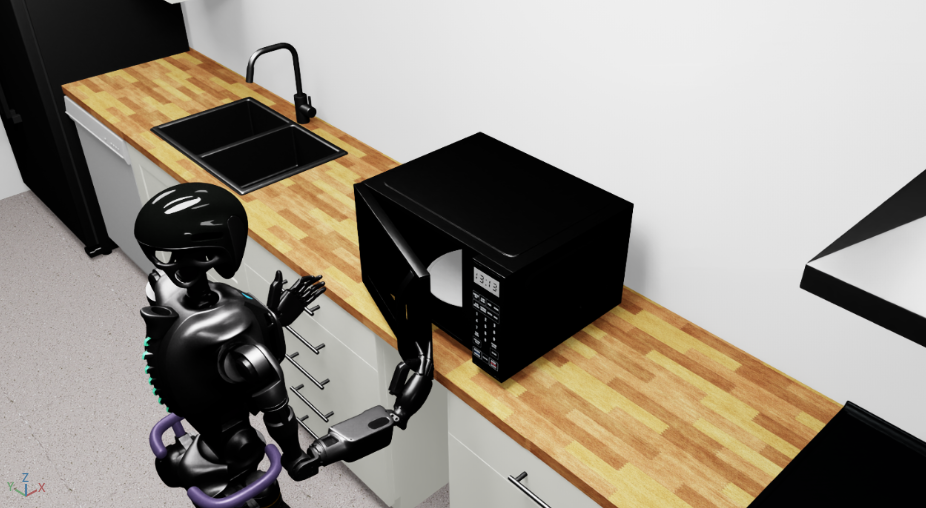
The GR1 Open Microwave Environment
class Gr1OpenMicrowaveEnvironment(ExampleEnvironmentBase):

    name: str = "gr1_open_microwave"

    def get_env(self, args_cli: argparse.Namespace):  # -> IsaacLabArenaEnvironment:
        from isaaclab_arena.environments.isaaclab_arena_environment import IsaacLabArenaEnvironment
        from isaaclab_arena.scene.scene import Scene
        from isaaclab_arena.tasks.open_door_task import OpenDoorTask
        from isaaclab_arena.utils.pose import Pose

        background = self.asset_registry.get_asset_by_name("kitchen")()
        microwave = self.asset_registry.get_asset_by_name("microwave")()
        assets = [background, microwave]

        embodiment = self.asset_registry.get_asset_by_name(args_cli.embodiment)(enable_cameras=args_cli.enable_cameras)
        embodiment.set_initial_pose(Pose(position_xyz=(-0.4, 0.0, 0.0), rotation_wxyz=(1.0, 0.0, 0.0, 0.0)))

        teleop_device = self.device_registry.get_device_by_name(args_cli.teleop_device)()

        # Put the microwave on the packing table.
        microwave_pose = Pose(
            position_xyz=(0.4, -0.00586, 0.22773),
            rotation_wxyz=(0.7071068, 0, 0, -0.7071068),
        )
        microwave.set_initial_pose(microwave_pose)

        scene = Scene(assets=assets)
        task = OpenDoorTask(microwave, openness_threshold=0.8, reset_openness=0.2)

        isaaclab_arena_environment = IsaacLabArenaEnvironment(
            name=self.name,
            embodiment=embodiment,
            scene=scene,
            task=task,
            teleop_device=teleop_device,
        )

        return isaaclab_arena_environment
Step-by-Step Breakdown#
1. Interact with the Asset and Device Registry
background = self.asset_registry.get_asset_by_name("kitchen")()
microwave = self.asset_registry.get_asset_by_name("microwave")()
assets = [background, microwave]

embodiment = self.asset_registry.get_asset_by_name(args_cli.embodiment)(enable_cameras=args_cli.enable_cameras)
teleop_device = self.device_registry.get_device_by_name(args_cli.teleop_device)()
Here, we’re selecting the components needed for our static manipulation task: the kitchen environment as our background,
a microwave with an openable door, and the GR1 embodiment (our robot).
The AssetRegistry and DeviceRegistry have been initialized in the ExampleEnvironmentBase class.
See Assets Design for details on asset architecture.
2. Position the Objects
microwave_pose = Pose(
    position_xyz=(0.4, -0.00586, 0.22773),
    rotation_wxyz=(0.7071068, 0, 0, -0.7071068),
)
microwave.set_initial_pose(microwave_pose)
Before we create the scene, we need to place our objects in the right locations. These initial poses are currently set manually to create an achievable task. In this case, we place the microwave on the packing table.
3. Compose the Scene
scene = Scene(assets=assets)
Now we bring everything together into an IsaacLab-Arena scene. See Scene Design for scene composition details.
4. Create the Open Door Task
task = OpenDoorTask(microwave, openness_threshold=0.8, reset_openness=0.2)
The OpenDoorTask encapsulates the goal of this environment: open the microwave door.
See Tasks Design for task creation details.
5. Create the IsaacLab Arena Environment
isaaclab_arena_environment = IsaacLabArenaEnvironment(
    name=self.name,
    embodiment=embodiment,
    scene=scene,
    task=task,
    teleop_device=teleop_device,
)
Finally, we assemble all the pieces into a complete, runnable environment. The IsaacLabArenaEnvironment is the
top-level container that connects the embodiment (the robot), the scene (the world), and the task (the objective).
See Environment Design for environment composition details.
Step 1: Download a Test Dataset#
To run a robot in the environment we need some recorded demonstration data that can be fed to the robot to control its actions. We download a pre-recorded dataset from Hugging Face.
hf download \
    nvidia/Arena-GR1-Manipulation-Task \
    arena_gr1_manipulation_dataset_generated.hdf5 \
    --repo-type dataset \
    --local-dir $DATASET_DIR
Step 2: Validate the Environment by Replaying the Dataset#
Replay the downloaded dataset to verify the environment setup:
python isaaclab_arena/scripts/replay_demos.py \
  --device cpu \
  --enable_cameras \
  --dataset_file "${DATASET_DIR}/arena_gr1_manipulation_dataset_generated.hdf5" \
  gr1_open_microwave \
  --embodiment gr1_pink
You should see the GR1 robot replaying the demonstrations, performing the microwave door opening task in the kitchen environment.
IsaacLab Arena GR1 opening the microwave door#