



Tutorial#
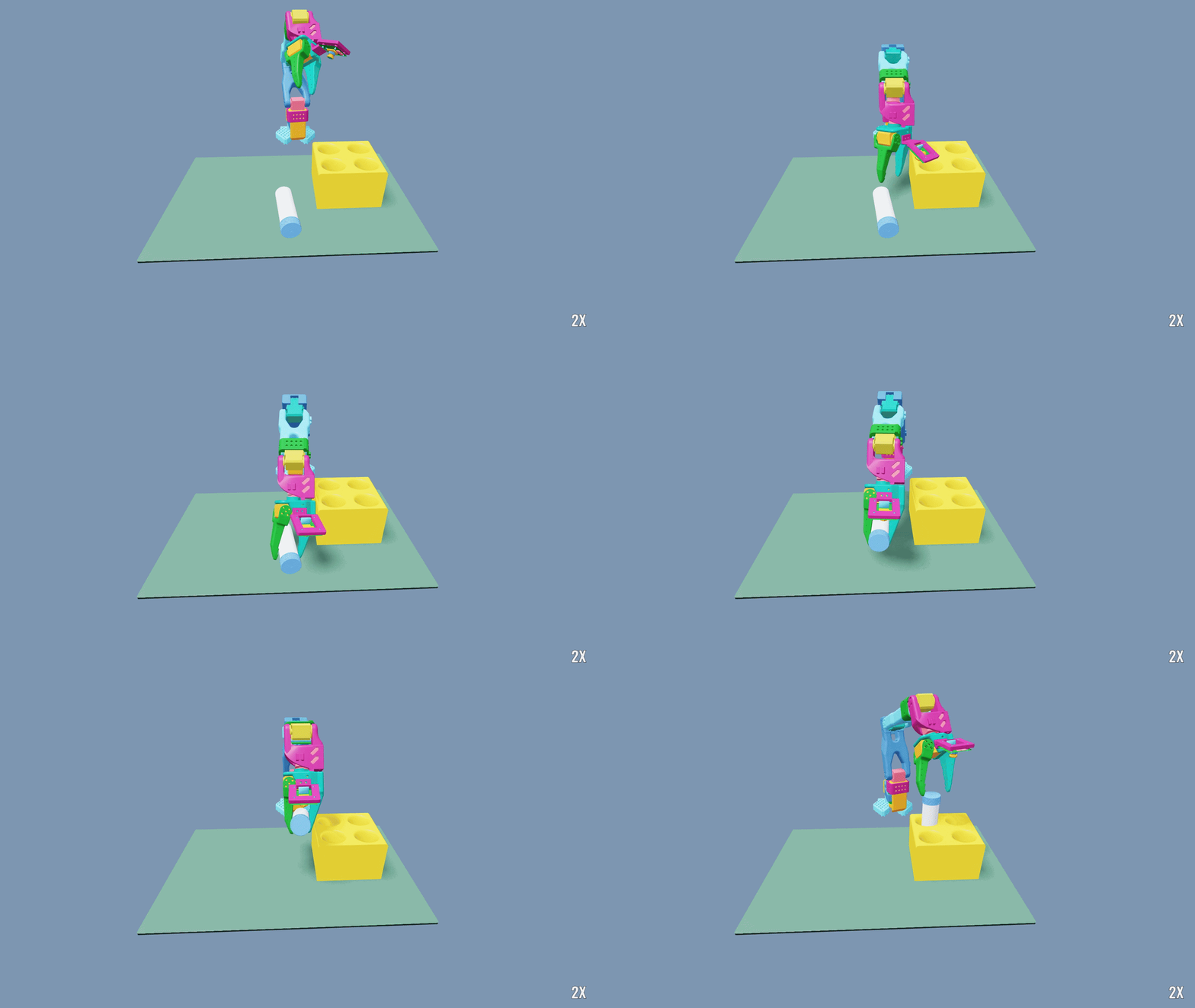
Note
This tutorial ties in with the NVIDIA Sim-to-Real SO-101 learning course and its workshop repository, which present a broader end-to-end physical AI workflow with the SO-101, Isaac Lab, and NVIDIA Isaac GR00T.
Build a vial-placement task for an SO-101 arm using the IsaacLabTutorial project. The project includes robot assets, a manager-based task, state and wrist-camera observations, RSL-RL training, policy distillation, tests, and an optional sim-to-real configuration.
By the end, you will know how a downstream Isaac Lab task is packaged, discovered, validated, trained, and evaluated. You will also know where to change the robot, scene, MDP, and learning configuration for your own task.
1. Set up the project#
You need Python 3.12, uv, Git with Git LFS, and an NVIDIA GPU on Linux or Windows. The tutorial uses Newton with the MJWarp solver, so it does not require the Isaac Sim application. Review the system requirements before starting.
Every command on this page is a single line, so it runs unchanged in bash, PowerShell, and Command Prompt.
Clone the tutorial’s main branch and create its environment:
git clone https://github.com/isaac-sim/IsaacLabTutorial.git
cd IsaacLabTutorial
uv sync
The project pins Isaac Lab’s release/3.0.0 branch through pyproject.toml, so it does not require a sibling
Isaac Lab checkout. uv sync creates the environment and installs the tutorial, Isaac Lab, and their runtime
dependencies.
This repository is also a complete example of the downstream project produced by the Isaac Lab template generator. Use the generator when starting your own project, then follow the same package layout and task-discovery pattern shown here.
Confirm that the shared CLI discovers the downstream package:
uv run isaaclab --help
uv run python -c "import importlib.metadata as m; print([e.name for e in m.entry_points(group='isaaclab.tasks')])"
The second command should include isaaclab_tutorial. Task discovery works because the project publishes an
isaaclab.tasks entry point:
[project.entry-points."isaaclab.tasks"]
isaaclab_tutorial = "isaaclab_tutorial.tasks"
Importing that package registers two Gymnasium task IDs:
Task ID |
Policy observations |
|---|---|
|
Robot, vial, rack, placement, and progress state, trained with PPO |
|
64 by 48 wrist RGB plus proprioception, distilled from a trained state policy |
Adding presets=sim2real to either task enables the randomization used for robot transfer (see
Train for the real robot).
Tip
Run all remaining commands from the IsaacLabTutorial directory. Train the state task first: it is the
baseline and supplies the teacher checkpoint used by the camera task.
2. Tour the project#
The project keeps reusable task logic separate from SO-101-specific configuration:
IsaacLabTutorial/
|-- pyproject.toml                     package metadata and task-discovery entry point
|-- docs/SIM2REAL.md                   training for and deploying to the real robot
|-- src/isaaclab_tutorial/
|   |-- assets/                        workshop assets and the reset-pose dataset
|   |-- tasks/place_vial/
|   |   |-- mdp/                       observations, rewards, terminations, events, and task geometry
|   |   |-- reset/                     reset dataset format, curriculum, and generator
|   |   `-- config/so101/
|   |       |-- __init__.py            Gymnasium task registration
|   |       |-- env_cfg.py             state task: scene, MDP, physics, and the sim2real preset
|   |       |-- camera_env_cfg.py      wrist-camera task, inheriting the state task
|   |       `-- agents/                PPO and distillation configurations
|   `-- utils/                         evaluation, policy export, and real-robot scripts
`-- tests/                              behavioral and configuration contracts
To add a robot, create a sibling of config/so101 and reuse the vial-placement
MDP. A different manipulation problem gets a sibling of tasks/place_vial and owns its task terms.
The registration connects a task ID to the generic manager-based environment, the task configuration, and its default RSL-RL agent:
gym.register(
    id="IsaacTutorial-Place-Vial-SO101",
    entry_point="isaaclab.envs:ManagerBasedRLEnv",
    disable_env_checker=True,
    kwargs={
        "env_cfg_entry_point": f"{_PACKAGE}.env_cfg:SO101VialEnvCfg",
        "rsl_rl_cfg_entry_point": f"{_PACKAGE}.agents.rsl_rl_ppo_cfg:SO101StatePPORunnerCfg",
        "default_agent": "rsl_rl",
    },
)
This is why the normal isaaclab train, play, and benchmark commands work without project-local
launcher scripts.
3. Understand the task#
The environment is assembled declaratively with ManagerBasedRLEnvCfg. The main
configuration connects one scene configuration and one configuration for each MDP manager:
@configclass
class SO101VialEnvCfg(ManagerBasedRLEnvCfg):
    scene: SO101SceneCfg = SO101SceneCfg(num_envs=4096, env_spacing=0.9, replicate_physics=True)
    actions: ActionsCfg = ActionsCfg()
    observations: ObservationsCfg = ObservationsCfg()
    events: EventsCfg = preset(default=EventsCfg(), sim2real=Sim2RealEventsCfg())
    rewards: RewardsCfg = RewardsCfg()
    terminations: TerminationsCfg = TerminationsCfg()

    def __post_init__(self):
        self.decimation = 4
        self.episode_length_s = preset(default=20.0, sim2real=30.0)
        self.is_finite_horizon = False
        self.sim.dt = 1.0 / 120.0
        self.sim.physics = PhysicsCfg()
The 120 Hz simulation and decimation of four give the policy a 30 Hz control rate. replicate_physics=True
allows the same scene to scale across thousands of environments. Values wrapped in preset(...) change only when
the named preset is selected on the command line.
Scene and control#
SO101SceneCfg contains a fixed-base SO-101, a free 20 g vial, the four-hole rack, the desk, contact sensors on
both jaws and the vial, and lights. The robot configuration, identified actuator dynamics, and limits come from
Isaac Lab’s SO101_CFG.
The six-dimensional policy action uses Isaac Lab’s relative joint-position action: at every physics step, each joint target is the measured joint position plus the scaled action. The task never attaches the vial to the gripper and never writes its pose after reset. Grasping, transport, insertion, and release must therefore succeed through simulated contact.
MDP at a glance#
The task reuses Isaac Lab’s core MDP terms and terms from the lift task (body_state_b, out_of_bound,
abnormal_robot_state), and adds only the terms specific to vial placement.
Component |
Contract |
|---|---|
Actions |
Five arm-joint offsets of up to 0.033 rad and one jaw offset of up to 0.02 rad from the measured positions. |
State actor |
Joint positions, velocities, and targets, previous action, end-effector and vial state, the vial position in the rack frame, placement features, and latched progress flags. |
Camera actor |
No object state: two stacked 64 by 48 wrist RGB frames plus noisy joint readings, targets, and previous action. |
Critic |
Privileged state observations plus jaw contact flags. |
Events |
Reset-pose sampling and modest vial mass and friction randomization. |
Rewards |
Approach progress toward the cap, held-vial shaping toward the nearest hole, one-time grasp, lift, and insertion milestones, a success bonus, a vial-loss penalty, and small action-rate, joint-velocity, and joint-limit costs. |
Terminations |
Successful placement, a dropped or out-of-bounds vial, unstable robot state, or the 20 s time limit. |
Physical progress and resets#
Long-horizon manipulation is difficult to learn from the initial tabletop pose alone. The project therefore replays physics-validated reset poses across eight phases:
home -> pregrasp -> grasp -> lift -> reorient -> transport -> insert -> release
Training samples these phases as a reset curriculum. Each phase remains part of the same task: observations,
actions, rewards, and termination criteria do not change. Progress flags advance only when physical evidence is
present, for example bilateral jaw contact while the vial is held off the desk. Interactive play returns to
phase-zero starts so the final policy must complete the entire task. Read mdp/terminations.py for the physical
success predicate and reset/curriculum.py for the reset distribution.
State and camera policies#
SO101VialEnvCfg is the fully observed baseline. SO101VialCameraEnvCfg in camera_env_cfg.py subclasses
it, adds the wrist camera, and replaces the actor observations. It also exposes the state actor’s observations as a
teacher_state group, which the state teacher reads during distillation; the deployed student consumes only wrist
RGB and proprioception.
4. Validate before training#
Start with fast checks. They catch broken assets, registration, geometry, rewards, reset data, and configuration errors before a long training run:
uv run pytest -q
uv run ruff check .
Next, construct and step a small vectorized environment with zero actions:
uv run isaaclab zero_agent --task IsaacTutorial-Place-Vial-SO101 --num_envs 8 --max_steps 100 presets=newton_mjwarp
If this fails, fix task discovery, asset loading, or simulation stability before tuning RL. When it passes, measure the environment separately from the learning algorithm:
uv run isaaclab benchmark runtime --task IsaacTutorial-Place-Vial-SO101 --num_envs 4096 --num_steps 1000 --warmup_steps 50 presets=newton_mjwarp
Reduce --num_envs if the batch does not fit your GPU. For the camera task, add the Newton renderer preset and
start with a smaller batch:
uv run isaaclab benchmark runtime --task IsaacTutorial-Place-Vial-SO101-Camera --num_envs 1024 --num_steps 1000 --warmup_steps 50 presets=newton_mjwarp,newton_renderer
5. Train and evaluate#
Train the state teacher with RSL-RL. The task’s default agent configuration is an 800-iteration run:
uv run isaaclab train --rl_library rsl_rl --task IsaacTutorial-Place-Vial-SO101 --num_envs 4096 --seed 42 --run_name so101_vial_seed42 presets=newton_mjwarp
Checkpoints and TensorBoard events are written below logs/rsl_rl/so101_vial_state/<run>; the final checkpoint is
model_799.pt. While training runs, inspect the learning curves in another terminal:
uv run tensorboard --logdir logs/rsl_rl/so101_vial_state
Look for rising Metrics/success_rate, not reward alone. A larger return can come from shaping without a
corresponding increase in successful placements.
Play the state teacher#
Play the trained teacher from the canonical home phase:
uv run isaaclab play --rl_library rsl_rl --task IsaacTutorial-Place-Vial-SO101 --num_envs 1 --checkpoint /path/to/state_model.pt --visualizer newton_gl presets=newton_mjwarp
The rollout should start from the canonical home phase, pick up the horizontal vial, turn it upright, move it over
a hole, insert it, and open the jaw so gravity seats it in the rack. Playback already uses the policy’s
deterministic actions. Do not add --deterministic: it also enables Warp’s deterministic kernel mode, which this
scene’s collision and solver kernels exceed.
Distill the wrist-camera policy#
Note
The consolidated tutorial uses IsaacTutorial-Place-Vial-SO101-Camera for distillation.
If you followed an earlier version of this page, replace
IsaacTutorial-Place-Vial-SO101-Camera-Distillation with that task ID in training and playback commands.
Pass the finished teacher to the camera task. Add the renderer preset because the student observes wrist RGB:
uv run isaaclab train --rl_library rsl_rl --task IsaacTutorial-Place-Vial-SO101-Camera --num_envs 1024 --seed 42 --checkpoint /path/to/state_model.pt --run_name wrist_distillation_seed42 presets=newton_mjwarp,newton_renderer
The camera task’s default agent is RSL-RL’s DAgger-style distillation runner: the student acts, the frozen teacher
labels every visited state, and the labels are clipped to the executed [-1, 1] action range. Outputs are written
below logs/rsl_rl/so101_vial_camera_distillation/<run>.
Play the distilled student with the same task ID used for training:
uv run isaaclab play --rl_library rsl_rl --task IsaacTutorial-Place-Vial-SO101-Camera --num_envs 1 --checkpoint /path/to/distilled_model.pt --visualizer newton_gl presets=newton_mjwarp,newton_renderer
Measure the policies#
Evaluate the policy over the tracked phase-zero starting states using the project’s callback:
uv run isaaclab play --rl_library rsl_rl --task IsaacTutorial-Place-Vial-SO101 --num_envs 1024 --checkpoint /path/to/state_model.pt --external_callback isaaclab_tutorial.utils.evaluation.install_episode_counter presets=newton_mjwarp
Evaluate the distilled policy from the same 1,024 starting states:
uv run isaaclab play --rl_library rsl_rl --task IsaacTutorial-Place-Vial-SO101-Camera --num_envs 1024 --checkpoint /path/to/distilled_model.pt --external_callback isaaclab_tutorial.utils.evaluation.install_episode_counter presets=newton_mjwarp,newton_renderer
The callback runs each tracked start once and prints one SO101_EVAL_RESULT JSON record. Preserve that record,
the checkpoint, seed, task ID, and resolved configuration when comparing experiments.
Maintain the reset dataset#
The checked-in reset dataset is ready for training. Generate or inspect a separate candidate without overwriting it:
uv run generate-so101-resets --output checkpoints/reset_poses.pt --device cuda:0 presets=newton_mjwarp
uv run view-so101-resets --dataset checkpoints/reset_poses.pt --device cuda:0 --visualizer newton_gl presets=newton_mjwarp
Train for the real robot#
presets=sim2real adds the randomization used for robot transfer: contact, joint-dynamics, gain, and encoder
variation in both tasks, plus appearance and camera variation in the camera task. Because the physics randomization
is shared, the teacher and student train under the same physics. Fine-tune the state teacher with the preset, then
distill under the same preset:
uv run isaaclab train --rl_library rsl_rl --task IsaacTutorial-Place-Vial-SO101 --num_envs 4096 --checkpoint /path/to/state_model.pt presets=newton_mjwarp,sim2real
uv run isaaclab train --rl_library rsl_rl --task IsaacTutorial-Place-Vial-SO101-Camera --num_envs 1024 --checkpoint /path/to/sim2real_state_model.pt presets=newton_mjwarp,newton_renderer,sim2real
The repository’s docs/SIM2REAL.md covers the physical setup, robot calibration, policy export, and deployment.
6. Make it yours#
Change one part of the task at a time and rerun the tests, zero-agent smoke test, and benchmark before training:
Goal |
Start here |
|---|---|
Change the scene or SO-101 |
|
Change actor inputs |
Observation groups in |
Change task behavior |
Observation, reward, termination, and event terms in |
Change reset coverage |
|
Change PPO or distillation |
|
Change sim-to-real randomization |
The |
Add another robot |
Add |
Add another manipulation task |
Add a sibling of |
Keep these invariants as the task evolves:
Task IDs resolve through the package entry point; do not copy Isaac Lab’s launcher scripts.
Policy actions use the order and scale expected by the robot.
Physical quantities and quaternions use Isaac Lab’s current conventions; Isaac Lab 3 uses XYZW quaternion order.
Resets create valid physical states, and post-reset task code does not teleport the manipulated object.
Success requires a released, mechanically seated vial rather than proximity to the rack.
Tests check task behavior, and benchmarks check for simulation slowdowns.
From here, use Direct and Manager MDP for the manager/direct architecture, Reinforcement Learning for framework details, and Hydra Configuration System for command-line overrides.