



Modifying an existing Direct RL Environment#
Having learnt how to create a task in Creating a Direct Workflow RL Environment, register it in Registering an Environment, and train it in Training with an RL Agent, we will now look at how to make minor modifications to an existing task.
Sometimes it is necessary to create, due to complexity or variations from existing examples, tasks from scratch. However, in certain situations, it is possible to start from the existing code and introduce minor changes, one by one, to transform them according to our needs.
In this tutorial, we will make minor modifications to the direct workflow Humanoid task to change the simple humanoid model to the Unitree H1 humanoid robot without affecting the original code.
The Base Code#
For this tutorial, we start from the direct workflow Humanoid environment defined in isaaclab_tasks.core.locomotion.humanoid module.
Code for humanoid_direct_env.py
 1# Copyright (c) 2022-2026, The Isaac Lab Project Developers (https://github.com/isaac-sim/IsaacLab/blob/main/CONTRIBUTORS.md).
 2# All rights reserved.
 3#
 4# SPDX-License-Identifier: BSD-3-Clause
 5
 6"""Direct-workflow Humanoid locomotion environment."""
 7
 8from __future__ import annotations
 9
10from ..locomotion_direct_env import LocomotionDirectEnv
11from .humanoid_direct_env_cfg import HumanoidEnvCfg
12
13
14class HumanoidEnv(LocomotionDirectEnv):
15    """Direct-workflow Humanoid locomotion environment.
16
17    The behavior is fully defined by :class:`LocomotionDirectEnv` and :class:`HumanoidEnvCfg`.
18    """
19
20    cfg: HumanoidEnvCfg
The Changes Explained#
Deriving and registering a new task#
To avoid modifying the existing task, create an h1_env.py file in the Isaac Lab project
source/isaaclab_tasks/isaaclab_tasks/core/locomotion/humanoid
folder. The new classes below inherit the existing environment and configuration, changing only the robot-specific data.
Register the derived task under the name Isaac-H1-Direct-v0.
To do this, we modify the __init__.py file in the same working folder and add the following entry.
Refer to the Registering an Environment tutorial for more details about environment registrations.
Hint
If the changes in the task are minimal, it is very likely that the same RL library agent configurations can be used to train it successfully.
Otherwise, it is advisable to create new configuration files (adjusting their name during registration under the kwargs parameter)
to avoid altering the original configurations.
from .h1_env import H1Env, H1EnvCfg
gym.register(
    id="Isaac-H1-Direct-v0",
    entry_point="isaaclab_tasks.core.locomotion.humanoid:H1Env",
    disable_env_checker=True,
    kwargs={
        "env_cfg_entry_point": H1EnvCfg,
        "rl_games_cfg_entry_point": f"{agents.__name__}:rl_games_direct_ppo_cfg.yaml",
        "rsl_rl_cfg_entry_point": f"{agents.__name__}.rsl_rl_ppo_cfg:HumanoidDirectPPORunnerCfg",
        "default_agent": "rsl_rl",
        "skrl_cfg_entry_point": f"{agents.__name__}:skrl_direct_ppo_cfg.yaml",
    },
)
Changing the robot#
The H1SceneCfg class (in the newly created h1_env.py file) declares the assets that the
environment constructs. In this example, its robot property holds the target articulation configuration.
Since the Unitree H1 robot is included in the Isaac Lab assets extension (isaaclab_assets) we can just import it
and do the replacement directly (under the H1SceneCfg.robot property), as shown below. Note that we also need to modify the
joint_gears property as it holds robot-specific configuration values.
Hint
If the target robot is not included in the Isaac Lab assets extension, it is possible to load and configure it, from a USD file,
by using the ArticulationCfg class.
See the Isaac-Open-Drawer-Franka-Direct source code for an example of loading and configuring a robot from a USD file.
Refer to the Importing a New Asset tutorial for details on how to import an asset from URDF or MJCF file, and other formats.
from isaaclab.assets import ArticulationCfg
from isaaclab.utils import configclass, replace
from isaaclab_assets import H1_CFG

from isaaclab_tasks.core.locomotion.humanoid.humanoid_direct_env import HumanoidEnv
from isaaclab_tasks.core.locomotion.humanoid.humanoid_direct_env_cfg import HumanoidDirectSceneCfg, HumanoidEnvCfg
@configclass
class H1SceneCfg(HumanoidDirectSceneCfg):
    robot: ArticulationCfg = replace(H1_CFG, prim_path="{ENV_REGEX_NS}/Robot")
The robot changed, and with it the number of joints to control or the number of rigid bodies that compose the articulation, for example. Therefore, define the derived environment configuration and adjust the values that depend on the robot, such as the action and observation spaces. The environment implementation itself remains unchanged.
The H1 has 19 controlled joints. The inherited observation function combines 12 root and target
values, 19 joint positions, 19 joint velocities, 19 actions, and 12 wrench values from its two feet,
for 81 values. Set feet_body_names to match H1’s ankle links so the joint-wrench sensor selects
the correct bodies instead of the base Humanoid’s foot names.
@configclass
class H1EnvCfg(HumanoidEnvCfg):
    action_space = 19
    observation_space = 81
    scene: H1SceneCfg = H1SceneCfg(num_envs=4096, env_spacing=5.0, replicate_physics=True, clone_in_fabric=True)
    # the gears are keyed by joint name expression, so they are independent of the joint ordering
    joint_gears: dict[str, float] = {".*": 50.0}
    feet_body_names: list[str] = [".*ankle_link"]


class H1Env(HumanoidEnv):
    cfg: H1EnvCfg
The Code Execution#
After the minor modification has been done, and similar to the previous tutorial, we can train on the task using one of the available RL workflows for such task.
uv run --extra rl-games isaaclab train --rl_library rl_games --task Isaac-H1-Direct-v0
./isaaclab.sh train --rl_library rl_games --task Isaac-H1-Direct-v0
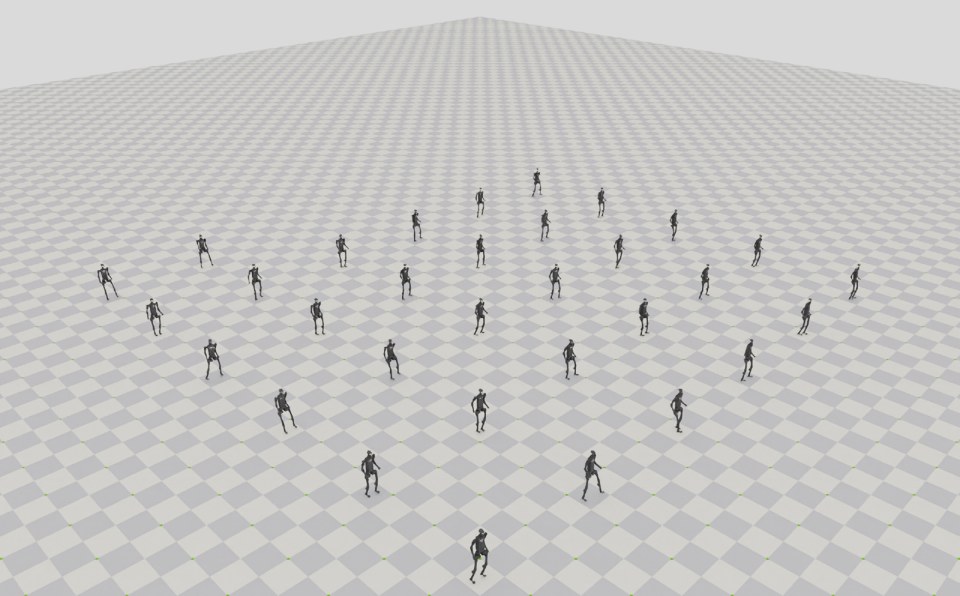
When the training is finished, we can visualize the result with the following command.
To stop the simulation, you can either close the window, or press Ctrl+C in the terminal
where you started the simulation.
uv run --extra rl-games isaaclab play --rl_library rl_games --task Isaac-H1-Direct-v0 --num_envs 64 --viz kit
./isaaclab.sh play --rl_library rl_games --task Isaac-H1-Direct-v0 --num_envs 64 --viz kit
When replacing an asset, check the task’s joint names, action dimensions, observation layout, and reward terms. These may depend on the original robot even when the scene change is small.