

Predicates and Subtask Progress Tracking#
Arena defines task success through CompletionCriteria objects. These criteria sets organize
Boolean predicates into required milestones, such as settling, lifting, and placing an object.
Their scores also describe partial progress when an episode ends before the task is complete.
Every task returns a TaskTerminationCfg from get_termination_cfg(). This configuration
declares its success criteria, named failures, and timeout_s in one place. The
environment builder creates one success termination that advances the criteria sets and reports
success when all required criteria sets are complete.
Predicates#
A predicate represents a boolean condition in a task, such as an object settling, being lifted, or reaching its destination. In Arena, a predicate is a callable that receives the manager-based environment (and optionally additional configuration arguments) and returns one Boolean per parallel environment.
Included predicates#
Arena comes with an existing collection of predicates under isaaclab_arena.tasks.predicates, including:
objects_below_velocity_thresholds— all selected objects are below linear and angular velocity thresholds.objects_settled— the same rest check, also recording each object’s first resting pose.object_is_above_height— an object is above a fixed height or its recorded resting height.object_moving— an object exceeds a linear velocity threshold.objects_in_proximity— two objects are within configured axis-aligned distances.object_on_destination— destination-footprint, upward-support, and velocity checks for a placement goal.
Note
objects_settled records each object’s first resting pose. Later predicates can use that
environment-specific pose as a reference, which is more robust than assuming every object starts at
the same world height. Arena clears the recorded poses for the environments being reset.
Defining a custom predicate#
Define a custom predicate when Arena’s included predicates do not express the condition you need. A custom predicate must:
Accept
envas its first argument.Evaluate all parallel environments in one call.
Return a Boolean tensor with shape
(env.num_envs,).
A predicate may accept any task-specific arguments it needs after env. For example:
import torch

def object_inside_x_bounds(env, object_name: str, min_x: float, max_x: float) -> torch.Tensor:
    object_x_e = env.arena_world.get_pose_e(object_name)[:, 0]
    return (object_x_e >= min_x) & (object_x_e <= max_x)
The arguments after env are configured when the predicate is added to a criteria set
(shown in the next section).
Defining completion criteria#
Add CompletionCriteria entries to TaskTerminationCfg.success. Provide exactly one of
predicate_sequence for a list of predicates or predicate_sequences for a dictionary of named lists.
PickAndPlaceTask requires the object to settle, be lifted, and be placed, in that order:
from functools import partial

from isaaclab.envs import mdp
from isaaclab.managers import SceneEntityCfg, TerminationTermCfg

from isaaclab_arena.progress_tracking.completion_criteria import CompletionCriteria
from isaaclab_arena.tasks.predicates.object_settling import objects_settled
from isaaclab_arena.tasks.predicates.spatial import object_is_above_height, object_on_destination
from isaaclab_arena.tasks.predicates.temporal import TrueForConsecutiveStepsCfg
from isaaclab_arena.tasks.task_termination_cfg import TaskTerminationCfg

def get_termination_cfg(self) -> TaskTerminationCfg:
    return TaskTerminationCfg(
        success=[
            CompletionCriteria(
                name="pick_and_place",
                predicate_sequence=[
                    partial(
                        objects_settled,
                        object_names=[self.pick_up_object.name],
                    ),
                    partial(
                        object_is_above_height,
                        object_name=self.pick_up_object.name,
                        use_settled_state=True,
                    ),
                    TrueForConsecutiveStepsCfg(
                        predicate=partial(
                            object_on_destination,
                            object_cfg=SceneEntityCfg(self.pick_up_object.name),
                            destination_cfg=SceneEntityCfg(self.destination_location.name),
                            contact_sensor_cfg=self.contact_sensor_cfg,
                            force_threshold=self.force_threshold,
                            velocity_threshold=self.velocity_threshold,
                            support_cone_half_angle_rad=self.support_cone_half_angle_rad,
                        ),
                        required_steps=self.placement_consecutive_steps,
                    ),
                ],
            ),
        ],
        failures={
            "object_dropped": TerminationTermCfg(
                func=mdp.root_height_below_minimum,
                params={
                    "minimum_height": self.background_scene.object_min_z,
                    "asset_cfg": SceneEntityCfg(self.pick_up_object.name),
                },
            ),
        },
        timeout_s=self.episode_length_s,
    )
Configuring a predicate’s arguments and requiring it to stay true are separate choices.
Here, partial supplies the object names; CompletionCriteriaRunner supplies the environment
when it calls the predicate:
from functools import partial

from isaaclab_arena.tasks.predicates.object_settling import objects_below_velocity_thresholds
from isaaclab_arena.tasks.predicates.temporal import TrueForConsecutiveStepsCfg

objects_are_resting = partial(objects_below_velocity_thresholds, object_names=["cube"])

# Complete this entry when the condition is true for one step.
predicate_sequence = [objects_are_resting]

# Or require the same condition to hold for ten consecutive steps.
predicate_sequence = [
    TrueForConsecutiveStepsCfg(
        predicate=objects_are_resting,
        required_steps=10,
    ),
]
TerminationTermCfg is another way to supply the function and its arguments instead of partial:
from isaaclab.managers import TerminationTermCfg

objects_are_resting = TerminationTermCfg(
    func=objects_below_velocity_thresholds,
    params={"object_names": ["cube"]},
)
This configuration can also go directly in predicate_sequence or inside TrueForConsecutiveStepsCfg.
CompletionCriteriaRunner prepares and evaluates these entries; TerminationTermCfg does not
create a separate termination-manager term here. For a callable class, the runner initializes it
with (cfg, env); ManagerTermBase inheritance is not required.
PickAndPlaceTask defaults to placement_consecutive_steps=1. Set it to a larger positive
integer, such as 10, to require placement, support, and low speed to hold together for that
many consecutive control steps.
Use a dictionary to track several sequences independently. This example requires any two
objects to be lifted and placed. Each entry, such as can_lifted, is a configured callable:
criteria = CompletionCriteria(
    name="pack_objects",
    predicate_sequences={
        "can": [can_lifted, can_placed],
        "bottle": [bottle_lifted, bottle_placed],
        "box": [box_lifted, box_placed],
    },
    logical="choose",
    K=2,
)
logical and K control how completed predicate sequences make the criteria set complete:
all— every sequence must complete. This is the default.any— one sequence must complete.choose— at leastKsequences must complete.
Completed stages are remembered until the environment resets. Separate sequences therefore describe milestones that may complete at different times. If several conditions must hold simultaneously, combine them into one predicate. For example, checking that all gears are seated together requires one combined condition; remembering each gear’s earlier placement would allow a gear to be removed before the task completes.
Conditions that must remain true#
Use TrueForConsecutiveStepsCfg around a configured callable:
placement_held = TrueForConsecutiveStepsCfg(
    predicate=placed_and_stable,
    required_steps=10,
)
placed_and_stable returns one Boolean per environment; it does not maintain a counter.
CompletionCriteriaRunner creates an internal _TrueForConsecutiveSteps instance from each
TrueForConsecutiveStepsCfg occurrence. The runner evaluates the predicate and passes its results
and active environments to that instance. _TrueForConsecutiveSteps stores the per-environment
counts: true adds one; false clears the streak.
The environment resets the tracker and its runners for each restarting episode, after terminal recording.
The environment owns ProgressTracker and advances it through update_task_progress() at most once
per control step. The shared task_success_from_progress(env) function in isaaclab_arena.tasks.terminations
calls this method and returns is_complete(); it can be used both as a termination term and as a direct
success callback. ArenaRecorderManager also updates progress before recorder terms run, including when
recording or replay disables success termination.
The builder stores the criteria in env_cfg.task_progress independently of cfg.terminations.
Reporting consumers read is_complete(), get_state(), or get_events() without advancing progress.
Direct callers of ProgressTracker.step() must also call it exactly once per control step.
Temporal requirements need a step_index per environment, such as env.episode_length_buf.
After the first update, repeated, skipped, or backwards indices raise an assertion before any
predicates are evaluated or counters change. ProgressTracker.reset() clears the stored index
for each restarting environment.
The examples below show three different requirements. object_still(env) and gripper_slow(env)
are configured instantaneous checks that each return one Boolean per environment.
Step numbers start when the criteria become active.
One condition after another#
Put both requirements in one predicate_sequence to count them in order:
criteria = CompletionCriteria(
    name="object_then_gripper",
    predicate_sequence=[
        TrueForConsecutiveStepsCfg(object_still, required_steps=10),
        TrueForConsecutiveStepsCfg(gripper_slow, required_steps=10),
    ],
)
CompletionCriteriaRunner first waits for ten consecutive steps with the object still.
On the following step, it starts counting the gripper’s ten steps. The earliest completion is
step 20. The object may move again after its requirement completes; that completion is remembered.
Independent conditions, both completed#
Use separate named predicate_sequences to start both counters together:
criteria = CompletionCriteria(
    name="object_and_gripper_ready",
    predicate_sequences={
        "object": [TrueForConsecutiveStepsCfg(object_still, required_steps=10)],
        "gripper": [TrueForConsecutiveStepsCfg(gripper_slow, required_steps=10)],
    },
    logical="all",
)
Each sequence completes independently, and logical="all" requires both to finish.
CompletionCriteriaRunner remembers each sequence’s completion until the episode resets.
The successful periods do not have to overlap. For example, if the object is still during steps
1–10 and the gripper is slow during steps 2–11, the criteria are complete at step 11, even if the
object is moving again then.
logical combines completed sequences; it does not create separate counters inside one predicate.
Both conditions during the same steps#
Combine the instantaneous checks before wrapping them to require ten shared steps:
def object_and_gripper_stable(env):
    return object_still(env) & gripper_slow(env)

criteria = CompletionCriteria(
    name="simultaneous_stability",
    predicate_sequence=[
        TrueForConsecutiveStepsCfg(
            predicate=object_and_gripper_stable,
            required_steps=10,
        ),
    ],
)
One counter tracks the combined condition. If either check becomes false, the streak starts over. If the object is still only during steps 1–10 and the gripper is slow only during steps 2–11, this requirement does not complete: they overlap for only nine steps.
Subtask progress tracking in composite and sequential tasks#
CompositeTaskBase collects subtask criteria sets in a flat TaskTerminationCfg.success list.
It prefixes their names with subtask_<index>/ and sets parent_subtask_idx to identify
which subtask each criteria set belongs to. Standalone tasks retain their original criteria names,
such as pick_and_place. Nested composite or sequential tasks are not supported.
For an order-independent composite task, every subtask’s criteria sets are active.
With CompositeTaskBase(..., subtasks_are_sequential=True), ProgressTracker
activates each subtask only after all criteria sets of the preceding subtask complete in that
environment. The next subtask starts on the following environment step. A later subtask’s predicates
cannot advance before that subtask becomes active, even if their physical conditions already happen
to be true.
ProgressTracker determines task success and reports the same criteria completion history.
Completed milestones remain recorded. TaskTerminationCfg.desired_subtask_success_state
preserves the composition’s optional final-condition checks. Reports contain the flat criteria sets
and their weighted overall progress; subtask metrics read ProgressTracker.get_subtask_completion().
For a consecutive-step final condition, these checks continue updating its counter. If the condition
becomes false, a new streak is required, but the recorded subtask completion is kept.
There are no additional reports for parent criteria sets. See
Composite and Sequential Tasks for composition and success semantics.
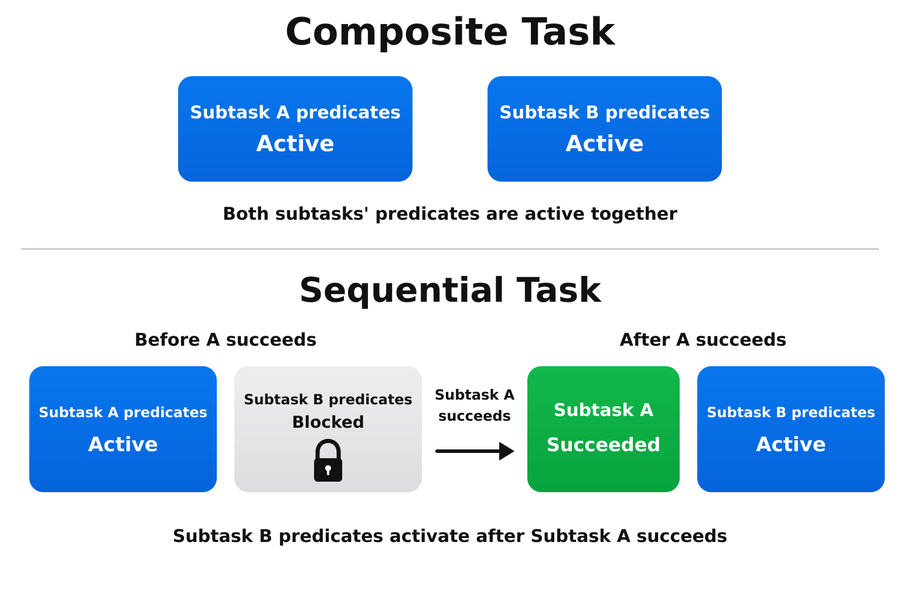
Composite tasks activate tracking on all subtasks’ predicates together, while sequential tasks activate tracking on each subtask’s predicates only after the preceding subtask succeeds.#
Reading subtask progress tracking at runtime#
ProgressTrackingRecorder puts progress results in the environment’s extras dictionary.
Read each environment’s state and completed-predicate events as follows:
progress = env.unwrapped.extras["progress_tracking"]

state = progress["states"][env_id]
print(state.overall_score, state.all_complete)

criteria = state.criteria_by_name["pick_and_place"]
print(criteria.score, criteria.is_complete)
print(criteria.active_predicates)

for event in progress["events"][env_id]:
    print(event.step, event.criteria_name, event.sequence_name, event.predicate_name)
After an automatic reset, env.extras["progress_tracking"] still shows the finished episode
until the next step.
Episode consecutive-step summary#
Some task conditions must remain true for several consecutive control steps. The episode
summary shows each condition’s last recorded streak and when it first completed. For example,
an object that must stay still for ten steps needs four more uninterrupted qualifying steps
at 6/10; movement resets the streak. Counts reflect the last evaluation, not the longest
streak achieved during the episode.
The episode recorder calls ProgressTracker.get_consecutive_step_summary(env_idx) before
reset to read existing counters and completion events for TrueForConsecutiveStepsCfg
requirements only. Nonempty results are added as progress.consecutive_step_summary to
episode JSONL and the Experiment Runner’s arena_experiment_result.json. When no such
requirements exist, the method returns an empty list and the recorder omits the field.
Each entry identifies the criteria, sequence, and predicate position, and includes:
consecutive_stepsandrequired_steps: the recorded streak and its target.first_satisfied_step: the episode control step when the requirement completed, ornull.status: whether the requirement is completed, active, or waiting, as described below.
Status |
Meaning |
|---|---|
|
The sequence has advanced past this requirement. Its completion history is retained even if a later final-condition recheck resets its streak. |
|
This is the current requirement in its sequence and its subtask is enabled. |
|
An earlier requirement in the same sequence or an earlier sequential subtask must complete first. |
The HTML report shows these fields in each episode’s Task completion summary table. A waiting requirement has not yet been reached. Completed milestones retain their first satisfied step even if a later final-condition recheck resets the streak.
Example consecutive-step summaries#
These examples cover consecutive-step requirements only. A is true on steps 1–10, then false; B is true from step 2 onward. Each requirement needs ten qualifying steps.
Requirement |
Recorded summary |
|---|---|
Sequential A then B |
Both 10/10; first satisfied at steps 10 and 20. |
Independent parallel A and B |
Both 10/10; first satisfied at steps 10 and 11. |
Joint A & B for the same ten steps |
At timeout step 20: 0/10, active, first satisfied is null. |
The joint streak reaches 9/10, then resets when A becomes false. If that episode instead ends at step 7, the summary shows 6/10, with four more uninterrupted qualifying steps needed.
Arena’s episode recorder also serializes the final progress state and predicate events into the episode’s JSONL record when an output path is configured. Tasks without completion criteria have no success termination or progress-tracking configuration and produce no progress fields.
For example, one entry of the JSONL record may look like this (placement predicate name shortened):
{
  "progress": {
    "overall_score": 0.67,
    "all_complete": false,
    "criteria_by_name": {
      "pick_and_place": {
        "score": 0.67,
        "is_complete": false,
        "completed_sequences": 0,
        "total_sequences": 1,
        "active_predicates": {
          "default_sequence": "object_on_destination"
        }
      }
    },
    "events": [
      {
        "step": 4,
        "criteria_name": "pick_and_place",
        "sequence_name": "default_sequence",
        "predicate_index": 0,
        "predicate_name": "objects_settled",
        "score_delta": 0.33
      },
      {
        "step": 18,
        "criteria_name": "pick_and_place",
        "sequence_name": "default_sequence",
        "predicate_index": 1,
        "predicate_name": "object_is_above_height(object_name='can', use_settled_state=True)",
        "score_delta": 0.33
      }
    ]
  }
}
The object has settled and been lifted: two of three predicates are complete, giving a score of 0.67.
Placement is still required. The two events record when settling and lifting completed.
The recording schema uses the same criteria and sequence names as the runtime API. Older
recordings that use objectives, objective, or group fields require conversion or
regeneration before they can be read by the current report tools.